
پیژندنه
Thank you for choosing the IMICE T98 Wired Gaming Mouse. This manual provides detailed instructions on how to set up, operate, and maintain your new gaming mouse. Please read this manual carefully before use to ensure optimal performance and a satisfying gaming experience.
د محصول ځانګړتیاوې
- د لوړ دقیق سینسر: د دقیق تعقیب لپاره تر ۲۶۰۰۰ DPI پورې.
- د تنظیم وړ DPI: Six adjustable DPI levels (1200, 1600, 2400, 3200, 4800, 7200) to suit various tasks and games.
- 6 د پروګرام وړ بټنونه: Includes Left, Right, DPI, Scroll Wheel, Forward, and Backward buttons for enhanced control.
- Dynamic RGB LED Lighting: Features 6 colorful LED lights for an immersive gaming atmosphere.
- ارګونومیک ډیزاین: Comfortable grip for extended use, designed for both left and right-handed users.
- د شاتو د شاتو سپک پوستکی: Reduces weight and enhances airflow to prevent hand sweat.
- آن بورډ حافظه: Stores up to four custom configurations without requiring driver software after initial setup.
- Durable USB Cable: High-quality 1.5-meter wired USB connection.
د تنظیم کولو لارښود
- موږک خلاص کړئ: Carefully remove the IMICE T98 Gaming Mouse from its packaging.
- کمپیوټر سره وصل کړئ: Plug the USB connector of the mouse into an available USB port on your computer or laptop.
- د ډرایور نصب کول: The mouse is plug-and-play and typically does not require additional drivers for basic functionality. Your operating system (Windows, Mac, Vista) will automatically detect and install the necessary drivers.
- د فعالیت تصدیق کول: Once connected, the mouse's LED lights should illuminate, and the cursor should respond to movement.
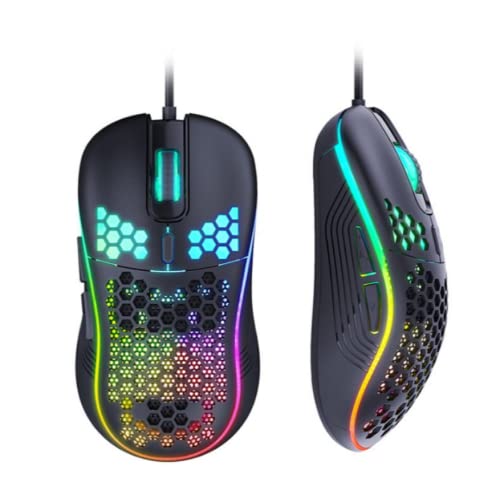
Image: The IMICE T98 Gaming Mouse with its USB cable, ready for connection.
عملیاتي لارښوونې
بنسټیز کارونه
- کیڼ کلیک: د لومړني عمل تڼۍ.
- ښي کلیک: د عمل ثانوي تڼۍ، معمولا د شرایطو مینو لپاره.
- سکرول ویل: Scroll up or down in documents and web pages. Can also be pressed for a middle-click function.
- مخکی / شاته تڼۍ: Located on the side, these buttons typically navigate forward or backward in web براوزرونه یا file سپړونکي
د DPI تعدیل
The IMICE T98 mouse features a dedicated DPI button to cycle through six sensitivity levels. Press the د DPI تڼۍ (usually located behind the scroll wheel) to change the cursor speed. Each press will switch to the next DPI setting:
- 1200 DPI (Default for browsing)
- 1600 DPI (Daily office/design)
- 2400 DPI (MOBA games)
- 3200 DPI
- 4800 DPI (FPS games)
- 7200 DPI

Image: The DPI button and visual representation of the six adjustable DPI speeds.
د LED رڼا
The mouse features dynamic RGB LED lighting. The lighting patterns are pre-programmed and enhance the aesthetic appeal of the mouse. Some lighting modes might be adjustable via the customization software.

Image: Two IMICE T98 mice displaying their vibrant RGB LED lighting.
اصلاح او سافټویر
The IMICE T98 mouse supports customization through dedicated macro definition software. This software allows you to:
- د تڼۍ بیا جوړونه: Reset mouse buttons as multimedia buttons or assign custom macro functions.
- د میکرو مدیریت: Record and manage macros according to your personal preferences for complex operations.
- پرمختللي ترتیبات: Adjust mouse pointer speed, fire speed, return rate, and DPI values.
- د LED ترتیبات: Customize backlight modes and colors.
The mouse also features onboard memory, allowing it to store up to four configurations. Once configured using the software, these settings can be used on other computers without needing the driver software installed.

Image: Screenshot of the IMICE macro definition software, showing options for button settings, macros, advanced settings, and LED control.
ساتنه
To ensure the longevity and optimal performance of your IMICE T98 Gaming Mouse, follow these maintenance guidelines:
- پاکول: د موږک سطحه د پاکولو لپاره نرم، وچ ټوکر وکاروئ. د سختې خاورې لپاره، لږ څهampټوکر د اوبو یا نرم پاکولو محلول سره ومینځئ. د سختو کیمیاوي موادو یا خړوبونکي موادو کارولو څخه ډډه وکړئ.
- د سینسر پاملرنه: Keep the optical sensor on the underside of the mouse clean from dust and debris. Use a cotton swab or compressed air if necessary.
- د کیبل مدیریت: د زیان څخه د مخنیوي لپاره د USB کیبل د تیزو کږو یا ډیر کشولو څخه ډډه وکړئ.
- ذخیره کول: کله چې په کارولو کې نه وي، موږک په پاک او وچ چاپیریال کې د سختې تودوخې څخه لرې وساتئ.
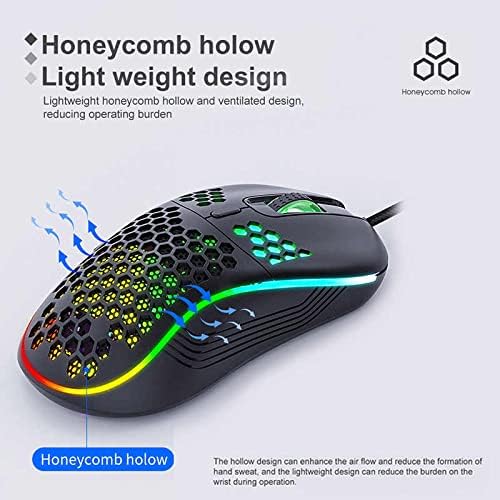
Image: The honeycomb hollow design of the IMICE T98 mouse, which aids in ventilation and reduces hand sweat.
د ستونزو حل کول
| ستونزه | احتمالي حل |
|---|---|
| موږک ځواب نه ورکوي |
|
| د کرسر حرکت بې نظمه یا ورو دی |
|
| LED څراغونه کار نه کوي |
|
| Buttons are not working or performing incorrectly |
|
مشخصات
| فیچر | تفصیل |
|---|---|
| برانډ | IMICE |
| ماډل | T98 |
| د ارتباط ټیکنالوژي | USB (ویر شوی) |
| ځانګړي ځانګړتیاوې | LED Lighting, Adjustable DPI, Programmable Buttons, Onboard Memory |
| د تڼۍ مقدار | 6 |
| د لاس لارښوونه | متضاد |
| وړاندیز شوی کارول | لوبې کول |
| مطابقت لرونکې وسیلې | شخصي کمپیوټر، لیپ ټاپ |
| د عملیاتي سیسټم مطابقت | Windows, Vista, Mac (implied) |
| سټایل | عصري |
| د پای ډول | مټ |
| د کیبل اوږدوالی | 1.5 متره |
| بیټرۍ پکې شاملې دي | نه |
تضمین او ملاتړ
For warranty information and technical support, please refer to the documentation provided with your purchase or contact the seller/manufacturer directly. Keep your proof of purchase for warranty claims.