
1. پیژندنه
Thank you for choosing the iPega PG-P4008 Wireless Game Controller. This manual provides detailed instructions on how to set up, operate, and maintain your controller. The PG-P4008 offers broad compatibility with PS4, PS3, Android (10.0+), iOS (13.0+), and Windows PC, connecting wirelessly via Bluetooth for an enhanced gaming experience.
2. محصول ختم شوview
The iPega PG-P4008 is designed for versatile gaming across multiple platforms. It features a comfortable ergonomic design, responsive controls, and several advanced functionalities to immerse you in your games.
کلیدي ځانګړتیاوې:
- Wireless Bluetooth connectivity (BT2.1+EDR) with up to 8 meters range.
- No driver installation required for connection.
- Integrated colored LED light indicator for operational status.
- Dual motors for realistic vibration feedback during gameplay.
- Built-in three-dimensional acceleration sensor and gyroscope sensor with six-axis induction.
- Integrated speaker and 3.5mm earphone jack for game audio.
- Dual-point capacitive touchpad for enhanced control.
- Compatible with PS4, PS3, Android (10.0+), iOS (13.0+), and Windows PC.
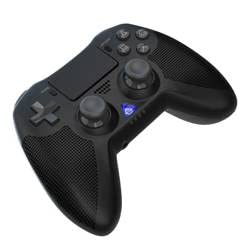
انځور 1: مخکی view of the iPega PG-P4008 Wireless Game Controller. This image displays the controller's ergonomic design, dual analog sticks, D-pad, action buttons, touchpad, and the central LED indicator.
3. تنظیم او پیوستون
The PG-P4008 controller connects wirelessly via Bluetooth. Follow these steps to pair your controller with your device:
- پاور آن: Ensure the controller is charged. Press and hold the PS ت buttonۍ (or equivalent power button) to turn on the controller.
- جوړه جوړه:
- For PS4/PS3: Connect the controller to the console using a USB cable. Once recognized, you can disconnect the cable for wireless play. The connection method is similar to the official P4 controller.
- For Android/iOS: Activate Bluetooth on your mobile device. On the controller, press and hold the SHARE button + PS button simultaneously until the LED indicator flashes rapidly, indicating pairing mode. Select "PG-P4008" (or similar) from your device's Bluetooth list to connect.
- For Windows PC: Ensure your PC has Bluetooth capability. On the controller, press and hold the PS button + OPTIONS button simultaneously until the LED indicator flashes rapidly. On your PC, go to Bluetooth settings, add a new device, and select "PG-P4008" (or similar) to pair.
- بریالۍ اړیکه: Once connected, the LED indicator on the controller will change to a solid color, indicating a successful pairing.
یادونه: No additional driver software is required for operation. The controller supports a stable connection up to 8 meters.
4. عملیاتي لارښوونې
د LED شاخص:
The built-in colored LED light indicates the controller's operational status and player assignment, similar to the official PS4 controller. Different colors will signify different stages or player numbers.
د وایبریشن فیډبیک:
The controller features dual motors embedded in the handles, providing tactile vibration feedback to enhance your gaming immersion. This feedback will vary based on in-game events.
ټچ پیډ:
The dual-point capacitive touchpad allows for intuitive control in games that support touch input, offering an additional layer of interaction.
د غږ فعالیت:
Connect your 3.5mm earphones to the integrated jack on the controller to experience game audio directly, providing a private and immersive sound experience.
5. ساتنه
- Keep the controller dry and away from moisture to prevent damage to internal components.
- کنټرولر په منظم ډول د نرم، وچ ټوکر سره پاک کړئ. د سختو کیمیاوي موادو یا کثافاتو موادو کارولو څخه ډډه وکړئ.
- کنټرولر په یخ او وچ ځای کې وساتئ کله چې نه کارول کیږي.
- کنټرولر د سختې تودوخې یا مستقیم لمر وړانګو سره مخ کیدو څخه ډډه وکړئ.
- Do not attempt to disassemble or modify the controller, as this will void any potential warranty and may cause damage.
6. ستونزه حل کول
- کنټرولر نه نښلي:
- ډاډ ترلاسه کړئ چې کنټرولر په بشپړ ډول چارج شوی دی.
- ډاډ ترلاسه کړئ چې ستاسو په وسیله کې بلوتوټ فعال شوی دی.
- Make sure the controller is in the correct pairing mode for your device (refer to Section 3).
- هڅه وکړئ چې کنټرولر او خپل وسیله دواړه بیا پیل کړئ.
- د خپل وسیلې د بلوتوث لیست څخه پخوانۍ جوړې لرې کړئ او بیا جوړه کولو هڅه وکړئ.
- د ننوتلو ځنډ یا قطع کیدل:
- ډاډ ترلاسه کړئ چې تاسو د 8 مترو د عملیاتي حد دننه یاست.
- د نورو بېسیم وسیلو مداخله کمه کړئ.
- Check for any physical obstructions between the controller and the device.
- وایبریشن کار نه کوي:
- ډاډ ترلاسه کړئ چې هغه لوبه چې تاسو یې لوبوئ د وایبریشن فیډبیک ملاتړ کوي.
- د لوبې دننه ترتیبات وګورئ ترڅو ډاډ ترلاسه کړئ چې وایبریشن فعال شوی دی.
- Audio not working via 3.5mm jack:
- Ensure your earphones are properly plugged in.
- Check the volume settings on your device and in-game.
- Test with another pair of earphones to rule out earphone issues.
7. مشخصات
| د ماډل شمیره | PG-P4008 |
| برانډ | آی پیګا |
| ارتباط | Bluetooth (BT2.1+EDR) |
| د بیسیم رینج | تر 8 مترو پورې |
| مطابقت لرونکې وسیلې | PS4, PS3, Android (10.0+), iOS (13.0+), Windows PC |
| ځانګړي ځانګړتیاوې | Wireless, Touchpad, Vibration, 6-axis Gyroscope, Built-in Speaker, 3.5mm Audio Jack |
| د تڼۍ مقدار | 17 |
| د بریښنا سرچینه | د بیټرۍ چلول |
8. تضمین او ملاتړ
Information regarding product warranty and customer support is not provided within this manual. Please refer to the product packaging or the retailer's website for details on warranty coverage and how to contact customer support for assistance.