
1. پیژندنه
د پیرودلو لپاره مننهasing the zelotes T80 Wired Gaming Mouse. This manual provides essential information for setting up, operating, and maintaining your new gaming mouse. Please read it thoroughly to ensure optimal performance and longevity of your device.
2. ترتیب کول
۲.۱ په بکس کې څه دي
- 1 x T80 Gaming Mouse
- 1 x د لارښوونې لارښود
۳.۲ ستاسو موږک سره نښلول
- Unpack the zelotes T80 Gaming Mouse and the instruction manual from the box.
- Locate an available USB port on your computer (Laptop, PC, Mac).
- د موږک USB نښلونکی په USB پورټ کې ولګوئ.
- The mouse is plug-and-play and should be automatically recognized by your operating system (Windows 11/10/8/7, Mac OS). No additional drivers are typically required for basic functionality.
For advanced customization of buttons and lighting, please refer to the manufacturer's webد هر ډول شته سافټویر ډاونلوډونو لپاره سایټ.
3. عملیاتي لارښوونې
3.1 د تڼۍ دندې
The zelotes T80 Gaming Mouse features 7 programmable buttons designed for enhanced gaming and productivity.
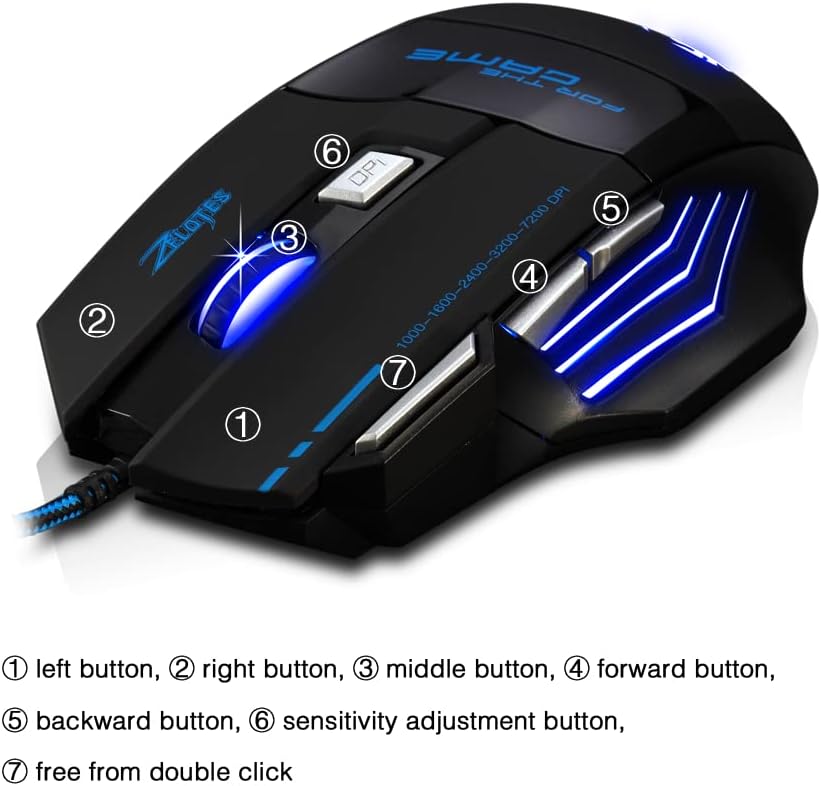
- کیڼ تڼۍ (۱): معیاري کیڼ کلیک فعالیت.
- ښي تڼۍ (2): د ښي کلیک کولو معیاري فعالیت.
- Middle Button / Scroll Wheel (3): Scrolls up/down and acts as a middle-click button.
- د مخته تګ تڼۍ (۴): مخ په وړاندې ځي web براوزرونه یا file سپړونکي
- د شا تڼۍ (۵): شاته نیویګیټ کوي web براوزرونه یا file سپړونکي
- Sensitivity Adjustment (DPI) Button (6): د DPI ترتیباتو له لارې تیریږي.
- Quick Fire Button (7): Equipped for rapid firing, allowing continuous shooting with a single press (functions as a double-click by default).
3.2 د DPI تعدیل
The mouse offers 5 adjustable DPI settings to match your preference for gaming or office work. Use the Sensitivity Adjustment (DPI) Button (6) to cycle through the following settings:
- 1000 DPI
- 1600 DPI
- 2400 DPI
- 3200 DPI
- 7200 DPI
3.3 LED Backlight Illumination
The zelotes T80 features multi-mode LED backlighting that enhances your visual experience and gaming atmosphere. The LED lights cycle through various colors, providing dynamic illumination.

۳.۳ ارګونومیک ډیزاین
The mouse is designed with an ergonomic shape and skin-friendly material for a comfortable grip and soft touch. Its sweat-resistant and anti-slip features ensure comfort during prolonged use, reducing arm fatigue.

4. ساتنه
- موږک د نرم او وچ ټوکر په مسح کولو سره پاک وساتئ.
- Avoid exposing the mouse to extreme temperatures, direct sunlight, or liquids.
- د موږک د جلا کولو هڅه مه کوئ، ځکه چې دا ممکن تضمین باطل کړي.
5. ستونزه حل کول
- موږک ځواب نه ورکوي: Ensure the USB cable is securely plugged into the computer. Try a different USB port or restart your computer.
- د کرسر حرکت بې نظمه دی: Clean the optical sensor on the bottom of the mouse. Ensure you are using the mouse on a suitable surface (e.g., a mouse pad).
- د LED څراغونه کار نه کوي: Check if the mouse is properly connected. Some operating systems or software might interfere with lighting controls.
6. مشخصات
| فیچر | تفصیل |
|---|---|
| د محصول ابعاد | 5.12 x 4.09 x 1.77 انچه |
| د توکي وزن | 5.5 اونس |
| د ماډل شمیره | T80 |
| برانډ | zelotes |
| رنګ | تور |
| د ارتباط ټیکنالوژي | USB (ویر شوی) |
| د حرکت کشف ټیکنالوژي | نظري |
| د DPI تنظیمات | 1000/1600/2400/3200/7200 DPI (5 adjustable levels) |
| تڼۍ | 7 (Programmable, including Quick Fire Button) |
| ځانګړی ځانګړنه | Ergonomic Design, LED Illumination, Sweat-resistant, Anti-slip |
| مطابقت | وینډوز ۷/۸/۱۰/۱۱، ماک او ایس |
۹. د محصول ویډیوګانې
7.1 T80 7200DPI Gaming Mouse Overview
دا ویډیو په لنډه توګه وړاندې کويview of the zelotes T80 Gaming Mouse, highlighting its 7200 DPI capability and overall design. It demonstrates the mouse's appearance and some features in action.
8. تضمین او ملاتړ
For warranty information or technical support, please refer to the contact details provided on the product packaging or visit the official zelotes webسایټ. د هر ډول تضمین ادعا لپاره د پیرود ثبوت په توګه د پیرود رسید وساتئ.