
1. پیژندنه
د پیرودلو لپاره مننهasing the Muse M-308 BT Bluetooth Speaker. This manual provides essential information for the safe and correct use of your device. Please read it thoroughly before use and keep it for future reference.
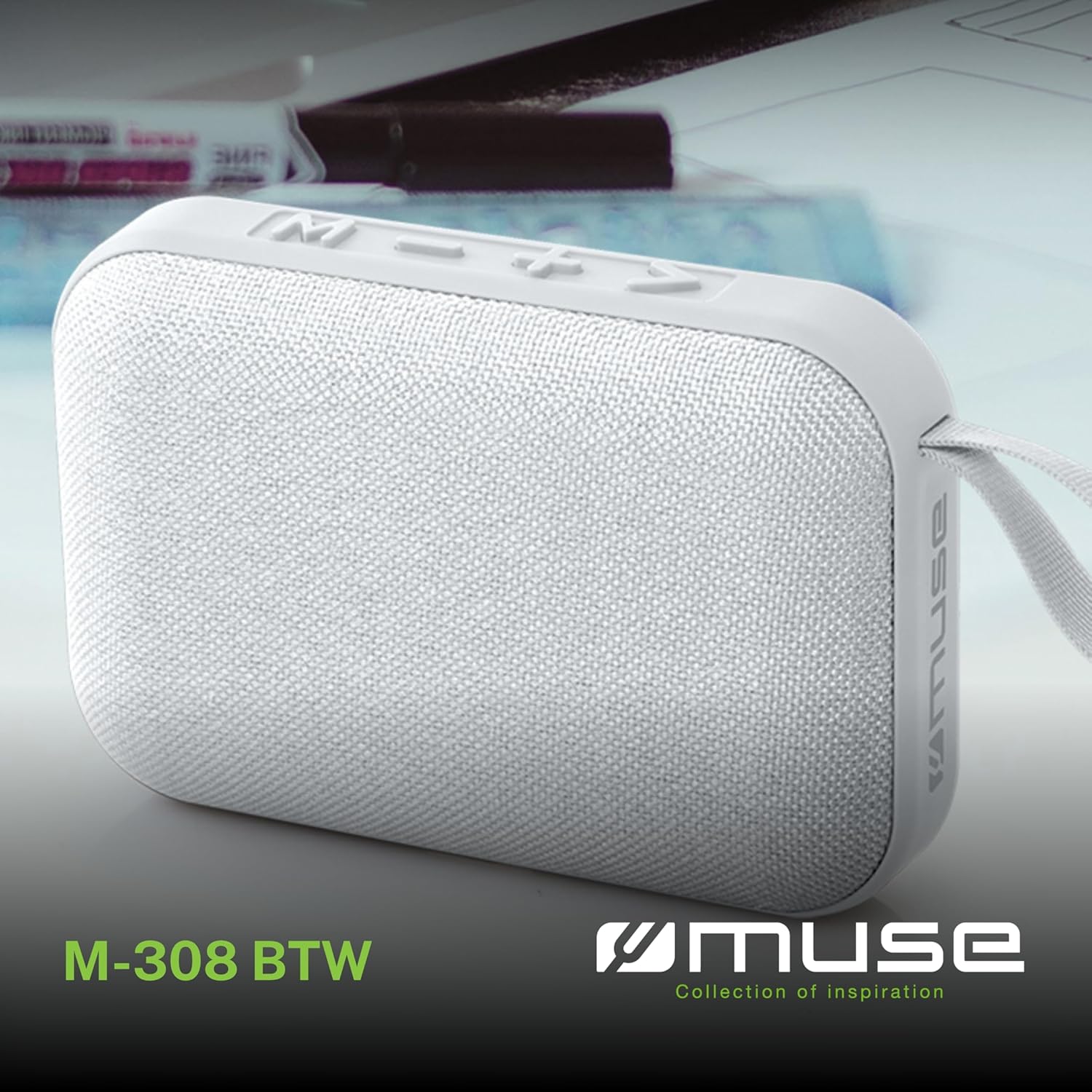
انځور 1.1: مخکی view of the Muse M-308 BT Bluetooth Speaker.
2. د محصول ب Featuresې
- د بلوتوټ ارتباط: د مطابقت لرونکو وسیلو څخه په بې سیم ډول آډیو جریان کړئ.
- د لاسونو څخه پاک فعالیت: Integrated microphone for taking calls.
- میډیا پلے بیک: Supports music playback from USB and MicroSD (TF) cards.
- سټیریو جوړه: Connect two M-308 BT speakers for enhanced stereo sound.
- د LED شاخص: Provides visual feedback for Bluetooth pairing and charging status.
- کمپیکٹ او لږ وزن: Designed for portability, weighing approximately 200g.
- دننه د چارج وړ بیټرۍ: 1200mAh capacity for up to 10 hours of playback.
- د تولید ځواک: 5 Watts for clear audio.

Image 2.1: Key features of the Muse M-308 BT speaker.

Image 2.2: Additional functionalities of the Muse M-308 BT speaker.
3. د بسته محتويات
ډاډ ترلاسه کړئ چې ټول توکي د خلاصولو پر مهال شتون لري:
- Muse M-308 BT Bluetooth Speaker
- د USB چارج کیبل
- د کارونکي لارښود (دا لاسوند)
4. کنټرولونه او اتصالات
د سپیکر کنټرولونو او د اتصال بندرونو سره ځان آشنا کړئ:

Image 4.1: Top panel with various connections.
- USB پورټ: د USB فلش ډرایو څخه د موسیقۍ غږولو لپاره.
- د مایکرو USB پورټ: د سپیکر چارج کولو لپاره.
- Micro SD (TF) Card Slot: د مایکرو ایس ډی کارت څخه د موسیقۍ غږولو لپاره.
- آن/آف سویچ: To power the speaker on or off.

Image 4.2: Side panel with control buttons.
- د M تڼۍ (حالت): د بلوتوث، USB، او مایکرو SD حالتونو ترمنځ د بدلولو لپاره فشار ورکړئ.
- - Button (Volume Down / Previous Track):
- لنډ فشار: حجم کم کړئ.
- Long press: Go to the previous track.
- + Button (Volume Up / Next Track):
- لنډ فشار: حجم زیات کړئ.
- Long press: Go to the next track.
- > Button (Play / Pause / Call):
- Short press: Play or pause music.
- Short press (during incoming call): Answer call.
- Long press (during incoming call): Reject call.
- Short press (during call): End call.
5. ترتیب کول
۳.۱ د سپیکر چارج کول
- Connect the supplied USB charging cable to the Micro-USB port on the speaker.
- د USB کیبل بل پای د USB بریښنا اډاپټر (شامل نه دی) یا د کمپیوټر USB پورټ سره وصل کړئ.
- د LED شاخص به د چارج کولو حالت ښودلو لپاره روښانه شي. دا به بند شي یا رنګ بدل کړي کله چې بشپړ چارج شي.
5.2 بریښنا کول / بندول
- To power on, slide the ON/OFF switch to the 'ON' position. You will hear an audible prompt.
- To power off, slide the ON/OFF switch to the 'OFF' position.
5.3 د بلوتوټ جوړه کول
- Ensure the speaker is powered on and in Bluetooth mode (indicated by a flashing LED). If not, press the 'M' button to switch to Bluetooth mode.
- په خپل سمارټ فون، ټابلیټ، یا بل مناسب وسیله کې بلوتوث فعال کړئ.
- لټون available Bluetooth devices and select "M-308 BT" from the list.
- یوځل چې جوړه شي، د LED شاخص به چمکۍ ودروي او ټینګ پاتې شي، او تاسو به د تایید غږ واورئ.
- The speaker will automatically connect to the last paired device when powered on, if it is within range.
۱.۵ سټیریو جوړه کول (TWS فعالیت)
To pair two M-308 BT speakers for true wireless stereo sound:
- Ensure both speakers are powered on and in Bluetooth pairing mode (LED flashing).
- On one of the speakers (this will be the primary speaker), double-press the 'M' button. The speaker will search for another M-308 BT speaker.
- Once connected, both speakers will emit a confirmation tone, and the LED on the primary speaker will flash slowly, while the LED on the secondary speaker will remain solid.
- اوس، خپل وسیله د بلوتوث له لارې لومړني سپیکر سره وصل کړئ لکه څنګه چې په 5.3 برخه کې تشریح شوي.
6. عملیاتي لارښوونې
6.1 غږول غږول
- بلوتوث موډ: After successful pairing, start playing music on your connected device. The audio will stream through the speaker.
- USB/Micro SD حالت: Insert a USB flash drive or Micro SD card into the respective port. The speaker will automatically switch to the corresponding mode and begin playing music. If it doesn't, press the 'M' button to cycle through modes.
6.2 د حجم کنټرول
- د حجم زیاتولو لپاره '+' تڼۍ کېکاږئ.
- د حجم کمولو لپاره '-' تڼۍ کېکاږئ.
۵.۳ د لارې نیویګیشن
- بل ټریک ته د تګ لپاره '+' تڼۍ اوږد فشار ورکړئ.
- Long press the '-' button to go back to the previous track.
6.4 له لاسونو خالي تلیفون
- When a call comes in, the music will pause. Press the '>' button to answer the call.
- To end a call, press the '>' button again.
- To reject an incoming call, long press the '>' button.
7. ساتنه
- سپیکر د سختې تودوخې، مستقیم لمر وړانګو او رطوبت څخه لرې وساتئ.
- Do not expose the speaker to water or other liquids. This model is not water-resistant.
- سپیکر په نرم او وچ ټوکر پاک کړئ. د کثافاتو پاکوونکي یا محلول مه کاروئ.
- د سپیکر د جلا کولو یا ترمیم کولو هڅه مه کوئ. دا به تضمین باطل کړي.
- کله چې د اوږدې مودې لپاره نه کارول کیږي، د بیټرۍ روغتیا ساتلو لپاره لږترلږه په هرو دریو میاشتو کې یو ځل بیټرۍ چارج کړئ.
8. ستونزه حل کول
| ستونزه | احتمالي لامل | د حل لاره |
|---|---|---|
| سپیکر نه چالانېږي. | بیټرۍ ختمه شوې. | د ورکړل شوي USB کیبل په کارولو سره سپیکر چارج کړئ. |
| د بلوتوث له لارې جوړه نشي کیدی. | Bluetooth is not enabled on your device or speaker is not in pairing mode. Speaker is too far from the device. | Ensure Bluetooth is active on both devices. Make sure the speaker is in Bluetooth pairing mode (flashing LED). Move the speaker closer to your device (within 10 meters). |
| غږ نشته. | Volume is too low. Speaker is not connected. Incorrect mode selected. | Increase the volume on both the speaker and your connected device. Re-pair the Bluetooth connection. Press the 'M' button to cycle through modes (Bluetooth, USB, Micro SD). |
| Music playback from Micro SD card is erratic or "screaming". | فاسد files on Micro SD card. Incompatible file بڼه. | غږ ډاډمن کړئ files are in a compatible format (e.g., MP3). Try using a different Micro SD card or reformatting the current one and reloading files. |
| Speaker switches between modes (e.g., SD and BT) unexpectedly. | Interference or a temporary software glitch. | Power off the speaker, wait a few seconds, then power it back on. Ensure no other devices are causing interference. If the issue persists, try removing the Micro SD card if it's inserted. |
9. مشخصات
| د ماډل نوم | M-308 BT |
| برانډ | میوز |
| د ارتباط ټیکنالوژي | بلوتوث، تار |
| د بې سیمه مخابراتو ټیکنالوژي | بلوتوث |
| د سپیکر اعظمي تولید ځواک | 5 واټ |
| د آډیو وتلې حالت | سټیریو |
| د سپیکر ډول | د پورټ ایبل بلوتوټ سپیکر |
| ځانګړي ځانګړتیاوې | بلوتوث |
| مطابقت لرونکې وسیلې | سمارټ فون، ټابلیټ |
| د بریښنا سرچینه | بیټرۍ |
| د بیټرۍ ژوند | 10 ساعته |
| د بیټرۍ ظرفیت | 1200 ملیونهampیو ساعت |
| د محصول ابعاد (د x څلویښتم x څلویښتم) | 118D x 30B x 76H millimeters (11.8 x 3 x 7.6 cm) |
| د توکي وزن | 200 ګرامه |
| مواد | Plastic rubber material |
| Is Water Resistant | نه |
| شاملې برخې | د USB چارج کیبل |
Image 9.1: Dimensions of the Muse M-308 BT speaker.
10. تضمین او ملاتړ
The Muse M-308 BT Bluetooth Speaker comes with a 2 کلن تضمین د پیرود نیټې څخه.
For technical support, warranty claims, or further assistance, please contact your retailer or visit the official MUSE webد اړیکو معلوماتو لپاره سایټ.