
1. پیژندنه
Welcome to the user manual for your new Cheerlux C50 Projector. This guide provides essential information on setting up, operating, maintaining, and troubleshooting your device. Please read this manual thoroughly before using the projector to ensure optimal performance and safety. Keep this manual for future reference.
2. د خوندیتوب لارښوونې
د اور، بریښنا شاک، یا ټپي کیدو مخنیوي لپاره، مهرباني وکړئ لاندې خوندیتوب احتیاطي تدابیر په پام کې ونیسئ:
- د هوا د جریان د خلاصیدو لارې مه بندوئ. د پروجیکټر شاوخوا مناسب ځای ډاډمن کړئ ترڅو هوا ښه جریان ولري.
- Do not expose the projector to rain or moisture. Avoid placing objects filled with liquids, such as vases, on the projector.
- پروجیکټر مه خلاصوه casinج. ټول خدمات وړ خدماتو پرسونل ته راجع کړئ.
- یوازې هغه بریښنا اډاپټر وکاروئ چې د پروجیکټر سره چمتو شوی وي.
- په مستقیم ډول د پروجیکټر لینز ته د کتلو څخه ډډه وکړئ کله چې lamp فعال دی، ځکه چې روښانه رڼا ستاسو سترګو ته زیان رسولی شي.
- پروجیکټر په یوه مستحکم او هواره سطحه کېږدئ ترڅو د رالوېدو مخه یې ونیول شي.
- د بریښنا د طوفانونو پرمهال یا کله چې د اوږدې مودې لپاره نه کارول کیږي، پروجیکټر د بریښنا له ساکټ څخه خلاص کړئ.
3. د بسته محتويات
مهرباني وکړئ وګورئ چې ټول توکي شتون لري او په ښه حالت کې دي:
- Cheerlux C50 پروجیکٹر
- ریموټ کنټرول
- د بریښنا کیبل
- HDMI کیبل
- د AV کیبل
- د کارن لارښود
4. محصول ختم شوview
Familiarize yourself with the components and ports of your Cheerlux C50 Projector.

This image displays the Cheerlux C50 Projector from a front-top angle, highlighting its lens, focus ring, and control panel buttons on the top surface. The projector features a white and grey casing.
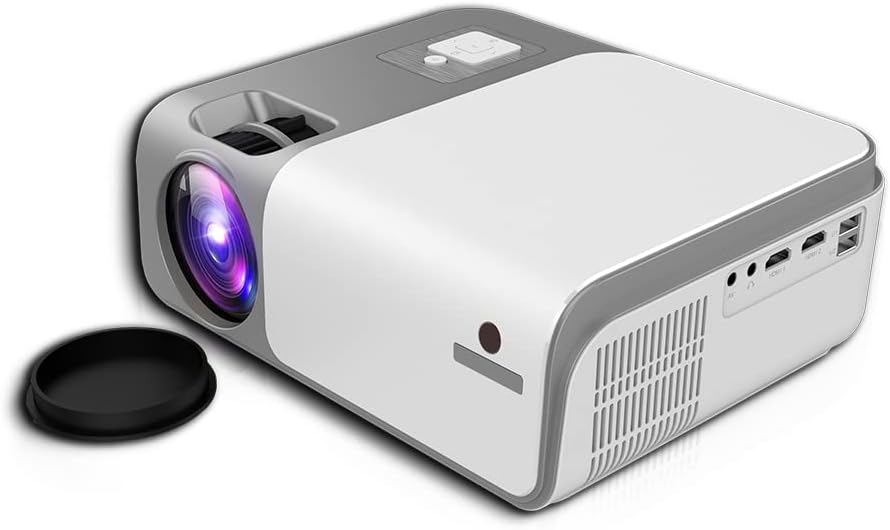
This image shows the rear and side of the Cheerlux C50 Projector, revealing various input/output ports such as HDMI, USB, and AV, along with ventilation grilles. A lens cap is visible next to the lens.
4.1. د مخ پینل
- د پروجیکشن لینز: انځور خپروي.
- د تمرکز زنګ: د انځور تیزوالی تنظیموي.
4.2. پورتنی پینل
- د کنټرول تڼۍ: Power, Menu, Source, Navigation (Up/Down/Left/Right), OK.
4.3. د شا پینل
- د بریښنا ننوتل: د بریښنا کیبل سره وصل کیږي.
- د HDMI پورټونه (x2): د HDMI فعالو وسیلو سره وصل شئ (لیپټاپونه، د لوبو کنسولونه، بلو رې پلیرونه).
- د USB پورټونه (x2): د میډیا پلې بیک لپاره USB ډرایوونه وصل کړئ.
- د AV پورټ: د AV کیبل په کارولو سره زړو وسیلو سره وصل شئ.
- د غږ غږ (۳.۵ ملي متره): بهرني سپیکرې یا هیډفونونه وصل کړئ.
- د IR ترلاسه کونکي: د ریموټ کنټرول سیګنالونو لپاره.
5. ترتیب کول
5.1. د بریښنا پیوستون
- د بریښنا کیبل د پروجیکټر د بریښنا ان پټ پورټ سره وصل کړئ.
- د بریښنا کیبل بله پای د دیوال په یوه سوري کې ولګوئ.
- په پروجیکټر کې د بریښنا شاخص څراغ به روښانه شي.
5.2. ځای پرځای کول
Position the projector on a stable, flat surface. The ideal projection distance for the Cheerlux C50 is between 1.5 to 6 meters, depending on the desired screen size. Ensure the projector is centered with your projection screen or wall.
۴. تمرکز او د کیسټون سمون
- د تمرکز سمون: Turn the focus ring on the front of the projector until the projected image appears sharp and clear.
- Keystone Correction (4P): If the projected image appears trapezoidal (wider at the top or bottom), use the 4P keystone correction function. This can typically be accessed via the projector's menu or dedicated buttons on the remote control. Adjust each of the four corners independently to achieve a perfectly rectangular image.
6. چلول
6.1. بریښنا فعال/بند
- پاور آن: Press the power button on the projector or the remote control. The projector will start up, and the lamp روښانه کړي.
- بندول: Press the power button again. Confirm shutdown if prompted. Allow the projector to cool down before unplugging it.
۲. د ننوتلو سرچینې
Connect your desired device to the projector using the appropriate cable (HDMI, AV, USB). Then, press the 'Source' button on the projector or remote control to select the corresponding input source.
- HDMI: For high-definition video and audio from laptops, game consoles, etc.
- USB: د میډیا لوبولو لپاره files (photos, videos, music) directly from a USB flash drive.
- ای وی: For standard definition video and audio from older devices like DVD players.
6.3. Wireless Connectivity (WiFi & Bluetooth)
The Cheerlux C50 Projector features built-in WiFi and Bluetooth for enhanced connectivity.
- د وائی فای اتصال: Navigate to the 'Settings' menu, select 'Network' or 'WiFi Settings'. Choose your desired WiFi network from the list and enter the password.
- بلوتوث پیوستون In the 'Settings' menu, select 'Bluetooth'. Turn on Bluetooth and pair with your Bluetooth-enabled speakers or headphones.
6.4. د سکرین عکس العمل
The projector supports wireless screen mirroring from compatible smartphones and tablets.

This image illustrates the Cheerlux C50 Projector wirelessly connected to a smartphone. The phone's screen, displaying a movie scene, is being mirrored to the projector, indicated by a Wi-Fi signal icon between the devices.
- Ensure both your projector and mobile device are connected to the same WiFi network.
- On the projector, select the 'Screen Mirroring' or 'Wireless Display' option from the main menu.
- On your mobile device, activate its screen mirroring feature (e.g., 'Smart View' for Samsung, 'Screen Mirroring' for Android, 'AirPlay' for iOS).
- Select the projector's name from the list of available devices on your phone.
- The mobile device's screen content will now be projected.
6.5. مینو نیویگیشن
Use the navigation buttons (Up, Down, Left, Right) and 'OK' button on the projector or remote control to browse through the on-screen menu. The 'Menu' button typically opens the main settings, and the 'Return' or 'Exit' button closes menus.
7. ساتنه
7.1. پاکول
- لینز: د نظري لینزونو لپاره په ځانګړي ډول ډیزاین شوي نرم، لینټ نه پاک ټوکر وکاروئ. د کثافاتو پاکونکي مه کاروئ.
- Casing: د پروجیکټر بهرنۍ برخه د نرم او وچ ټوکر سره پاک کړئ. د سختې خاورې لپاره، لږ څهampد اوبو سره ټوکر.
- د هوا د تودولو لارې: Periodically clean the vents with a soft brush or compressed air to prevent dust buildup, which can affect cooling.
7.2. ذخیره کول
کله چې د اوږدې مودې لپاره نه کارول کیږي، پروجیکټر په یخ او وچ ځای کې وساتئ، د مستقیم لمر وړانګو او سختې تودوخې څخه لرې. لینز د هغې د کیپ سره پوښ کړئ ترڅو دا د دوړو او سکریچونو څخه خوندي شي.
8. ستونزه حل کول
که تاسو د خپل پروجیکټر سره ستونزې سره مخ شئ، لاندې عامې ستونزې او حل لارې وګورئ:
| ستونزه | احتمالي لامل | د حل لاره |
|---|---|---|
| هیڅ انځور نه دی وړاندې شوی | Power cable loose, incorrect input source, device not connected. | Check power connection, select correct input source, ensure source device is on and connected. |
| انځور غلی دی | Focus not adjusted, projector too close/far. | Adjust the focus ring. Reposition the projector within the recommended distance. |
| انځور trapezoidal دی | پروجیکټر د سکرین سره عمودي نه دی. | Use the 4P keystone correction function in the menu. |
| غږ نشته | Volume too low, external speakers not connected, source device muted. | Increase projector volume, check external speaker connection, unmute source device. |
| ریموټ کنټرول کار نه کوي | Batteries dead, obstruction, not pointing at IR receiver. | Replace batteries, remove obstructions, point remote directly at the projector's IR receiver. |
9. مشخصات
Technical specifications for the Cheerlux C50 Projector:
| فیچر | مشخصات |
|---|---|
| د برانډ نوم | Generic (Cheerlux C50) |
| د ارتباط ټیکنالوژي | وای فای، بلوتوث |
| اصلي حل | 1920 x 1080 |
| روښانتیا | 4000 Lumen |
| د فارم فکتور | د پورټ وړ |
| د نصب کولو ډول | د میز ټاپ غر |
| د کنټرولر ډول | ریموټ کنټرول |
| د اعظمي غورځولو واټن | 6 متره |
| واټtage | ۴۵ واټه |
| ځانګړي ځانګړتیاوې | Built In Wi Fi, Portable, Wireless, 4P Keystone Correction |
10. تضمین او ملاتړ
The Cheerlux C50 Projector comes with a standard manufacturer's warranty. Please refer to the warranty card included in your package for specific terms and conditions, including warranty period and coverage details. For technical support, service, or further inquiries, please contact your retailer or the manufacturer's customer service department.
د تضمین ادعاوو لپاره د پیرود ثبوت په توګه د پیرود رسید وساتئ.