
FLEXISPOT EC5B-EU3+PR1206-Black
FLEXISPOT EC5 Standing Desk User Manual
Model: EC5B-EU3+PR1206-Black
پیژندنه
This manual provides comprehensive instructions for the assembly, operation, maintenance, and troubleshooting of your FLEXISPOT EC5 Standing Desk. Please read this manual thoroughly before use to ensure proper setup and safe operation.

Figure 1: FLEXISPOT EC5 Standing Desk with a black tabletop and black frame, set up in an office environment.
The FLEXISPOT EC5 is an electric height-adjustable desk designed to promote a healthier work environment by allowing seamless transitions between sitting and standing positions. It features a robust dual-motor system, a smart control panel with memory presets, and a durable construction.
کلیدي ځانګړتیاوې:
- Three-tier frame for height adjustment from 60.5cm to 125cm.
- Supports heavy loads up to 125kg (or 160kg with upgraded design).
- Smooth and quiet lifting speed of 38mm/second.
- Programmable digital memory with 3 preset options for customized heights.
- Collision protection system for enhanced safety.
- Durable MDF tabletop with scratch-resistant laminate.
تنظیم او مجلس
The FLEXISPOT EC5 Standing Desk is designed for straightforward assembly. All necessary tools are included, and detailed instructions are provided to guide you through the process, typically taking 20-25 minutes.
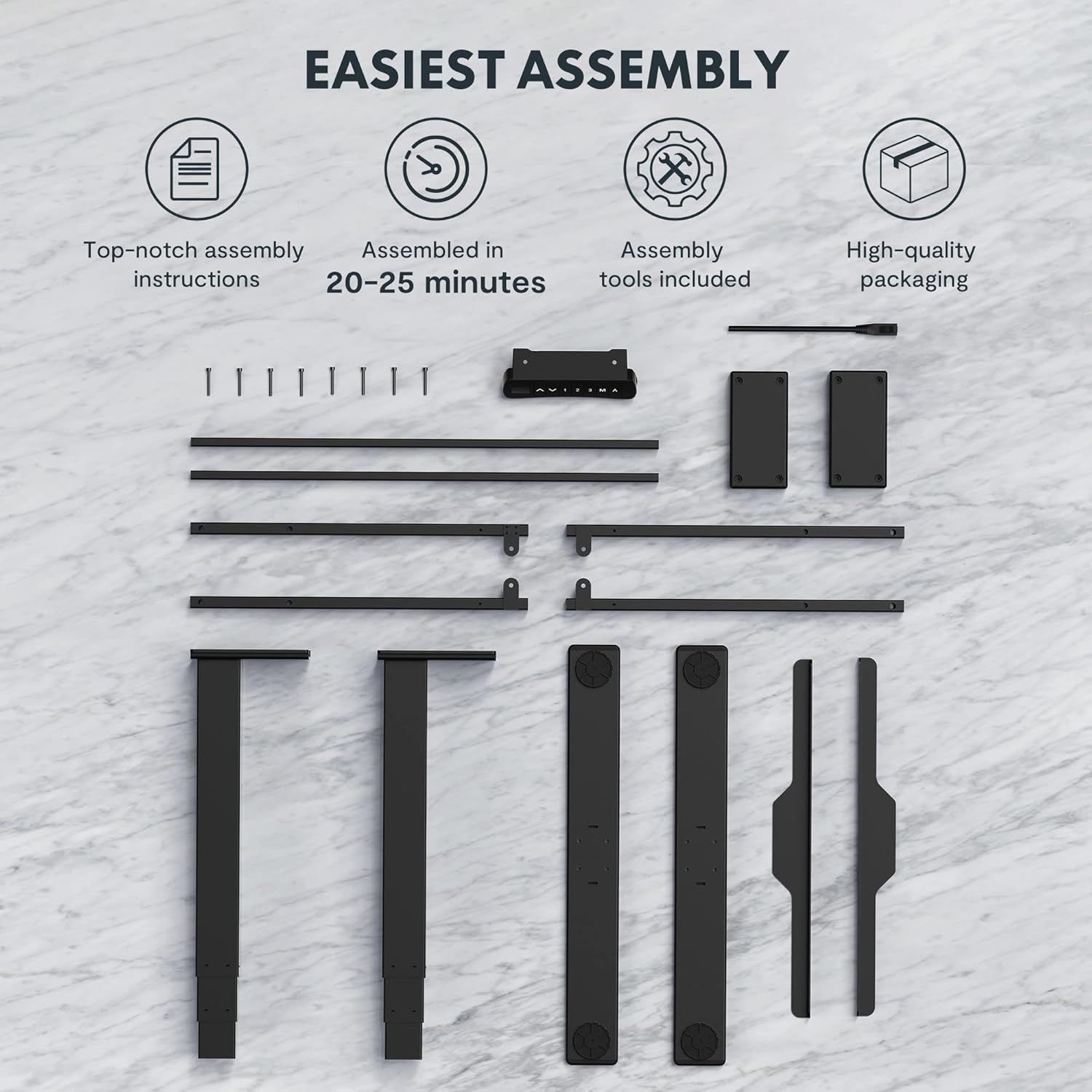
Figure 2: All components and tools required for assembling the FLEXISPOT EC5 Standing Desk.
د بسته محتويات:
- Desk Frame (legs, crossbars)
- Tabletop (if included in package)
- Control Panel with Cable
- د بریښنا اډاپټر او کیبل
- د اسمبلۍ هارډویر (پیچونه، بولټونه)
- د اسمبلۍ وسایل (د مثال په توګه، د ایلن رنچ)
- د لارښوونې لارښود
د اسمبلۍ مرحلې (عمومي اوور)view):
- ټولې برخې خلاصې کړئ او د برخو لیست سره سم یې تایید کړئ.
- Assemble the desk legs to the crossbars, ensuring all connections are secure.
- Attach the assembled frame to the tabletop using the provided screws.
- Mount the control panel to the underside of the tabletop in an accessible location.
- Connect all cables (motor cables to control box, control panel cable to control box, power cable to control box).
- Ensure all cables are neatly managed and secured to prevent snagging.
- Place the desk in its desired location, ensuring it is on a level surface.
For detailed, step-by-step assembly instructions, please refer to the separate assembly guide included in your product packaging.
عملیاتي لارښوونې
The FLEXISPOT EC5 Standing Desk features an intuitive control panel for easy height adjustment and memory functions.

Figure 3: The EC5 control panel, featuring height display, up/down buttons, and memory presets.
بنسټیز عملیات:
- د لوړوالی تعدیل: د کارولو ▲ او ▼ arrows on the control panel to raise or lower the desk to your desired height. The current height will be displayed on the digital screen.
- د لوړوالی سلسله: The desk can be adjusted from a minimum height of 60.5 cm (23.8 inches) to a maximum height of 125 cm (49.2 inches).
د حافظې پریزیټ:
The EC5 desk allows you to save up to three preferred height settings for quick adjustments.
- مخکینۍ ساتل:
- میز د خپلې خوښې لوړوالي سره سم تنظیم کړئ.
- فشار ورکړئ "م" تڼۍ. ښودنه به "S-" ښکاره کړي.
- Within 3 seconds, press the desired number button ("1" په یوټیوب کې په 19/09/2022 19:00:00 کې خپور شوی., "2" په یوټیوب کې په 19/09/2022 19:00:00 کې خپور شوی.، یا "3" په یوټیوب کې په 19/09/2022 19:00:00 کې خپور شوی.) to save the current height to that preset. The display will show "S-1", "S-2", or "S-3" to confirm.
- د مخکینۍ سیټ یادول:
- په ساده ډول د اړونده شمېرې تڼۍ فشار ورکړئ ("1" په یوټیوب کې په 19/09/2022 19:00:00 کې خپور شوی., "2" په یوټیوب کې په 19/09/2022 19:00:00 کې خپور شوی.، یا "3" په یوټیوب کې په 19/09/2022 19:00:00 کې خپور شوی.). میز به په اتوماتيک ډول خوندي شوي لوړوالي ته حرکت وکړي.
د ټکر ضد ځانګړتیا:
The desk is equipped with an anti-collision system. If the desk encounters an obstacle while moving up or down, it will automatically stop and reverse slightly to prevent damage. Ensure the area around the desk is clear during operation.
ساتنه
Regular maintenance ensures the longevity and optimal performance of your FLEXISPOT EC5 Standing Desk.
- پاکول: د میز سطحه او چوکاټ د نرم، d سره پاک کړئamp ټوکر. د خړوبولو پاکوونکو یا سختو کیمیاوي موادو څخه ډډه وکړئ چې کولی شي پای ته زیان ورسوي.
- د کیبل مدیریت: Periodically check that all cables are securely connected and neatly organized to prevent tangling or damage.
- بندونکي: Occasionally check all screws and bolts to ensure they are tight. Retighten if necessary, but do not overtighten.
- د وزن ظرفیت: Do not exceed the maximum weight capacity of 125kg (or 160kg for upgraded models) to prevent damage to the motors and frame.
- چاپیریال: Use the desk in a dry indoor environment. Avoid exposure to extreme temperatures or high humidity.
د ستونزو حل کول
If you encounter issues with your FLEXISPOT EC5 Standing Desk, refer to the following common problems and solutions:
| ستونزه | احتمالي لامل | د حل لاره |
|---|---|---|
| مېز نه حرکت کوي. | د برېښنا کیبل قطع شوی، د موټرو کیبل خلاص شوی، ډیر بار شوی. | Check all cable connections. Ensure power is supplied. Reduce weight on desk if overloaded. |
| میز په نا مساوي ډول حرکت کوي یا غیر معمولي غږ کوي. | نا مساوي بار، خلاص فاسټینرونه، خنډ. | Distribute weight evenly. Check and tighten all fasteners. Clear any obstructions. |
| ډیجیټل ښودنه د تېروتنې کوډ ښیي. | System malfunction, sensor issue. | Refer to the full troubleshooting guide in your product manual for specific error codes. Try unplugging the desk for 10 seconds and plugging it back in to reset. |
| د ټکر ضد ځانګړتیا ډیره حساسه ده یا کار نه کوي. | Sensor calibration needed, obstruction. | Ensure no constant obstructions. Consult the full manual for anti-collision sensitivity adjustment or reset procedures. |
که چیرې د دې حلونو له هڅه کولو وروسته هم ستونزه دوام ومومي، مهرباني وکړئ د FLEXISPOT پیرودونکو ملاتړ سره اړیکه ونیسئ.
د محصول مشخصات
Detailed technical specifications for the FLEXISPOT EC5 Standing Desk:
| فیچر | مشخصات |
|---|---|
| برانډ | FLEXISPOT |
| د ماډل شمیره | EC5B-EU3+PR1206-Black |
| UPC | 810072812643 |
| د لوړوالی تنظیم کولو سلسله | ۶۲.۵ سانتي متره - ۱۰۶.۸ سانتي متره (۲۴.۷ انچه - ۴۲ انچه) |
| د پورته کولو سرعت | 38 mm/ ثانیه |
| د اعظمي وزن ظرفیت | ۴۷.۶۳ کیلوګرامه (۱۰۵ پونډه) - Upgraded models may support up to 160 kg |
| د موټرو شمیر | 2 |
| چوکاټ ایسtages | 3 |
| د تضمین اداره | Digital display with 3 memory presets |
| Tabletop Dimensions (H x W x D) | ۳۰ x ۴۰ x ۱۵ سانتي متره (۱۱.۸۱" ژور x ۱۵.۷۵" ژور x ۵.۹۱" ژور) |
| د ټابلیټ ټاپ مواد | MDF with high pressure scratch resistant laminate |
| اساسی مواد | Engineered Wood (for tabletop), Metal (for frame) |
| رنګ | تور |
| مجلس ته اړتیا ده | هو |
| د تضمین ډول | محدود |

Figure 4: The EC5 desk frame is designed for stability and can support significant weight, with some models supporting up to 160KG.
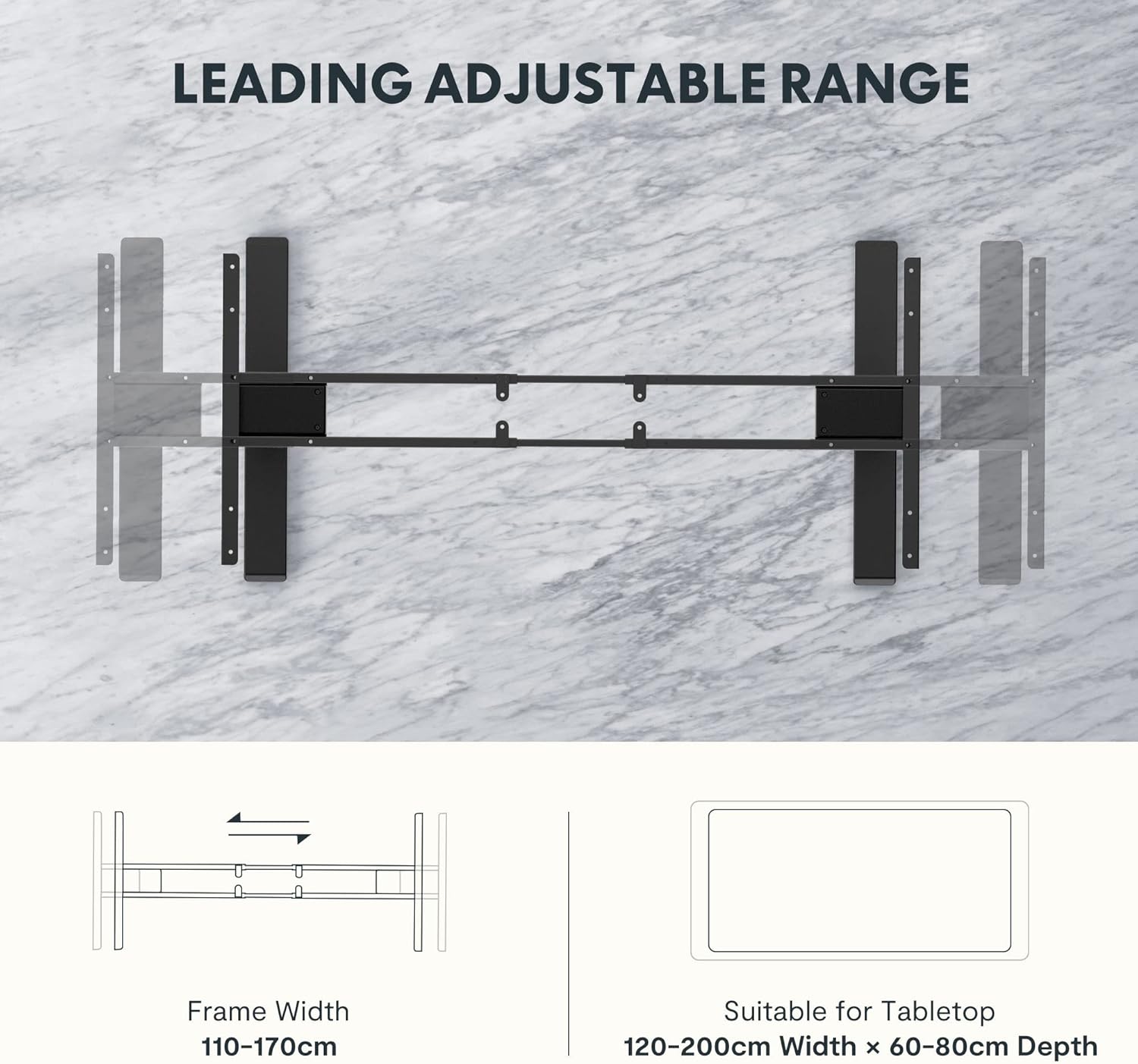
Figure 5: The adjustable frame accommodates various tabletop sizes, offering flexibility for different workspace needs.
تضمین او ملاتړ
د تضمین معلومات:
The FLEXISPOT EC5 Standing Desk comes with a محدود تضمین. Please refer to the warranty card included with your product for specific terms, conditions, and duration of coverage. This warranty typically covers manufacturing defects in materials and workmanship under normal use.
د پیرودونکي ملاتړ:
For technical assistance, warranty claims, or any questions regarding your FLEXISPOT EC5 Standing Desk, please contact FLEXISPOT customer support. You can typically find contact information on the FLEXISPOT official webپه سایټ یا ستاسو د محصول په بسته بندۍ کې.
When contacting support, please have your model number (EC5B-EU3+PR1206-Black) and proof of purchase readily available.
Ask a question about this manual
Ask about setup, troubleshooting, compatibility, parts, safety, or missing instructions. Manuals+ will review the question and use this page’s manual context to help answer it.