
پیژندنه
The RAZEAK Syww 8 is an ultra-customizable wireless gaming mouse designed for high-performance gaming. Featuring a Pixart 3395 optical sensor with up to 26000 DPI, triple-mode connectivity (Wired, 2.4G Wireless, Bluetooth 5.0), and software-programmable functions, this mouse offers versatility and precision. Its unique design allows for replaceable mouse shells, click switches, and click spacers, enabling personalized aesthetics and feel.
د بسته محتويات
- RAZEAK Syww 8 Wireless Gaming Mouse
- USB-C to USB-A Paracord Cable
- 2.4 GHz USB رسیدونکی
- د کارن لارښود
محصول پای ته ورسیدview
Familiarize yourself with the key components and features of your RAZEAK Syww 8 gaming mouse.

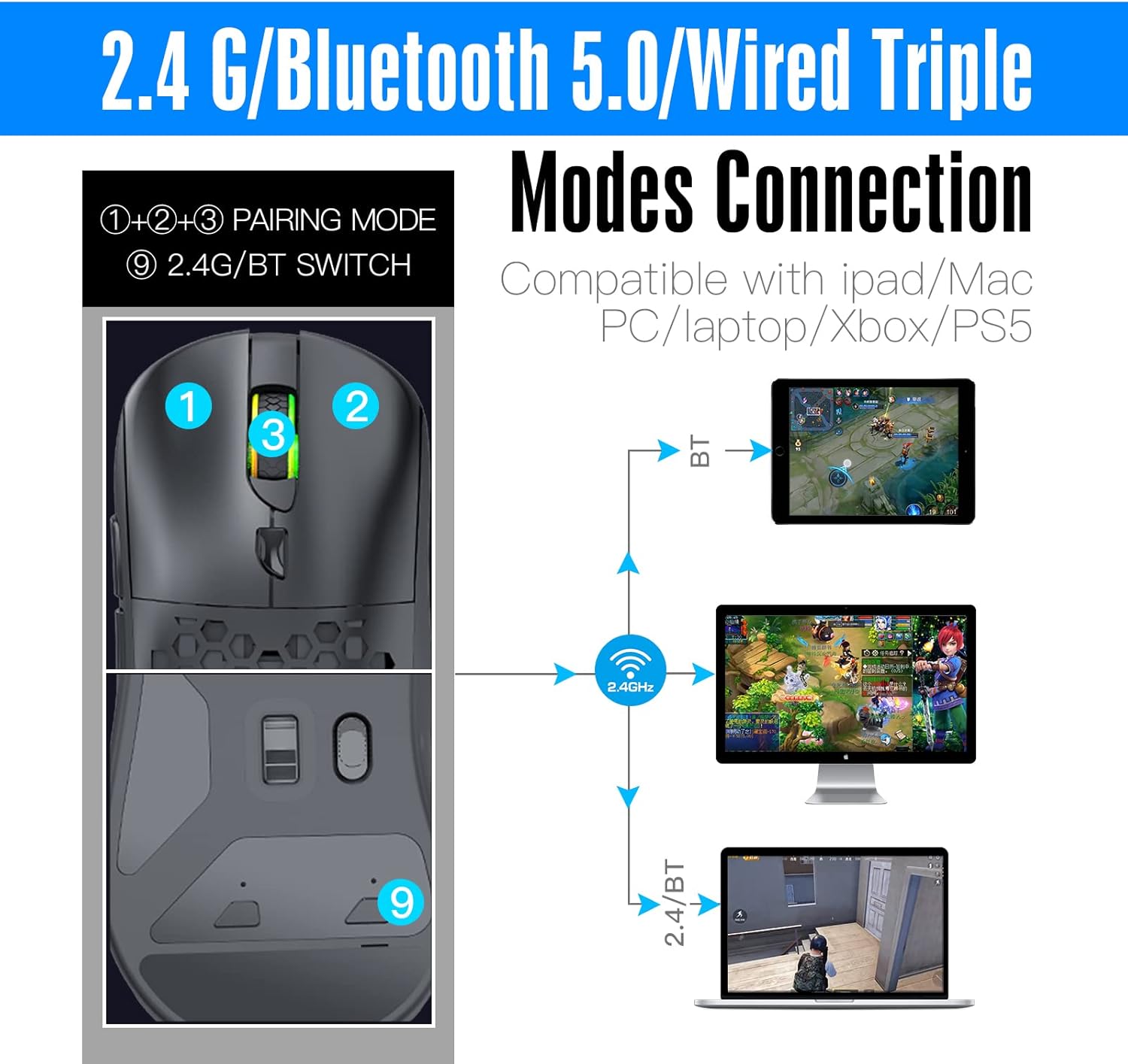
شکل 1: Mouse layout with connection mode switch and pairing buttons. (1) Left Click, (2) Right Click, (3) Scroll Wheel/Middle Click, (9) 2.4G/BT Switch.

شکل 2: The customizable design of the RAZEAK Syww 8, showcasing its replaceable top shell.
شکل 3: تفصيلي view of the Pixart 3395 advanced optical sensor, providing high precision tracking.

شکل 4: The light, flexible, and durable USB-C paracord cable for wired connection and charging.

شکل 5: The ergonomic and lightweight design (86g) of the mouse, suitable for various grip styles.
چمتو کول
د موږک چارج کول
Connect the supplied USB-C paracord cable to the front port of the mouse and the other end to a USB-A port on your computer or a USB power adapter. The mouse will charge automatically. A full charge provides approximately 70 hours of continuous use with the backlight off.
د موږک سره نښلول
The RAZEAK Syww 8 supports three connection modes: Wired, 2.4G Wireless, and Bluetooth 5.0. Use the switch on the bottom of the mouse (labeled '9' in Figure 1) to select your desired mode.
۴.۳. وایرډ موډ
- Ensure the mouse is connected to your computer via the USB-C paracord cable.
- The mouse will automatically function in wired mode.
۲. ۲.۴G بېسیم حالت
- Insert the 2.4 GHz USB receiver into an available USB-A port on your computer.
- د موږک په ښکته برخه کې سویچ د '2.4G' موقعیت ته وغورځوئ.
- The mouse should connect automatically. If not, press the pairing button (if available, refer to specific instructions in the full manual) to initiate pairing.
۳. بلوتوث ۵.۰ حالت
- د موږک په ښکته برخه کې سویچ د 'BT' موقعیت ته وغورځوئ.
- په خپل کمپیوټر یا وسیله کې، د بلوتوټ ترتیباتو ته لاړ شئ او بلوتوټ فعال کړئ.
- The mouse should appear as 'RAZEAK Syww 8' or similar in the list of discoverable devices. Select it to pair.
- If prompted, confirm the pairing code.
عملیاتي لارښوونې
د DPI تعدیل
The mouse features a Pixart 3395 sensor with adjustable DPI up to 26000. Use the dedicated DPI button (usually located behind the scroll wheel) to cycle through preset DPI levels. The current DPI level may be indicated by an LED color change or through the software.
د سافټویر اصلاح کول
For advanced customization, download the official RAZEAK software from the manufacturer's webسایټ. سافټویر تاسو ته اجازه درکوي:
- Program button functions (6 programmable buttons).
- د DPI ترتیبات تنظیم کړئ او دودیز پرو جوړ کړئfiles.
- Configure backlight modes and colors.
- د پیچلو امرونو لپاره میکرو تنظیم کړئ.
Customizing Mouse Shells and Switches
The Syww 8 is designed for ultra-customization. You can replace the mouse's back cover, click switches, and click spacers to personalize its appearance and tactile feedback. Refer to the full manual or online guides for detailed instructions on how to safely replace these components.
ساتنه
پاکول
To clean your mouse, use a soft, dry cloth. For stubborn dirt, lightly dampen the cloth with water. Avoid using harsh chemicals or abrasive materials, as these can damage the mouse's surface or internal components.
د بیټرۍ پاملرنه
To prolong battery life, avoid fully discharging the mouse frequently. Store the mouse in a cool, dry place when not in use for extended periods. The integrated 580mAh lithium battery is not user-replaceable.
د ستونزو حل کول
- موږک ځواب نه ورکوي: Ensure the mouse is charged. Check the connection mode switch (Wired, 2.4G, BT) is set correctly. For 2.4G, ensure the USB receiver is properly inserted. For Bluetooth, verify pairing in your device's settings. Try connecting via the USB cable to rule out wireless issues.
- Lag or intermittent connection (Wireless): Ensure the USB receiver (for 2.4G) is not obstructed and is close to the mouse. Avoid interference from other wireless devices. For Bluetooth, ensure your device's Bluetooth drivers are up to date.
- سافټویر موږک نه کشفوي: Ensure the mouse is connected and powered on. Download the latest software version from the official RAZEAK website. Temporarily disable any firewall or antivirus software that might be blocking the application.
- DPI or button settings not saving: Ensure the software is running with administrator privileges. Save your profiles within the software after making changes.
مشخصات
| فیچر | تفصیل |
|---|---|
| د ماډل نوم | Syww 8 |
| د ماډل شمیره | RM-X08 |
| ارتباط | Wired (USB-C), 2.4G Wireless, Bluetooth 5.0 |
| سینسر | Pixart 3395 Optical |
| DPI | Up to 26000 CPI (adjustable) |
| د تعقیب سرعت | 650IPS |
| سرعت | 50G |
| تڼۍ | 6 (د پروګرام وړ) |
| بیټرۍ | 580mAh لیتیم پولیمر |
| د بیټرۍ ژوند | Approx. 70 hours (backlight off) |
| وزن | 86 ګرامه |
| عملیاتي سیسټم | Compatible with PC (Windows), Mac, iPad, Xbox, PS5 |
| رینج | 10 متره |
د محصول ویډیو
ویډیو 1: د مظاهرې لنډه نندارهasing the RGB lighting effects of the RAZEAK Syww 8 gaming mouse.
تضمین او ملاتړ
RAZEAK offers a 2 کلن تضمین for the Syww 8 Wireless Gaming Mouse. If you encounter any product-related questions or issues, please contact RAZEAK customer service directly for assistance. Refer to the official RAZEAK website for contact information and further support resources.