
پیژندنه
Thank you for choosing the BOBLOV W3 WiFi Body Camera. This manual provides detailed instructions for the proper setup, operation, and maintenance of your device. Please read this manual thoroughly before using the camera to ensure optimal performance and to prevent damage.
د بسته محتويات
ډاډ ترلاسه کړئ چې لاندې ټول توکي ستاسو په بسته کې شامل دي:
- 1x BOBLOV W3 Body Camera
- 1x 64GB Micro SD Card (pre-installed in camera)
- 1x USB-C چارج کیبل
- ۱x سکرو ډرایور
- ۱x د کارونکي لارښود (دا سند)
- 1x Back Magnets Clip
- 1x Brooch
محصول پای ته ورسیدview
Familiarize yourself with the camera's components and controls:

انځور: BOBLOV W3 Body Camera with labels indicating the Power/Video Button, Audio/WiFi Button, Microphone, Reset button, Brooch attachment point, Back Magnetic Clip, and USB-C Charging Interface. The image also shows the dimensions of the camera.
- Power/Video Button: Used to power on/off the device and start/stop video recording.
- Audio/WiFi Button: Used to start/stop audio recording and activate/deactivate WiFi function.
- مایک: د غږ ثبتولو لپاره مایکروفون.
- بیا تنظیمول: Small button to reset the device (requires a pin).
- Brooch: Attachment point for the included brooch clip.
- Back Magnetic Clip: Removable clip for magnetic attachment.
- د چارج کولو انٹرفیس: د چارج کولو او معلوماتو لیږد لپاره د USB-C پورټ.
چمتو کول
1. د کیمرې چارج کول
Before initial use, fully charge the camera. The built-in 1450mAh battery takes approximately 3 hours to fully charge.
- Connect the provided USB-C charging cable to the camera's charging interface.
- د کیبل بل پای د USB بریښنا اډاپټر (شامل نه دی) یا د کمپیوټر USB پورټ سره وصل کړئ.
- د چارج کولو شاخص څراغ به د چارج کولو پرمهال روښانه شي او کله چې په بشپړ ډول چارج شي نو بند شي.
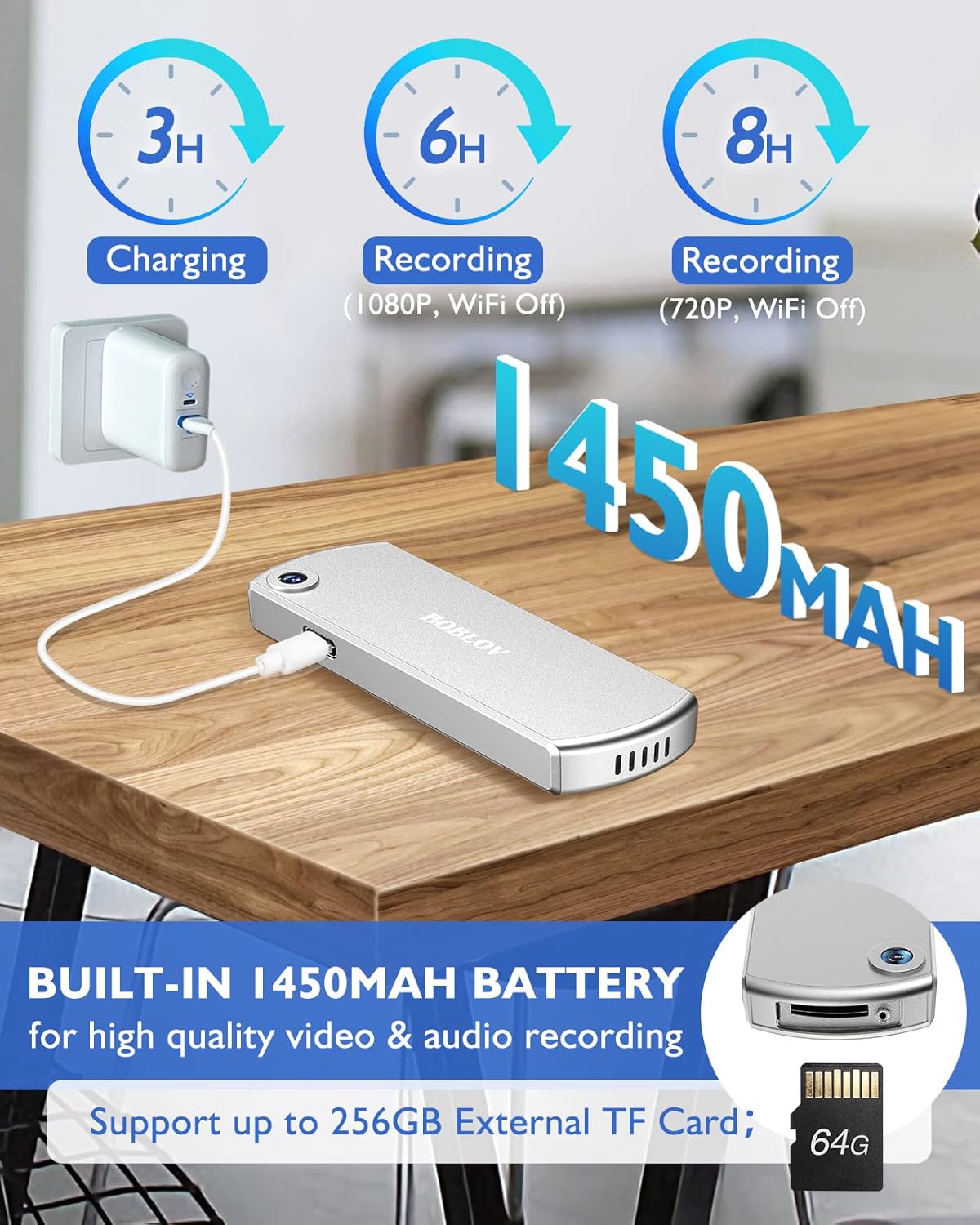
انځور: The BOBLOV W3 Body Camera being charged via a USB-C cable, highlighting the 1450mAh battery and charging times: 3 hours for full charge, 6 hours recording (1080P, WiFi Off), and 8 hours recording (720P, WiFi Off).
2. Inserting/Expanding Memory Card
The W3 Body Camera uses an external Micro SD card. A 64GB card is included and pre-installed.
- په کیمره کې د حافظې کارت سلاټ ومومئ.
- Use the included screwdriver to carefully unscrew the cover of the card slot.
- Insert or replace the Micro SD card (up to 256GB) into the slot with the contacts facing down.
- Securely fasten the card slot cover with the screwdriver.
۳. د کیمرې نښلول
The camera offers two attachment options: a back magnetic clip and a brooch.
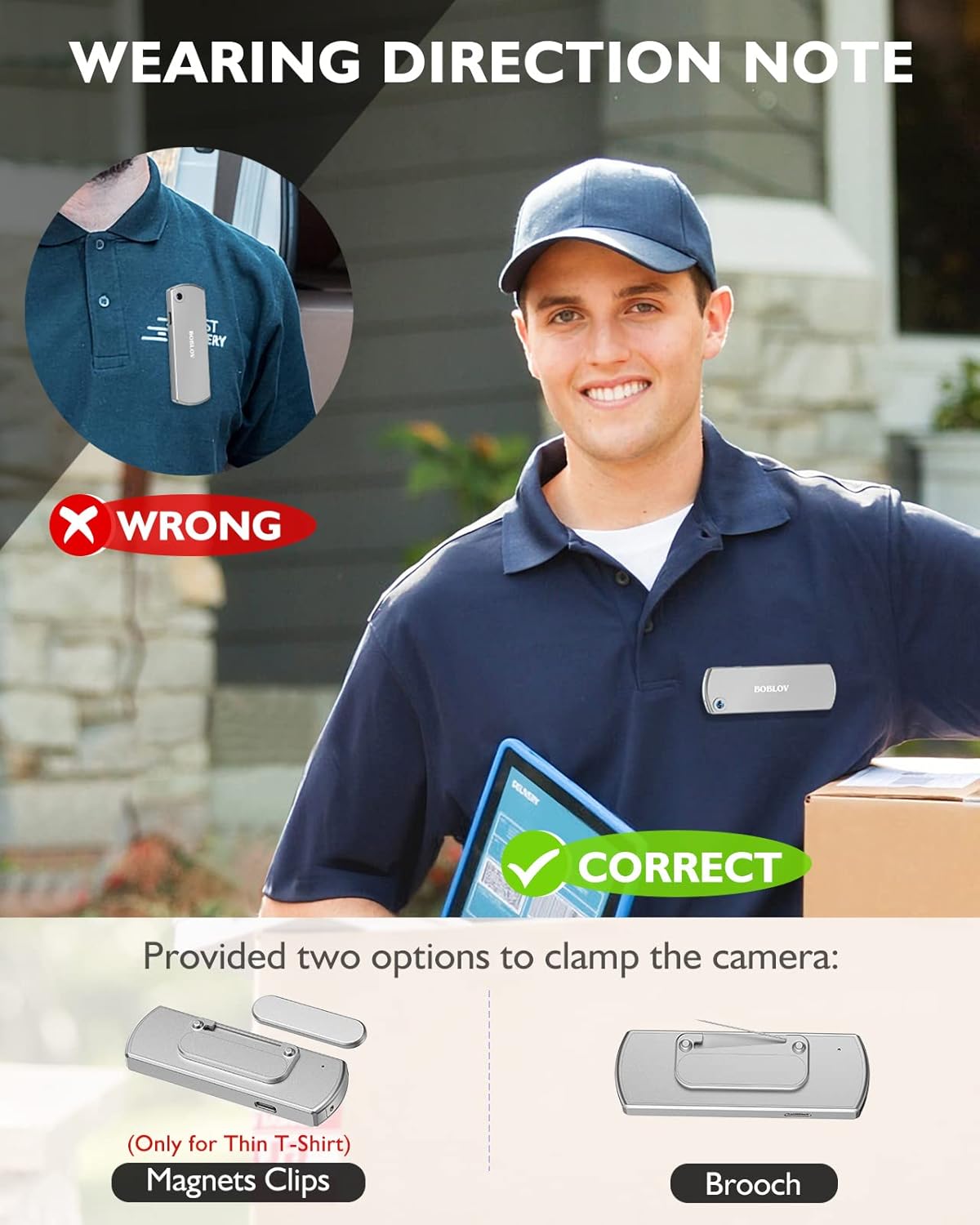
انځور: Illustration demonstrating correct and incorrect ways to wear the BOBLOV W3 Body Camera. It shows that magnetic clips are suitable for thin T-shirts, while a brooch provides a more secure attachment for other clothing types.
- مقناطیسي کلیپ: Attach the magnetic clip to the back of the camera. This is suitable for thin fabrics like T-shirts. Ensure the camera is securely held.
- Brooch: For more secure attachment or thicker clothing, use the provided brooch. Attach it to the camera's designated brooch point and then pin it to your clothing.
عملیاتي لارښوونې
1. بریښنا فعال/بند
- پاور آن: فشار ورکړئ او ونیسئ Power/Video Button د څو ثانیو لپاره تر هغه چې د شاخص رڼا روښانه شي.
- بندول: فشار ورکړئ او ونیسئ Power/Video Button again for a few seconds until the indicator light turns off.
2. د ویډیو ثبت کول
- While the camera is powered on, press the Power/Video Button once to start video recording. The indicator light will flash to indicate recording is in progress.
- فشار ورکړئ Power/Video Button again to stop video recording. The indicator light will return to a steady state.
- The camera supports 1080P and 720P video recording. With WiFi off, it can record for approximately 6 hours at 1080P or 8 hours at 720P on a full charge.
- Videos are saved in 5-minute fragments by default. The camera supports loop recording, overwriting older fileکله چې د حافظې کارت ډک وي.
3. د آډیو ثبت کول
- While the camera is powered on, press the Audio/WiFi Button once to start audio recording.
- فشار ورکړئ Audio/WiFi Button بیا د آډیو ثبت کولو بندولو لپاره.
4. WiFi Function and App Connectivity
The BOBLOV W3 features WiFi connectivity, allowing you to manage files and change settings via a smartphone app.
- وای فای فعال کړئ: فشار ورکړئ او ونیسئ Audio/WiFi Button for a few seconds to turn on the WiFi function. The WiFi indicator light will flash.
- اپلیکیشن ډاونلوډ کړئ:
- For Android devices, download the DHiHZ اپلیکیشن
- For iOS devices, download the Mini-XRcam اپلیکیشن
- د کیمرې سره وصل شئ: On your smartphone, go to WiFi settings and connect to the camera's WiFi network (usually named "BOBLOV_W3_XXXX"). The default password is typically "12345678".
- Use App: Open the downloaded app to view ژوندی اوسیtage، د پلې بیک ریکارډونه، ډاونلوډ files، او د کیمرې ترتیبات تنظیم کړئ.
- Deactivate WiFi: فشار ورکړئ او ونیسئ Audio/WiFi Button بیا د وائی فای بندولو لپاره.

انځور: The BOBLOV W3 Body Camera wirelessly connected to a smartphone, illustrating the WiFi function for managing files, changing settings, and accessing features like video, audio, preview, playback, and download through the dedicated Android (DHiHZ) and iOS (Mini-XRcam) applications.
5. د کمپیوټر سره نښلول
You can connect the camera to a computer to manage recorded files او ترتیبات بدل کړئ.
- Ensure the camera is powered ON before connecting to the PC.
- Connect the camera to your computer using the provided USB-C cable.
- کیمره به ستاسو په کمپیوټر کې د لرې کولو وړ ډیسک ډرایو په توګه ښکاره شي.
- You can then access, copy, delete, or upload recorded files. Some settings may also be configurable via a configuration file on the camera's storage.

انځور: The BOBLOV W3 Body Camera connected to a laptop via a USB-C cable, demonstrating how to manage recorded files and change settings. Icons for Playback, Delete, Upload, and Settings are shown, with a note to ensure the camera is powered ON for connection.
ساتنه
- پاکول: Use a soft, dry cloth to clean the camera body. Do not use liquid cleaners or solvents.
- ذخیره کول: کیمره په یخ او وچ ځای کې د مستقیم لمر وړانګو او سختې تودوخې څخه لرې وساتئ.
- د بیټرۍ پاملرنه: د بیټرۍ د ژوند اوږدولو لپاره، د بیټرۍ په مکرر ډول د بشپړ چارج کولو څخه ډډه وکړئ. کیمره په منظم ډول چارج کړئ، حتی که د اوږدې مودې لپاره نه کارول کیږي.
- د حافظې کارت: Periodically back up important recordings from the Micro SD card to a computer. Format the Micro SD card regularly (e.g., once a month) to maintain optimal performance and prevent data corruption.
- د اوبو مقاومت: The camera has an IP65 waterproof rating, meaning it is protected against dust and low-pressure water jets. It is not designed for submersion.
د ستونزو حل کول
| ستونزه | احتمالي لامل / حل |
|---|---|
| کیمره نه چالانیږي. | Battery may be depleted. Charge the camera for at least 3 hours. If the issue persists, try resetting the camera using a pin in the reset hole. |
| Camera gets hot when WiFi is on. | This is normal behavior for the camera when the WiFi function is active due to increased power consumption. |
| Cannot connect to WiFi via smartphone app. | Ensure WiFi is enabled on the camera. Check if you have downloaded the correct app (DHiHZ for Android, Mini-XRcam for iOS). Verify the WiFi password (default is "12345678"). Try restarting both the camera and your phone. |
| Camera stops recording unexpectedly. | The memory card may be full. The camera supports loop recording, but if the card is corrupted or too slow, it might cause issues. Try formatting the card or using a different high-speed Micro SD card. Battery may be low. |
| لاسرسی نشي کولی fileپه PC کې. | Ensure the camera is powered ON before connecting to the PC. Try a different USB-C cable or USB port. |
مشخصات
| فیچر | تفصیل |
|---|---|
| برانډ | بوبلوف |
| د ماډل نوم | W3 |
| د ماډل شمیره | د B-W3 |
| د ارتباط ټیکنالوژي | وای فای |
| ځانګړي ځانګړتیاوې | د رڼا وزن |
| مطابقت لرونکې وسیلې | Android/iOS Phone |
| د بریښنا سرچینه | د بیټرۍ چلول |
| د ویډیو نیول حل | 1080p |
| رنګ | سره زر |
| د نصب کولو ډول | د سطحې غر |
| د فارم فکتور | تړون |
| د تړلو موادو | فلزي |
| د خبرتیا ډول | یوازې حرکت |
| د رڼا سرچینه | انفراریډ |
| د پنروک درجه | IP65 |
| د کنټرول طریقه | اپلیکیشن |
| واټtage | 3.7 واټ-ساعت |
| د شپې لید | د شپې رنګ |
| د توکي ابعاد | 9 x 3 x 1.5 سانتي متره |
| د بیټرۍ ظرفیت | ۴۰۰۰mAh (جوړ شوی) |
| Recording Time (1080P, WiFi Off) | نږدې 6 ساعته |
| Recording Time (720P, WiFi Off) | نږدې 8 ساعته |
| د چارج کولو وخت | نږدې 3 ساعته |
| بهرنۍ حافظه | Micro SD Card, up to 256GB (64GB included) |
| خالص وزن | 60g / 2oz |
تضمین او ملاتړ
BOBLOV provides a two-year warranty for high-value products, including the W3 Body Camera. For any technical assistance, troubleshooting, or warranty claims, please contact BOBLOV customer service.
Please refer to the official BOBLOV webد اړیکو د خورا تازه معلوماتو او تضمین توضیحاتو لپاره سایټ یا ستاسو د پیرود اسناد.