
1. پیژندنه
Thank you for choosing the RAZEAK RM-X18 Wired Gaming Mouse. This manual provides detailed instructions to help you set up, operate, and customize your new gaming mouse. Please read this manual thoroughly before use to ensure optimal performance and longevity of your device.
2. محصول ختم شوview
The RAZEAK RM-X18 is a high-performance wired gaming mouse designed for PC gamers, featuring programmable buttons, adjustable DPI, and customizable RGB lighting.
2.1 د بسته محتويات
- RAZEAK RM-X18 Wired Gaming Mouse
- د کارن لارښود
۳.۳ د موږک ځانګړتیاوې
- 8 د پروګرام وړ بټنونه: Customize functions, DPI settings, RGB lighting, and record macros via software.
- 2 Using Modes: Switch between Gaming and Office modes by pressing the middle and right buttons simultaneously.
- 9 RGB Backlight Modes: Enhance gaming atmosphere with 16 million customizable colors.
- ۸ د تنظیم وړ DPI کچه: Default settings of 500/1000/1500/2000/3000/4000 DPI, with software customization for numerical values and indicator colors.
- ارګونومیک ډیزاین: Provides a comfortable grip for extended use.
2.3 د تڼۍ ترتیب
Refer to the image below for the button identification on your RAZEAK RM-X18 mouse.
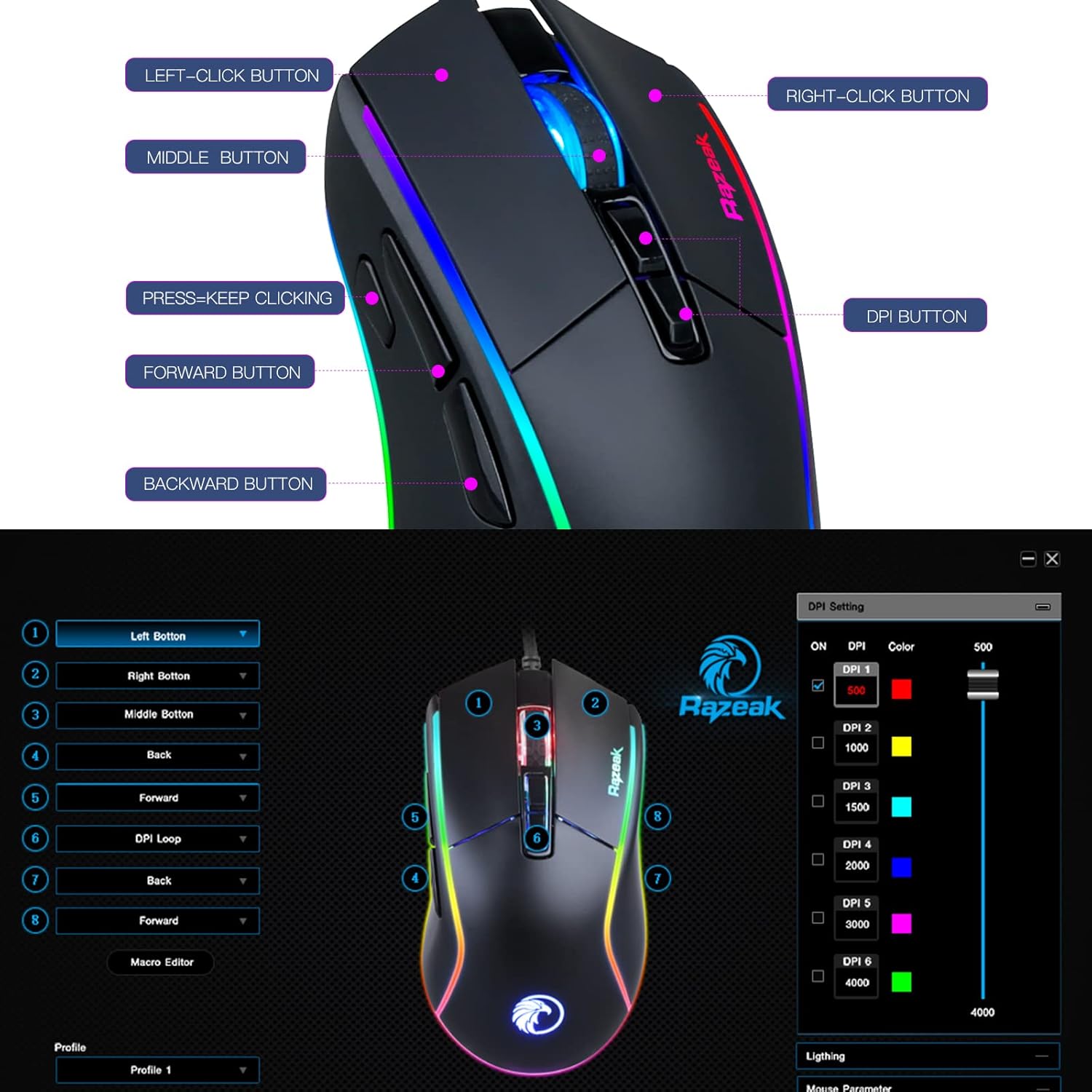
Image: RAZEAK RM-X18 Gaming Mouse with labels for Left-Click, Right-Click, Middle Button, Press-Keep Clicking, Forward Button, Backward Button, and DPI Button.
3. ترتیب کول
The RAZEAK RM-X18 mouse is a plug-and-play device for basic functionality. For advanced customization, software installation is required.
۳.۲ د موږک سره نښلول
- په خپل کمپیوټر کې موجود USB پورټ ومومئ.
- Plug the USB connector of the RAZEAK RM-X18 mouse into the USB port.
- The mouse will be automatically recognized by your operating system. Basic functions will be immediately available.
۳.۳ د سافټویر نصبول (اختیاري، د پرمختللو ځانګړتیاو لپاره)
To unlock the full potential of your RAZEAK RM-X18, including programmable buttons, macro recording, and advanced RGB customization, download and install the official RAZEAK software from the manufacturer's website. A link to the software can typically be found on the product page or by searching for "RAZEAK RM-X18 software".

Image: Screenshot of the RAZEAK RM-X18 software interface showing DPI settings and button assignments.
4. عملیاتي لارښوونې
4.1 Adjusting DPI (Dots Per Inch)
The RAZEAK RM-X18 features 6 default DPI levels for quick sensitivity adjustments. The DPI button is located on the top of the mouse, behind the scroll wheel.
- فشار ورکړئ د DPI تڼۍ to cycle through the preset DPI levels: 500, 1000, 1500, 2000, 3000, and 4000.
- Each DPI level is typically indicated by a different color on the mouse logo or lighting strip.
- For precise DPI customization and to assign specific indicator colors, use the RAZEAK software.
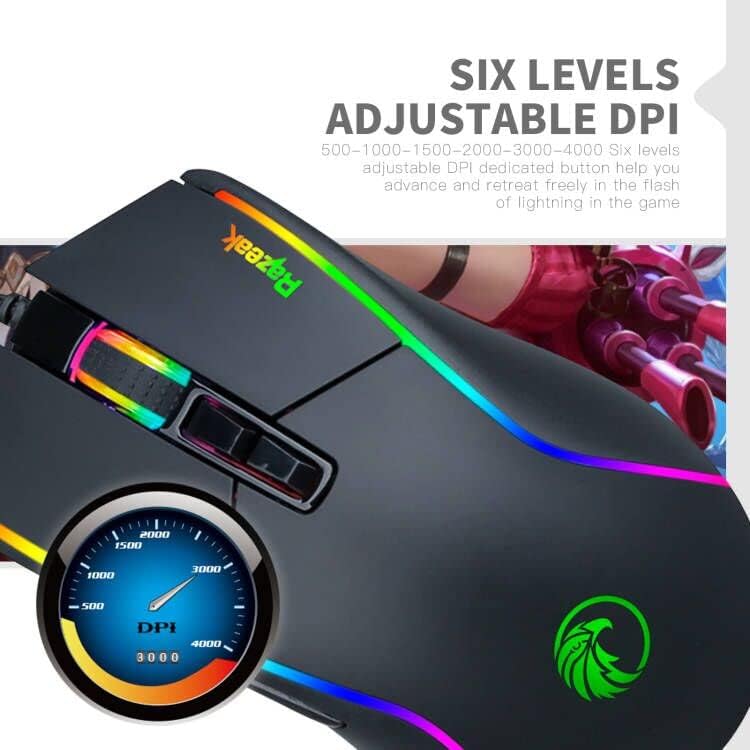
Image: Close-up of the RAZEAK RM-X18 mouse highlighting the DPI button and a graphic showing DPI levels from 500 to 4000.
4.2 Customizing RGB Backlight
The mouse features 9 cool RGB backlight modes and 16 million colors to personalize your gaming setup.
- To adjust the lighting effect, press the Left-Click button او د د DPI تڼۍ simultaneously. This action cycles through various preset lighting modes.
- په بدیل سره، وکاروئ scroll wheel key او د شاته کیلي simultaneously to change the light effect.
- For full customization of colors, effects, and speed, use the RAZEAK software.
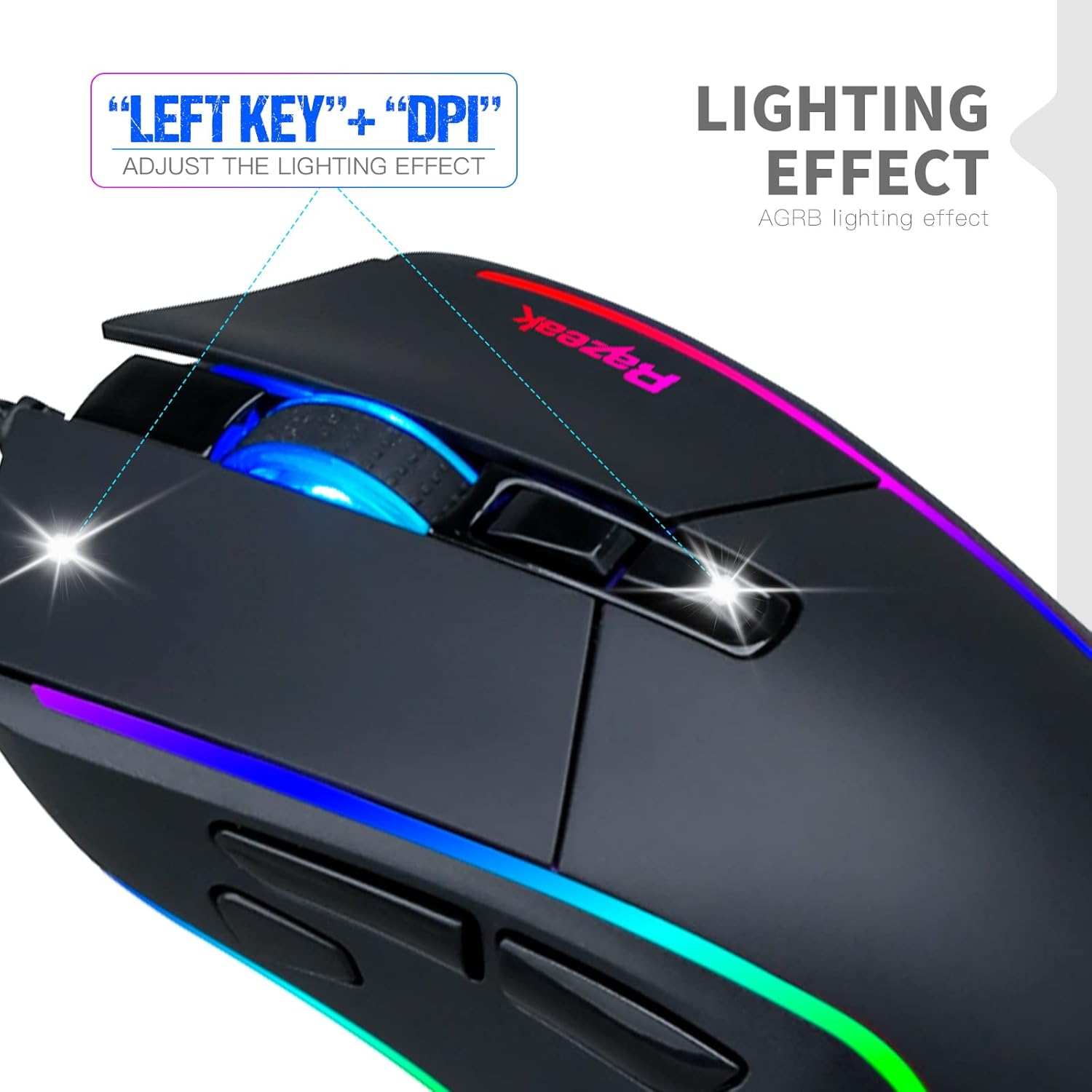
Image: A hand demonstrating how to adjust the lighting effect on the RAZEAK RM-X18 mouse by pressing the Left-Click and DPI buttons.

Image: Screenshot of the RAZEAK RM-X18 software interface showing lighting effect customization options.
۴.۳ د پروګرام وړ تڼۍ او میکرو
The RAZEAK RM-X18 features 8 buttons that can be customized for various functions, including macro recording, through the dedicated software.
- Download and install the RAZEAK software (refer to Section 3.2).
- د تڼۍ د ټاکلو انٹرفیس ته د لاسرسي لپاره سافټویر خلاص کړئ.
- Select each button and assign desired functions, keyboard shortcuts, or complex macros.
- خپل مسلکي خوندي کړئfileد مختلفو لوبو یا غوښتنلیکونو لپاره.

Image: Screenshot of the RAZEAK RM-X18 software interface displaying options for programming the 8 mouse buttons.
4.4 Switching Between Gaming and Office Modes
The mouse supports two distinct usage modes: Gaming and Office. These modes can be switched quickly without software.
- د حالتونو بدلولو لپاره، فشار ورکړئ Middle button (scroll wheel click) او د Right-Click button په ورته وخت کې
- This allows for quick adaptation of mouse settings to different tasks.
۵.۴ د محصول د ښودلو ویډیو
Watch this official product video for a visual guide on the features and functionality of the RAZEAK RM-X18 Wired Gaming Mouse.
Video: An official demonstration of the RAZEAK RM-X18 Wired Gaming Mouse, showcasing its RGB lighting, DPI settings, and programmable buttons.
5. ساتنه
Proper maintenance ensures the longevity and performance of your RAZEAK RM-X18 mouse.
- پاکول: د موږک سطحه د پاکولو لپاره نرم، وچ ټوکر وکاروئ. د سختې خاورې لپاره، لږ څهampټوکر د اوبو یا نرم پاکولو محلول سره ومینځئ. د سختو کیمیاوي موادو څخه ډډه وکړئ.
- د سینسر پاکول: Occasionally clean the optical sensor on the bottom of the mouse with a cotton swab to ensure accurate tracking.
- د کیبل پاملرنه: د زیان څخه د مخنیوي لپاره د USB کیبل د تیزو کږو یا ډیر کشولو څخه ډډه وکړئ.
- ذخیره کول: موږک په پاک او وچ چاپیریال کې وساتئ کله چې کارول نه وي.
6. ستونزه حل کول
If you encounter issues with your RAZEAK RM-X18 mouse, refer to the following common solutions:
| ستونزه | د حل لاره |
|---|---|
| موږک ځواب نه ورکوي. |
|
| DPI or RGB lighting is not changing. |
|
| د پروګرام وړ تڼۍ کار نه کوي. |
|
| Mouse cursor movement is erratic or inaccurate. |
|
7. مشخصات
| فیچر | تفصیل |
|---|---|
| برانډ | RAZEAK |
| د ماډل نوم | RM-X18 |
| د ارتباط ټیکنالوژي | USB (ویر شوی) |
| د حرکت کشف ټیکنالوژي | نظري |
| د DPI کچه | Adjustable 6 levels: 500/1000/1500/2000/3000/4000 |
| د تڼیو شمیر | ۴ (پروګرام وړ) |
| د لاس لارښوونه | سمه ده |
| د RGB شاته رڼا | 9 modes, 16 million colors |
| مطابقت لرونکې وسیلې | شخصي کمپیوټر (PC) |
| د توکي وزن | 137 ګرامه |
| د بریښنا سرچینه | د بریښنا تار شوی |
8. تضمین او ملاتړ
RAZEAK offers a comprehensive warranty and customer support for your RM-X18 Wired Gaming Mouse.
- تضمین: This product comes with a 2-YEAR manufacturer warranty.
- د پیرودونکو خدمت: For any questions, technical support, or warranty claims, please contact RAZEAK customer service. Messages are typically replied to within 24 hours.
- د اړیکو معلومات: Refer to the RAZEAK official website or your purchase documentation for the most up-to-date contact details.