
1. پیژندنه
Thank you for choosing the RAZEAK RM-X18 Wired Gaming Mouse. This manual provides detailed instructions for setting up, operating, and maintaining your new gaming mouse. Please read this manual thoroughly before use to ensure optimal performance and longevity of your device.
2. د محصول ب Featuresې
- Programmable 8 Buttons: Customize button functions, DPI settings, RGB lighting, and record macros using the dedicated software.
- د دوه ګوني کارونې طریقې: Switch between gaming and office modes by simultaneously pressing the middle and right buttons.
- 9 RGB Backlight Modes: Enhance your gaming environment with 9 distinct backlight modes and 16 million customizable colors.
- ۸ د تنظیم وړ DPI کچه: Default DPI settings include 500, 1000, 1500, 2000, 3000, and 4000. These values and their indicator colors can be customized via software.
- ارګونومیک ډیزاین: Engineered for comfortable grip during extended use.
- د لوړ دقت نظري سینسر: Equipped with an Avago 3050 sensor for accurate tracking.
3. د بسته محتويات
- RAZEAK RM-X18 Wired Gaming Mouse
- د کارن لارښود
4. د تنظیم کولو لارښود
- موږک سره وصل کړئ: Plug the USB connector of the RAZEAK RM-X18 mouse into an available USB port on your computer.
- د ډرایور نصب کول: The mouse is plug-and-play for basic functionality. For advanced features such as button programming, DPI customization, and RGB lighting effects, please download and install the official RAZEAK software from the manufacturer's webسایټ

Image: The RAZEAK RM-X18 mouse connected to a computer, showcasing its RGB lighting and ergonomic design alongside a keyboard.
5. عملیاتي لارښوونې
۴.۱ د تڼۍ ترتیب او دندې
The RAZEAK RM-X18 mouse features 8 buttons, all of which can be customized using the dedicated software.
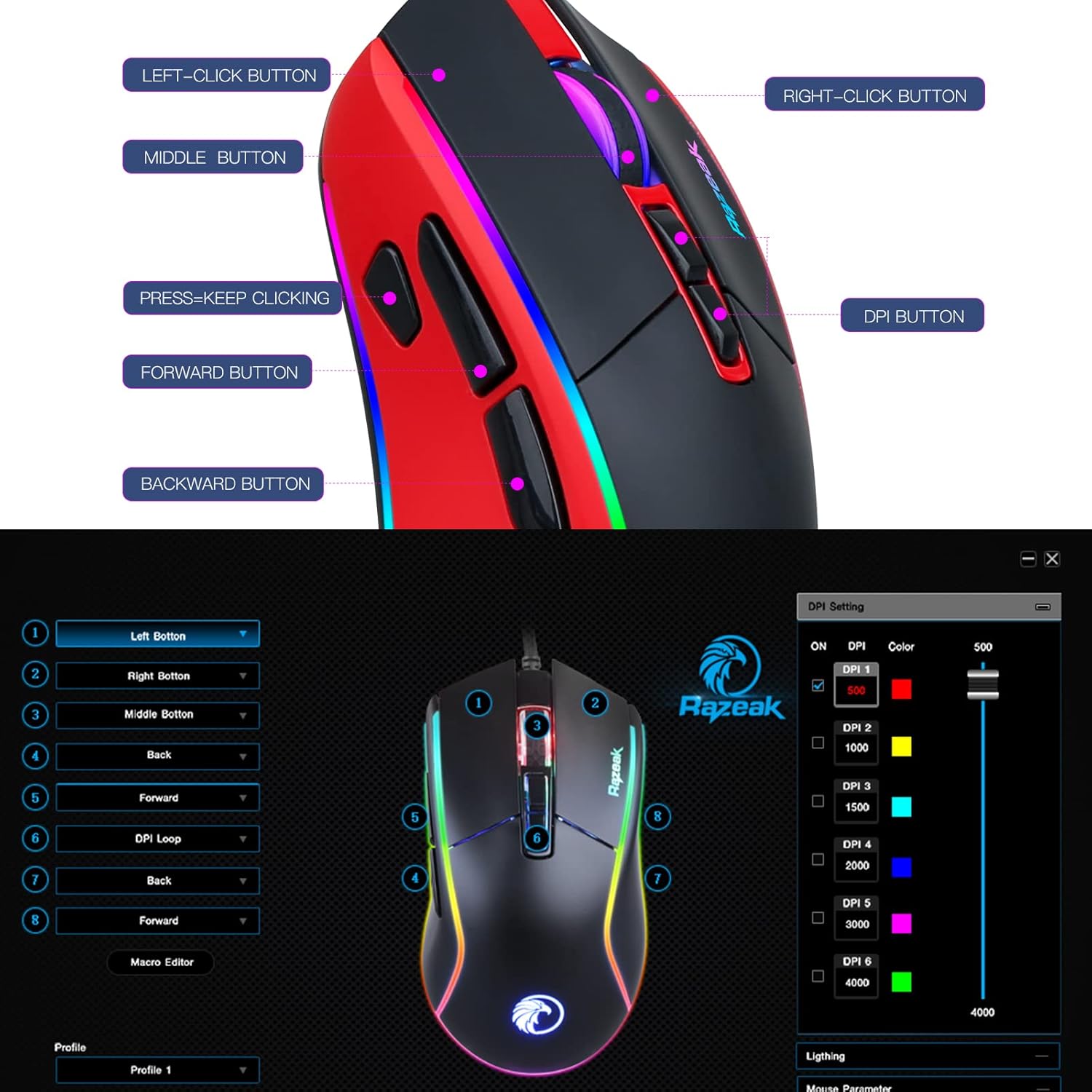
Image: A diagram illustrating the location and labels of the Left-Click, Right-Click, Middle Button, DPI Button, Press=Keep Clicking, Forward, and Backward buttons on the RAZEAK RM-X18 mouse.
- د کیڼ کلیک تڼۍ: د معیاري لومړني کلیک فعالیت.
- د ښي کلیک تڼۍ: د معیاري ثانوي کلیک فعالیت.
- منځنۍ تڼۍ (د سکرول ویل کلیک): Standard middle click function.
- د DPI تڼۍ: د DPI ترتیباتو له لارې تیریږي.
- د وړاندې کولو تڼۍ: مخ په وړاندې ځي web براوزرونه یا file سپړونکي
- شاته تڼۍ: شاته نیویګیټ کوي web براوزرونه یا file سپړونکي
- "Press=Keep Clicking" Button: A dedicated button for rapid, continuous clicks, often referred to as a "fire button" in gaming. This button can be programmed to perform multiple left clicks with a single press.
5.2 د DPI تعدیل
The mouse offers 6 adjustable DPI levels to suit various tasks and gaming preferences. Press the د DPI تڼۍ (located behind the scroll wheel) to cycle through the preset DPI levels: 500, 1000, 1500, 2000, 3000, and 4000.
For advanced customization, including setting specific numerical values for each DPI level and assigning indicator colors, use the RAZEAK software.

Image: A close-up of the RAZEAK RM-X18 mouse highlighting the DPI button and a graphic representation of the six adjustable DPI levels.
5.3 Button Programming and Macros
All 8 buttons on the RM-X18 mouse are programmable. To customize button functions, record macros, or assign specific actions, you must use the RAZEAK software. The software allows you to create profileد مختلفو غوښتنلیکونو یا لوبو لپاره.

Image: Screenshot of the RAZEAK software interface, showing options to program each of the 8 mouse buttons and manage profiles.
۵.۴ د RGB رڼا کنټرول
The RM-X18 mouse features dynamic RGB lighting with 9 backlight modes and 16 million colors. You can adjust the lighting effects directly on the mouse or through the RAZEAK software.
- On-Mouse Adjustment: فشار ورکړئ Left-Click Button او د د DPI تڼۍ simultaneously to cycle through different lighting effects.
- د سافټویر تخصیص: Use the RAZEAK software for full control over lighting modes, colors, brightness, and speed.

Image: A close-up of the RAZEAK RM-X18 mouse, indicating the combination of the Left Key and DPI button to adjust lighting effects.

Image: The RAZEAK RM-X18 mouse displaying vibrant RGB lighting effects.
5.5 Switching Between Gaming and Office Modes
The mouse supports two distinct usage modes: Gaming and Office. To switch between these modes, simultaneously press the منځنۍ تڼۍ (scroll wheel click) and the ښي کلیک وکړئ تڼۍ.
6. Software Installation and Usage
To unlock the full potential of your RAZEAK RM-X18 mouse, including advanced button programming, macro recording, and detailed RGB lighting customization, download the official software from the RAZEAK webسایټ. د نصبولو لپاره په سکرین کې لارښوونې تعقیب کړئ.
The software interface allows you to:
- Assign custom functions to all 8 buttons.
- Create and manage multiple user profiles.
- Adjust DPI levels and their corresponding indicator colors.
- Configure RGB lighting effects, colors, and speed.
- Record and edit macros for complex command sequences.
Video: An official RAZEAK video demonstrating the features and customization options of the RM-X18 Wired Gaming Mouse, including RGB lighting, DPI settings, and programmable buttons.
7. ساتنه
To ensure the longevity and optimal performance of your RAZEAK RM-X18 mouse, follow these maintenance guidelines:
- پاکول: د موږک سطحه د پاکولو لپاره نرم، وچ ټوکر وکاروئ. د سختې خاورې لپاره، لږ څهampټوکر د اوبو سره ومینځئ. د سختو کیمیاوي موادو یا خړوبونکو موادو کارولو څخه ډډه وکړئ.
- د سینسر پاملرنه: د موږک په لاندې برخه کې نظري سینسر پاک او د دوړو یا کثافاتو څخه پاک وساتئ ترڅو دقیق تعقیب ډاډمن شي.
- د کیبل مدیریت: د زیان څخه د مخنیوي لپاره د USB کیبل د تیزو کږو یا ډیر کشولو څخه ډډه وکړئ.
- ذخیره کول: موږک په پاک او وچ چاپیریال کې وساتئ کله چې کارول نه وي.
8. ستونزه حل کول
| ستونزه | احتمالي لامل | د حل لاره |
|---|---|---|
| موږک ځواب نه ورکوي | د USB اتصال خراب دی، د USB پورټ خراب دی، د موټر چلوونکي ستونزه. |
|
| ناسم تعقیب یا د کرسر ځنډ | ناپاک نظري سینسر، د موږک پیډ نامناسب سطح، د DPI ناسم ترتیب. |
|
| د RGB رڼا کار نه کوي یا غلطه ده | Software settings, mode conflict. |
|
| تڼۍ د پروګرام وړ نه دي | Software not installed or not running, incorrect profile ټاکل شوی. |
|
9. مشخصات
| فیچر | تفصیل |
|---|---|
| برانډ | RAZEAK |
| د ماډل نوم | RM-X18 |
| د ارتباط ټیکنالوژي | د USB تار |
| د حرکت کشف ټیکنالوژي | Optical (Avago 3050 Sensor) |
| د DPI کچه | 500/1000/1500/2000/3000/4000 (Adjustable) |
| د تڼیو شمیر | ۴ (پروګرام وړ) |
| د RGB شاته رڼا | 9 Modes, 16.8 Million Colors |
| د لاس لارښوونه | سمه ده |
| مطابقت لرونکې وسیلې | شخصي کمپیوټر |
| د هارډویر پلیټ فارم | PC |
| د توکي وزن | 137 ګرامه |
10. تضمین او ملاتړ
RAZEAK offers a د یو کال جوړونکي تضمین for the RM-X18 Wired Gaming Mouse. For any product inquiries, technical support, or warranty claims, please contact RAZEAK customer service. We aim to respond to messages within 24 hours.
مهرباني وکړئ د تضمین تصدیق لپاره د پیرود ثبوت وساتئ.