
PowerDrive PWD2000P
د پاور ډرایو 2000 واټ پاور انورټر کارونکي لارښود
Model: PWD2000P
پیژندنه
This manual provides detailed instructions for the safe and efficient operation, installation, and maintenance of your PowerDrive 2000 Watt Power Inverter, Model PWD2000P. This device converts 12V DC power from your vehicle battery into 110V AC power, allowing you to operate various AC devices and charge electronic devices on the go. Please read this manual thoroughly before using the inverter.
د خوندیتوب مهم معلومات
Always observe the following safety precautions to prevent injury or damage to the inverter or connected devices:
- انورټر مه خلاصوئ casinج. دننه د کارونکي لپاره د خدمت وړ برخې نشته.
- د انورټر شاوخوا مناسب هوا ورکول ډاډمن کړئ. د یخولو ځایونه مه بندوئ.
- انورټر د اوبو، رطوبت او اور اخیستونکو موادو څخه لرې وساتئ.
- انورټر یوازې د 12V DC بریښنا سرچینې سره وصل کړئ.
- Do not exceed the inverter's rated power output (2000 Watts continuous, 4000 Watts surge).
- Always connect the inverter to the battery before plugging in AC devices.
- Disconnect the inverter from the battery when not in use.
- دا محصول د کالیفورنیا ایالت ته پیژندل شوي کیمیاوي توکي لري چې د سرطان او زیږون نیمګړتیاو یا نورو زیږون زیان لامل کیږي. له مینځلو وروسته لاسونه ومینځئ.
د محصول اجزا
The PowerDrive 2000 Watt Power Inverter comes with the following components:
- PowerDrive 2000 Watt Power Inverter unit
- 39-inch heavy-duty installation cables (red for positive, black for negative)
- د لرې کولو وړ LCD سکرین
- د قوسونو نصبول

شکل 1: مخکی view of the PowerDrive 2000 Watt Power Inverter, showing the digital display, power button, Bluetooth indicator, four AC 120V outlets, one USB-C port, and one USB-A port. The unit features a durable yellow and black casing د هوا د جریان ګریلونو سره.

شکل 2: اوورview of the PowerDrive 2000 Watt Power Inverter with key dimensions (14.54" length, 9.8" width, 4.25" height) and included accessories. The image displays the inverter unit, red and black 39-inch battery cables, and a 12-foot remote LCD cable.
تنظیم او نصب کول
Proper installation is crucial for the inverter's performance and safety. Follow these steps carefully:
- یو ځای غوره کړئ: Select a dry, well-ventilated area for mounting the inverter. Ensure it is away from direct sunlight, heat sources, and any flammable materials. The mounting brackets can be used to secure the unit.
- بیټرۍ چمتو کړئ: Ensure your vehicle's battery is a 12V DC system. Turn off the vehicle and any accessories.
- کیبلونه وصل کړئ:
- سره وصل کړئ سور (positive) cable to the مثبت (+) terminal of the inverter.
- سره وصل کړئ تور (negative) cable to the منفي (-) terminal of the inverter.
- د بل پای سره وصل کړئ سور ته کیبل مثبت (+) terminal of the vehicle battery.
- د بل پای سره وصل کړئ تور ته کیبل منفي (-) terminal of the vehicle battery.
مهم: Always connect the inverter terminals first, then the battery terminals. Ensure connections are tight and secure.
- Connect Remote LCD (Optional): If desired, connect the removable LCD screen to the inverter using the provided cable. This allows for remote monitoring and control.
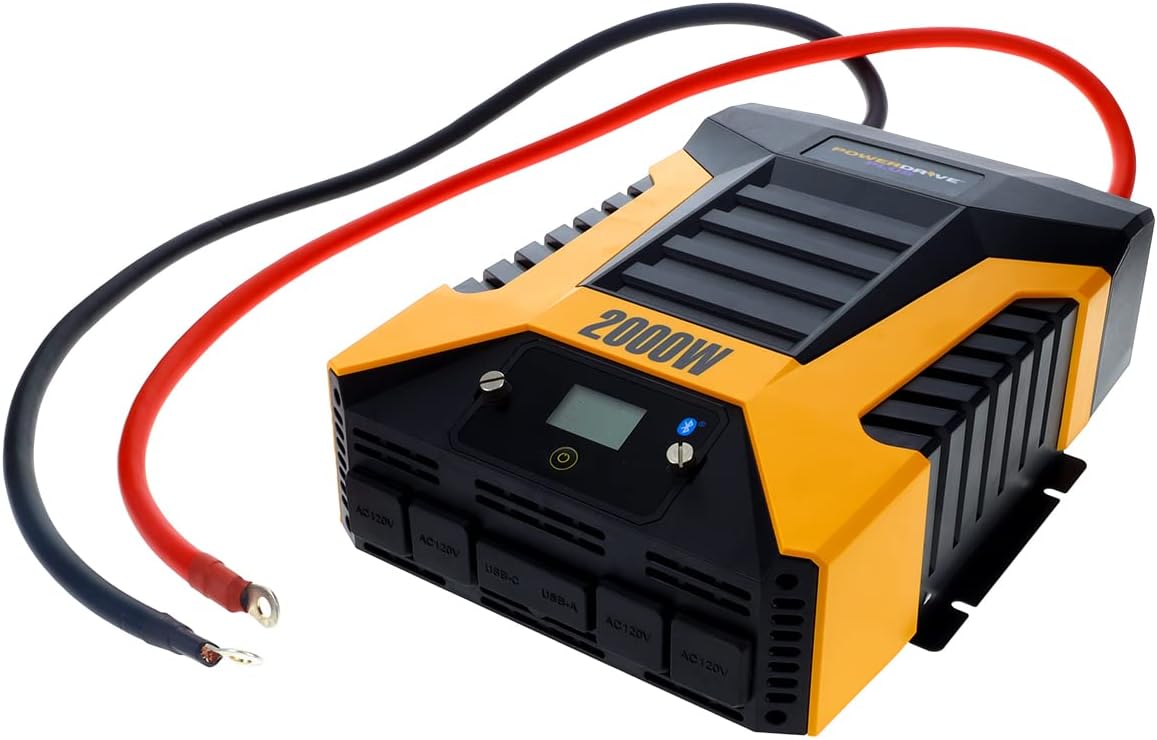
شکل 3: The PowerDrive 2000 Watt Power Inverter with the red positive and black negative battery cables securely connected to its terminals, ready for connection to a vehicle battery. This illustrates the correct cable attachment for power input.
عملیاتي لارښوونې
Once installed, the inverter is ready for operation:
- فعالول: Press the power button on the inverter's front panel or on the remote LCD screen. The digital display will illuminate, showing battery voltage او واټ تولیدويtage.
- د نښلولو وسایل: Plug your AC devices into the four 3-prong AC outlets. For charging smartphones and tablets, use the standard USB 2.4 Amp port or the fast-charging USB-C 3.0 Amp بندر
- څارنه: The digital display provides real-time information on battery voltage, output power (watts), and any error codes.
- د بلوتوټ بېسیم ټیکنالوژي:
- وړیا ډاونلوډ کړئ PowerDrive Plus app from your smartphone's app store (compatible with Android and iOS).
- Enable Bluetooth on your smartphone and pair it with the inverter.
- The app allows you to remotely monitor battery voltage, output power, and product temperature. You can also set up protections like undervoltage and overload, and power the inverter on/off from a distance.
- د بریښنا بندول: Press and hold the power button until the display turns off, or use the PowerDrive Plus app. Disconnect devices before turning off the inverter.

شکل 4: مخ ته نږدې انځور view of the PowerDrive 2000 Watt Power Inverter, highlighting its four AC 120V outlets, one USB-C port, and one USB-A port. These ports provide versatile power options for various electronic devices and appliances.

شکل 5: A smartphone screen showing the PowerDrive Plus application interface. The app displays real-time data such as output power (842 watts), battery power percentage (88%), battery voltage (12.6 VDC), and output voltage (120 VAC), along with temperature readings and control options.
ساتنه
To ensure the longevity and optimal performance of your PowerDrive inverter, follow these maintenance guidelines:
- پاک ساتل: Regularly wipe the exterior of the inverter with a dry, soft cloth. Do not use liquid cleaners or solvents.
- وینټیلیشن: Ensure the cooling fan vents are clear of dust and debris. The high-speed cooling fan automatically activates when needed and is designed for quiet operation.
- د کیبل پیوستون: Periodically check that all cable connections to the battery and inverter terminals are secure and free from corrosion.
- ذخیره کول: When not in use for extended periods, store the inverter in a cool, dry place, disconnected from the battery.

شکل 6: شاته view of the PowerDrive 2000 Watt Power Inverter, showcasing its two high-speed cooling fans and the robust battery input terminals. Proper airflow through these fans is essential for maintaining optimal operating temperature.
د ستونزو حل کول
که تاسو د خپل انورټر سره ستونزې سره مخ شئ، لاندې عامې ستونزې او حل لارې وګورئ:
| ستونزه | احتمالي لامل | د حل لاره |
|---|---|---|
| د بریښنا تولید نشته / انورټر نه چالانیږي |
|
|
| انورټر په مکرر ډول بندیږي |
|
|
| Digital display shows error code | Specific error condition (e.g., over-voltage ، تر وال لاندېtage, overload, short circuit) | Refer to the PowerDrive Plus app or contact customer support for specific error code interpretations and solutions. Address the underlying issue (e.g., reduce load, check battery). |
د محصول مشخصات
| فیچر | تفصیل |
|---|---|
| برانډ | پاور ډرایو |
| د ماډل شمیره | PWD2000P |
| دوامداره ځواک | 2000 واټ |
| سرج پاور | 4000 واټ |
| ننوتۍ جلدtage | 12V DC |
| د محصول Voltage | 110V AC |
| د AC سایټونه | Four 3-prong outlets |
| USB بندرونه | یو USB 2.4 Amp, One USB-C 3.0 Amp |
| ارتباط | Bluetooth Wireless Technology (PowerDrive Plus App compatible) |
| ښودل | Digital display (removable LCD screen) |
| کولنګ | د تیز رفتار یخولو فین |
| د توکي وزن | ۲.۴۵ پونډه |
| د محصول ابعاد | 5.7 x 17 x 12 انچه |
تضمین او ملاتړ
For warranty information, technical support, or service inquiries, please contact PowerDrive customer service. Keep your purchase receipt as proof of purchase.
For additional resources and frequently asked questions, visit the official PowerDrive website or refer to the PowerDrive Plus app.
Ask a question about this manual
Ask about setup, troubleshooting, compatibility, parts, safety, or missing instructions. Manuals+ will review the question and use this page’s manual context to help answer it.