
1. پیژندنه
د پیرودلو لپاره مننهasing the Lenco SCD-341 Portable CD-Radio. This device combines a CD player, DAB+ and FM radio, and Bluetooth connectivity in a compact design. This manual provides essential information for safe and efficient use of your new audio system. Please read it thoroughly before operation and retain it for future reference.
2. د خوندیتوب معلومات
- د اور یا بریښنا شاک څخه د مخنیوي لپاره واحد باران یا رطوبت ته مه ښکاره کوئ.
- د هوا مناسبه هوا ورکول ډاډمن کړئ. د هوا د بهېدو لارې مه بندوئ.
- یوازې د بریښنا اډاپټر وکاروئ چې د واحد سره چمتو شوي.
- سي مه خلاصوهasinج. ټول خدمات وړ پرسونل ته راجع کړئ.
- د تودوخې سرچینو ته نږدې یا مستقیم لمر وړانګو کې د واحد له ایښودلو څخه ډډه وکړئ.
- واحد د قوي مقناطیسي ساحو څخه لرې وساتئ.
3. د بسته محتويات
مهرباني وکړئ وګورئ چې ټول توکي شتون لري او په ښه حالت کې دي:
- Lenco SCD-341 Portable CD-Radio Unit
- د بریښنا اډاپټر
- د کارونکي لارښود (دا لاسوند)
- د چټک پیل لارښود
4. محصول ختم شوview
The Lenco SCD-341 features a user-friendly interface with clearly labeled buttons and an LCD display.

شکل 1: مخکی view of the Lenco SCD-341, showing the main controls, LCD display, and stereo speakers.

Figure 2: Lenco SCD-341 with its integrated handle and telescopic antenna extended for radio reception.
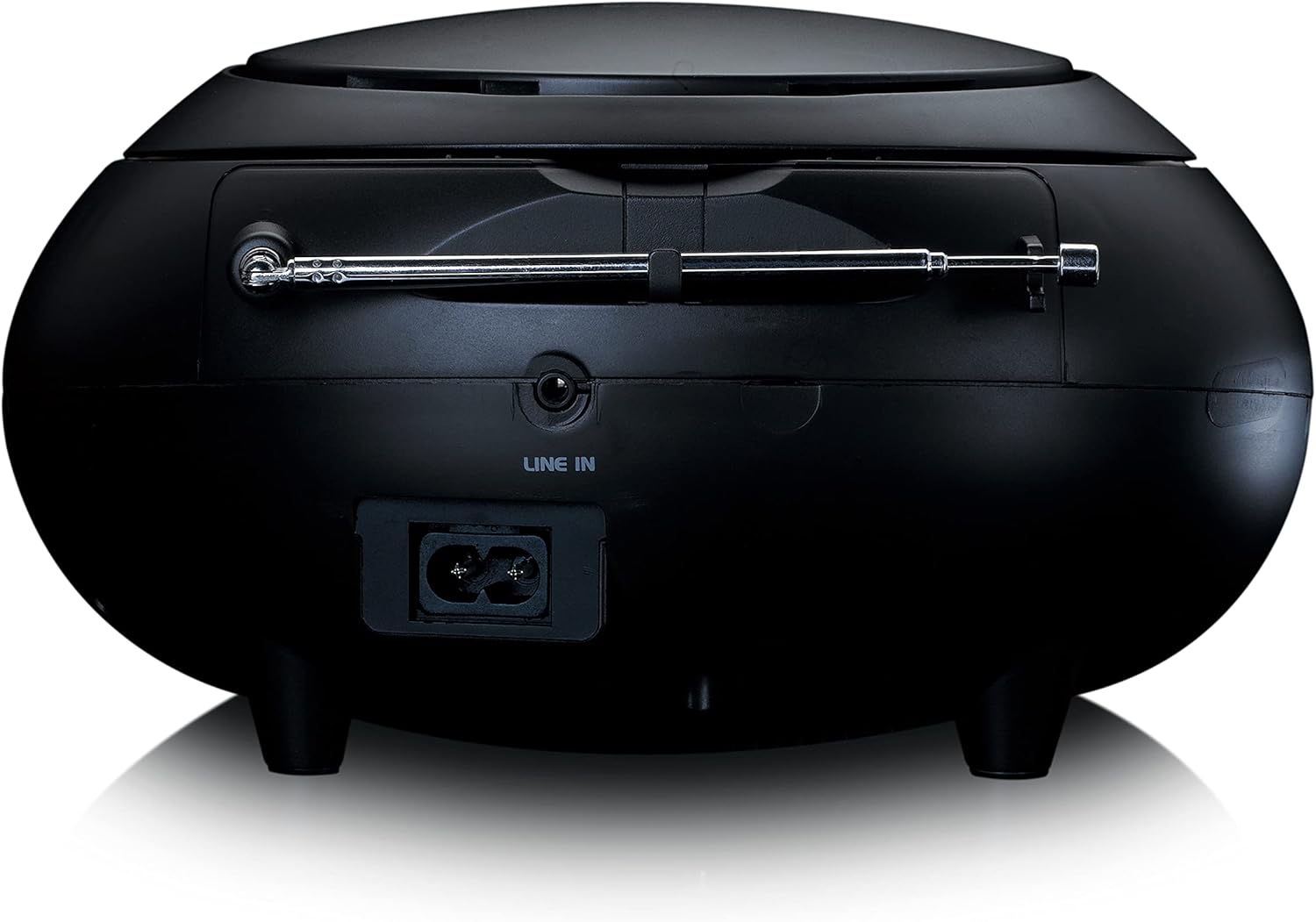
شکل 3: شاته view of the Lenco SCD-341, highlighting the power input and LINE IN audio port.
5. ترتیب کول
5.1 د بریښنا نښلول
The Lenco SCD-341 can be powered by the included AC adapter or by batteries.
- د AC بریښنا: Connect the supplied power adapter to the AC IN socket on the rear of the unit (refer to Figure 3) and plug the other end into a standard wall outlet.
- د بیټرۍ ځواک: Open the battery compartment on the bottom of the unit. Insert the required number of C-type batteries (not included), ensuring correct polarity. Close the compartment securely.
5.2 د انتن تنظیم کول
For optimal DAB+ and FM radio reception, fully extend the telescopic antenna located on the rear of the unit. Adjust its position for the best signal.
6. عملیاتي لارښوونې
۸ پاور آن/بند
فشار ورکړئ پاور د واحد د فعالولو یا بندولو لپاره ت buttonۍ.
6.2 CD پلے بیک
- فشار ورکړئ سرچینه button repeatedly until "CD" is displayed on the LCD screen.
- د سي ډي د خونې سر په نرمۍ سره پورته کولو سره خلاص کړئ.
- یوه سي ډي د لیبل اړخ پورته مخ په سپینډل باندې کېږدئ.
- Close the CD compartment lid. The unit will begin reading the CD.
- د کارولو پلی/پاز, ودروئ, مخکې لاړ شه، او شاته پریږدئ د پلې بیک کنټرول لپاره تڼۍ.

شکل 4: پورته view of the Lenco SCD-341 with the CD compartment open, showing a CD being inserted.
۶.۲ د DAB+ راډیو عملیات
- فشار ورکړئ سرچینه button repeatedly until "DAB" is displayed.
- The unit will automatically scan for available DAB+ stations. This may take a few moments.
- یوځل چې سکینګ بشپړ شو ، نو وکاروئ TUNE +/- buttons to navigate through the available stations.
- د سټیشن د مخکینۍ برخې په توګه د خوندي کولو لپاره، فشار ورکړئ او ونیسئ PRESET تڼۍ، بیا وکاروئ TUNE +/- د مخکینۍ شمېرې غوره کولو لپاره او فشار ورکړئ PRESET بیا د تایید لپاره.
د ۶.۵ ایف ایم راډیو عملیات
- فشار ورکړئ سرچینه تڼۍ په مکرر ډول تر هغه وخته پورې فشار ورکړئ تر څو چې "FM" ښکاره نشي.
- فشار ورکړئ او ونیسئ TUNE +/- د راتلونکي موجود سټیشن لپاره په اتوماتيک ډول سکین کولو لپاره تڼۍ. په لاسي ډول د ټون کولو لپاره په لنډ ډول فشار ورکړئ.
- د سټیشن د مخکینۍ برخې په توګه د خوندي کولو لپاره، فشار ورکړئ او ونیسئ PRESET تڼۍ، بیا وکاروئ TUNE +/- د مخکینۍ شمېرې غوره کولو لپاره او فشار ورکړئ PRESET بیا د تایید لپاره.
6.5 د بلوتوټ جوړه کول
- فشار ورکړئ سرچینه button repeatedly until "Bluetooth" is displayed. The unit will enter pairing mode, indicated by a flashing Bluetooth icon on the display.
- On your external device (smartphone, tablet), enable Bluetooth and search for available devices.
- Select "Lenco SCD-341" from the list of found devices.
- Once paired, the Bluetooth icon on the unit's display will stop flashing and remain solid. You can now play audio from your device through the Lenco SCD-341.
6.6 د حجم کنټرول
د کارولو حجم +/- د آډیو آوټ پټ کچه تنظیمولو لپاره تڼۍ.
7. ساتنه
- پاکول: د واحد بهرنۍ برخه پاکولو لپاره نرم، وچ ټوکر وکاروئ. د کثافاتو پاکوونکي یا محلولونه مه کاروئ.
- د سي ډي لینز پاملرنه: که چیرې د سي ډي پلې بیک ستونزې رامنځته شي، نو په سوداګریزه توګه شتون لرونکي سي ډي لینز کلینر ډیسک وکاروئ.
- ذخیره کول: When not in use for extended periods, disconnect the power adapter and remove batteries. Store the unit in a cool, dry place.
8. ستونزه حل کول
| ستونزه | احتمالي لامل | د حل لاره |
|---|---|---|
| هیڅ ځواک نشته | Power adapter not connected; batteries depleted or incorrectly inserted. | Check power adapter connection; replace batteries or ensure correct polarity. |
| غږ نشته | Volume too low; incorrect source selected; headphones connected. | Increase volume; select correct source (CD, DAB, FM, Bluetooth); disconnect headphones. |
| سي ډي نه غږېږي | سي ډي په غلط ډول داخل شوې ده؛ سي ډي چټله یا سکریچ شوې ده؛ د سي ډي بڼه نه ملاتړ کېږي. | Reinsert CD correctly; clean or replace CD; ensure CD is a standard audio CD. |
| د راډیو ضعیف استقبال | Antenna not extended or positioned poorly; strong interference. | Fully extend and adjust antenna; move unit away from other electronic devices. |
| بلوتوث جوړه ناکامه شوه | Bluetooth not enabled on external device; device too far; unit not in pairing mode. | Ensure Bluetooth is on and discoverable; move device closer; select Bluetooth source on unit. |
9. مشخصات
| د ماډل شمیره | SCD-341 |
| برانډ | لینکو |
| ابعاد (L x W x H) | 21.5 x 21 x 11.5 سانتي متره |
| وزن | 1.09 کیلو ګرامه |
| د بریښنا سرچینه | AC (adapter included) / Battery-Powered |
| د تونر ټیکنالوژي | DAB+، FM |
| ارتباط | بلوتوث |
| د آډیو وتلې حالت | سټیریو |
| د ښودلو ډول | LCD |
| د تولید بریښنا | 3 واټ RMS |

Figure 5: Dimensions of the Lenco SCD-341 unit.
10. تضمین او ملاتړ
For warranty information and technical support, please refer to the warranty card included in your package or visit the official Lenco webسایټ
جوړونکی: Lenco GmbH
د اصلي هیواد: هانګ کانګ
۸. د محصول رسمي ویډیوګانې
Watch this official video for a visual guide to the Lenco SCD-341.
Video 1: A 360-degree product view of the Lenco SCD-341, showcasinد هغې ډیزاین او ځانګړتیاوې له ټولو زاویو څخه.