
پیژندنه
د پیرودلو لپاره مننهasing the RCA 32V-type FHD Tunerless Smart TV, model RCA-32D1. This television is designed for seamless access to online streaming content without the need for traditional terrestrial broadcast tuners. It features a Full HD display, built-in Wi-Fi, Chromecast functionality, and voice control for an enhanced viewing experience. This manual provides essential information for setting up, operating, maintaining, and troubleshooting your new TV.

شکل 1: مخکی view of the RCA 32V-type FHD Tunerless Smart TV.
د خوندیتوب معلومات
مهرباني وکړئ د محصول کارولو دمخه د خوندیتوب ټولې لارښوونې په دقت سره ولولئ. دا لارښود د راتلونکي حوالې لپاره وساتئ.
- د اور یا بریښنا شاک څخه د مخنیوي لپاره تلویزیون باران یا رطوبت ته مه ښکاره کوئ.
- د هوا مناسبه هوا ورکول ډاډمن کړئ. د هوا د بهېدو لارې مه بندوئ.
- یوازې د تلویزیون سره ورکړل شوي بریښنا تار وکاروئ.
- تلویزیون مه خلاصوه casinج. ټول خدمات وړ پرسونل ته راجع کړئ.
- بیټرۍ د ماشومانو له لاسرسي لرې وساتئ. کارول شوي بیټرۍ په مسؤلیت سره له منځه یوسئ.
- په بې ثباته سطحو کې د تلویزیون له ایښودلو څخه ډډه وکړئ.
د بسته محتويات
ډاډ ترلاسه کړئ چې ټول توکي په کڅوړه کې شتون لري:
- RCA 32V-type FHD Tunerless Smart TV Unit
- ریموټ کنټرول
- د AAA بیټرۍ (x2)
- د تلویزیون سټینډ (بیس او پیچونه)
- د بریښنا کیبل
- د کارن لارښود (دا سند)
چمتو کول
۱. فزیکي ترتیب
Attach the TV stand or mount the TV to a wall. For wall mounting, ensure you use a VESA-compatible bracket (40 x 40mm) and appropriate screws (M6 10mm x 2 for upper two points, screws for lower two points are included with the TV). Always ensure the TV is securely mounted to prevent accidents.

Figure 2: TV dimensions and connection terminal layout.
2. ارتباطات
Connect the power cable to the TV and then to a power outlet. This TV requires only a power connection and Wi-Fi for internet streaming.

Figure 3: Power and Wi-Fi connectivity for the tunerless TV.
د بهرنیو وسیلو لپاره، شته پورټونه وکاروئ:
- د HDMI پورټونه (x3): Connect game consoles, Blu-ray players, or other HDMI-compatible devices.
- د USB 2.0 بندرونه (x2): د میډیا پلې بیک لپاره د USB ذخیره کولو وسایل وصل کړئ.
- LAN پورټ: For wired internet connection (optional, Wi-Fi is also available).
- آډیو تولید: د بهرني آډیو سیسټمونو سره د نښلولو لپاره.

Figure 4: Connecting external devices via HDMI ports.
۴. لومړنی بریښنا فعالول
After connecting the power, press the power button on the remote control. Follow the on-screen instructions to complete the initial setup, including connecting to your Wi-Fi network and logging into your Google account to access smart TV features.
عملیات
1. ریموټ کنټرول
The included remote control allows for easy navigation and features voice control capabilities. Dedicated buttons provide quick access to popular streaming services.
- د غږ کنټرول: Press the voice assistant button and speak commands like "Play cat videos on YouTube" or "Increase volume."
- وقف شوي اپلیکیشن تڼۍ: Quickly launch NETFLIX, YouTube, and Prime Video with a single press.
- نیویگیشن: د مینو نیویګیټ کولو او انتخابونو غوره کولو لپاره د لارښوونې پیډ او OK تڼۍ وکاروئ.
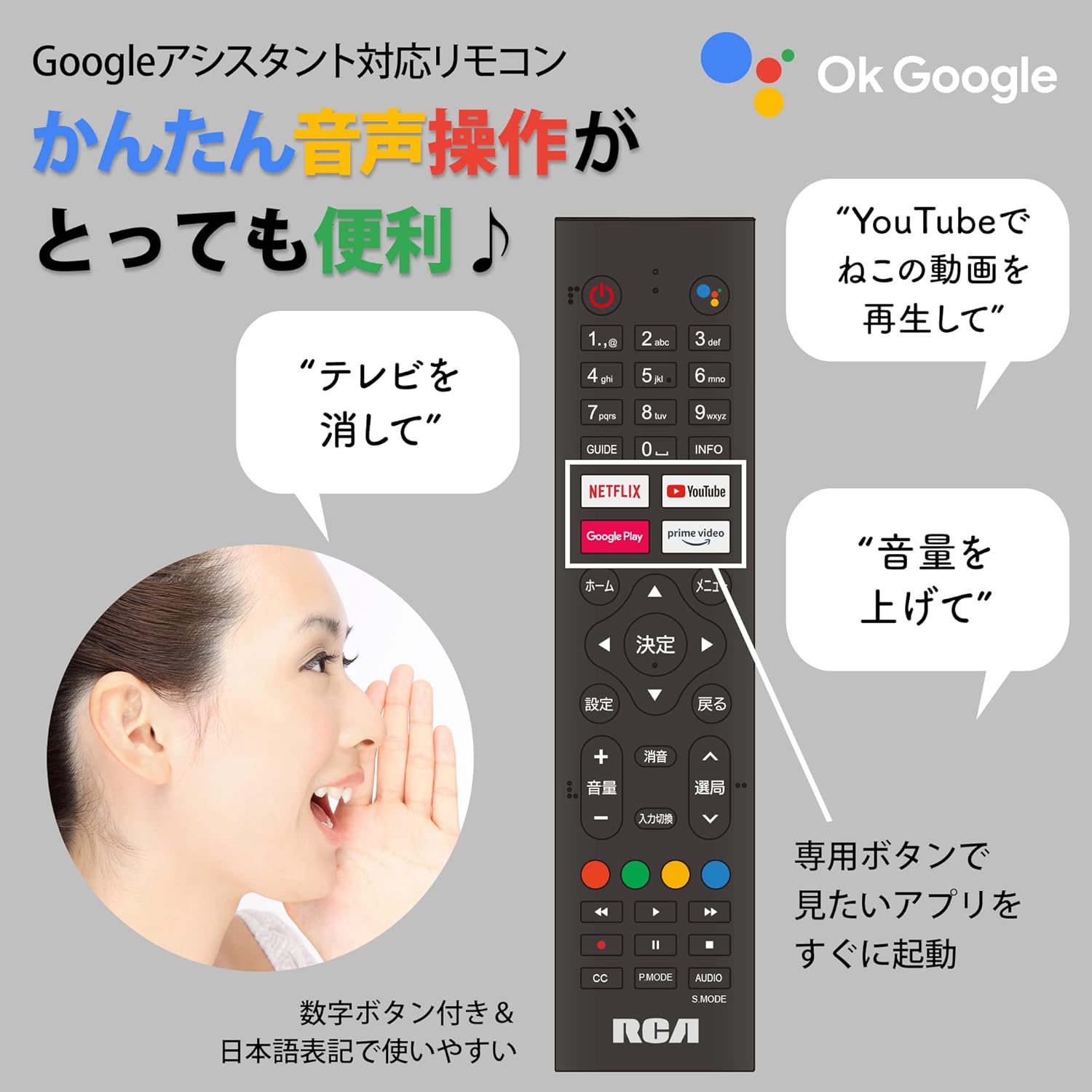
Figure 5: Remote control with voice command functionality and dedicated app buttons.
۴. د سمارټ تلویزیون ځانګړتیاوې
This tunerless TV provides access to a wide range of online video distribution services and features:
- د خپریدو خدمتونه: Enjoy content from NETFLIX, YouTube, Prime Video, Tver, U-NEXT, AbemaTV, and more.
- د Chromecast جوړ شوی: Cast content directly from your smartphone or tablet to the TV screen.
- د Android OS: Access a variety of apps from the Google Play Store.

Figure 6: Using Chromecast to cast content from a smartphone to the TV.
Video 1: Demonstration of the Google TV interface and voice control for content discovery.
3. بنسټیز عملیات
- پاور آن/بند: په ریموټ کنټرول کې د بریښنا تڼۍ فشار ورکړئ.
- د حجم کنټرول: په ریموټ کې د حجم پورته / ښکته تڼۍ وکاروئ.
- د ننوتلو انتخاب: Press the Input button to switch between HDMI and other connected sources.
ساتنه
1. پاکول
To clean the TV screen, gently wipe it with a soft, lint-free cloth. For stubborn marks, slightly dampen the cloth with water or a screen-cleaning solution. Do not spray liquid directly onto the screen. Clean the TV casing د نرم، وچ ټوکر سره.
2. ذخیره کول
If storing the TV for an extended period, disconnect it from the power outlet and store it in a cool, dry place away from direct sunlight and extreme temperatures.
د ستونزو حل کول
که تاسو په خپل تلویزیون کې ستونزې سره مخ شئ، لاندې عامې ستونزې او حل لارې وګورئ:
| ستونزه | د حل لاره |
|---|---|
| هیڅ ځواک نشته | ډاډ ترلاسه کړئ چې د بریښنا کیبل په خوندي ډول د تلویزیون او بریښنا ساکټ دواړو سره وصل دی. یو بل ساکټ هڅه وکړئ. |
| No picture/Sound but no picture | د ننوتلو سرچینه وګورئ. ډاډ ترلاسه کړئ چې بهرني وسایل فعال دي او په سمه توګه وصل دي. |
| ریموټ کنټرول کار نه کوي | بیټرۍ بدل کړئ. ډاډ ترلاسه کړئ چې د ریموټ او د تلویزیون د IR سینسر ترمنځ هیڅ خنډ شتون نلري. |
| د وائی فای سره وصل نشو | Check your router and internet connection. Re-enter the Wi-Fi password. Move the TV closer to the router. |
| App is slow or freezes | Restart the TV. Clear the app's cache in the TV settings. Ensure your internet connection is stable. |
که ستونزه دوام ومومي، مهرباني وکړئ د پیرودونکو ملاتړ سره اړیکه ونیسئ.
مشخصات
The following are the technical specifications for the RCA-32D1 Tunerless Smart TV:
| فیچر | تفصیل |
|---|---|
| د ماډل شمیره | RCA-32D1 |
| د سکرین اندازه | 31.5 inches (32V-type) |
| ټیکنالوژي ښکاره کول | LCD, VA Panel, LED Backlight |
| قرارداد | بشپړ HD (1920 x 1080) |
| د تازه کولو نرخ | 60 Hz |
| د تناسب تناسب | 3000:1 |
| عملیاتي سیسټم | Android |
| ارتباط | Wi-Fi, HDMI (x3), USB 2.0 (x2), LAN, Audio Output |
| ځانګړي ځانګړتیاوې | Chromecast Built-in, Voice Control |
| ملاتړ شوي سټریمینګ خدمتونه | Netflix, YouTube, Prime Video, Tver, U-NEXT, AbemaTV |
| د محصول ابعاد (د x څلویښتم x څلویښتم) | 16.1 x 73.1 x 47 سانتي متره |
| د توکي وزن | 4.9 کیلو ګرامه |
| د VESA ماونټ معیاري | 40 x 40mm |
| شامل بیټرۍ | 2 AAA بیټرۍ |

Figure 7: High-definition VA panel for vivid image quality.
تضمین او ملاتړ
This product is covered by the manufacturer's warranty. Please refer to the warranty card included in your package for specific terms and conditions.
د پیرودونکي ملاتړ
For technical assistance or inquiries, please contact the KEIYO Support Center:
- تلیفون: 050-8880-2812
- د استقبال ساعتونه: Weekdays 10:00-12:00, 13:00-17:00 (Excluding summer holidays, year-end/New Year holidays, Golden Week, and public holidays).