
پیژندنه
The Docooler Bone Conduction Speaker is a compact, portable audio device designed to transform various surfaces into sound-producing diaphragms. Utilizing bone conduction technology, it offers a unique audio experience with enhanced bass and volume depending on the surface it is placed upon. This manual provides essential information for the safe and effective use of your speaker.
د خوندیتوب معلومات
مهرباني وکړئ دا خوندیتوب لارښوونې ولولئ او تعقیب یې کړئ ترڅو وسیله ته زیان ونه رسوي یا شخصي زیان ونه رسوي:
- سپیکر د سختې تودوخې یا مستقیم لمر وړانګو ته مه ښکاره کوئ.
- د قوي تاثیراتو سره د وسیله له مینځه وړلو یا تابع کولو څخه ډډه وکړئ.
- Keep the speaker away from water and liquids, as it is not waterproof.
- د وسیلې د جلا کولو، ترمیم کولو یا بدلولو هڅه مه کوئ. دا به تضمین باطل کړي.
- یوازې چمتو شوی چارجینګ کیبل او یو مناسب بریښنا اډاپټر وکاروئ.
- د اورېدو د زیان د مخنیوي لپاره په لوړ غږ د اوږدې مودې اورېدلو څخه ډډه وکړئ.
د بسته محتويات
ډاډ ترلاسه کړئ چې ټول توکي ستاسو په کڅوړه کې شتون لري:
- Docooler Bone Conduction Speaker (1 unit)
- د USB ډول-سي چارج کولو کیبل (۱ واحد)
- د کارونکي لارښود (دا لاسوند)
- Adhesive Pads / Suction Cup (for mounting)
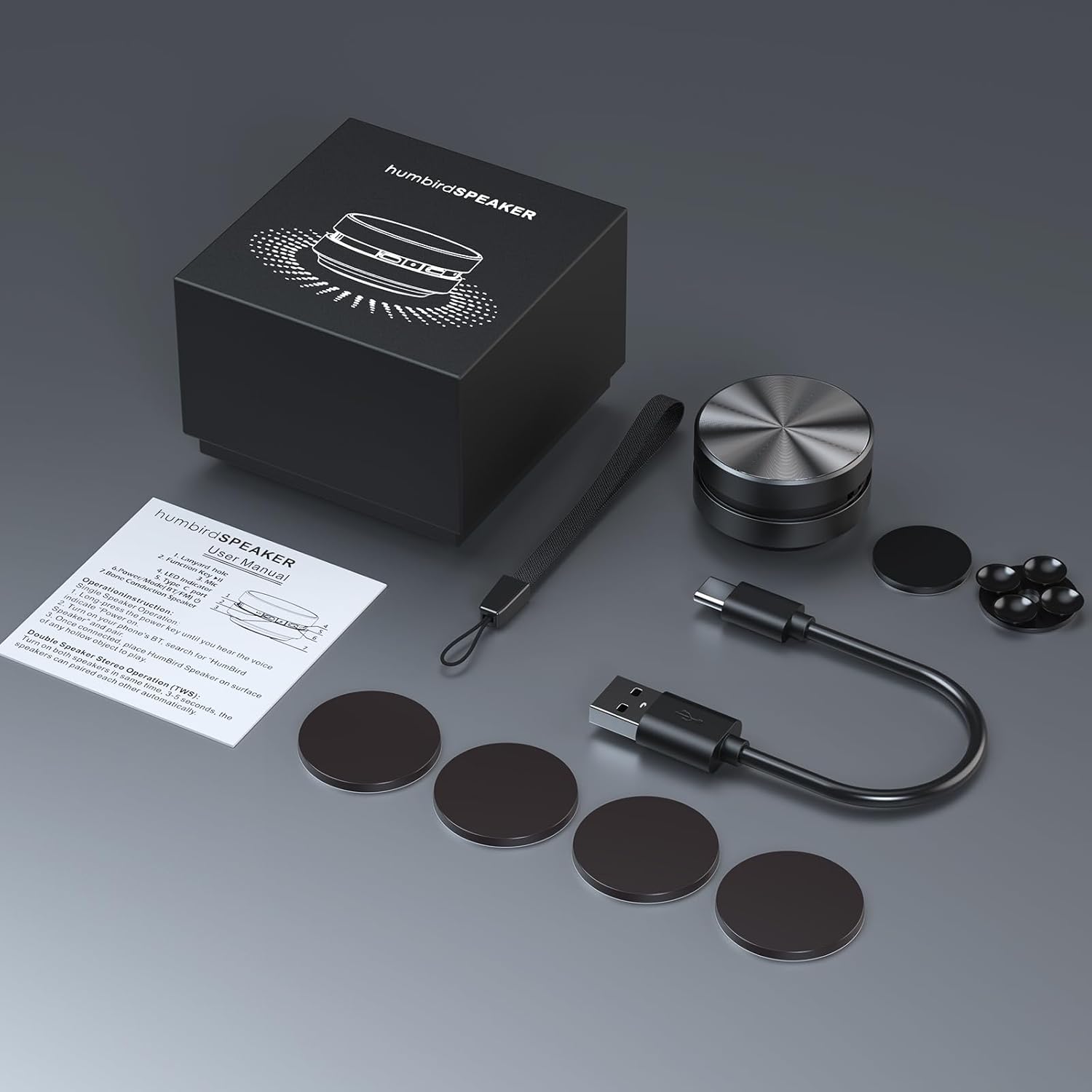
Image: Contents of the Docooler Bone Conduction Speaker package, showing the speaker, charging cable, and various adhesive pads for mounting.
محصول پای ته ورسیدview
The Docooler Bone Conduction Speaker is a compact device with a minimalist design. It features a durable aluminum alloy casing and a Type-C charging port. The speaker utilizes Bluetooth 5.0 for wireless connectivity and supports True Wireless Stereo (TWS) pairing for an enhanced audio experience.

انځور: مخکینۍ برخه view of the Docooler Bone Conduction Speaker, highlighting its key features such as Bone Conduction technology, Bluetooth 5.0, TWS, Type-C Charging Port, Fast Charge, and Aviation Aluminum Alloy construction.
چمتو کول
1. د سپیکر چارج کول
- Connect the provided USB Type-C cable to the speaker's charging port.
- د کیبل بله پای د یو مناسب USB بریښنا سرچینې سره وصل کړئ (د بیلګې په توګه، دیوال اډاپټر، د کمپیوټر USB پورټ).
- د شاخص څراغ به د چارج کولو حالت وښيي (د جزیاتو لپاره د LED شاخص برخې ته مراجعه وکړئ).
- بشپړ چارج معمولا شاوخوا ۲-۳ ساعته وخت نیسي.
۳. د بلوتوټ جوړه کول (واحد سپیکر)
- Press and hold the power button on the speaker until the indicator light flashes, indicating pairing mode.
- په خپل سمارټ فون یا بل بلوتوث فعال شوي وسیله کې، بلوتوث فعال کړئ او د شته وسایلو لټون وکړئ.
- Select "Humbird Speaker" (or similar name) from the list of devices.
- Once connected, the indicator light will remain solid, and you will hear a confirmation tone.
3. True Wireless Stereo (TWS) Pairing (Two Speakers)
For a stereo sound experience, you can pair two Docooler Bone Conduction Speakers together:
- ډاډ ترلاسه کړئ چې دواړه سپیکرې په بشپړ ډول چارج شوي او بند شوي دي.
- Power on both speakers simultaneously. They will automatically attempt to pair with each other within 3-5 seconds.
- Once successfully paired, one speaker will act as the master (left channel) and the other as the slave (right channel). The indicator lights will reflect their connected status.
- Now, connect your smartphone or Bluetooth device to the master speaker as described in the "Bluetooth Pairing (Single Speaker)" section.

Image: Two Docooler Bone Conduction Speakers positioned for True Wireless Stereo (TWS) pairing, demonstrating their ability to create a wider soundstage.
عملیاتي لارښوونې
1. بریښنا فعال/بند
- پاور آن: د نږدې 3 ثانیو لپاره د بریښنا تڼۍ فشار ورکړئ او ونیسئ.
- بندول: د نږدې 3 ثانیو لپاره د بریښنا تڼۍ فشار ورکړئ او ونیسئ.
۳. د پلې بیک کنټرول
- پلی کول / ودرول: یو ځل د بریښنا تڼۍ لنډ فشار ورکړئ.
- بله لار: د بریښنا تڼۍ دوه ځله فشار ورکړئ.
- مخکینی لار Triple-press the power button.
3. د حجم سمون
Volume is primarily controlled via your connected Bluetooth device (smartphone, tablet, etc.). The speaker itself does not have dedicated volume buttons.
4. Using with Different Surfaces
The unique feature of this bone conduction speaker is its ability to use various surfaces as sound amplifiers. Experiment with different materials to discover unique sound profiles:
- Hollow Objects: Cardboard boxes, plastic containers, or hollow wooden surfaces often produce a fuller sound with enhanced bass.
- د شیشې سطحې: Windows or glass tables can create a clear, crisp sound.
- د لرګیو سطحې: Desks, guitars, or wooden panels can offer a warm, resonant tone.
- Car Dashboards: Can provide an immersive in-car audio experience.
Use the included adhesive pads or suction cup to securely attach the speaker to your chosen surface. The sound quality will vary significantly based on the material, size, and hollowness of the surface.

Image: The bone conduction speaker demonstrated on different surfaces, including a guitar, a kitchen countertop, a mirror, and a car dashboard, illustrating its versatility in sound production.
ساتنه
To ensure the longevity and optimal performance of your Docooler Bone Conduction Speaker, follow these maintenance tips:
- پاکول: Wipe the speaker with a soft, dry cloth. Do not use abrasive cleaners, alcohol, or solvents.
- ذخیره کول: سپیکر په یخ او وچ ځای کې وساتئ، د مستقیم لمر وړانګو او سختې تودوخې څخه لرې وساتئ کله چې کارول نه وي.
- د بیټرۍ پاملرنه: For best battery life, avoid fully discharging the speaker frequently. Charge it regularly, even if not used for extended periods.
د ستونزو حل کول
| ستونزه | احتمالي حل |
|---|---|
| سپیکر نه چالانېږي. | ډاډ ترلاسه کړئ چې سپیکر په بشپړ ډول چارج شوی دی. دا د بریښنا سرچینې سره وصل کړئ او بیا هڅه وکړئ. |
| د بلوتوث له لارې جوړه نشي کیدی. | Make sure the speaker is in pairing mode (flashing indicator light). Turn off and on Bluetooth on your device. Ensure the speaker is within range (up to 10 meters). |
| غږ نشته یا ټیټ غږ. | Increase the volume on your connected device. Ensure the speaker is placed on a suitable surface. Try a different surface. Check if the speaker is properly connected. |
| د TWS جوړه ناکامه شوه. | Ensure both speakers are powered off before attempting TWS pairing. Power them on simultaneously and wait for automatic pairing. Disconnect any existing Bluetooth connections before TWS pairing. |
| د غږ کیفیت ټیټ دی. | Experiment with different surfaces. Hollow and resonant surfaces generally yield better results. Ensure the speaker is securely attached to the surface. |
مشخصات
| فیچر | تفصیل |
|---|---|
| د ماډل نوم | د هډوکي کنډکشن سپیکر |
| د ماډل شمیره | RM |
| برانډ | ډاکولر |
| مواد | المونیم |
| د محصول ابعاد | ۱۶"د x ۲۶"وچ x ۴۷"ح |
| د توکي وزن | 4.6 اونس (0.13 کیلوګرامه) |
| د ارتباط ټیکنالوژي | بلوتوث |
| د بلوتوټ رینج | 10 متره |
| د آډیو وتلې حالت | سټیریو (د TWS جوړه کولو سره) |
| د سپیکر اعظمي تولید ځواک | 3 واټ |
| د تعدد ځواب | 20 KHz |
| د سیګنال څخه تر شور پورې نسبت | 70 dB |
| د بریښنا سرچینه | د بیټرۍ چلول |
| د بیټرۍ ظرفیت | 400 ملیونهamp ساعتونه |
| د کنټرول طریقه | App (implied by product data, but primary control is physical buttons) |
| پنروک دی | غلط |
تضمین او ملاتړ
The Docooler Bone Conduction Speaker comes with a limited warranty. For specific warranty details, please refer to the documentation included with your purchase or contact Docooler customer service.
If you encounter any issues or have questions not covered in this manual, please contact Docooler customer support through their official channels. Contact information can typically be found on the product packaging or the official Docooler webسایټ