
پیژندنه
The IMICE T97 RGB Honeycomb Gaming Mouse is designed to provide a precise and comfortable experience for gaming and general computer use. It features a high-precision 4800 DPI sensor, a durable and ergonomic design, and is compatible with various operating systems. This manual will guide you through the setup, operation, and maintenance of your new gaming mouse.
- نښه: IMICE
- ډول: موږک
- مطابقت: کمپیوټرونه او لپټاپونه
- کلیدي ځانګړتیاوې: High precision 4800 DPI, comfortable and durable design, anti-sweat design, precise positioning.
- رنګ: تور
د تنظیم کولو لارښوونې
1. موږک سره نښلول
The IMICE T97 mouse uses a standard USB connection for plug-and-play functionality. No additional drivers are typically required for basic operation on supported operating systems.
- په خپل کمپیوټر یا لپ ټاپ کې یو موجود USB پورټ ومومئ.
- Insert the USB connector of the IMICE T97 mouse firmly into the USB port.
- ستاسو عملیاتي سیسټم باید په اتوماتيک ډول اړین چلوونکي کشف او نصب کړي. دا پروسه ممکن څو دقیقې وخت ونیسي.
- یوځل چې نصب شي، موږک به د کارولو لپاره چمتو وي.
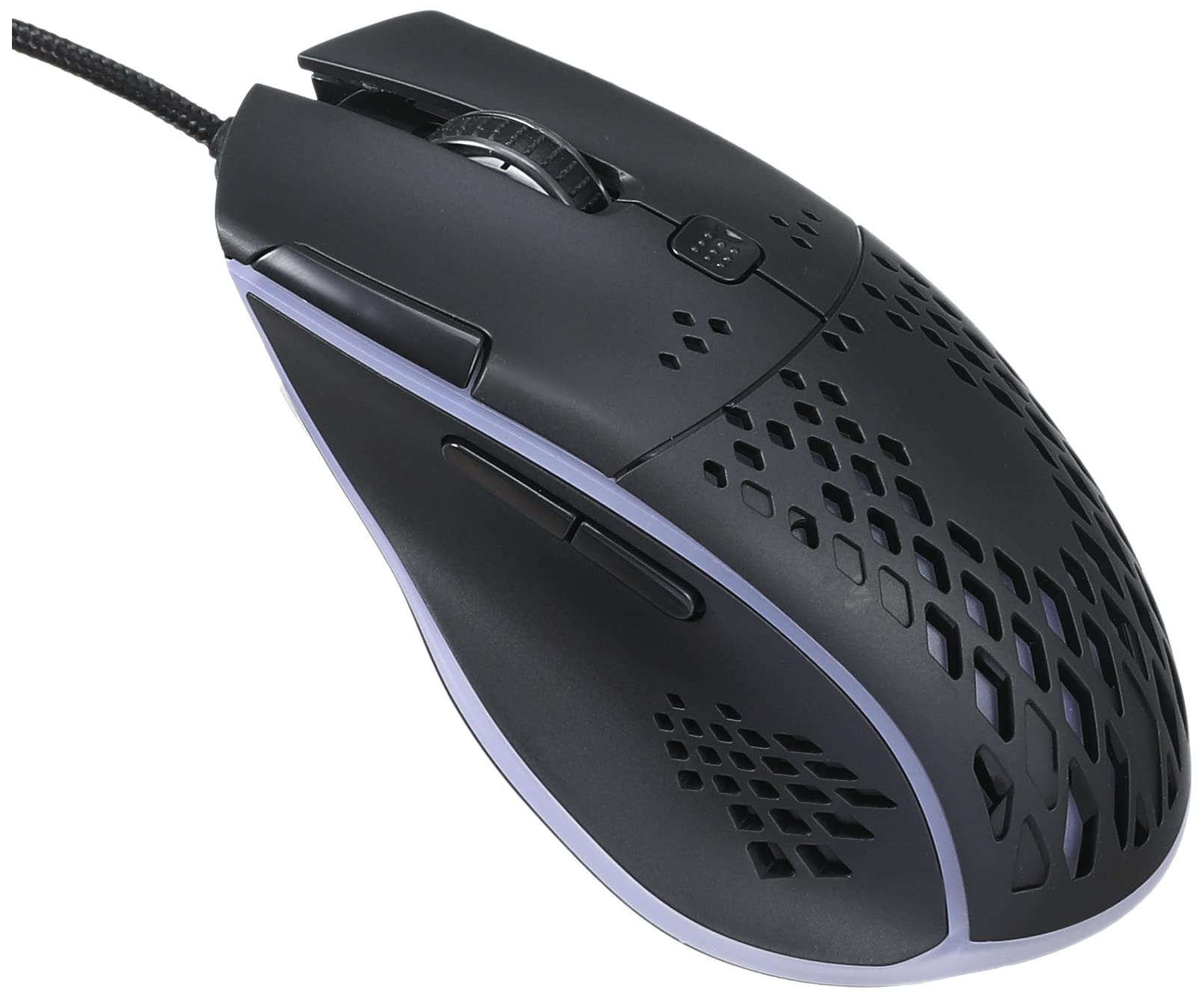
Image: Top-front view of the IMICE T97 RGB Honeycomb Gaming Mouse, showing its ergonomic shape and honeycomb shell design.
د موږک چلول
بنسټیز کارونه
- کیڼ کلیک: لومړنۍ کړنه، انتخاب، فعالول.
- ښي کلیک: د شرایطو مینو، ثانوي کړنې.
- سکرول ویل: اسناد پورته/ښکته سکرول کړئ او web پاڼې. د منځني کلیک فعالیت لپاره هم کلیک کیدی شي.
- د غاړې تڼۍ: (If present, typically for forward/back navigation in browsers or custom functions in games). The T97 model typically includes two side buttons.
د DPI تعدیل
The IMICE T97 mouse features adjustable DPI (Dots Per Inch) settings, allowing you to change the cursor sensitivity. This mouse supports up to 4800 DPI. There is usually a dedicated button, often located behind the scroll wheel, to cycle through different DPI levels. Press this button to switch between sensitivity settings to find your preferred speed.
د RGB رڼا
The mouse features RGB lighting, which typically cycles through various colors automatically. There may not be user-configurable software for lighting control, and it operates as a default aesthetic feature.

انځور: لاندې view of the IMICE T97 RGB Honeycomb Gaming Mouse, showing the optical sensor, product label with model T97, and regulatory marks.
ساتنه
پاکول
- د پاکولو دمخه موږک له خپل کمپیوټر څخه جلا کړئ.
- د موږک سطحه د پاکولو لپاره نرم، وچ، لینټ نه پاک ټوکر وکاروئ.
- د سختې خاورې لپاره، لږ څهampټوکر د اوبو یا نرم پاکولو محلول سره ومینځئ (د سختو کیمیاوي موادو څخه ډډه وکړئ).
- د تڼیو او سکرول ویل شاوخوا پاکولو لپاره د پنبې سویب یا فشار شوي هوا وکاروئ.
- ډاډ ترلاسه کړئ چې هیڅ مایع د موږک داخلي برخو ته نه ننوځي.
ذخیره کول
موږک په یخ او وچ ځای کې د مستقیم لمر وړانګو او سختې تودوخې څخه لرې وساتئ کله چې د اوږدې مودې لپاره نه کارول کیږي.
د ستونزو حل کول
| ستونزه | د حل لاره |
|---|---|
| موږک ځواب نه ورکوي. |
|
| د کرسر حرکت بې نظمه یا ناڅاپي دی. |
|
| Buttons or scroll wheel are not working. |
|
| Cannot find software for customization. | The IMICE T97 mouse is primarily designed for plug-and-play operation. Dedicated software for advanced customization (like button remapping or detailed RGB control) may not be available or easily accessible for this model. Most functions are hardware-controlled. |
مشخصات
| برانډ | IMICE |
| ماډل | T97 |
| رنګ | تور |
| د ارتباط ټیکنالوژي | USB |
| DPI (اعظمي) | 4800 DPI |
| ځانګړي ځانګړتیاوې | Comfortable design, RGB lighting, honeycomb shell |
| د لاس لارښوونه | متضاد |
| وړاندیز شوي استعمالونه | لوبې کول |
| مطابقت لرونکې وسیلې | شخصي کمپیوټر، لیپ ټاپ |
| د عملیاتي سیسټم مطابقت | لینکس، وینډوز ایکس پی (او نوي نسخې) |
| د توکي وزن | 120 ګرامه |
| د لېږد ابعاد | 15 x 11 x 5 سانتي متره |
| بیټرۍ پکې شاملې دي | No (Wired USB mouse) |
| ASIN | B0BD2DDWNQ |
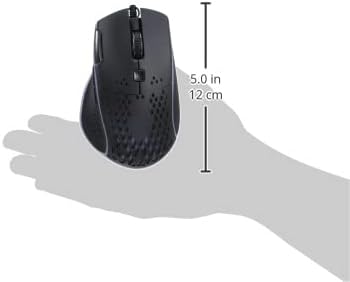
انځور: اړخ view of the IMICE T97 RGB Honeycomb Gaming Mouse held in a hand, illustrating its compact size (approximately 5.0 inches or 12 cm in length).
د تضمین معلومات
Please refer to the retailer or your purchase documentation for specific warranty terms and conditions. IMICE products typically come with a limited warranty against manufacturing defects. Keep your proof of purchase for warranty claims.
د پیرودونکي ملاتړ
For technical assistance or further inquiries, please contact your retailer or visit the official IMICE website for support resources. Ensure you have your product model (T97) and purchase details ready when contacting support.