
1. پیژندنه
This manual provides detailed instructions for the Nulea Wireless Ergonomic Keyboard, Model RT05. This keyboard is designed to enhance typing comfort and efficiency through its split, splayed, and curved layout, integrated wrist rest, and versatile connectivity options. It features a 7-color adjustable backlight and convenient USB-C charging.

Figure 1.1: Nulea Wireless Ergonomic Keyboard (Model RT05)
This image displays the Nulea Wireless Ergonomic Keyboard from a top-down perspective, highlighting its split design, integrated wrist rest, and full key layout including a numeric keypad. The keyboard is black with yellow accents on the spacebar area.
2. د بسته محتويات
ډاډ ترلاسه کړئ چې ټول توکي په کڅوړه کې شتون لري:
- Ergonomic Keyboard x1
- د USB کیبل x1
- د کارن لارښود x1
3. ترتیب کول
3.1 ابتدايي چارج کول
Before first use, fully charge the keyboard using the provided USB-C cable. The keyboard features a 2000mAh internal battery for extended operation.
- Connect the USB-C end of the cable to the keyboard's charging port.
- Connect the USB-A end to a compatible USB power source (e.g., computer USB port, wall adapter).
- The battery indicator light will provide charging status. Recharge when the battery level is below 10% (backlight will turn off to conserve power).

Figure 3.1: USB-C Quick Charging
This image illustrates the Nulea keyboard being charged via a USB-C cable, with a graphic indicating a 2000mAh built-in rechargeable battery. The image emphasizes the convenience of USB-C charging.
3.2 بې سیم اتصال
The Nulea keyboard supports both Bluetooth and 2.4G USB connectivity, allowing connection to up to three devices simultaneously.
د 2.4G USB اتصال:
- د 2.4G USB ریسیور ومومئ (معمولا د کیبورډ په یوه کمپارټمینټ کې ساتل کیږي).
- د USB ریسیور په خپل کمپیوټر کې موجود USB پورټ کې ولګوئ.
- کیبورډ چالان کړئ. دا باید په اتوماتيک ډول له ریسیور سره وصل شي.
بلوتوث پیوستون
- کیبورډ چالان کړئ.
- فشار ورکړئ Fn key simultaneously with either Q (د 2.4G لپاره)، W (د بلوتوث ۱ لپاره)، یا E (for Bluetooth 2) to select the desired connection channel. For Bluetooth pairing, select W or E.
- Hold the selected Fn + W or Fn + E key combination for 3-5 seconds until the indicator light flashes rapidly, indicating pairing mode.
- On your device (computer, smartphone, tablet), go to Bluetooth settings and search for new devices.
- Select "Nulea Keyboard" or a similar name from the list of available devices to complete the pairing process.
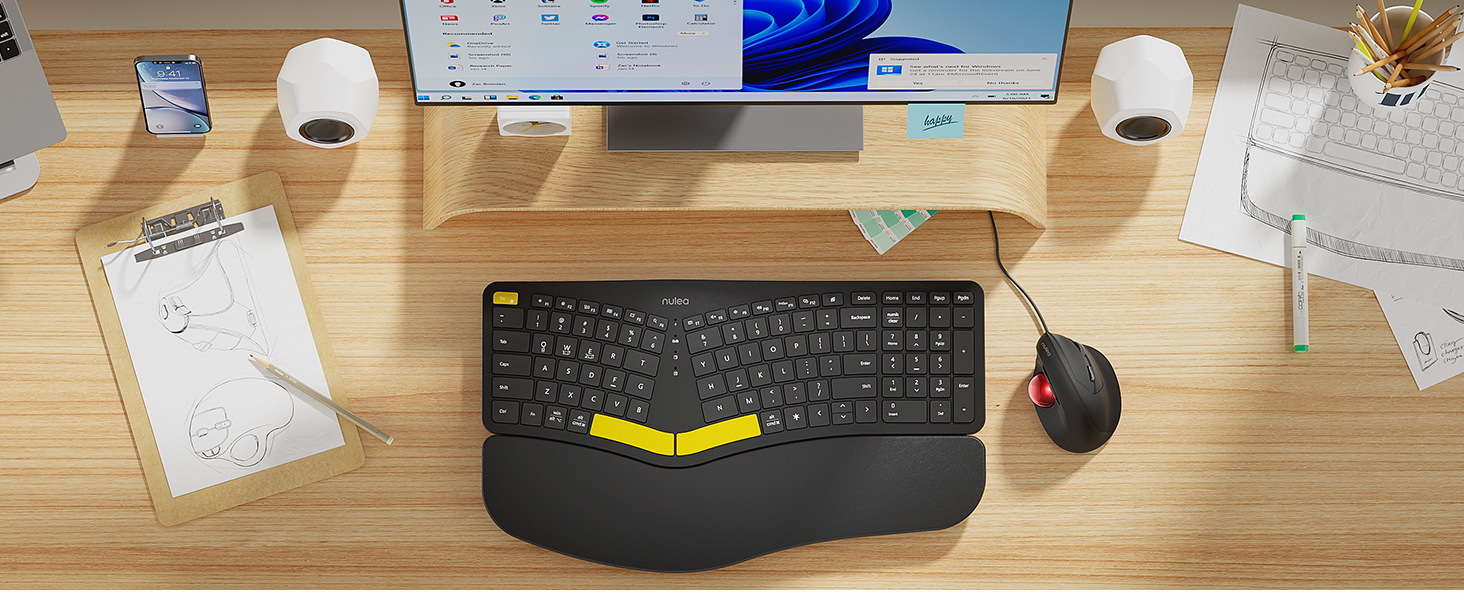
Figure 3.2: Wireless Connectivity Setup
This diagram illustrates the three connectivity options for the Nulea keyboard: 2.4G USB connection via a dongle, and two separate Bluetooth connections. It shows how to switch between devices using Fn + Q/W/E keys.
4. عملیاتي لارښوونې
۸ پاور آن/بند
Locate the power switch on the keyboard (typically on the top edge or underside) and slide it to the 'ON' or 'OFF' position.
۴.۱ د وصل شویو وسیلو ترمنځ بدلول
Once multiple devices are paired, you can switch between them instantly:
- مطبوعاتي Fn + Q to switch to the 2.4G USB connected device.
- مطبوعاتي Fn + W د بلوتوث وسیلې ۱ ته د بدلولو لپاره.
- مطبوعاتي Fn + E د بلوتوث وسیلې ۱ ته د بدلولو لپاره.

Figure 4.1: Easy Device Switching
This image shows the Nulea keyboard connected to a desktop monitor, a laptop, and a smartphone, illustrating its ability to easily switch between up to three paired devices with a single tap.
د 4.3 شاته څراغ کنټرول
The keyboard features a 7-color backlight with 3 brightness levels. You can customize the lighting to your preference:
- To cycle through backlight colors (blue, green, red, cyan, purple, yellow, white), press the backlight control key (refer to keyboard layout for specific key).
- To adjust brightness levels, use the dedicated brightness control keys (refer to keyboard layout).
- Note: When the battery level drops below 10%, the backlight will automatically turn off to preserve basic keyboard functionality.

Figure 4.2: Adjustable 7-Color Backlight
This image displays the Nulea keyboard in a dimly lit environment, showcasing its illuminated keys with a vibrant backlight. The image highlights the 7 available backlight colors and 3 brightness levels.
۲.۳ د تنظیم وړ خښتې پښې
The keyboard is equipped with 4 adjustable tilt legs, allowing you to set the keyboard at 3 different angles for optimal wrist comfort and posture.
- Gently pull out the tilt legs located on the underside of the keyboard to adjust the angle.
- Experiment with different tilt levels to find the most comfortable position for your typing style.

شکل ۶: د تنظیم وړ خښتې پښې
دا انځور یو اړخ ښیي view of the Nulea keyboard on a desk, with its adjustable tilt legs extended to demonstrate the ergonomic angle. The image emphasizes how the tilt legs help maintain a comfortable wrist position.
۳.۱ د ټایپ کولو تجربه
The keyboard features spherical-dished key shapes designed to conform to your fingertips, promoting effortless and comfortable typing.

Figure 4.4: Spherical-Dished Keys
This close-up image focuses on the keys of the Nulea keyboard, highlighting their spherical-dished shape designed for comfortable and precise typing.
5. ساتنه
5.1 پاکول
د کیبورډ بڼه او فعالیت ساتلو لپاره:
- د پاکولو دمخه کیبورډ له ټولو وسیلو او بریښنا سرچینو څخه جلا کړئ.
- د نرم، لینټ پاک ټوکر څخه لږ څه کار واخلئampد سطحې د پاکولو لپاره د اوبو یا یو نرم پاکولو محلول سره مینځل کیږي.
- د سختو کیمیاوي موادو، خړوبونکو پاکوونکو، یا محلولونو کارولو څخه ډډه وکړئ.
- د کیلي ګانو ترمنځ د دوړو او کثافاتو د لرې کولو لپاره د فشار شوي هوا څخه کار واخلئ.
5.2 د بیټرۍ پاملرنه
د بیټرۍ ژوند اوږدولو لپاره:
- Recharge the keyboard when the battery low indicator appears.
- د بیټرۍ په مکرر ډول له بشپړې وچولو څخه ډډه وکړئ.
- که چیرې کیبورډ د اوږدې مودې لپاره ذخیره کوئ، نو د ذخیره کولو دمخه یې شاوخوا 50٪ ته چارج کړئ.
6. ستونزه حل کول
۵.۱ کیبورډ ځواب نه ورکوي
- ډاډ ترلاسه کړئ چې کیبورډ فعال دی.
- د بیټرۍ کچه وګورئ او که اړتیا وي نو چارج کړئ.
- For 2.4G connection, ensure the USB receiver is securely plugged into the device. Try a different USB port.
- For Bluetooth connection, ensure Bluetooth is enabled on your device and the keyboard is paired. Try re-pairing the keyboard.
- Ensure you are on the correct connection channel (Fn + Q/W/E).
۶.۳ د شا څراغ کار نه کوي
- Check the battery level. The backlight automatically turns off when the battery is below 10%. Recharge the keyboard.
- Ensure the backlight is turned on and brightness is adjusted using the dedicated keys.
6.3 Connectivity Issues / Lag
- Move the keyboard closer to your device to reduce interference.
- Avoid placing the keyboard near other wireless devices that may cause interference (e.g., Wi-Fi routers, cordless phones).
- ډاډ ترلاسه کړئ چې ستاسو د وسیلې عملیاتي سیسټم او بلوتوث چلوونکي تازه دي.
7. مشخصات
| فیچر | تفصیل |
|---|---|
| د ماډل نوم | RT05 |
| د محصول ابعاد | ۱۱.۴"L x ۷.۱"W x ۹.۴۵"H (۲۸.۹۶ x ۱۸.۰۳ x ۲۴.۰ سانتي متره) |
| د توکي وزن | ۶ پونډه (۳ کیلو ګرامه) |
| جوړونکی | نولیا |
| بیټرۍ | 1 لیتیم آئن بیټرۍ (شامل ده) |
| د ارتباط ټیکنالوژي | 2.4G USB, Bluetooth |
| مطابقت لرونکې وسیلې | لپ ټاپ، کمپیوټر، سمارټ فون، ټابلیټ |
| ځانګړي ځانګړتیاوې | Backlit, Rechargeable, Split Keyset Design, Adjustable Tilt Legs |
| رنګ | تور |
8. تضمین او ملاتړ
For warranty information, technical support, or service inquiries, please refer to the contact information provided on the Nulea official webسایټ ته مراجعه وکړئ یا مستقیم له پلورونکي سره اړیکه ونیسئ. د تضمین ادعاوو لپاره د پیرود رسید وساتئ.
This user manual is included with your product for future reference.