
TENVIS IP602W
د TENVIS IP602W بهرنۍ IP کیمرې کارونکي لارښود
Model: IP602W
برانډ: ټینوس
پیژندنه
The TENVIS IP602W is a robust outdoor IP camera designed for reliable surveillance. It offers broad compatibility, supporting not only Windows OS but also Mac OS and other platforms accessible via an internet browser. Its design facilitates easy installation, allowing for wall mounting and wireless connectivity.
Equipped with a 1/4 CMOS image sensor and a 6mm lens, the IP602W delivers video at a maximum frame rate of 30 frames per second, with a resolution of up to 640 x 480 pixels. For low-light and nighttime environments, the camera features 30 infrared LEDs, providing high levels of invisible light for clear visibility. Mobile viewing is supported across multiple platforms via 3G networks, including iPhone, Android, Windows Mobile, and Java phones, enabling remote monitoring from any location with internet access.
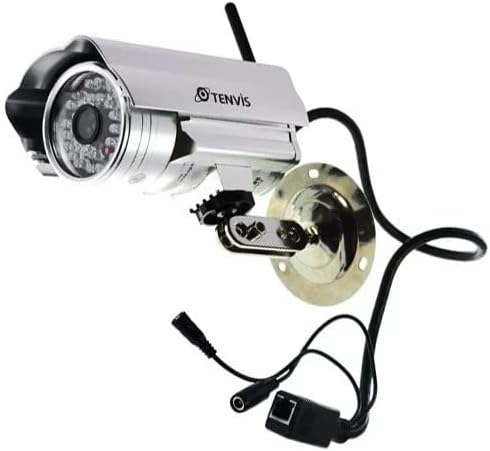
Image: The TENVIS IP602W Outdoor IP Camera, showcasing its durable build, integrated mounting bracket, and connectivity cables.
په بکس کې څه دي
د بسته بندۍ پرانستلو سره، ډاډ ترلاسه کړئ چې لاندې ټولې برخې پکې شاملې دي:
- 1 x IP602W WiFi IP Camera
- 1 x Power Adaptor (AU Plug)
- 1 x وائی فای انتن
- 1 x د قوس قوس
- 1 x CD (containing software/drivers)
- 1 x Screw Set for mounting
- 1 x د کارونکي لارښود

Image: All components included in the TENVIS IP602W package, laid out for verification.
د محصول ځانګړتیاوې
The TENVIS IP602W camera is equipped with several key features to enhance its performance and usability:
- Night Version: Integrated infrared LEDs provide clear visibility in low-light and complete darkness.
- بې سیم ملاتړ: Connects to your network via Wi-Fi for flexible placement.
- Metal and Waterproof Shell: Designed for outdoor use with a durable, weather-resistant casing.
- د حرکت کشف: Configurable motion detection alerts for security monitoring.
- د کراس پلیټ فارم مطابقت: ملاتړ کوي viewing and control from various operating systems and browsers, including Windows, Mac OS, Firefox, Chrome, and Safari.
- موبایل View: Access live feeds and controls from mobile devices via 3G network, supporting iPhone, Android, Windows Mobile, and Java phones.

Image: Visual representation of the TENVIS IP602W camera, emphasizing its key features such as night vision and wireless capabilities.
تنظیم او نصب کول
د اجزاوو پیژندنه
Familiarize yourself with the camera's ports and components before installation:
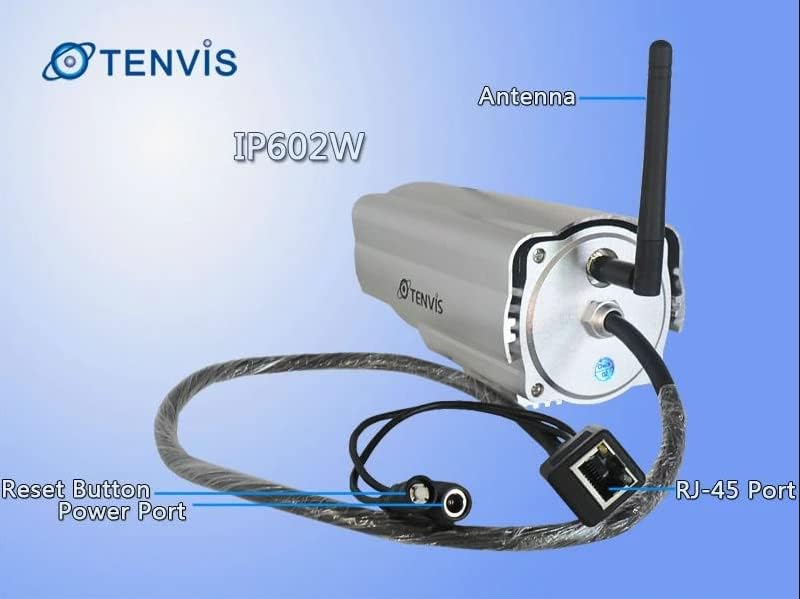
انځور: تفصیلي view of the TENVIS IP602W camera's rear, showing the antenna, RJ-45 Ethernet port, power input, and reset button.
- انتن: د بېسیم شبکې اتصال لپاره.
- RJ-45 بندر: For wired Ethernet connection to your router.
- د بریښنا بندر: د شامل شوي بریښنا اډاپټر دلته وصل کړئ.
- د بیا تنظیم تڼۍ: د فابریکې ډیفالټ ترتیباتو بیرته راګرځولو لپاره کارول کیږي.
د شبکې پیوستون
The IP602W can connect to your network wirelessly or via an Ethernet cable. For initial setup, a wired connection is often recommended for stability.

Image: Network diagram showing how the IP602W camera connects to a router, allowing access from a LAN PC, Internet PC, and 3G phone.
- Connect the camera to your router using an Ethernet cable (if using wired setup).
- د بریښنا اډاپټر کیمرې سره وصل کړئ او په بریښنایی آوټ لیټ کې یې ولګوئ.
- Allow the camera a few minutes to power on and initialize.
- Refer to the included CD or the TENVIS website for software installation and detailed network configuration instructions, especially for wireless setup.
پورته کول
The camera comes with a mounting bracket for easy installation on a wall or other suitable surface. Ensure the mounting location provides a clear view and is within range of your Wi-Fi signal or Ethernet cable.
- Choose a suitable outdoor location for mounting.
- Use the mounting bracket as a template to mark drill holes.
- Drill the necessary holes and insert wall anchors if required.
- د چمتو شوي پیچونو په کارولو سره د نصب کولو بریکٹ سطحې ته خوندي کړئ.
- کیمره د نصب کولو بریکٹ سره وصل کړئ او د هغې زاویه د غوره لپاره تنظیم کړئ viewing.
عملیات
Once the camera is set up and connected to your network, you can begin monitoring. The IP602W supports various viewing methods:
- PC/Mac Access: Use the provided software or a compatible web browser (Firefox, Chrome, Safari) to access the camera's live feed and settings from your computer.
- Mobile Device Access: Download the TENVIS mobile application (if available) or use a compatible mobile browser on your iPhone, Android, Windows Mobile, or Java phone to view the camera remotely via a 3G network connection.
- د ویډیو کیفیت: The camera streams video at up to 640x480 resolution with a frame rate of 30fps, providing clear and smooth surveillance footage.
- د حرکت کشف: Configure motion detection settings through the camera's interface to receive alerts when movement is detected in the monitored area.
ساتنه
Regular maintenance helps ensure the longevity and optimal performance of your TENVIS IP602W camera:
- پاکول: په دوره یي ډول د کیمرې لینز او کور د نرم، ډ سره پاک کړئamp ټوکر. د کثافاتو پاکوونکو یا محلولونو څخه ډډه وکړئ.
- د کیبل معاینه: Check all cables (power, Ethernet) for any signs of wear, damage, or loose connections.
- د فرم ویئر تازه معلومات: Check the TENVIS official website periodically for any available firmware updates. Keeping the firmware updated can improve performance and security.
- د چاپیریال معاینات: Ensure the camera's mounting remains secure and that no obstructions are blocking its field of view.
د ستونزو حل کول
If you encounter issues with your IP602W camera, try the following steps:
- ځواک نشته: Ensure the power adapter is securely connected to both the camera and a working electrical outlet.
- د شبکې اړیکه نشته:
- د تار لرونکي اتصال لپاره، د ایترنیټ کیبل او روټر حالت وګورئ.
- For wireless connection, ensure the Wi-Fi antenna is properly attached and the camera is within range of your router. Verify Wi-Fi settings in the camera's configuration.
- کیمرې ته لاسرسی نشم کولی: Verify the camera's IP address. Ensure your computer or mobile device is on the same network or has proper internet access for remote viewing. Check firewall settings on your computer.
- د ویډیو خراب کیفیت: Ensure the lens is clean. Check network bandwidth and signal strength.
- د کیمرې بیا تنظیم کول: If issues persist, use the reset button (refer to Component Identification) to restore factory default settings. You will need to reconfigure the camera after a reset.
مشخصات
| فیچر | تفصیل |
|---|---|
| د ماډل نوم | IP602W |
| برانډ | TENVIS |
| د کور دننه / بهر کارول | بهر |
| د ارتباط ټیکنالوژي | بې سیم (وائی فای) |
| د کنټرولر ډول | Android (and other platforms) |
| د نصب کولو ډول | دیوال غر |
| د ویډیو نیول حل | 480p (640 x 480) |
| د چوکاټ نرخ | 30 fps |
| د عکس سینسر ټیکنالوژي | CMOS (1/4 inch) |
| لینس | 6mm |
| د ټیټ رڼا ټیکنالوژي | Night Color (Infrared LEDs) |
| د خبرتیا ډول | یوازې حرکت |
| د محصول ابعاد | 10 x 9.5 x 4 انچه |
| GTIN | 06928446299816 |
تضمین او ملاتړ
For warranty information, technical support, or further inquiries regarding your TENVIS IP602W camera, please refer to the official TENVIS website or contact their customer service directly. The included CD may also contain support contact details.
You can visit the official TENVIS store for more information: TENVIS Store on Amazon
Ask a question about this manual
Ask about setup, troubleshooting, compatibility, parts, safety, or missing instructions. Manuals+ will review the question and use this page’s manual context to help answer it.