
Logicool M550MGR
Logicool Signature M550MGR Silent Wireless Mouse User Manual
Model: M550MGR
1. پیژندنه
The Logicool Signature M550MGR is a silent wireless mouse designed for comfort and productivity. It features the unique SmartWheel for versatile scrolling and SilentTouch technology for reduced click noise. This mouse offers dual connectivity options: Bluetooth Low Energy and the Logi Bolt USB receiver, ensuring stable performance across various operating systems.

Image: The Logicool Signature M550MGR mouse, highlighting its ergonomic design and advanced scrolling capabilities.
2. د بسته محتويات
- Logicool Signature M550MGR Wireless Mouse
- د لوګي بولټ USB رسیدونکی
- ۱ AA بیټرۍ (مخکې نصب شوې)
- د کارونکي اسناد (دا لارښود)
3. ترتیب کول
3.1. د بیټرۍ نصب کول
- د موږک لاندې برخه کې د بیټرۍ کڅوړه ومومئ.
- د بیټرۍ کمپارټ پوښ خلاص کړئ.
- Ensure the AA battery is correctly oriented according to the polarity indicators (+/-).
- د بیټرۍ کمپارټ پوښ وتړئ.
3.2. خپل موږک سره نښلول
The M550MGR offers two connection methods: Logi Bolt USB receiver or Bluetooth Low Energy.
۴.۲.۱. د لوګي بولټ USB رسیور اتصال
- Remove the Logi Bolt USB receiver from the battery compartment or packaging.
- د لوګي بولټ USB ریسیور په خپل کمپیوټر کې موجود USB پورټ کې ولګوئ.
- موږک باید په اتوماتيک ډول وصل شي. که نه، ډاډ ترلاسه کړئ چې موږک چالان دی.
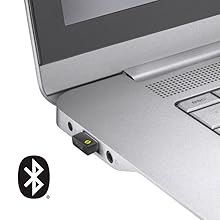
Image: The Logi Bolt USB receiver connected to a laptop, illustrating the wireless connection method.
3.2.2. Bluetooth Low Energy Connection
- ډاډ ترلاسه کړئ چې ستاسو د وسیلې بلوتوټ فعال دی.
- موږک چالان کړئ.
- Press and hold the connect button on the underside of the mouse for 3 seconds until the LED indicator starts blinking rapidly.
- On your device, go to Bluetooth settings and select "Logicool M550MGR" from the list of available devices to pair.
- The LED indicator will turn solid for a few seconds, then turn off, indicating a successful connection.

Image: Visual representation of the two connectivity options: Bluetooth and the Logi Bolt USB receiver.
4. عملیاتي لارښوونې
4.1. بنسټیز کارونه
- کیڼ کلیک: لومړنۍ کړنه، انتخاب.
- ښي کلیک: دوهم عمل، د شرایطو مینو.
- سکرول ویل: د اسنادو له لارې پورته یا ښکته سکرول کړئ او web پاڼې
۴.۳. سمارټ ویل سکرول کول
The SmartWheel automatically switches between two scrolling modes:
- Line-by-line Scrolling: For precise navigation, ideal for detailed work.
- Hyper-fast Scrolling: Spin the wheel quickly to effortlessly glide through long documents and web pages. The wheel will automatically switch to this mode when spun with momentum.

انځور: نږدې انځور view of the SmartWheel, demonstrating its design for efficient scrolling.
۴.۲. سایلنټ ټچ ټیکنالوژي
The M550MGR incorporates SilentTouch technology, which reduces click noise by 90% compared to traditional mice, while maintaining the familiar click feel. This creates a quieter work environment without compromising tactile feedback.

Image: A user operating the silent mouse in a calm environment, illustrating the benefit of SilentTouch technology.
5. ځانګړتیاوې
- سمارټ ویل: Automatic switching between precise line-by-line and hyper-fast scrolling.
- د سایلنټ ټچ ټیکنالوژي: 90% reduced click noise with retained click feel.
- دوه اړخیز ارتباط: Connect via Logi Bolt USB receiver or Bluetooth Low Energy.
- ارګونومیک ډیزاین: Comfortable shape with rubber side grips for extended use.
- د بیټرۍ اوږد ژوند: په یوه AA بیټرۍ کې تر ۲۴ میاشتو پورې.
- ملټي OS مطابقت: Supports Windows, macOS, Chrome OS, iPadOS, and Android.
6. د بیټرۍ معلومات
- د بیټرۍ ډول: 1 x AA alkaline battery.
- د بیټرۍ ژوند: Up to 24 months, depending on usage.
- د بیټرۍ بدلول: Replace the AA battery when the LED indicator on the mouse turns red or when performance degrades. Follow the installation steps in Section 3.1.
7. مطابقت
The Logicool Signature M550MGR mouse is compatible with the following operating systems:
- Logi Bolt Connection:
- وینډوز 10، 11 یا وروسته
- macOS 10.10 یا وروسته
- کروم OS
- د بلوتوث ټیټې انرژۍ اتصال:
- وینډوز 10، 11 یا وروسته
- macOS 10.15 یا وروسته
- کروم OS
- iPadOS 13.4 یا وروسته
- Android 5.0 یا وروسته
Note: This mouse is not compatible with Logitech Unifying receivers.
8. ساتنه
- پاکول: Use a soft, lint-free cloth to clean the mouse surface. For stubborn dirt, slightly dampټوکر د اوبو سره. د سختو کیمیاوي موادو یا خړوبونکو موادو څخه ډډه وکړئ.
- سینسر: د غوره تعقیب فعالیت لپاره د موږک په لاندې برخه کې آپټیکل سینسر پاک او له دوړو یا کثافاتو څخه پاک وساتئ.
- ذخیره کول: When not in use for extended periods, turn off the mouse to conserve battery life. Store in a dry, cool place.
9. ستونزه حل کول
۹.۱. موږک ځواب نه ورکوي
- ډاډ ترلاسه کړئ چې موږک فعال دی.
- د بیټرۍ کچه وګورئ او د اړتیا په صورت کې یې بدل کړئ.
- For Logi Bolt connection: Ensure the receiver is securely plugged into a working USB port. Try a different USB port.
- For Bluetooth connection: Ensure Bluetooth is enabled on your device and the mouse is paired. Try re-pairing the mouse (refer to Section 3.2.2).
- خپل کمپیوټر یا وسیله بیا پیل کړئ.
۷.۲. د کرسر غیر منظم حرکت
- د موږک په لاندې برخه کې نظري سینسر پاک کړئ.
- ډاډ ترلاسه کړئ چې تاسو موږک په مناسب سطحه کاروئ. د ډیر انعکاس کونکي یا شفاف سطحو څخه ډډه وکړئ.
- Move the mouse closer to the Logi Bolt receiver or your Bluetooth-enabled device to reduce interference.
9.3. SmartWheel Not Switching Modes
- Ensure the wheel is spun with enough momentum to activate hyper-fast scrolling.
- Check for any debris around the scroll wheel that might impede its movement.
10. مشخصات
| برانډ | Logicool |
| د ماډل شمیره | د M550MGR معرفي کول |
| رنګ | ګرافیت |
| د ارتباط ټیکنالوژي | Bluetooth, Logi Bolt (USB) |
| د حرکت کشف ټیکنالوژي | نظري |
| ځانګړي ځانګړتیاوې | SilentTouch, Wireless |
| د محصول ابعاد | 6.1 x 10.82 x 3.88 سانتي متره |
| د توکي وزن | 97.4 ګرامه |
| د بیټرۍ ډول | 1 x AA بیټرۍ |
| د دوامداره کارونې وخت | تر 24 میاشتو پورې |
11. تضمین او ملاتړ
The Logicool Signature M550MGR Wireless Mouse comes with a د جوړونکي دوه کلن تضمین د پیرود نیټې څخه.
For technical support, warranty claims, or additional information, please visit the official Logicool support webسایټ ته مراجعه وکړئ یا د دوی د پیرودونکو خدماتو سره اړیکه ونیسئ. د تضمین موخو لپاره د پیرود ثبوت وساتئ.
Official Logicool Support: www.logicool.co.jp
Ask a question about this manual
Ask about setup, troubleshooting, compatibility, parts, safety, or missing instructions. Manuals+ will review the question and use this page’s manual context to help answer it.