
1. پیژندنه
The Audeze Filter Speakerphone is a portable conference device designed for clear voice communication. It features advanced Artificial Intelligence (A.I.) noise filtering and proprietary planar magnetic speaker technology to optimize speech clarity. This manual provides instructions for setting up, operating, maintaining, and troubleshooting your Audeze Filter Speakerphone.
۲. په بکس کې څه دي؟
Upon unboxing your Audeze Filter Speakerphone, verify that all the following items are included:
- Audeze Filter Speakerphone Unit
- USB-C ته USB-C چارج کیبل ته
- USB-C ته USB-A اډاپټر
- د چټک پیل لارښود (څو ژبې)
- Leatherette Magnetic Closure Carry Case
- Anti-slip Pad with Audeze Logo
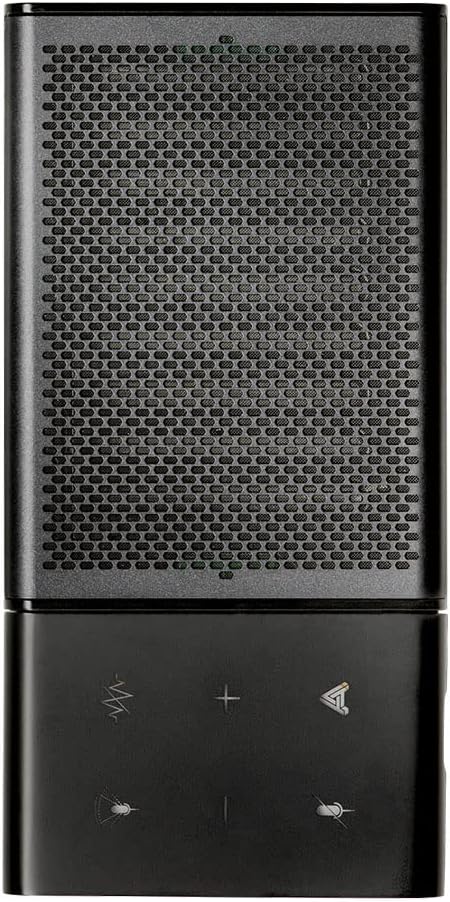
Image: All items included in the Audeze Filter Speakerphone package.
ویډیو: یو اوورview of the Audeze Filter Speakerphone, including unboxing and initial setup. This video demonstrates the physical components and accessories.
3. محصول ختم شوview
The Audeze Filter is designed for portability and ease of use, featuring a sleek aluminum chassis. It is comparable in size to a large cellphone when folded.
3.1 فزیکي ځانګړتیاوې
- کنټرولونه: Touch-sensitive buttons for mute, AI filter, volume adjustment, and call management.
- مایکروفونونه: Intelligent beamforming microphone array.
- سپیکر: Patented Audeze Planar Magnetic Speaker optimized for speech clarity.
- د USB-C پورټ: د چارج کولو او تار لرونکي اتصال لپاره.
- د بریښنا تڼۍ: د اسانه لاسرسي لپاره په اړخ کې موقعیت لري.
- د LED شاخص: د حالت په اړه فیډبیک وړاندې کوي.
- پوښي ډیزاین: Allows the speaker to stand upright for optimal sound direction or fold flat for portability.

Image: Close-up of the speakerphone's control panel and speaker grille.

Image: The Audeze Filter Speakerphone in its upright position, ready for use.

Image: Dimensions of the Audeze Filter Speakerphone.

Image: The Audeze Filter Speakerphone in its compact, folded state.

Image: The Audeze Filter Speakerphone neatly stored in its protective carry case.
4. ترتیب کول
4.1 د وسیلې چارج کول
The Audeze Filter has a built-in rechargeable Lithium Polymer battery, providing up to 15 hours of usage. To charge:
- Connect the provided USB-C cable to the USB-C port located on the inside of the speakerphone when it is unfolded.
- Connect the other end of the USB-C cable to a power source (e.g., computer, wall adapter). If your power source only has a USB-A port, use the included USB-C to USB-A adapter.
- بشپړ چارج شاوخوا 2.5 ساعته وخت نیسي.
۸ پاور آن/بند
To power on the device, press the singular power button located on the side. The LED indicator will illuminate. To power off, press and hold the power button.
4.3 د بلوتوټ جوړه کول
The Audeze Filter supports Bluetooth connectivity for wireless use with compatible devices.
- Power on the Audeze Filter. It will automatically enter pairing mode, indicated by a blinking LED.
- ستاسو په وسیله (سمارټ فون، ټابلیټ، لیپ ټاپ) کې، د بلوتوټ ترتیباتو ته لاړ شئ.
- Select "Audeze Filter" from the list of available devices to connect.
- For Android devices, a prompt may appear for quick connection. For other operating systems like Windows or macOS, you may need to manually select it in Bluetooth settings.
۴.۳.۳ د USB وائرډ اتصال
For a direct and stable connection, you can use the USB-C cable:
- Connect one end of the USB-C cable to the Audeze Filter's USB-C port.
- Connect the other end to your computer's USB-C port. Use the provided USB-C to USB-A adapter if necessary.
- The device will be recognized as an audio input/output device.
۴. د سپیکر فون چلول
5.1 کنټرولونه
The Audeze Filter features intuitive touch controls on its surface:
- تteۍ غږول: Located at the upper left, mutes/unmutes the microphone.
- AI Filter Button: Located to the right of the mute button, cycles through AI Noise Suppression settings (Off, Low, Medium, High).
- د حجم تڼۍ (+/-): Adjust speaker volume. Long-press to skip tracks (forward/reverse) when listening to media.
- ملټي بټن: Located at the lower right, used for accepting and rejecting phone calls.
5.2 AI Noise Filtering
The Audeze Filter utilizes A.I. to identify and remove background noises, enhancing voice clarity. It is trained to recognize over 1000 different sounds, such as barking dogs, crying babies, fan noises, and car sounds.
- Adjust the level of noise suppression (Low, Medium, High) via the AI Filter button on the device or through the companion app.
۷ د بیم جوړولو مایکروفونونه
The intelligent beamforming microphone array allows you to adjust the microphone pickup pattern to suit your environment:
- 30°: Ideal for a single user directly in front of the speakerphone.
- 90°: Suitable for a small group or two people facing the speakerphone.
- 180°: For users on one side of a table.
- 360°: Best for multiple participants around the speakerphone in a conference setting.
5.4 Companion App (Audeze Hub)
The Audeze Hub app, available for iOS and Android, provides advanced control and customization options for your Audeze Filter Speakerphone.
- د بیټرۍ ژوند شاخص: View د بیټرۍ پاتې برخهtage.
- Speaker Boost: Increase speaker loudness by up to 15dB for larger rooms or louder environments.
- د مایکروفون فاصله: Fine-tune the microphone pickup range from 0.5 meters to 5.5 meters to optimize for different room sizes and participant distances.
- مایک خاموش: One-tap microphone mute control.
- اتومات بندول: Configure the device to automatically shut down after 30 minutes, 1 hour, 2 hours, 4 hours, or disable this feature.
- د غږ غوښتنه: Adjust the volume level of voice prompts from 0% to 100%.
- د فرم ویئر تازه معلومات: Keep your device updated with the latest features and improvements by checking for and installing firmware updates directly through the app.
Video: This video provides a comprehensive demonstration of the Audeze Filter Speakerphone, including its unboxing, physical features, and a detailed walkthrough of the Audeze Hub companion app's functionalities, such as AI noise suppression, speaker boost, and microphone distance settings. It also includes a practical test of the AI noise filtering feature.
6. ساتنه
To ensure the longevity and optimal performance of your Audeze Filter Speakerphone, follow these maintenance guidelines:
- پاکول: د وسیلې بهر پاکولو لپاره نرم او وچ ټوکر وکاروئ. د سختو کیمیاوي موادو یا خړوبونکي موادو کارولو څخه ډډه وکړئ.
- ذخیره کول: When not in use, store the speakerphone in its provided leatherette carry case to protect it from scratches and dust.
- دحرارت درجه: د اوږدې مودې لپاره د وسیلې د سختې تودوخې یا مستقیم لمر وړانګو سره د مخ کیدو څخه ډډه وکړئ.
7. ستونزه حل کول
If you encounter issues with your Audeze Filter Speakerphone, refer to the following common solutions:
- Difficulty Hearing Others / Low Volume:
- Check the volume level on the device and your connected computer/smartphone.
- Use the Audeze Hub app to activate the Speaker Boost ځانګړتیا.
- Others Cannot Hear You Clearly / Background Noise:
- ډاډ ترلاسه کړئ چې مایکروفون خاموش نه دی.
- تنظیم کړئ د AI شور کمول level (Low, Medium, High) via the device button or the Audeze Hub app.
- تنظیم کړئ Beamforming setting to focus on the speaker(s) and minimize ambient noise.
- In the Audeze Hub app, verify the د مایکروفون فاصله setting is appropriate for your position relative to the speakerphone.
- د بلوتوټ ارتباط مسلې:
- Ensure the speakerphone is powered on and in pairing mode (blinking LED).
- Turn off and on Bluetooth on your connecting device.
- وسیله په خپل بلوتوت ترتیباتو کې هیر کړئ او بیا جوړه کړئ.
- Try connecting via the USB-C cable as an alternative.
- د فرم ویئر تازه کولو ستونزې:
- Ensure the device has sufficient battery charge before attempting an update.
- Maintain a stable Bluetooth connection between the speakerphone and the device running the Audeze Hub app during the update process.
8. مشخصات
| فیچر | تفصیل |
|---|---|
| مواد | المونیم |
| د ماډل نوم | Filter Speakerphone |
| د سپیکر ډول | سپیکرفون |
| ځانګړی ځانګړنه | A.I. Noise filtering |
| وړاندیز شوي استعمالونه | For Computers, For Smartphones or Tablets, For Online Meetings, For Travel |
| مطابقت لرونکې وسیلې | Android, Mac, Windows, iPhones |
| شاملې برخې | USB-C کیبل |
| د محصول ابعاد | ۱۶"د x ۲۶"وچ x ۴۷"ح |
| د توکي وزن | 280 ګرامه (9.9 اونس) |
| د بې سیمه مخابراتو ټیکنالوژي | بلوتوث |
| د بریښنا سرچینه | د بیټرۍ چلول |
| بیټرۍ | 1 لیتیم پولیمر بیټرۍ ته اړتیا ده (شامل ده) |
| د آډیو ډرایور ډول | د پلانر مقناطیسي چلوونکی |
| د سپیکر اعظمي تولید ځواک | 10 واټ |
| د ارتباط ټیکنالوژي | بلوتوث، USB |
| د آډیو وتلې حالت | سټیریو |
| د نصب کولو ډول | د میز ټاپ غر |
| د چارج کولو وخت | 2.5 ساعته |
9. تضمین او ملاتړ
The Audeze Filter Speakerphone comes with a بشپړ تضمین. For detailed warranty information, product support, or to contact customer service, please visit the official Audeze Store: