
1. پیژندنه
Thank you for choosing the typecase Touch iPad Keyboard Case. This manual provides detailed instructions for setting up, operating, and maintaining your keyboard case to ensure optimal performance and longevity. Please read this manual thoroughly before use.
2. مطابقت
This keyboard case is designed for specific iPad models. Please verify your iPad model number to ensure compatibility.
- iPad 10th Generation (10.9-inch, 2022): ماډلونه A2696، A2757، A2777
- iPad A16 (11th Generation, 2025): ماډلونه A3354، A3355، A3356
To verify your iPad model:
- طريقه 1: Check the back of your iPad for the model number (e.g., A2696).
- طريقه 2: Go to iPad Settings > General > About > Model Number. Tap the model number to display the A-number.
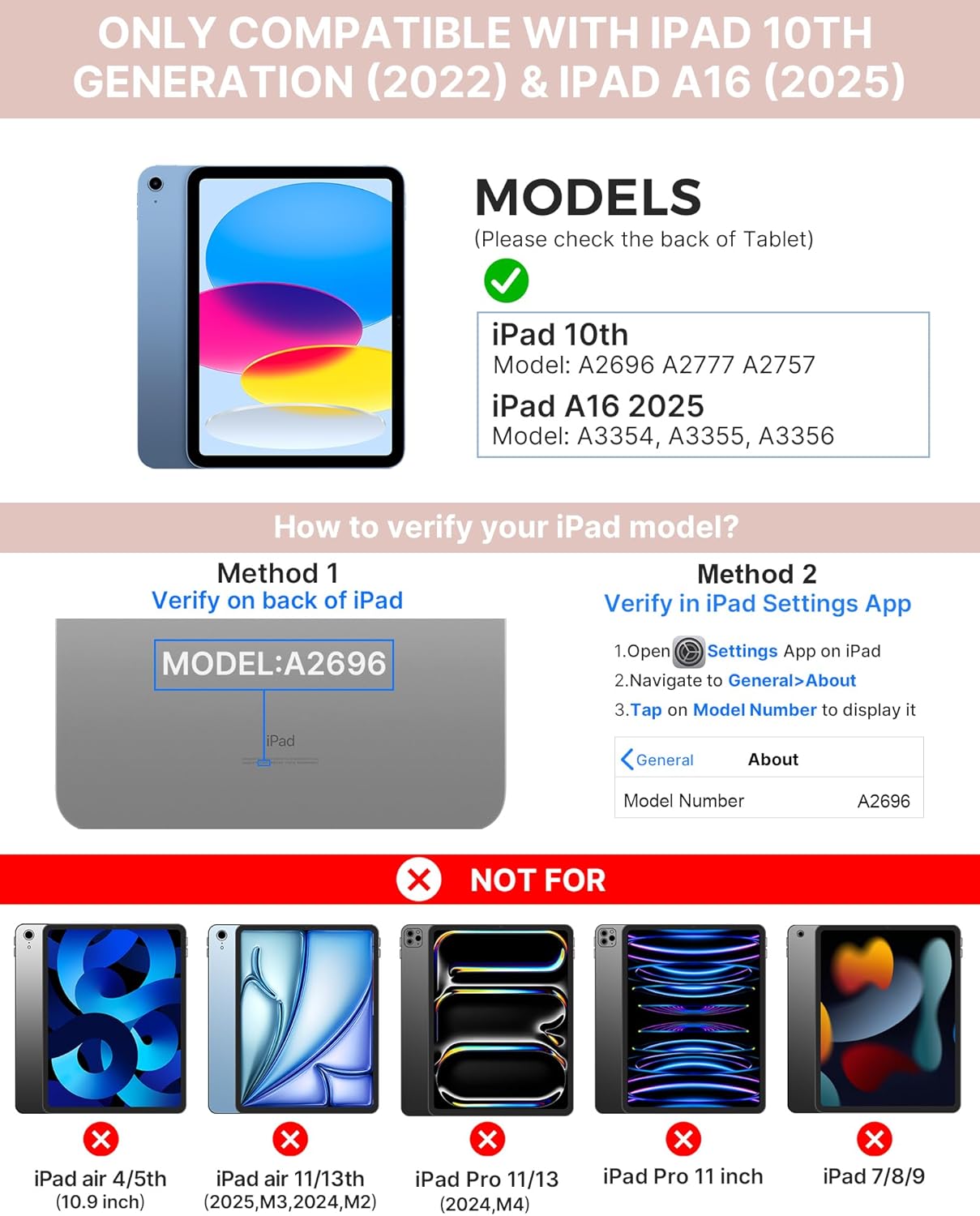
Image: Visual guide for identifying compatible iPad models and verifying the model number on the device or through settings.
3. د بسته محتويات
په بسته کې شامل دي:
- 1 x typecase Touch iPad Keyboard Case
- 1 X USB-C چارج کیبل
- 1 x د کارونکي لارښود
۴. د تنظیم لارښوونې
۳.۱ د کیبورډ چارج کول
Before initial use, fully charge the keyboard. Connect the provided USB-C charging cable to the keyboard's charging port and a power source. The charging indicator light will show the charging status.
- ولاړ: تر 1 کال پورې
- Daytime use (2 hours/day with backlight off): تر 3 میاشتو پورې
- Nighttime use (2 hours/day with backlight on): تر 2 اونیو پورې

Image: Close-up of the keyboard's USB-C charging port and battery life specifications.
۲.۲ د iPad سره جوړه کول
- ډاډ ترلاسه کړئ چې کیبورډ چارج شوی دی.
- Turn on the keyboard by pressing the power button. The Bluetooth indicator light will flash.
- په خپل iPad کې، لاړ شئ ترتیبات> بلوتوټ.
- بلوتوث فعال کړئ. ستاسو iPad به د شته وسایلو لټون وکړي.
- Select "typecase Keyboard" from the list of devices.
- Follow any on-screen prompts to complete the pairing process. The Bluetooth indicator light on the keyboard will turn solid when successfully paired.
5. عملیاتي لارښوونې
۳.۱ ستاسو د iPad نصب کول
Gently insert your iPad into the case, ensuring all edges are securely seated. The case provides full protection for your device.
5.2 د کیبورډ دندې
The keyboard features a standard 78-key layout with a dedicated row of iPadOS shortcut keys for enhanced productivity.

انځور: سر view of the keyboard layout, highlighting the 78-key design and iPadOS shortcuts.
د بیک لیټ کیلي
The keyboard features 11-color RGB LED backlighting with adjustable brightness levels. This allows for comfortable typing in various lighting conditions.
- فشار ورکړئ light bulb key to cycle through backlight colors.
- مطبوعاتي Fn + light bulb key د شاليد روښانتیا تنظیم کړئ.
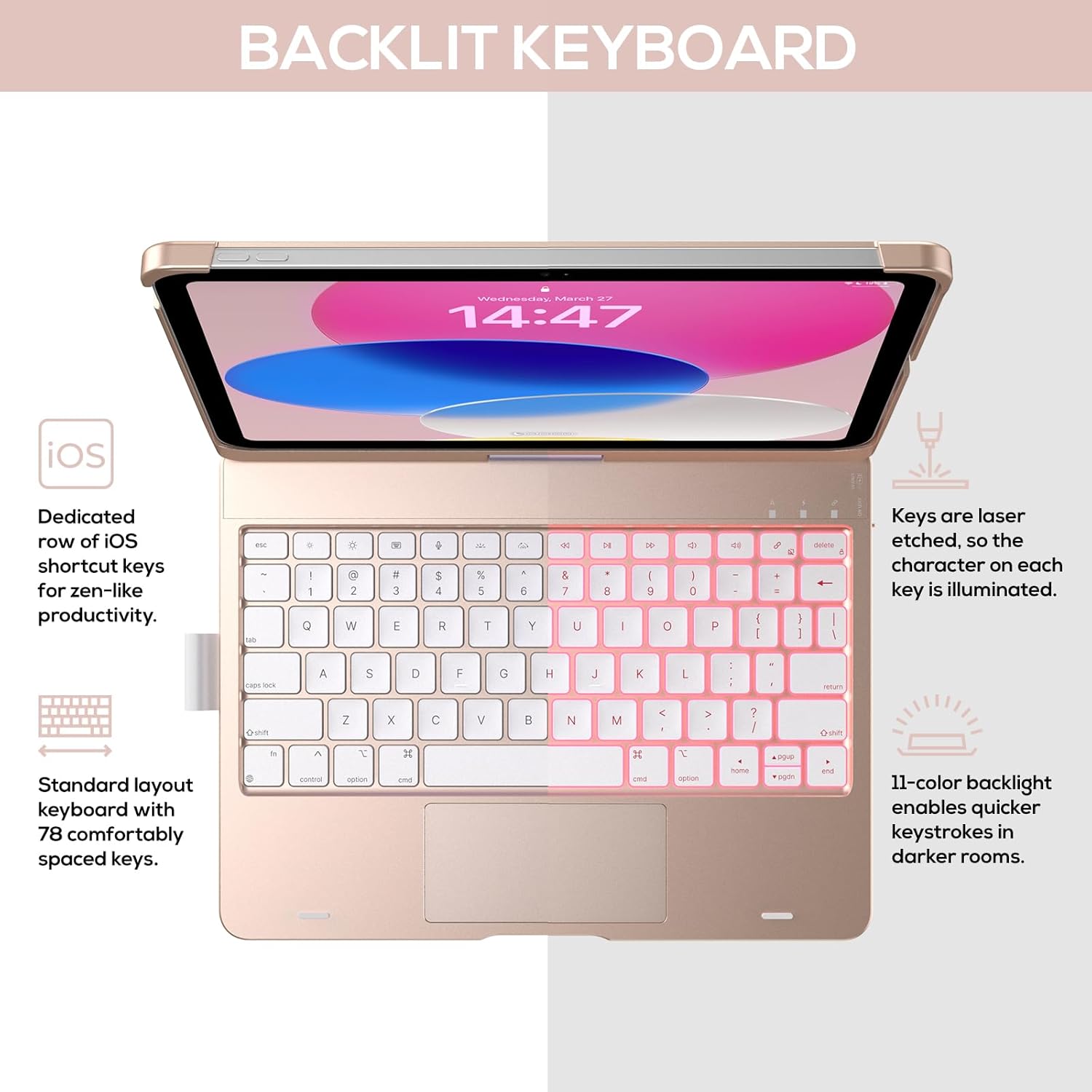
Image: The keyboard with illuminated keys, demonstrating the 11-color backlight and dedicated iOS shortcut keys.
۴.۲ ملټي ټچ ټریک پیډ
The integrated precision trackpad supports multi-gesture controls, enhancing productivity for tasks like document editing, web browsing, and presentation building.
- د یوې ګوتې ټپ: کلیک/ټاکنه
- دوه ګوتو سکرول: پورته/ښکته یا کیڼ/ښي اړخ ته سکرول کړئ
- د زوم کولو لپاره پنچ: زوم ان/آؤټ
- په درې ګوتو پورته پورته کول: د اپلیکیشن سویچر خلاص کړئ
- په درې ګوتو ښکته کول: کور سکرین ته بیرته راشئ

Image: Diagram showing common multi-touch gestures for the trackpad, including managing files, web لټون کول، او د اپلیکیشن بدلول.
5.4 360° Rotatable Hinge and Use Modes
The patented 360° hinge allows for versatile use of your iPad in 7 unique modes, adapting to various tasks from typing to viewing.
- د لپ ټاپ حالت: Traditional laptop setup for typing.
- د ولاړ حالت: لپاره مثالی viewمنځپانګه
- د خیمې حالت: Stable for touch interaction or presentations.
- د ټابلیټ حالت: Fold the keyboard behind the iPad for tablet use. Keys are protected in this mode.
- Corner Mode: Angled for comfortable drawing or writing.
- د شریکولو حالت: Rotate the screen to share content with others.
- Protect Mode: Close the case to fully protect the iPad.
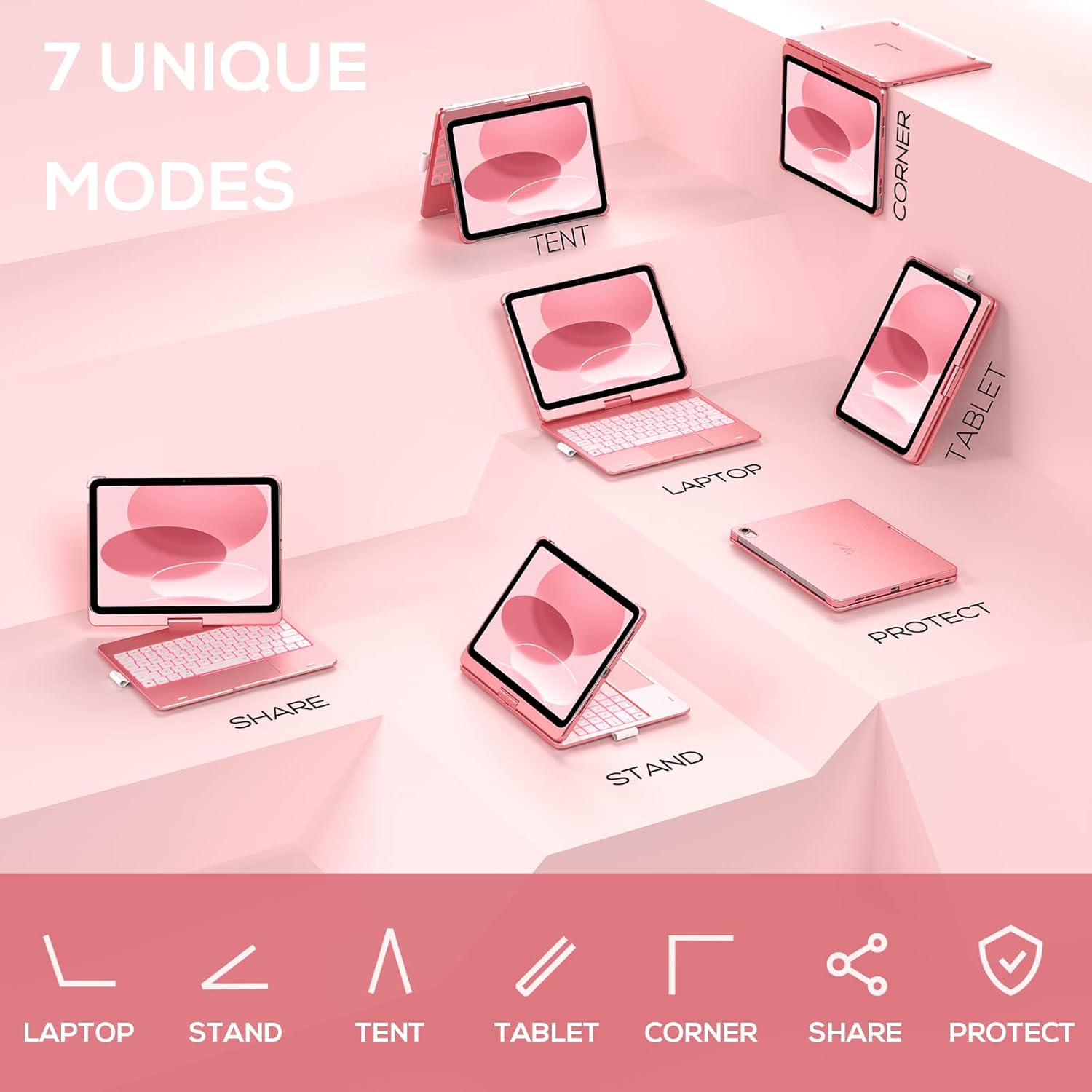
Image: A visual representation of the seven different configurations the keyboard case can be used in, including laptop, stand, and tablet modes.
۶.۴ د خوب او ویښیدو اتومات فعالیت
The case features an auto sleep/wake function. Opening the case will wake your iPad, and closing it will put your iPad to sleep, helping to conserve battery life for both the iPad and the keyboard.

Image: A user's hand on the trackpad, illustrating the built-in trackpad and the auto sleep/wake feature that activates when the case is opened or closed.
5.6 Apple Pencil Holder
An integrated holder is provided for your Apple Pencil, ensuring it is securely stored and easily accessible.
6. ساتنه
6.1 پاکول
To clean the keyboard case, use a soft, damp cloth. Avoid using harsh chemicals or abrasive materials, as these may damage the surface. Ensure the charging port is dry before charging.
6.2 ذخیره کول
When not in use for extended periods, store the keyboard case in a cool, dry place. It is recommended to fully charge the keyboard before long-term storage to maintain battery health.
7. ستونزه حل کول
۷.۱ کیبورډ نه نښلي
- ډاډ ترلاسه کړئ چې کیبورډ فعال او چارج شوی دی.
- Check that Bluetooth is enabled on your iPad.
- د خپل iPad د بلوتوث ترتیباتو کې وسیله هیر کړئ او د بیا جوړې کولو هڅه وکړئ.
- خپل iPad او کیبورډ دواړه بیا پیل کړئ.
۸.۴ کیلي ځواب نه ورکوي
- ډاډ ترلاسه کړئ چې کیبورډ د بلوتوث له لارې په سمه توګه وصل دی.
- د کیبورډ د بیټرۍ کچه وګورئ.
- د کیلي شاوخوا هر ډول کثافات پاک کړئ.
7.3 Trackpad Not Working
- ډاډ ترلاسه کړئ چې کیبورډ وصل دی.
- Check iPad settings for trackpad functionality (Settings > General > Trackpad).
- کیبورډ او iPad بیا پیل کړئ.
۶.۳ د شا څراغ کار نه کوي
- ډاډ ترلاسه کړئ چې کیبورډ فعال دی.
- Press the backlight control keys (light bulb key, Fn + light bulb key) to activate or adjust.
- د بیټرۍ کچه وګورئ؛ ټیټه بیټرۍ ممکن د شا روښانتیا غیر فعاله کړي.
8. مشخصات
| د ماډل شمیره | KB201T-100 |
| د محصول ابعاد | ۱.۷۲ x ۶.۳ x ۴.۷۶ انچه (۶.۳" لیتر x ۱.۷۲" واټ x ۴.۷۶" هات) |
| د توکي وزن | ۲.۴۵ پونډه |
| د ارتباط ټیکنالوژي | بلوتوث |
| د کیبورډ توضیحات | Flexible, 78-key layout with iPadOS shortcuts |
| ځانګړي ځانګړتیاوې | 360° Rotatable, 11-Color Backlit, Ergonomic, Lightweight, Multi-Touch Trackpad, Auto Sleep/Wake, Apple Pencil Holder |
| د کیبورډ شاته رڼا کول | RGB (11 رنګونه) |
| د بیټرۍ ډول | 1 لیتیم پولیمر بیټرۍ (شامل) |
9. تضمین او ملاتړ
typecase is committed to product quality and customer satisfaction. This product comes with the following support:
- د بدلولو خدمت: Within 1 year of purchase.
- د بیرته ورکولو پالیسي: د پیرودلو څخه د ۱۵ ورځو دننه.
For any issues or inquiries, please contact typecase customer support for quick feedback and assistance.

Image: Information on typecase's after-sales service, including replacement, refund, and customer support.