
1. پیژندنه
Thank you for choosing the DELTACO Gaming PM80 Wireless Optical Gaming Mouse. This manual provides essential information for setting up, operating, and maintaining your new gaming mouse. Please read these instructions carefully before use to ensure optimal performance and longevity of your device.
2. د بسته محتويات
- DELTACO Gaming PM80 Wireless Optical Gaming Mouse
- د USB بې سیم رسیدونکی
- د USB چارج کیبل
- د کارن لارښود
3. محصول ختم شوview
The DELTACO Gaming PM80 is a high-performance wireless optical gaming mouse designed for precision and comfort. It features 7 programmable buttons, adjustable DPI up to 4800, and customizable illumination. The mouse is rechargeable, ensuring uninterrupted gaming sessions.
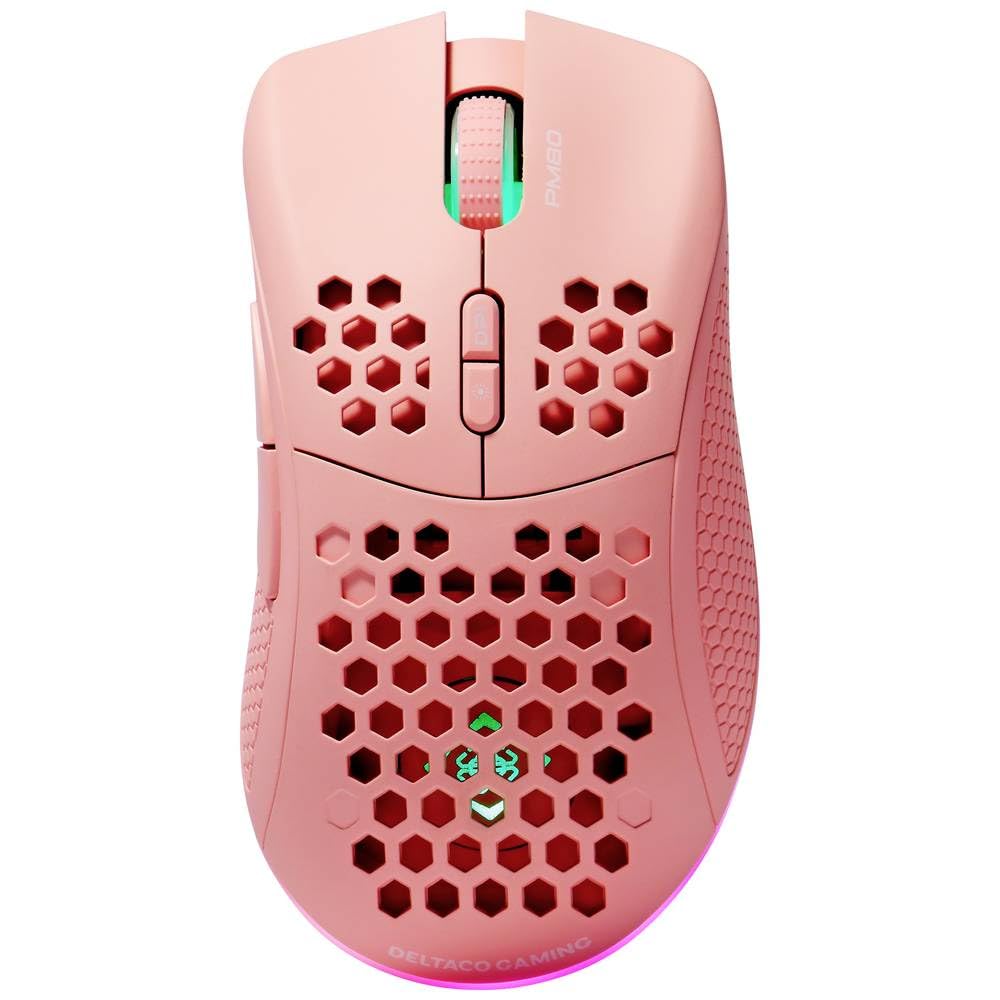
Image: DELTACO Gaming PM80 Wireless Optical Gaming Mouse. This image displays the mouse from a top-down perspective, highlighting its ergonomic design, the central scroll wheel, and the arrangement of its seven buttons.
د تڼۍ دندې:
- د کیڼ کلیک تڼۍ: د معیاري لومړني کلیک فعالیت.
- د ښي کلیک تڼۍ: د معیاري ثانوي کلیک فعالیت.
- سکرول ویل: پورته/ښکته سکرول کوي، او د منځني کلیک تڼۍ په توګه کار کوي.
- د DPI سایکل تڼۍ: Changes the mouse's sensitivity (DPI).
- د وړاندې کولو تڼۍ: مخ په وړاندې ځي web براوزرونه یا file سپړونکي
- شاته تڼۍ: شاته نیویګیټ کوي web براوزرونه یا file سپړونکي
- Illumination Mode Button: Cycles through different lighting effects or turns illumination on/off.
4. ترتیب کول
4.1. د موږک چارج کول
- Connect the small end of the USB charging cable to the charging port on the front of the mouse.
- Connect the larger end of the USB charging cable to an available USB port on your computer or a USB wall adapter.
- The mouse's illumination will indicate charging status (e.g., breathing effect, specific color). A full charge typically takes 2-3 hours.
- Once fully charged, the illumination may change or turn off. Disconnect the charging cable.
۲. د USB بېسیم رسیور سره نښلول
- د USB بېسیم ریسیور ومومئ، چې معمولا د موږک په لاندې برخه کې په یوه کڅوړه کې ساتل کیږي.
- رسیور د هغې د ذخیره کولو ځای څخه لرې کړئ.
- د USB بېسیم ریسیور په خپل کمپیوټر کې موجود USB پورټ کې ولګوئ.
- ستاسو کمپیوټر باید په اتوماتيک ډول اړین چلوونکي ومومي او نصب کړي. دا ممکن یو څو شیبې وخت ونیسي.
4.3. بریښنا کول/بندول
- د موږک په ښکته برخه کې د بریښنا سویچ ومومئ.
- Slide the switch to the 'ON' position to power on the mouse. The illumination will light up.
- To conserve battery life, slide the switch to the 'OFF' position when the mouse is not in use for extended periods.
5. عملیاتي لارښوونې
5.1. بنسټیز کارول
Once connected and powered on, the mouse is ready for use. Move the mouse on a flat surface to control the cursor on your screen. Use the left and right click buttons for primary and secondary actions, and the scroll wheel for navigation.
۴.۴. د DPI سمون
The DPI (Dots Per Inch) setting determines the sensitivity of your mouse. The DELTACO Gaming PM80 offers multiple DPI levels up to 4800 DPI. To adjust the DPI:
- فشار ورکړئ د DPI سایکل تtonۍ (typically located behind the scroll wheel).
- Each press will cycle through the available DPI settings. The mouse's illumination may change color or flash to indicate the current DPI level.
- Select the DPI setting that best suits your preference for gaming or general use.
5.3. Illumination Control
The DELTACO Gaming PM80 features customizable illumination. To change the lighting effects:
- فشار ورکړئ Illumination Mode Button (د محصول اوور ته مراجعه وکړئview د موقعیت لپاره).
- Each press will cycle through different lighting modes, such as static colors, breathing effects, or off.
6. ساتنه
6.1. پاکول
- ډاډ ترلاسه کړئ چې موږک د پاکولو دمخه بند دی.
- د موږک سطحه د پاکولو لپاره نرم، وچ، لینټ نه پاک ټوکر وکاروئ.
- د سختې خاورې لپاره، لږ څهampټوکر د اوبو یا یو نرم، غیر خارښونکي پاکونکي سره ومینځئ. د ډیر رطوبت څخه ډډه وکړئ.
- سخت کیمیاوي مواد، محلولونه، یا خړوبونکي مواد مه کاروئ، ځکه چې دا کولی شي د موږک پای ته زیان ورسوي.
- د سکرول ویل او تڼۍ درزونو شاوخوا پاکولو لپاره د پنبې سویب یا فشار شوي هوا وکاروئ.
6.2. ذخیره کول
When not in use for extended periods, store the mouse in a cool, dry place away from direct sunlight and extreme temperatures. Ensure the power switch is in the 'OFF' position to preserve battery life.
7. ستونزه حل کول
- موږک ځواب نه ورکوي:
- ډاډ ترلاسه کړئ چې موږک فعال دی.
- Check if the USB wireless receiver is securely plugged into a working USB port.
- Verify the mouse battery is charged. Connect the charging cable and try again.
- هڅه وکړئ چې ریسیور په بل USB پورټ کې ولګوئ.
- خپل کمپیوټر بیا پیل کړئ.
- ځنډ یا وقفه ای اړیکه:
- Ensure the mouse is within close proximity to the USB receiver (ideally within 10 meters).
- Avoid placing the receiver near other wireless devices or sources of interference (e.g., Wi-Fi routers, cordless phones).
- ډاډ ترلاسه کړئ چې موږک په بشپړ ډول چارج شوی دی.
- د کرسر حرکت بې نظمه یا ناسم دی:
- د موږک په لاندې برخه کې نظري سینسر د نرم او وچ ټوکر سره پاک کړئ.
- ډاډ ترلاسه کړئ چې تاسو موږک په مناسب سطحه کاروئ (د مثال په توګه، د موږک پیډ). د ډیر انعکاس کونکي یا شفاف سطحو څخه ډډه وکړئ.
- Adjust the DPI setting to a lower sensitivity if the cursor is too fast.
- روښانتیا کار نه کوي:
- ډاډ ترلاسه کړئ چې موږک فعال دی.
- Press the Illumination Mode Button to cycle through modes, ensuring it's not set to 'off'.
- Check battery level; low battery might disable illumination.
8. مشخصات
| فیچر | تفصیل |
|---|---|
| برانډ | ډیلټاکو لوبو |
| د ماډل شمیره | GAM-120-P |
| ارتباط | بې سیم (USB رسیدونکی) |
| د سینسر ډول | نظري |
| DPI | تر ۱۰۰۰۰ DPI پورې (د تعدیل وړ) |
| د تڼیو شمیر | 7 |
| د لاس لارښوونه | سمه ده |
| روښانه کول | هو |
| د چارج وړ | هو |
| بیټرۍ ته اړتیا ده | No (Internal Rechargeable) |
9. تضمین او ملاتړ
For warranty information and technical support, please refer to the warranty card included with your product or visit the official DELTACO Gaming webسایټ. د هر ډول تضمین ادعا لپاره د پیرود ثبوت وساتئ.