
پیژندنه
This manual provides detailed instructions for the Docooler F520 Wireless Business Headset. Please read this manual carefully before use to ensure proper operation and to maximize the product's lifespan. Keep this manual for future reference.
The Docooler F520 is a versatile wireless headset designed for business, sport, and everyday use. It features Bluetooth 5.3 for stable connectivity, a retractable earbud for convenience, and a high-definition microphone with noise reduction for clear calls.
د بسته محتويات
The Docooler F520 package includes:
- 1 x Docooler F520 Wireless Headset
- 1 x د USB چارج کیبل
- 2 x Silicone Ear Caps (various sizes)
- 1 x د کارونکي لارښود
محصول پای ته ورسیدview
The Docooler F520 headset is designed for comfort and functionality, featuring a collar clip design and a retractable earbud.

انځور: اصلي view of the Docooler F520 Wireless Headset, showcasing its compact design and retractable earbud.

Image: Diagram illustrating the dimensions and key components of the F520 headset, including the button to retract earbud, LED indicator, Type-C USB port, volume buttons, and microphone.
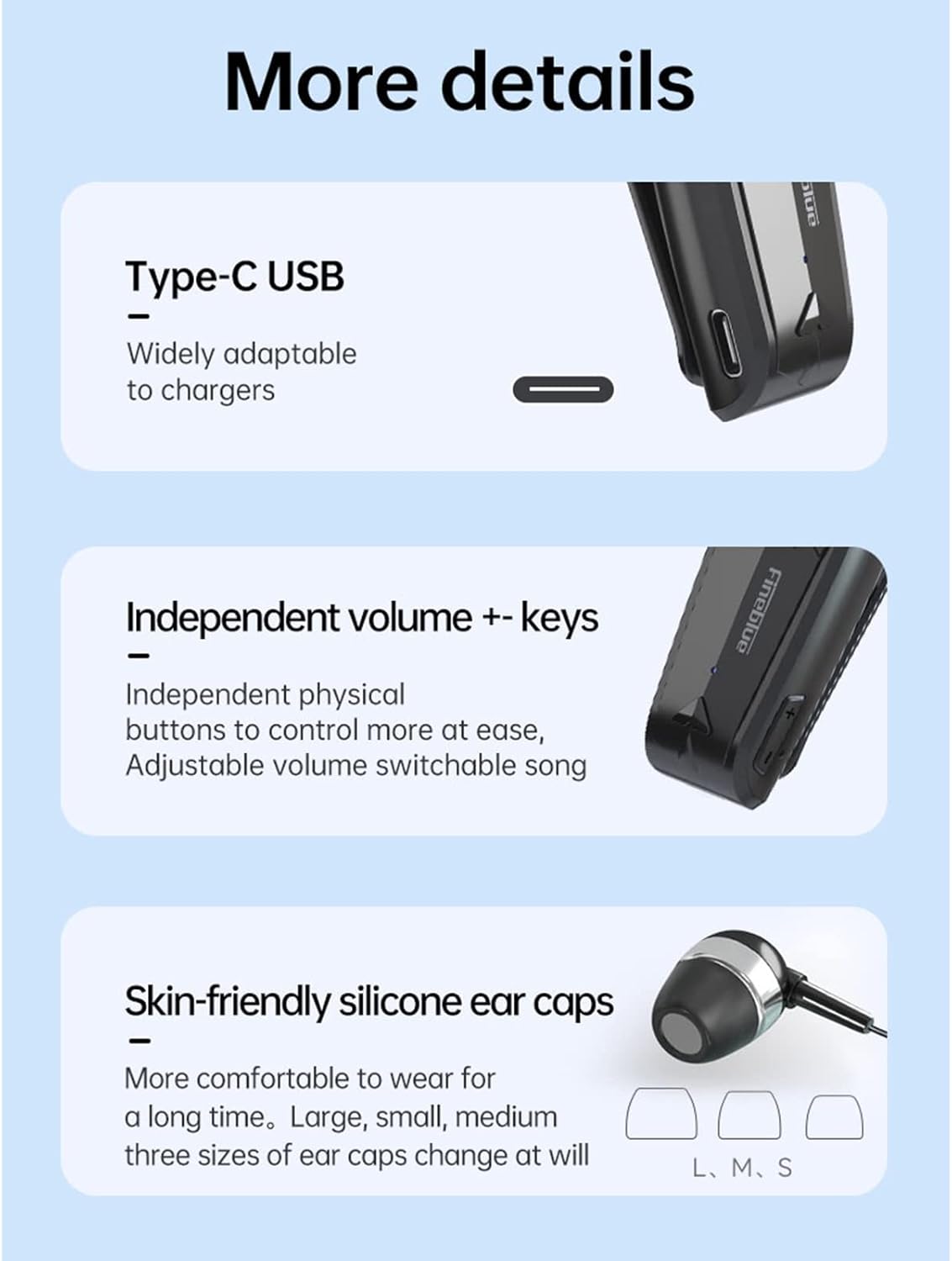
انځور: تفصیلي view highlighting the Type-C USB charging port, independent volume control buttons, and the three sizes of skin-friendly silicone ear caps (L, M, S) included for comfortable wear.
چمتو کول
د هیډسیټ چارج کول
Before first use, fully charge the headset. Connect the provided USB charging cable to the Type-C port on the headset and to a compatible USB power source (e.g., computer USB port, wall adapter). The LED indicator will illuminate during charging and change color or turn off when fully charged (refer to specific LED behavior in the diagram).
- د چارج کولو وخت: نږدې 2 ساعته.
- د بیټرۍ ژوند: Up to 10 hours talk time, 14 hours music time (at 70% volume), 120 hours standby time.
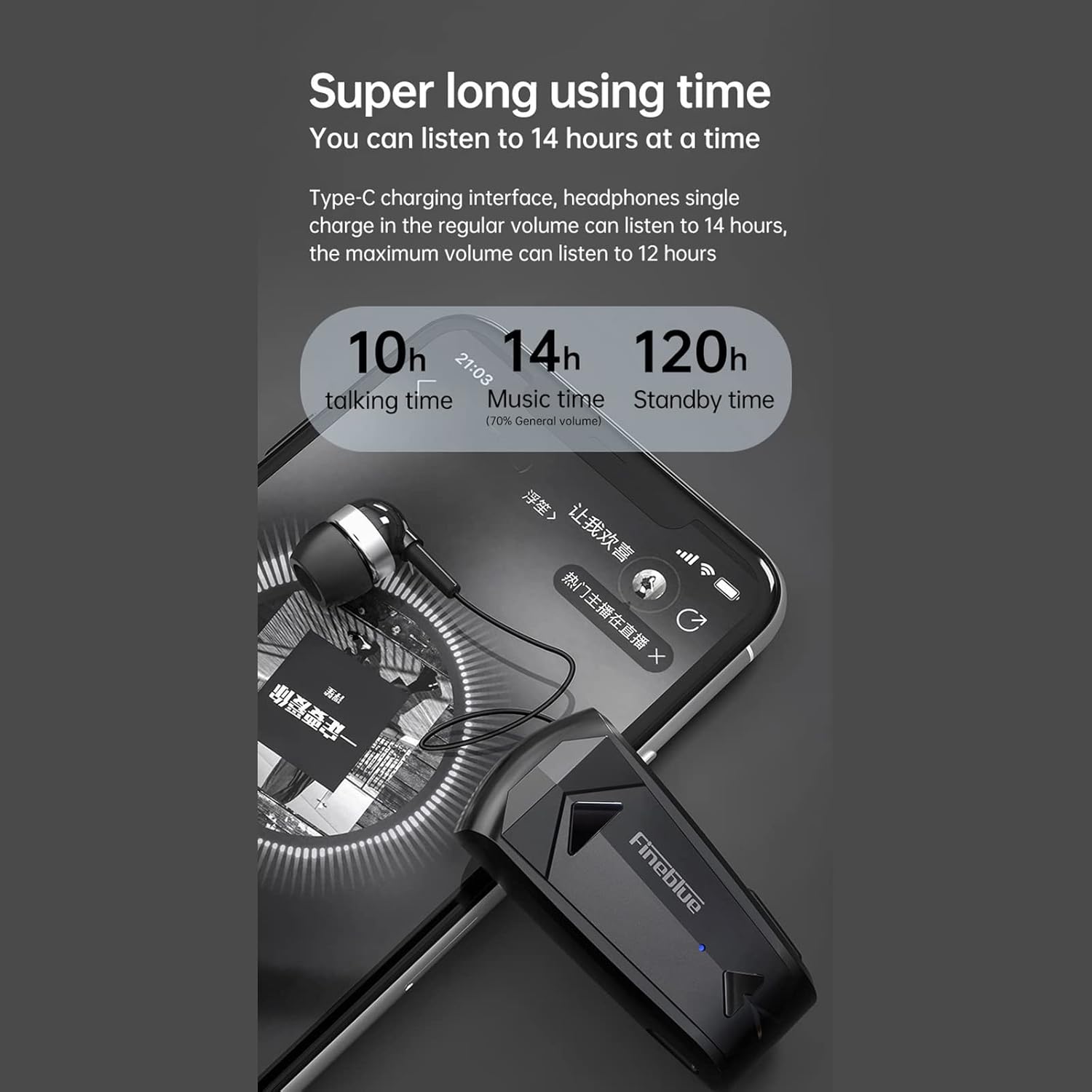
Image: Diagram illustrating the impressive battery life of the F520 headset, showing 10 hours of talk time, 14 hours of music time, and 120 hours of standby time.
د بلوتوث جوړې کول
The F520 headset utilizes advanced Bluetooth 5.3 technology for a stable, fast, and energy-efficient wireless connection.

Image: Visual representation of the Bluetooth 5.3 chip, emphasizing lower power consumption and smoother performance for enhanced wireless connectivity.
- پاور آن: Press and hold the Multi-function Button (MFB) for approximately 3 seconds until the LED indicator flashes, indicating the headset is in pairing mode.
- بلوتوث فعال کړئ: په خپل سمارټ فون یا بل بلوتوت فعال شوي وسیله کې، د بلوتوټ ترتیباتو ته لاړ شئ او ډاډ ترلاسه کړئ چې بلوتوټ فعال دی.
- لټون وسایل: ستاسو وسیله به په اتوماتيک ډول د نږدې بلوتوث وسیلو لټون وکړي.
- نښلول: Select "F520" from the list of available devices. Once connected, the LED indicator will change (e.g., slow blue flash) and you will hear an audible confirmation.
څو ټکي اړیکه: The F520 supports connecting to two smartphones simultaneously. After pairing with the first device, disable Bluetooth on the first device, then pair with the second device. Re-enable Bluetooth on the first device, and the headset should connect to both.
عملیاتي لارښوونې
The F520 headset features intuitive physical buttons for easy control of calls, music, and voice assistant functions.

Image: Diagram illustrating the functions of the physical buttons on the F520 headset, including power, call control, music playback, volume adjustment, and voice assistant activation.
- پاور آن/بند:
Press and hold the Multi-function Button (MFB) for 3 seconds. - ځواب ویل / د زنګ وهلو کالونه:
یو ځل په MFB کلیک وکړئ. - د رد کالونه:
په MFB دوه ځله کلیک وکړئ. - وروستنۍ شمیره بیا ولیکئ:
په MFB دوه ځله کلیک وکړئ. - میوزیک چلول / بندول:
یو ځل په MFB کلیک وکړئ. - سندره بدل کړئ:
Long press the Volume + button for 2 seconds for the next song.
Long press the Volume - button for 2 seconds for the previous song. - حجم تنظیم کړئ:
Click the Volume + button to increase volume.
Click the Volume - button to decrease volume. - Voice Assistant (Siri):
Long press the MFB for 2 seconds to activate your device's voice assistant. - Retract Earbud:
Press the dedicated button on the side of the headset to automatically retract the earbud cable, keeping it organized and tangle-free.
Call Quality and Noise Reduction
The F520 features a built-in high-definition microphone with multiple noise reduction technologies to enhance call audio transmission, ensuring clear sound and high-quality conversations.

Image: Diagram illustrating the intelligent noise reduction feature, showing how ambient noise is reduced for clearer voice calls. It also highlights effective wind noise reduction for speeds up to 60km/h.
Single-Ear Design for Safe Travel
The monaural design allows you to enjoy audio while remaining aware of your surroundings, which is beneficial for driving, riding, or general travel safety.

Image: A person wearing the F520 headset, demonstrating its single-ear design which allows for privacy while also maintaining environmental awareness, promoting safer travel.
ساتنه
پاکول
Wipe the headset with a soft, dry, lint-free cloth. Do not use abrasive cleaners, solvents, or harsh chemicals. Avoid getting moisture into any openings.
ذخیره کول
Store the headset in a cool, dry place away from direct sunlight, extreme temperatures, and humidity. When not in use for extended periods, ensure the earbud cable is retracted to prevent damage.
د ستونزو حل کول
- هیډسیټ به نه چالانیږي: ډاډ ترلاسه کړئ چې هیډسیټ په بشپړه توګه چارج شوی دی. دا د بریښنا سرچینې سره وصل کړئ او څو دقیقې وروسته بیا هڅه وکړئ.
- د وسیلې سره جوړه نشي کیدی: Make sure Bluetooth is enabled on your device and the headset is in pairing mode (LED flashing). Try restarting both the headset and your device. Ensure the headset is not already connected to another device.
- بې غږه یا ټیټ غږ: Check the volume levels on both the headset and your connected device. Ensure the headset is properly paired and selected as the audio output device.
- د زنګ وهلو کیفیت: Ensure the microphone is not obstructed. Move closer to your connected device to ensure a strong Bluetooth signal. Avoid environments with strong electromagnetic interference.
- Earbud cable not retracting: Gently press the retraction button. If it's stuck, ensure there are no obstructions. Do not force the cable.
مشخصات
| فیچر | تفصیل |
|---|---|
| برانډ | ډاکولر |
| د ماډل نوم | F520 |
| د ماډل شمیره | LLS9325159902624XR |
| مواد | ABS+PC+UV |
| بلوتوث نسخه | V5.3 |
| د بیټرۍ ظرفیت | 80mAh |
| د میوزیک غږولو وخت | Approx. 14 hours (70% volume), 12 hours (100% volume) |
| د خبرو وخت | نږدې 10 ساعته |
| ولاړ وخت | نږدې 120 ساعته |
| د چارج کولو وخت | نږدې 2 ساعته |
| د تار اوږدوالی | نږدې 35 سانتي متره |
| وزن | 18.5 ګرامه |
| د اوبو مقاومت | پنروک |
| د کنټرول طریقه | Voice, Physical Buttons |
| مطابقت لرونکې وسیلې | بلوتوث فعال شوي وسایل |
| د غوږ ځای پرځای کول | په غوږ کې |
| د فارم فکتور | په غوږ کې |
| د زنګ وهلو شور کمول | هو |
| غیر فعال شور جلا کول | هیڅ نه |
| د ارتباط ټیکنالوژي | بې سیم (بلوتوث) |
| ځانګړي استعمالونه | Travel, Business, Sport |
د خوندیتوب معلومات
- Do not disassemble, repair, or modify the headset. This may void the warranty and cause damage.
- Keep the headset away from extreme temperatures (hot or cold), direct sunlight, and high humidity.
- د اوریدلو احتمالي زیان څخه د مخنیوي لپاره په لوړ غږ کې د اوږدې مودې اوریدلو څخه ډډه وکړئ.
- وسیله د ماشومانو او څارویو څخه لرې وساتئ.
- محصول او د هغې بیټرۍ د ځایی مقرراتو سره سم په مسؤلیت سره تصفیه کړئ. د کور کثافات مه تصفیه کوئ.
تضمین او ملاتړ
For warranty information, technical support, or any inquiries regarding your Docooler F520 Wireless Business Headset, please refer to the documentation provided at the time of purchase. You may also contact Docooler customer service through their official website or authorized retailers for assistance.