
1. پیژندنه
Thank you for choosing the Stouchi 16K DisplayPort 2.1 Cable. This high-performance cable is designed to connect DisplayPort-enabled desktops, laptops, and graphics cards directly to monitors, HDTVs, and gaming displays. It supports crystal-clear audio and high-resolution video, providing a smooth and immersive visual experience. This manual provides essential information for proper setup, operation, and maintenance of your cable.
2. کلیدي ځانګړتیاوې
- لوړ بینډ ویت: Supports 80Gbps for stable and fast signal transmission without loss.
- Ultra-High Resolution Support: Compatible with 16K (15360x8640) at 60Hz, 10K (10240x4320) at 60Hz, 8K (7680x4320) at 120Hz, and 4K (3840x2160) at 240Hz/165Hz/144Hz.
- شاته مطابقت: Fully compatible with DisplayPort 2.0, 1.4, 1.3, 1.2, and 1.1 standards.
- پرمختللې تکنالوژي: Supports FreeSync and G-Sync for tear-free gaming, Display Stream Compression (DSC), and Dynamic HDR transmission.
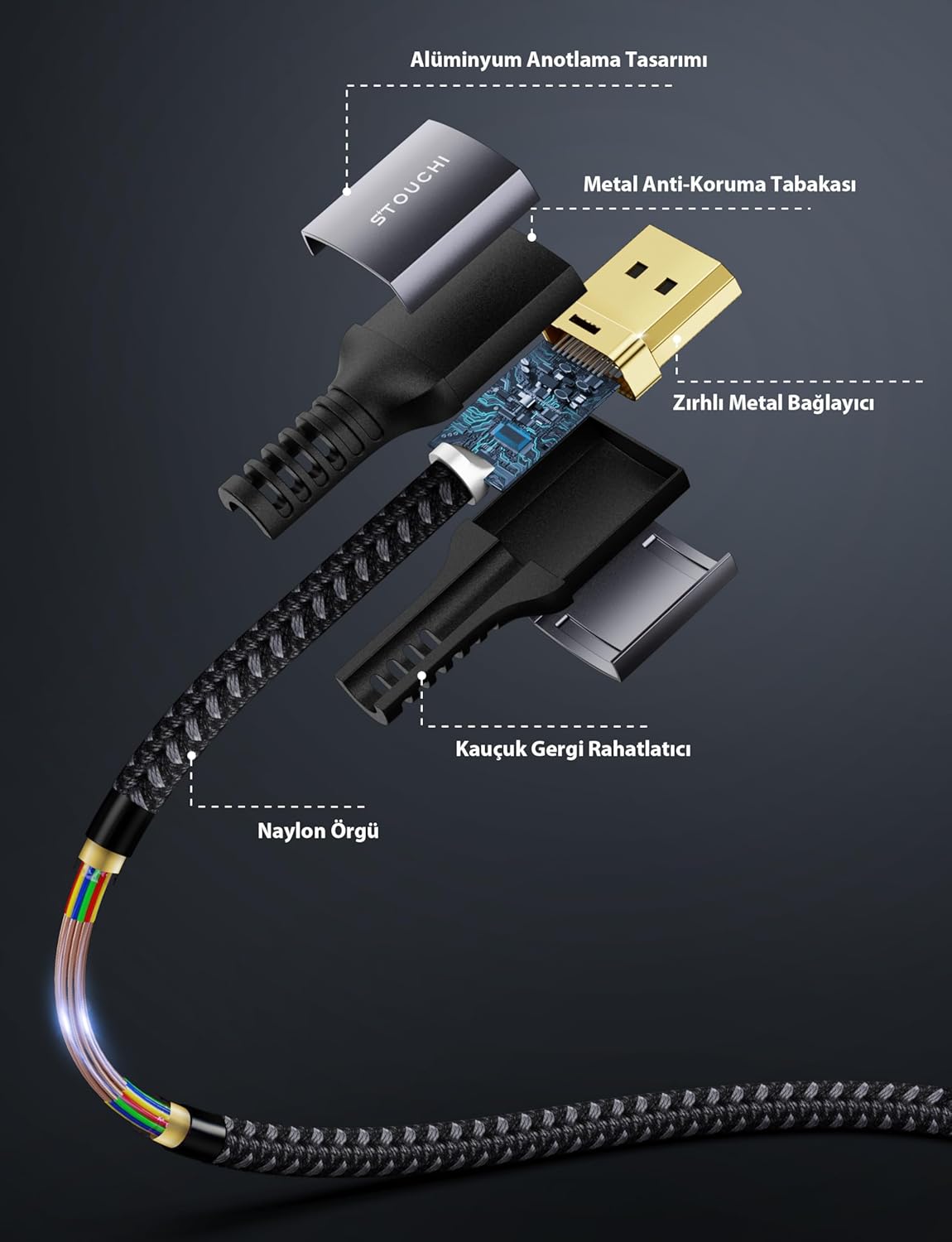
- دوامدار ساختمان: Features 24K gold-plated connectors, 28 AWG tinned copper wire with triple-layer shielding, a high-quality nylon braided sleeve, and an aluminum alloy ultra-thin casing for reliable interference prevention and longevity.
- د دوامدارۍ وده: Engineered to withstand over 30,000 bends, ensuring a long lifespan.
- د کارونکي دوستانه ډیزاین: Features a no-latch design for easy connection and disconnection, and a slim profile to save space and prevent blocking adjacent ports.


۴. د تنظیم لارښوونې
Follow these steps to connect your Stouchi DisplayPort 2.1 Cable:
- د بندرونو پیژندنه: Locate the DisplayPort output on your source device (e.g., computer, graphics card) and the DisplayPort input on your display device (e.g., monitor, HDTV). DisplayPort connectors are typically rectangular with one corner beveled.
- کیبل نښلول: Gently insert one end of the Stouchi DisplayPort 2.1 cable into the DisplayPort output of your source device. Ensure it is fully seated.
- د نندارې سره وصل شئ: Insert the other end of the cable into the DisplayPort input of your display device. Ensure a firm connection.
- په وسایلو کې بریښنا: خپل سرچینه وسیله او د ښودلو وسیله چالان کړئ.
- ان پټ غوره کړئ: On your display device, use the input/source selection menu to choose the correct DisplayPort input.

4. عملیاتي لارښوونې
After connecting the cable, you may need to adjust settings on your computer or display for optimal performance:
- د ښودلو ترتیبات: On your computer, navigate to your operating system's display settings. Verify that the correct resolution and refresh rate are selected for your monitor. For Windows, right-click on the desktop and select 'Display settings' or 'Screen resolution'. For macOS, go to 'System Preferences' > 'Displays'.
- Graphics Card Control Panel: For advanced settings, such as enabling FreeSync or G-Sync, open your graphics card's control panel (e.g., NVIDIA Control Panel, AMD Radeon Software). Ensure that these features are enabled if your monitor and graphics card support them.
- آډیو تولید: If you are using the DisplayPort cable for audio transmission, ensure that your display device is selected as the audio output device in your computer's sound settings.
5. ساتنه
To ensure the longevity and optimal performance of your Stouchi DisplayPort 2.1 Cable, follow these maintenance guidelines:
- پاکول: Use a soft, dry cloth to gently wipe the cable and connectors. Avoid using liquid cleaners or abrasive materials, as these can damage the cable.
- ذخیره کول: When not in use, store the cable in a cool, dry place, away from direct sunlight and extreme temperatures. Avoid tightly coiling the cable or placing heavy objects on it.
- سمبالول: Always grasp the connector ends when plugging or unplugging the cable. Avoid pulling on the cable itself, as this can strain the internal wires and connectors. Do not bend the cable sharply, especially near the connectors.

6. ستونزه حل کول
If you encounter issues with your Stouchi DisplayPort 2.1 Cable, refer to the following troubleshooting steps:
- سیګنال نشته/تور سکرین:
- Ensure both ends of the cable are securely connected to the DisplayPort ports.
- Verify that your monitor is set to the correct DisplayPort input source.
- Try restarting both your computer and monitor.
- Test the cable with another DisplayPort-enabled device or try a different DisplayPort on your current devices, if available.
- ډاډ ترلاسه کړئ چې ستاسو د ګرافیک کارت چلوونکي تازه دي.
- ځلیدونکی/ وقفه ای سیګنال:
- کیبل یا نښلونکو ته د کوم فزیکي زیان لپاره وګورئ.
- Reduce the display resolution or refresh rate in your computer's display settings to see if the issue persists. Some older hardware may not fully support the highest resolutions/refresh rates.
- Ensure the cable is not near sources of strong electromagnetic interference.
- ناسم ریزولوشن یا د تازه کولو کچه:
- Access your computer's display settings and manually select the desired resolution and refresh rate.
- خپل ګرافیک کارت چلوونکي وروستي نسخه ته تازه کړئ.
- ډاډ ترلاسه کړئ چې ستاسو ګرافیک کارت او مانیټر دواړه د مطلوب ریزولوشن او ریفریش نرخ ملاتړ کوي.
If these steps do not resolve the issue, please contact Stouchi customer support.
7. مشخصات
| فیچر | مشخصات |
|---|---|
| برانډ | سټوچي |
| د ماډل شمیره | D16K2 |
| د کیبل نسخه | DisplayPort 2.1 (Backward compatible with DP 2.0, 1.4, 1.3, 1.2, 1.1) |
| بانډ ویت | 80 Gbps |
| Supported Resolutions & Refresh Rates | ۴K (۳۸۴۰x۲۱۶۰) @ ۳۰ هرټز ۴K (۳۸۴۰x۲۱۶۰) @ ۳۰ هرټز ۴K (۳۸۴۰x۲۱۶۰) @ ۳۰ هرټز 4K (3840x2160) @ 240Hz/165Hz/144Hz |
| Key Technologies Supported | HDR, HDCP 2.2, DSC 1.2a, FreeSync, G-Sync |
| نښلونکی مواد | ۲۴ قیراطه د سرو زرو پوښل شوی |
| کنډکټر مواد | 28 AWG Tinned Copper Wire |
| کیبل جاکټ | Nylon Braided Sleeve |
| Casing | Aluminum Alloy Ultra-thin Casing |
| پایښت | د 30,000+ خم عمر |
| مطابقت لرونکې وسیلې | Computer, Monitor, Graphics Card |
| د کیبل اوږدوالی | 2 متره (6.6 فټ) |

8. تضمین او ملاتړ
Stouchi offers a lifetime warranty for this product. To benefit from the lifetime warranty, customers are encouraged to register their product on the official Stouchi webسایټ
For any issues, questions, or support needs, please contact our dedicated support team:
بریښنالیک: support@stouchi.com