
1. پیژندنه
This manual provides detailed instructions for the amazon basics Wired Gaming Mouse, Model ABIM03. This mouse is designed to enhance your gaming and computing experience with its adjustable DPI, customizable RGB lighting, and programmable buttons. Please read this manual thoroughly before use to ensure proper operation and longevity of your device.
2. د محصول ب Featuresې
- د تنظیم وړ DPI: Up to 6400 DPI for precise cursor control and quick movements.
- د اصلاح وړ RGB رڼا: Personalize your mouse with various RGB lighting modes and driver customization options for PC.
- د پروګرام وړ بټنونه: Equipped with multiple programmable buttons for assigning custom functions or macros.
- Gaming-Grade Sensor: Ensures accurate tracking and rapid response for gaming.
- دوامدار ډیزاین: Features extra durable switches and enhanced build quality for extended use.
- Honeycomb Grip: Ergonomic honeycomb design provides a comfortable and secure grip.

Image: The amazon basics Wired Gaming Mouse highlighting its adjustable DPI settings, ranging from 1200 to 7200 (though product states up to 6400).
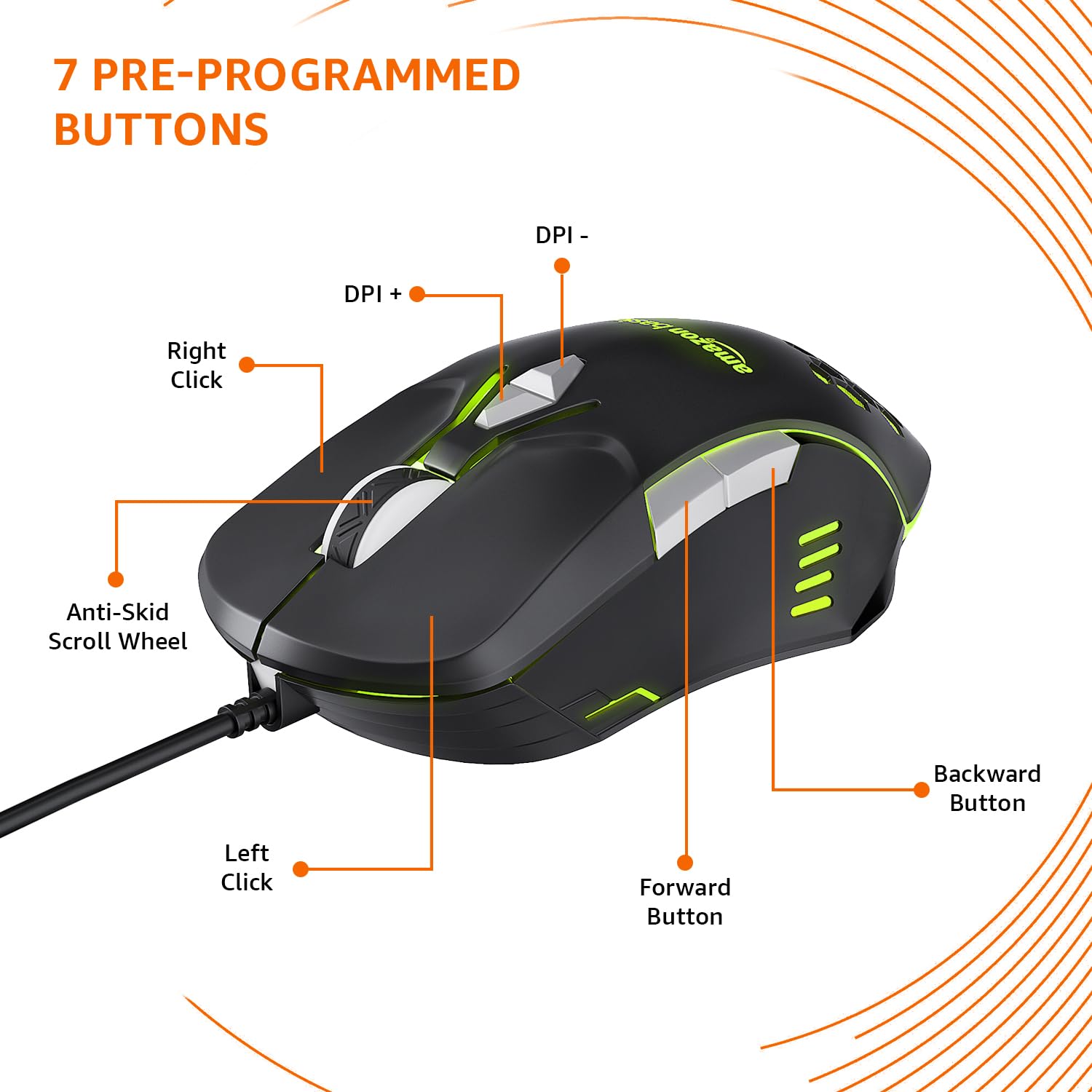
Image: The amazon basics Wired Gaming Mouse showing its 7 pre-programmed buttons, including Left Click, Right Click, Anti-Skid Scroll Wheel, DPI+, DPI-, Forward Button, and Backward Button.

انځور: له پورته څخه ښکته view of the amazon basics Wired Gaming Mouse, emphasizing its honeycomb-designed surface for improved grip and airflow.

Image: The amazon basics Wired Gaming Mouse illuminated with red RGB lighting, showcasing its light and comfortable design.
۴. د تنظیم لارښوونې
- موږک خلاص کړئ: Carefully remove the gaming mouse from its packaging.
- د کمپیوټر سره وصل کړئ: د موږک USB نښلونکی په خپل کمپیوټر کې موجود USB پورټ کې ولګوئ.
- د ډرایور نصب کول: Your operating system (Windows, Linux) should automatically detect and install the necessary drivers. If prompted, follow the on-screen instructions. For advanced customization of RGB and programmable keys, refer to the manufacturer's webد ځانګړي ډرایور سافټویر لپاره سایټ.
- ځای په ځای کول: Place the mouse on a flat, clean surface or a mouse pad for optimal performance.
4. عملیاتي لارښوونې
۵.۱ اساسي فعالیت
- کیڼ کلیک: لومړنۍ کړنه، انتخاب.
- ښي کلیک: دوهم عمل، د شرایطو مینو.
- سکرول ویل: Scroll up/down pages. Pressing the scroll wheel often acts as a middle click.
- مخکی / شاته تڼۍ: معمولا د نیویګیشن لپاره کارول کیږي web براوزرونه یا file سپړونکي
4.2 Adjusting DPI (Dots Per Inch)
The mouse features dedicated DPI adjustment buttons (DPI+ and DPI-) to change cursor sensitivity on the fly. Press these buttons to cycle through different DPI levels up to 6400. A higher DPI setting results in faster cursor movement across the screen with less physical mouse movement.
۵.۳ د RGB رڼا تنظیمول
The mouse includes customizable RGB lighting. Specific lighting modes can often be cycled through using a dedicated button (if present) or through the optional driver software. Refer to the driver software for advanced customization options, including color selection, effects, and brightness.
۵.۲ د پروګرام کولو تڼۍ
The mouse is equipped with programmable buttons. To assign custom functions, macros, or key combinations to these buttons, you will need to install and use the specific driver software provided by the manufacturer. This software typically allows you to create profileد مختلفو غوښتنلیکونو یا لوبو لپاره.
Video: A short product highlight video demonstrating the key features of the amazon basics Wired Gaming Mouse, including adjustable DPI, RGB lighting, programmable buttons, and durable design.
5. ساتنه
- پاکول: د موږک بهرنۍ برخه پاکولو لپاره نرم، وچ ټوکر وکاروئ. د سختې خاورې لپاره، یو څه damp ټوکر کارول کیدی شي، ډاډ ترلاسه شي چې هیڅ مایع موږک ته ننوځي.
- د سینسر پاکول: کله ناکله، په نرمۍ سره د پنبې سویب وکاروئampened with isopropyl alcohol to gently clean the optical sensor on the underside of the mouse. Ensure the mouse is disconnected before cleaning.
- د مایعاتو څخه ډډه وکړئ: Do not immerse the mouse in water or any cleaning solutions.
- ذخیره کول: موږک په یخ او وچ ځای کې د مستقیم لمر وړانګو او سختې تودوخې څخه لرې وساتئ.
6. ستونزه حل کول
| ستونزه | د حل لاره |
|---|---|
| موږک ځواب نه ورکوي. |
|
| د کرسر حرکت بې نظمه یا ناڅاپي دی. |
|
| د پروګرام وړ تڼۍ کار نه کوي. |
|
| د RGB رڼا کار نه کوي یا بنده ده. |
|
7. مشخصات
| فیچر | تفصیل |
|---|---|
| برانډ | د ایمیزون اساسات |
| د ماډل شمیره | ABIM03 |
| د ارتباط ټیکنالوژي | برښنایی (USB) |
| د حرکت کشف ټیکنالوژي | نظري |
| د DPI حد | تر 6400 DPI پورې |
| د پروګرام وړ کیلي | 4 (in addition to standard left/right click and scroll) |
| روښنايي | RGB |
| رنګ | تور |
| د توکي وزن | 145 ګرامه |
| د محصول ابعاد (LxWxH) | 15.8 x 10.4 x 5.4 سانتي متره |
| د هارډویر پلیټ فارم | PC |
| د عملیاتي سیسټم مطابقت | Linux, Windows 7 and above |
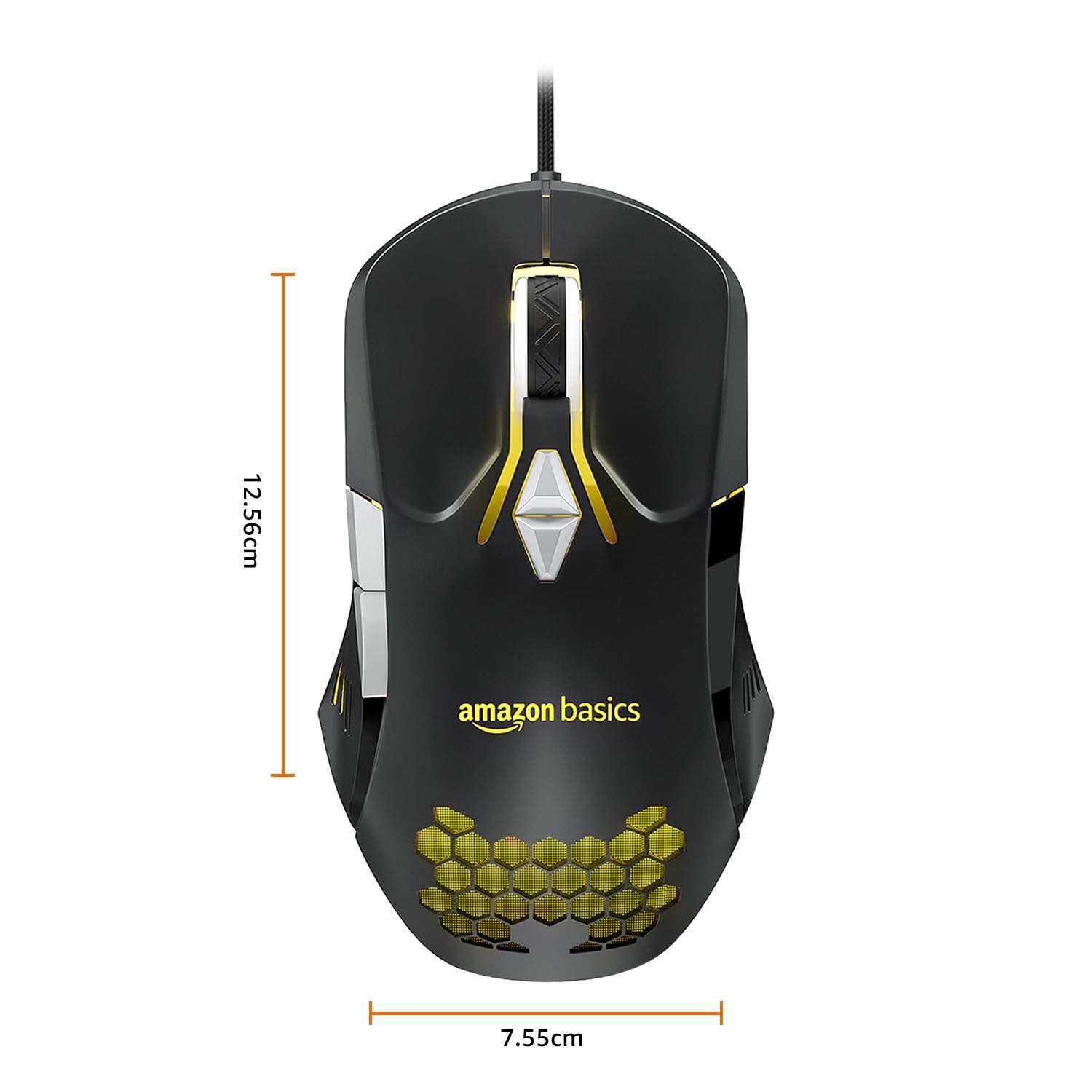
Image: The amazon basics Wired Gaming Mouse with its length (12.56cm) and width (7.55cm) dimensions indicated.
8. د تضمین معلومات
This amazon basics Wired Gaming Mouse comes with a 1 کلن تضمین from the date of purchase. This warranty covers manufacturing defects and issues arising from normal use. It does not cover damage caused by misuse, accidents, unauthorized modifications, or normal wear and tear. Please retain your proof of purchase for warranty claims.
9. ملاتړ
For further assistance, technical support, or warranty claims, please visit the official amazon basics support page or contact customer service through your purchase platform. Ensure you have your product model number (ABIM03) and proof of purchase ready when contacting support.
آنلاین سرچینې:
- د محصول پا Pageه: amazon.in/dp/B0BTD2YN6Y
- amazon basics Store: amazon basics Store