Lenovo ThinkVision P24q-30 24-inch WQHD LED Monitor User Manual
Model: P24q-30
پیژندنه
This manual provides detailed instructions for setting up, operating, maintaining, and troubleshooting your Lenovo ThinkVision P24q-30 24-inch WQHD LED Monitor. Please read this manual thoroughly before using your monitor to ensure proper and safe operation.
په بکس کې څه دي
ډاډ ترلاسه کړئ چې ټول توکي په کڅوړه کې شتون لري:
ThinkVision P24q-30 Widescreen LED Monitor
ډي پي کیبل (ډیسپلی پورټ کیبل)
د USB ډول-A څخه د Type-B کیبل
د بریښنا کیبل
اسناد (د چټک پیل لارښود، د خوندیتوب معلومات)
چمتو کول
۱. د مانیټر سټینډ راټولول
Carefully remove the monitor and stand components from the packaging. Attach the stand base to the stand column, then attach the assembled stand to the back of the monitor. Ensure all connections are secure.
انځور: مخکینۍ برخه view of the Lenovo ThinkVision P24q-30 monitor, showing the display and the attached stand.
2. د کیبلونو نښلول
Connect the necessary cables to the monitor and your computer. The monitor supports DisplayPort and HDMI for video input, and USB for the integrated hub.
د ویډیو کیبل: Connect one end of the provided DisplayPort (DP) cable to the DP port on your computer and the other end to the DP input on the monitor. Alternatively, use an HDMI cable if your computer supports it.
د USB اپ سټریم کیبل: Connect the USB Type-A end of the provided USB cable to your computer and the USB Type-B end to the upstream USB port on the monitor. This enables the monitor's USB hub.
د بریښنا کیبل: د بریښنا کیبل د مانیټر د بریښنا ان پټ سره وصل کړئ او بیا د ځمکې لاندې بریښنایی آوټ لیټ سره وصل کړئ.
انځور: شاته view of the monitor, highlighting the input ports for DisplayPort, HDMI, USB, and power connection.
۴. لومړنی بریښنا فعالول
Press the power button on the monitor to turn it on. Ensure your computer is also powered on. The monitor should automatically detect the input signal. If not, you may need to select the input source using the monitor's OSD (On-Screen Display) menu.
د نظارت عمل کول
1. بریښنا فعال/بند
Press the power button, usually located on the front or side of the monitor, to turn the display on or off.
۳. د ښودنې ترتیبات تنظیم کول (OSD مینو)
The monitor features an On-Screen Display (OSD) menu for adjusting various settings. The physical menu buttons are located on the back-right of the monitor. Use these buttons to navigate and select options.
روښانتیا/ تضاد: د رڼا او تیاره سیمو ترمنځ عمومي رڼا او توپیر تنظیم کړئ.
د رنګ ترتیبات: Modify color temperature, gamma, and color space (sRGB). The monitor features factory calibrated color accuracy and HDR10 support.
د ننوتلو انتخاب: په لاسي ډول د ډیسپلی پورټ او HDMI ان پټونو ترمنځ تیر کړئ.
Picture Quality Enhancement: Utilize features like Eye Comfort Technology, Natural Low Blue Light, and Flicker-Free to reduce eye strain.
قرارداد: The native resolution is 2560 x 1440 (WQHD). Ensure your computer's display settings match this for optimal clarity.
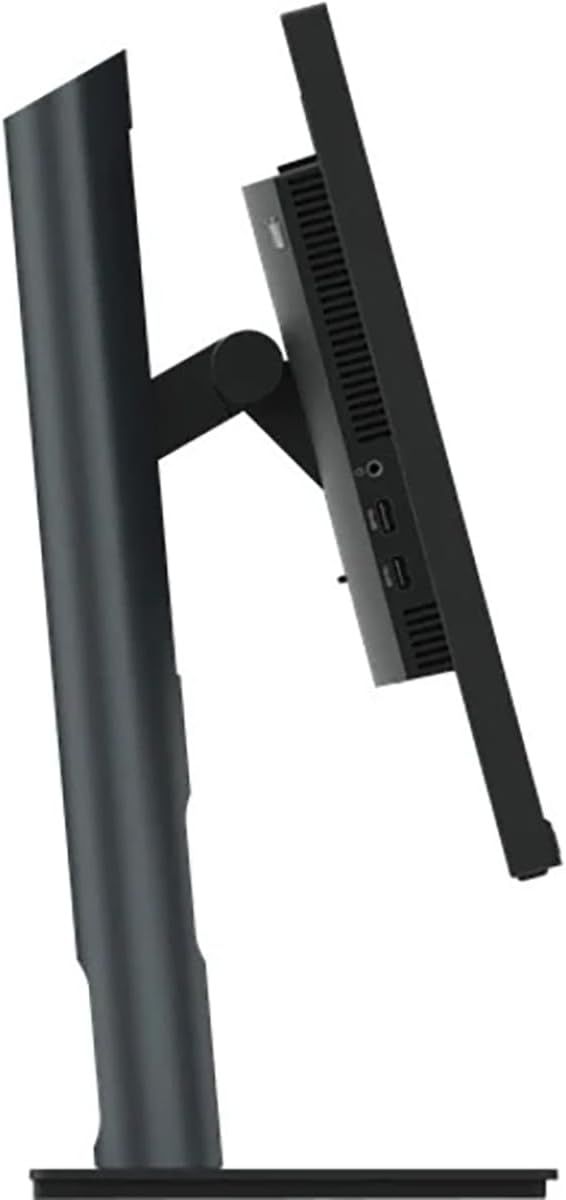
انځور: اړخ view of the monitor, illustrating its thin profile and the stand's connection point, where OSD buttons are typically located on the rear.
سویول تعدیل: مانیټر د هغې په اساس کې چپ یا ښي خوا ته وګرځوئ.
انځور: اړخ view demonstrating the monitor's tilt capability on its stand.
4. Using the USB Hub
With the USB upstream cable connected to your computer, the monitor's integrated USB hub becomes active. You can connect up to 4 USB devices (e.g., keyboard, mouse, USB drive) to the downstream USB ports on the monitor.
ساتنه
مناسب ساتنه ستاسو د مانیټر اوږد عمر او غوره فعالیت تضمینوي.
Verify the refresh rate is set to 60 Hz in your computer's display settings.
USB پورټونه کار نه کوي
Ensure the USB Type-A to Type-B upstream cable is connected from the monitor to your computer.
Check if the computer's USB drivers are up to date.
مشخصات
فیچر
تفصیل
برانډ
Lenovo
د ماډل شمیره
P24q-30
د سکرین اندازه
۷۸۷ انچه
قرارداد
QHD Wide 1440p (2560 x 1440 Pixels)
د اړخ نسبت
16:9
د ښودلو ډول
LED, In-plane Switching (IPS) Technology
د تازه کولو نرخ
60 Hz
د غبرګون وخت
4 ملی ثانیه
روښانتیا
۱۰۵۰ نایټ
د تناسب تناسب
3,000,000:1
Viewزاویه
178 درجې
رنګ Gamut
99٪ sRGB
ارتباط
1x HDMI, 1x DisplayPort, 5x USB (1 upstream, 4 downstream)
ځانګړي ځانګړتیاوې
Eye Comfort Technology, Natural Low Blue Light, Flicker-Free, Height Adjustment, Tilt Adjustment, Swivel Adjustment, HDR10 Support, Factory Calibrated Color Accuracy, USB Hub
د بریښنا مصرف
25 واټ
د توکي ابعاد (D x W x H)
۱۶"د x ۲۶"وچ x ۴۷"ح
د توکي وزن
18 پونډه
د تضمین معلومات
The Lenovo ThinkVision P24q-30 monitor comes with a د 3 کلن تولید کونکي تضمین. For detailed terms and conditions, please refer to the warranty documentation included with your product or visit the official Lenovo support webسایټ
ملاتړ
For further assistance, technical support, or service inquiries, please contact Lenovo customer support. You can find contact information and additional resources on the official Lenovo webسایټ
Ask about setup, troubleshooting, compatibility, parts, safety, or missing instructions. Manuals+ will review the question and use this page’s manual context to help answer it.