
1. پیژندنه
This manual provides detailed instructions for the installation, operation, and maintenance of your TP-Link Deco X50-Outdoor AX3000 Whole Home Mesh WiFi 6 Unit. The Deco X50-Outdoor is designed to extend your mesh WiFi network to outdoor and indoor spaces, providing robust and stable wireless connectivity. Please read this manual thoroughly before using the device to ensure proper setup and optimal performance.
2. د خوندیتوب معلومات
د اور، بریښنا شاک او ټپي کیدو خطر کمولو لپاره تل د خوندیتوب دا اساسي احتیاطي تدابیر تعقیب کړئ:
- دا وسیله اوبه یا رطوبت ته مه ورکوئ.
- هڅه مه کوئ چې وسیله جلا کړئ، ترمیم کړئ، یا ترمیم کړئ.
- یوازې د وسیلې سره چمتو شوي بریښنا اډاپټر وکاروئ.
- Ensure the device is installed in a stable location to prevent it from falling.
- وسیله د تودوخې سرچینو او مستقیم لمر څخه لرې وساتئ.
- د بهرنۍ نصبولو لپاره، ډاډ ترلاسه کړئ چې د کیبل ټولې اړیکې په سمه توګه مهر شوي دي ترڅو د اوبو د ننوتلو مخه ونیسي.
3. د بسته محتويات
ډاډ ترلاسه کړئ چې ستاسو کڅوړه لاندې توکي لري:
- 1 x TP-Link Deco X50-Outdoor Unit
- 1 x د بریښنا اډاپټر
- 1 ایکس ایترنیټ کیبل
- Mounting Kit (includes mounting bracket, screws, and wall plugs)
- د چټک نصبولو لارښود

Image: The retail packaging for the TP-Link Deco X50-Outdoor unit, showing the device and its key features.
4. محصول ختم شوview
The Deco X50-Outdoor is a cylindrical, white unit designed for both outdoor and indoor use. It features an IP65 rating for waterproof and dustproof protection, making it suitable for various weather conditions.
4.1 وسیله وسیله

انځور: مخکینۍ برخه view of the TP-Link Deco X50-Outdoor unit, showcasing its sleek, cylindrical design and 'deco outdoor' branding.

Image: The bottom of the Deco X50-Outdoor unit, revealing the port cover and the attachment point for the mounting bracket.
۲.۲.۱ بندرونه او تڼۍ
Under the protective cover at the bottom of the unit, you will find the following:
- د PoE بندر: Used for Power over Ethernet (PoE) connection, providing both power and data through a single Ethernet cable.
- LAN Ports (2): For connecting wired devices or for backhaul connection to other Deco units.
- د بریښنا بندر: For connecting the included power adapter when not using PoE.
- د بیا تنظیم تڼۍ: A small button to reset the device to factory settings.

انځور: نږدې انځور view of the PoE and AC power supply ports located at the base of the Deco X50-Outdoor unit, with labels indicating their functions.
5. ترتیب کول
Follow these steps to set up your Deco X50-Outdoor unit. It is recommended to use the TP-Link Deco app for a guided setup process.
5.1 Download the Deco App
- Scan the QR code in the Quick Installation Guide or search for "TP-Link Deco" in the App Store or Google Play.
- په خپل سمارټ فون یا ټابلیټ کې د ډیکو ایپ ډاونلوډ او نصب کړئ.
5.2 فزیکي نصب کول
The Deco X50-Outdoor can be mounted on a pole, wall, or placed on a tabletop.
- یو ځای غوره کړئ: Select a location that provides optimal WiFi coverage and is within range of your existing Deco network (if extending). For outdoor use, ensure it's protected from direct impact and accessible for power/Ethernet.
- پورته کول:
- د قطب غره: Use the provided straps to secure the mounting bracket to a pole.
- وال ماونټ: Drill holes, insert wall plugs, and screw the mounting bracket to the wall.
- ټابلیټ: Simply place the unit on a flat, stable surface.
- بریښنا وصل کړئ:
- د بریښنا اډاپټر کارول: Connect the provided power adapter to the power port and plug it into an electrical outlet.
- د PoE کارول: Connect an Ethernet cable from a PoE-enabled switch or injector to the PoE port on the Deco unit.
- Connect to Existing Network (Optional): If you are using the Deco X50-Outdoor as a satellite unit, it will connect wirelessly to your main Deco unit. For a wired backhaul, connect an Ethernet cable from one of the LAN ports to your main Deco unit or network switch.

Image: The Deco X50-Outdoor unit securely mounted on an outdoor pole, demonstrating a typical installation scenario.
۳.۳ د اپلیکیشن لارښود تنظیم
- د ډیکو ایپ خلاص کړئ او د خپل TP-Link ID سره ننوتل وکړئ. که تاسو یو حساب نلرئ، نو یو حساب جوړ کړئ.
- Tap the "+" icon in the top right corner to add a new Deco unit.
- Select your Deco model (X50-Outdoor) and follow the on-screen instructions to complete the setup. The app will guide you through connecting the unit and integrating it into your existing Deco mesh network.
6. چلول
Once set up, your Deco X50-Outdoor unit will automatically integrate into your mesh network, providing seamless WiFi coverage. You can manage your network using the TP-Link Deco app.
6.1 Deco App Features
The Deco app allows you to:
- View وصل شوي وسایل او د هغوی حالت.
- د میلمنو شبکه جوړه کړئ.
- د والدینو کنټرولونه اداره کړئ.
- Prioritize devices for optimal performance (QoS).
- Access HomeShield Security features.
- فرم ویئر تازه کړئ.
- Monitor network health and usage.
6.2 د LED شاخص حالت
The LED on your Deco unit indicates its status:
- کلک شنه: ډیکو په سمه توګه کار کوي.
- شنه شنه: ډیکو پیل کیږي.
- کلک سور: ډیکو یوه ستونزه لري (د مثال په توګه، د انټرنیټ اتصال نشته).
- سور رنګ: ډیکو د اصلي ډیکو واحد څخه جلا شوی دی.
- جامد نیلي: ډیکو د تنظیم کولو لپاره چمتو دی.
- شین رنګ: Deco is pairing via Bluetooth.
7. ساتنه
Regular maintenance ensures the longevity and optimal performance of your Deco X50-Outdoor unit.
7.1 د فرم ویئر تازه معلومات
Keep your Deco's firmware updated to benefit from the latest features, security enhancements, and bug fixes. You can check for and install updates via the Deco app.
7.2 پاکول
Wipe the device with a soft, dry cloth. Do not use liquid cleaners or chemical sprays.
7.3 د چاپیریال په اړه نظرونه
Despite its outdoor rating, avoid placing the unit in locations where it is constantly submerged in water or exposed to extreme physical impact.
8. ستونزه حل کول
If you encounter issues with your Deco X50-Outdoor, try the following solutions:
۱۶.۶ د انټرنیټ اتصال نشته
- Check the LED status. If solid red, ensure your main Deco unit has an internet connection.
- Verify that the Ethernet cable (if used) is securely connected.
- Restart your modem, main Deco unit, and then the X50-Outdoor unit.
8.2 Deco X50-Outdoor Disconnected
- Ensure the unit is within range of your main Deco or another satellite Deco.
- د بریښنا پیوستون چیک کړئ.
- Try relocating the unit to a closer position to the main Deco.
۸.۲ د وای فای ورو سرعت
- Ensure the unit is placed in an open area, free from obstructions.
- د فرم ویئر تازه معلوماتو لپاره وګورئ.
- Use the Deco app to run a network optimization test.
8.4 د فابریکې ری سیٹ
If issues persist, you may need to perform a factory reset. With the Deco unit powered on, use a pin to press and hold the Reset button until the LED turns solid red (approximately 1 second), then release. The unit will restart with factory default settings.
9. مشخصات
Technical details for the TP-Link Deco X50-Outdoor unit:
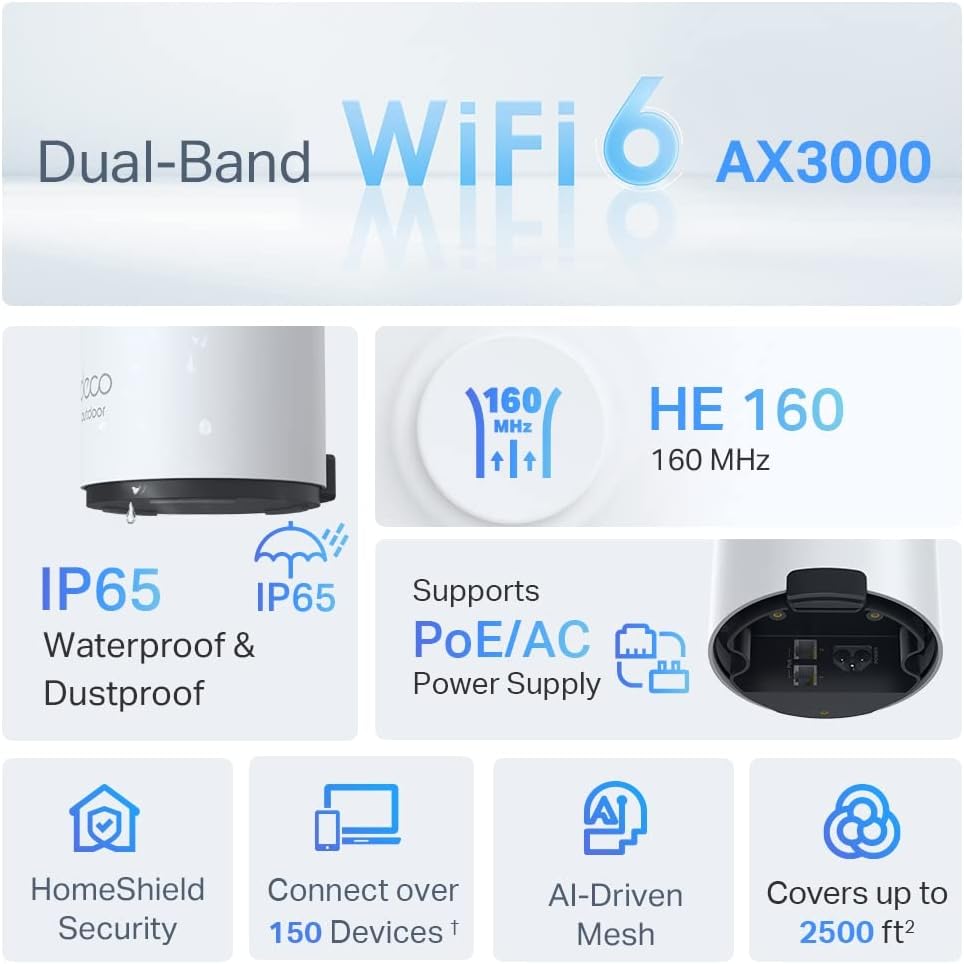
Image: An infographic highlighting key features of the Deco X50-Outdoor, including Dual-Band WiFi 6, AX3000 speeds, IP65 rating, PoE/AC power support, HomeShield Security, support for over 150 devices, AI-Driven Mesh, and up to 2500 sq ft coverage.
| فیچر | تفصیل |
|---|---|
| د ماډل نوم | AX3000 Outdoor Whole Home Mesh WiFi 6 Unit |
| بيسيم ستندرد | Wi-Fi 6 (802.11ax) |
| د فریکونسی بانډ ټولګی | دوه ګونی بند |
| د معلوماتو د لیږد کچه | تر ۱۲۰۱ ایم بی پی ایس (۵ ګیګاهرتز) + ۵۷۴ ایم بی پی ایس (۲.۴ ګیګاهرتز) پورې |
| د ارتباط رینج | Up to 2000 Square Feet (per unit) |
| بندرونه | 2 x Gigabit Ethernet Ports (Auto-sensing WAN/LAN) |
| د بریښنا رسول | PoE (802.3at) or AC Power Adapter (240V AC) |
| د هوا مقاومت | IP65 (د اوبو او دوړو ضد) |
| امنیت پروټوکول | WPA، WPA2، WPA3 |
| د کنټرول طریقه | TP-Link Deco App |
| د توکي وزن | 0.9 کیلوګرامه |
10. تضمین او ملاتړ
د تضمین معلوماتو او تخنیکي ملاتړ لپاره، مهرباني وکړئ رسمي TP-Link ته مراجعه وکړئ. webسایټ یا د دوی پیرودونکي خدمت سره اړیکه ونیسئ.
- د TP-Link رسمي Webسایټ: www.tp-link.com
- تخنیکي ملاتړ: په TP-Link کې د ملاتړ برخې ته مراجعه وکړئ webد FAQs، د ستونزو د حل لارښوونو، او د اړیکو معلوماتو لپاره سایټ.