
1. پیژندنه
Thank you for choosing the FLEXISPOT EF1 Basic Plus Electric Height-Adjustable Desk. This manual provides essential information for the safe and efficient assembly, operation, and maintenance of your new desk. Please read these instructions thoroughly before use and retain them for future reference.
د خوندیتوب خبرداری
- Always follow the assembly instructions carefully to prevent accidents and ensure proper function.
- Do not exceed the maximum load capacity of 70 kg (154 lbs) on the desktop. Overloading can compromise stability and cause damage.
- To prevent tipping, especially when the desk is at its maximum height (121 cm), ensure the desk is anchored correctly to a stable wall.
- Keep children and pets away from the desk during operation to avoid injury from moving parts.
- ډاډ ترلاسه کړئ چې د لوړوالي د تنظیم پرمهال د میز په لاره کې هیڅ خنډ شتون نلري.
- په میز مه کښېنئ یا مه ودریږئ.
- د پاکولو یا هر ډول ساتنې ترسره کولو دمخه بریښنا قطع کړئ.
2. تنظیم او مجلس
The FLEXISPOT EF1 Basic Plus desk requires assembly. Please ensure all components are present before beginning. Refer to the included assembly guide for detailed step-by-step instructions.
د بسته بندۍ او اجزاو چک کول
Carefully unpack all parts and lay them out on a soft, clean surface to prevent scratches. Verify that all components listed in the packing list are present.
مجلس ختم شوview
- د پورته کولو ستنې د میز پښو سره وصل کړئ.
- کراس بار د پورته کولو ستنو سره وصل کړئ.
- ډیسټاپ د راټول شوي چوکاټ سره ضمیمه کړئ.
- Install the control panel and cable management tray (if included).
- Connect all motor and control cables according to the wiring diagram.
- د بریښنا مزي په ځمکه کې ستن کړئ.

شکل 1: The FLEXISPOT EF1 Basic Plus Electric Height-Adjustable Desk with a black tabletop and white frame, set up in a home office environment.

شکل 2: This image illustrates the smooth, single-piece desktop construction of the FlexiSpot desk, contrasting it with typical multi-piece desktops that may have uneven surfaces.

شکل 3: An illustrative diagram detailing various desktop size and color options, along with key specifications for the desk frame, including adjustable height range, static and dynamic load capacities, and lifting noise levels.
3. عملیاتي لارښوونې
د کنټرول پینل ختم شوview

شکل 4: یو مفصل view of the desk's Smart Control Panel, highlighting the LED display, the up and down adjustment buttons, and four numbered buttons for memory presets.
The desk is equipped with an advanced all-in-one keypad for easy height adjustment and memory functions.
- د LED ښودنه: د میز اوسنی لوړوالی په سانتي مترو کې ښیي.
- پورته/ښکته تڼۍ (⌃ / ⌄): د میز لوړوالی په لاسي ډول پورته یا ښکته تنظیمولو لپاره فشار ورکړئ او ونیسئ. تڼۍ خوشې کړئ ترڅو په مطلوب لوړوالي کې ودروئ.
- د حافظې پریزیسټونه (۱، ۲، ۳، ۴): Four programmable buttons to save and recall your preferred sitting and standing heights.
د حافظې پریسیټونه تنظیم کول
- د پورته/ښکته تڼیو په کارولو سره میز د خپلې خوښې لوړوالي سره سم تنظیم کړئ.
- Press the "M" or "SET" button (if available, otherwise proceed to step 3) to activate memory mode.
- Press one of the numbered preset buttons (1, 2, 3, or 4) within 3 seconds. The LED display will show "S-1", "S-2", etc., indicating the height has been saved to that preset.
د حافظې پریسیټونه یادول
په ساده ډول د مطلوب شمیرې سره سم ټاکل شوی تڼۍ فشار ورکړئ (۱، ۲، ۳، یا ۴). میز به په اتوماتيک ډول خوندي شوي لوړوالي ته حرکت وکړي.
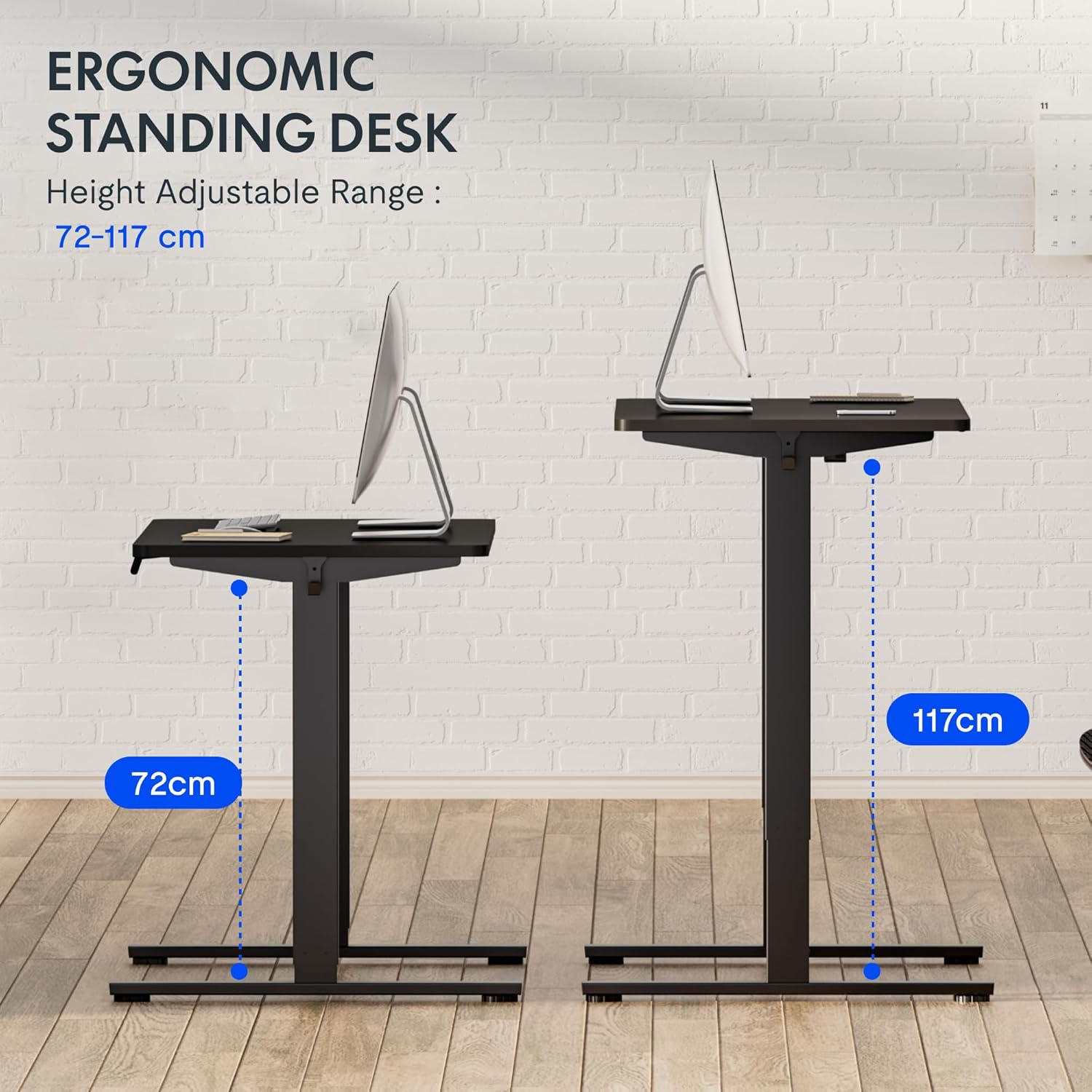
شکل 5: This image demonstrates the height adjustment capabilities of the desk, showing a range from 72 cm (sitting height) to 117 cm (standing height). Note that the full adjustable range for this model is 71 cm to 121 cm.
4. ساتنه
منظم ساتنه ستاسو د FLEXISPOT میز اوږد عمر او غوره فعالیت تضمینوي.
- پاکول: ډیسټاپ او چوکاټ د نرم، d سره پاک کړئamp ټوکر. د خړوبولو پاکوونکو یا سختو کیمیاوي موادو څخه ډډه وکړئ چې کولی شي پای ته زیان ورسوي.
- د کیبل مدیریت: په دوره یي ډول کیبلونه وګورئ او تنظیم کړئ ترڅو د پیچلتیا مخه ونیسئ او اسانه عملیات ډاډمن کړئ.
- معاینه: Regularly inspect all screws and bolts to ensure they are tight. Retighten if necessary.
- غوړول: The lifting columns are generally maintenance-free. Do not attempt to lubricate internal components unless specifically instructed by customer support.
5. ستونزه حل کول
که تاسو په خپل میز کې کومې ستونزې سره مخ شئ، لاندې عامې ستونزې او حل لارې وګورئ.
| ستونزه | احتمالي لامل | د حل لاره |
|---|---|---|
| مېز نه حرکت کوي. |
|
|
| میز په نا مساوي ډول حرکت کوي یا غیر معمولي غږونه کوي. |
|
|
| Error code displayed on LED. |
|
|
پروسیجر بیا تنظیم کړئ
If the desk is not functioning correctly, a reset may resolve the issue.
- Press and hold the "Down" button until the desk reaches its lowest position and slightly retracts, then releases.
- If this does not initiate a reset, unplug the desk from the power outlet for at least 10 seconds, then plug it back in.
- Repeat step 1. The desk should now be reset.
6. مشخصات
| برانډ | FLEXISPOT |
| د ماډل شمیره | HU-XI-201 |
| Desktop Dimensions (L x W x Thickness) | 120 x 80 x 2.5 سانتي متره |
| د تنظیم وړ لوړوالی حد (پرته له میز څخه) | ۴۸ سانتي متره - ۵۶.۸ سانتي متره |
| Max Lifting Speed | 2.5 cm/s |
| د اعظمي بار ظرفیت | ۷.۰ کیلو ګرامه (۱۵.۵ پونډه) |
| د شور کچه پورته کول | <50 dB |
| د ډیسټاپ مواد | Engineered Wood (MDF) with High-Pressure Laminate |
| د چوکاټ مواد | پوډر لیپت فولاد |
| رنګ | Black tabletop + White frame |
| ځانګړتیاوې | Electric height adjustment, 4 memory presets |
7. تضمین او ملاتړ
د تضمین معلومات
FLEXISPOT stands behind the quality of its products. Your EF1 Basic Plus desk comes with the following warranty:
- ۱ کلن تضمین: Covers controllers and motors.
- ۱ کلن تضمین: Covers the desk frame.
Please retain your proof of purchase for warranty claims. The warranty covers manufacturing defects under normal use. It does not cover damage caused by misuse, accidents, unauthorized modifications, or failure to follow the instructions in this manual.

شکل 6: An image outlining the warranty coverage for FlexiSpot desks, specifically mentioning a 3-year warranty for controllers and motors, and a 5-year warranty for the desk frame.
د پیرودونکي ملاتړ
For technical assistance, warranty claims, or any questions regarding your FLEXISPOT EF1 Basic Plus desk, please contact FLEXISPOT customer support.
Webسایټ: www.flexispot.com (or regional equivalent)
بریښنالیک: Refer to your purchase documentation or the official FlexiSpot webد اړیکې بریښنالیک لپاره سایټ.
تلیفون: Refer to your purchase documentation or the official FlexiSpot webد اړیکې د تلیفون شمېرې لپاره سایټ.