
1. پیژندنه
Thank you for choosing the Goshyda Portable Multimedia 1080P Projector. This compact and versatile device is designed to provide a personal cinema experience, supporting various multimedia inputs for entertainment, presentations, and more. Please read this manual carefully before using the projector to ensure proper operation and to maximize its lifespan.

Image 1.1: The Goshyda YG300 Mini Portable Projector in a home entertainment setting.
2. د خوندیتوب معلومات
- د بریښنا رسول: Use only the specified 5V 2A power adapter or a compatible power bank. Incorrect voltage کیدای شي وسیله ته زیان ورسوي.
- وینټیلیشن: د هوا د تودېدو دروازې مه بندوئ. د پروجیکټر شاوخوا د هوا مناسب جریان ډاډمن کړئ ترڅو د ډیر تودوخې مخه ونیول شي.
- چاپیریال: Avoid exposing the projector to water, moisture, dust, or extreme temperatures. Operate in a clean, dry environment.
- پاکول: د پاکولو دمخه بریښنا قطع کړئ. نرم او وچ ټوکر وکاروئ. مایع یا ایروسول پاکوونکي مه کاروئ.
- بې لارې کول: د پروجیکټر د جلا کولو یا ترمیم کولو هڅه مه کوئ. ټولې خدمتونه وړ پرسونل ته راجع کړئ.
- د سترګو ساتنه: کله چې l وي، مستقیم د پروجیکټر لینز ته مه ګورئamp روانه ده
3. د بسته محتويات
مهرباني وکړئ د بکس خلاصولو پر مهال د کڅوړې محتويات وګورئ. که کوم توکي ورک یا خراب وي، نو خپل پرچون پلورونکي سره اړیکه ونیسئ.
- Goshyda Portable Projector
- ریموټ کنټرول
- د AV کیبل
- د بریښنا اډاپټر
- د کارونکي لارښود (دا لاسوند)

Image 3.1: Included accessories with the Goshyda Portable Projector.
4. محصول ختم شوview
۴.۱. د پروجیکټر ځانګړتیاوې
- 1080P Resolution Support: روښانه او مفصل انځورونه وړاندې کوي.
- کمپیکٹ او پورټ ایبل ډیزاین: Weighing approximately 290g, it is easy to carry.
- څو-پورټ اتصال: Includes USB, HDMI, AV, memory card slot, and audio output.
- جوړ شوي سپیکرونه: Provides integrated audio for convenience.
- انعطاف منونکی ځواک: Can be powered by a 5V 2A wall charger or power bank.

Image 4.1: Visual representation of the projector's main features.
4.2. Projector Ports and Controls
Familiarize yourself with the various ports and controls on your projector.
- لینز: Front-facing projection lens.
- د تمرکز زنګ: د انځور وضاحت تنظیموي.
- د بریښنا داخلول (DC IN): Connects to the 5V 2A power adapter.
- د HDMI پورټ: د HDMI کیبل له لارې د وسیلو د نښلولو لپاره.
- USB پورټ: د USB ذخیره کولو وسیلو سره د نښلولو لپاره.
- د AV پورټ: For connecting devices via AV cable.
- د مایکرو ایس ډی کارت سلاټ: For inserting a memory card.
- آډیو تولید: د بهرني سپیکرو یا هیډفونونو د نښلولو لپاره.
- د کنټرول تڼۍ: On the top panel for basic navigation and selection.

انځور ۵.۱: اړخ view of the projector highlighting its connectivity ports.

Image 4.3: Close-up of the projector lens.
5. ترتیب کول
5.1. د بریښنا پیوستون
- ورکړل شوی بریښنا اډاپټر په پروجیکټر کې د DC IN پورټ سره وصل کړئ.
- د بریښنا اډاپټر په معیاري بریښنایی پلورنځي کې ولګوئ.
- Alternatively, for portable use, connect a 5V 2A power bank to the DC IN port.

Image 5.1: Powering the projector via wall adapter or power bank.
۴.۲. ځای پر ځای کول او وړاندوینه
Place the projector on a stable, flat surface. The optimal projection distance is between 1 to 2.5 meters, allowing for a screen size of up to 60 inches.
- For a 24-inch screen, place the projector approximately 0.8 meters away.
- For a 47-inch screen, place the projector approximately 1.2 meters away.
- For a 60-inch screen, place the projector approximately 1.6 meters away.
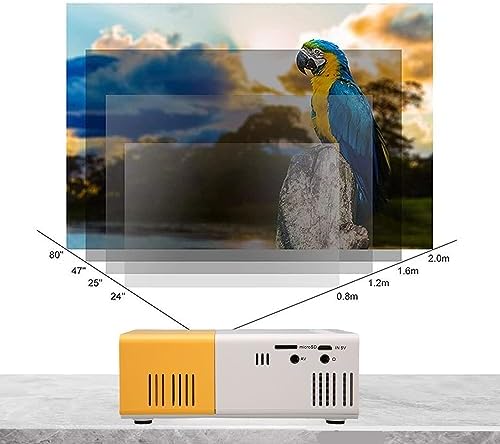
Image 5.2: Projection distance guidelines for various screen sizes. Note: Maximum recommended projection size is 60 inches.
5.3. د تمرکز تنظیم کول
After placing the projector and powering it on, rotate the focus ring located around the lens until the projected image appears clear and sharp.
6. عملیاتي لارښوونې
6.1. بریښنا فعال/بند
- پاور آن: په پروجیکٹر یا ریموټ کنټرول کې د بریښنا تڼۍ فشار ورکړئ.
- بندول: د بریښنا تڼۍ بیا فشار ورکړئ. پروجیکټر به بند شي.
6.2. د ننوت سرچینې انتخاب
Use the 'Source' button on the remote control or the projector's control panel to cycle through available input sources (HDMI, USB, AV, MicroSD).
6.3. مینو نیویگیشن
Use the arrow buttons on the remote control or projector to navigate through menus. Press 'OK' or 'Enter' to confirm selections. Use the 'Return' or 'Back' button to go back to the previous menu.
7. ارتباط
The projector offers multiple connectivity options for various devices.

Image 7.1: Connectivity options for the Goshyda projector.
7.1. د HDMI پیوستون
Connect devices such as laptops, TV Sticks, game consoles (e.g., for Xbox One), or Blu-ray players using an HDMI cable. Select 'HDMI' as the input source.
7.2. د USB پیوستون
د میډیا غږولو لپاره په USB پورټ کې یو USB فلش ډرایو دننه کړئ files directly. Select 'USB' as the input source and navigate through your files.
۶.۳. د AV اتصال
Use the provided AV cable to connect older devices like DVD players. Select 'AV' as the input source.
7.4. Smartphone/Tablet Connection
To connect directly to your smartphone or tablet, you will need an appropriate adapter (e.g., Micro USB to HDMI, Type-C to HDMI, or a dedicated HD multimedia interface device), depending on your device's operating system (OS X or Android) and available ports. These adapters are sold separately.
7.5. د آډیو محصول
د غږ د ښه والي لپاره بهرني سپیکرونه یا هیډفونونه د آډیو آوټ پټ پورټ سره وصل کړئ.
8. ساتنه
- د عینکو پاکول: Use a soft, lint-free cloth specifically designed for optical lenses to gently wipe the projector lens. Do not use abrasive materials or harsh chemicals.
- بهرنۍ پاکوالی: د پروجیکټر بهرنۍ برخه د نرم او وچ ټوکر سره پاک کړئ.
- ذخیره کول: کله چې د اوږدې مودې لپاره نه کارول کیږي، پروجیکټر په یخ او وچ ځای کې وساتئ، د مستقیم لمر وړانګو او دوړو څخه لرې.
9. ستونزه حل کول
| ستونزه | احتمالي لامل | د حل لاره |
|---|---|---|
| هیڅ ځواک نشته | Power adapter not connected or faulty; insufficient power supply. | Ensure the 5V 2A power adapter is securely connected and plugged into a working outlet. Try a different power source or power bank. |
| هیڅ عکس نشته | Incorrect input source selected; cable not connected properly; device not outputting signal. | Select the correct input source (HDMI, USB, AV). Check all cable connections. Ensure the connected device is powered on and outputting a signal. |
| انځور غلی دی | تمرکز نه دی تنظیم شوی؛ پروجیکټر د سکرین څخه ډیر نږدې/لرې دی. | Rotate the focus ring to sharpen the image. Adjust the projection distance within the recommended range (1-2.5m). |
| غږ نشته | Volume too low or muted; external speakers not connected; audio format not supported. | Increase the volume on the projector and the source device. Check if external speakers are properly connected. Ensure the audio format is supported. |
10. مشخصات
| فیچر | تفصیل |
|---|---|
| برانډ | ګوشیدا |
| د ماډل شمیره | Goshyda89pkbg17g0 |
| د ښودلو ریزولوشن | ۱۲۸۰ x ۷۲۰ (۱۰۸۰P ملاتړ) |
| روښانتیا | 200 Lumens |
| د اړخ نسبت | 4:3 |
| د پروجیکشن فاصله | ۱.۵ - ۶ متره |
| د پروجیکشن اندازه | تر 60 انچو پورې |
| د ارتباط ټیکنالوژي | HDMI, USB, AV, MicroSD, Audio Out |
| د بریښنا انډول | 5V 2A |
| د ښودلو ډول | LCD |
| د محصول ابعاد | 12L x 8.5W x 4.6H cm (Approx. 4.7 x 3.3 x 1.8 inches) |
| د فارم فکتور | د پورټ وړ |
| د نصب کولو ډول | د میز غره |
11. تضمین او ملاتړ
For warranty information and customer support, please refer to the documentation provided with your purchase or contact your retailer directly. Keep your proof of purchase for warranty claims.