
1. پیژندنه
This manual provides detailed instructions for the installation, configuration, and operation of your Keenetic Runner 4G N300 Mesh Router. This device combines 4G/LTE mobile internet access with N300 Wi-Fi and Mesh capabilities, featuring a 4-port smart switch for versatile network connectivity. Please read this manual thoroughly before using the device to ensure proper setup and optimal performance.
2. د خوندیتوب معلومات
- ډاډ ترلاسه کړئ چې روټر په ښه هوا لرونکي ځای کې ځای پر ځای شوی، د مستقیم لمر وړانګو، تودوخې سرچینو او رطوبت څخه لرې.
- Use only the power adapter supplied with the device. Using an unauthorized adapter may damage the router and void the warranty.
- روټر مه خلاصوئ casinج. خدمتونه باید یوازې د وړ پرسونل لخوا ترسره شي.
- وسیله د ماشومانو او څارویو څخه لرې وساتئ.
- د روټر د قوي الکترومقناطیسي ساحو ته نږدې د ځای پر ځای کولو څخه ډډه وکړئ.
3. د بسته محتويات
ډاډ ترلاسه کړئ چې ستاسو کڅوړه لاندې توکي لري:
- Keenetic Runner 4G N300 Mesh Router (Model: KN-2211-01-EU)
- د ډول-C بریښنا اډاپټر
- Multilingual Installation Manual
4. محصول ختم شوview
The Keenetic Runner 4G N300 is designed for reliable internet access via 4G/LTE and Wi-Fi. It features multiple ports and indicators for easy monitoring and connectivity.
4.1 مخ View

انځور: مخکینۍ برخه view of the Keenetic Runner 4G N300 Mesh Router, showing the Keenetic logo and indicator lights.
4.2 اړخ View او ابعاد

انځور: اړخ view of the Keenetic Runner 4G N300 Mesh Router, illustrating its dimensions: 185 mm width, 32 mm height, and 184 mm antenna height.
4.3 بندرونه او شاخصونه
- د سیم سلاټ: For inserting a Nano SIM card for 4G/LTE connectivity.
- ایترنیټ بندرونه: Four LAN ports for wired connections to devices.
- د بریښنا بندر: Connects to the Type-C power adapter.
- بهرنۍ انتن نښلونکي: Two connectors for optional external 4G/LTE antennas to enhance signal reception.
- د LED شاخصونه: Provide status information for power, internet, Wi-Fi, and 4G/LTE signal.
5. ترتیب کول
5.1 د هارډویر اتصال
- سیم کارت داخل کړئ: Locate the Nano SIM slot on the router. Gently insert your Nano SIM card until it clicks into place. Ensure the card is oriented correctly as indicated on the device.

انځور: نږدې انځور view of the Nano SIM slot on the Keenetic Runner 4G N300 Mesh Router, showing a SIM card being inserted.
- بهرني انتنونه وصل کړئ (اختیاري): If you wish to use external 4G/LTE antennas for improved signal, connect them to the two external antenna connectors on the router.
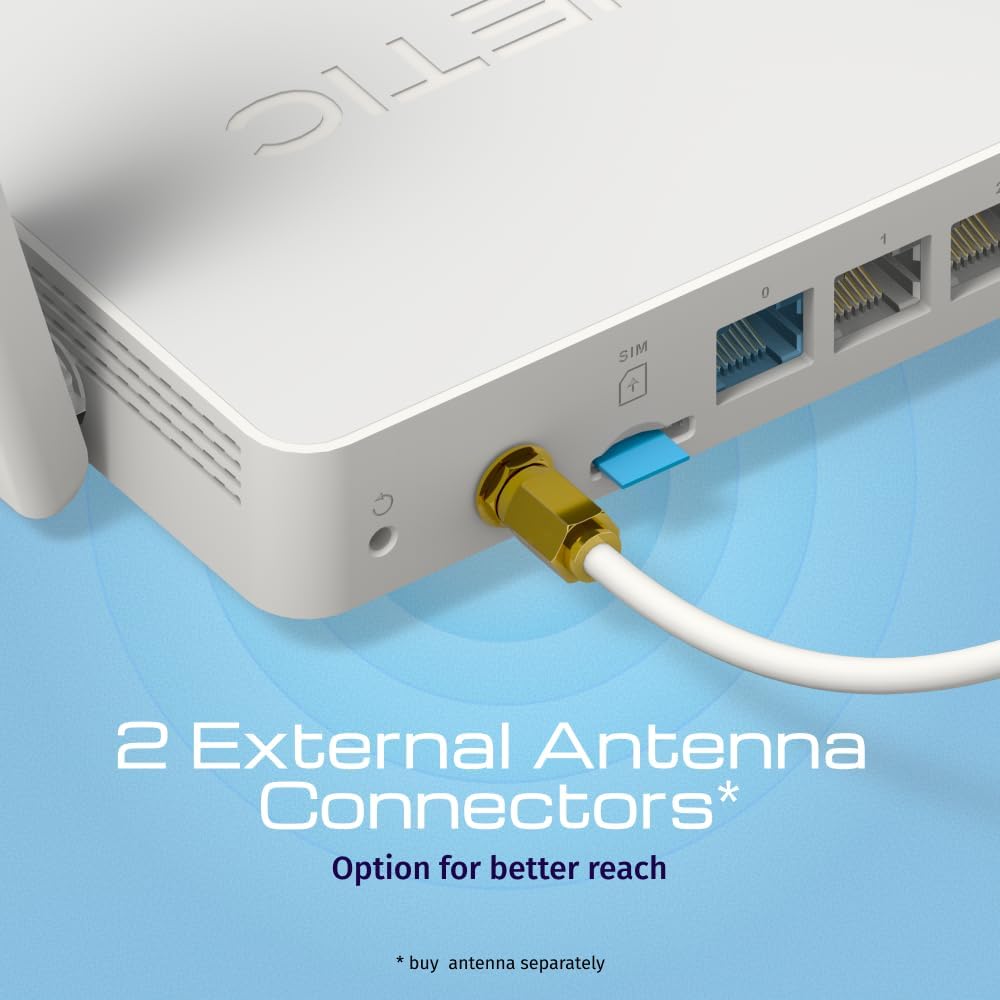
انځور: View of the two external antenna connectors on the Keenetic Runner 4G N300 Mesh Router, with an antenna cable connected to one.
- بریښنا وصل کړئ: Plug the Type-C power adapter into the router's power port and then into a power outlet. The router will power on automatically.
- لومړنۍ اړیکه: Connect your computer to one of the router's Ethernet LAN ports using an Ethernet cable, or connect wirelessly to the default Wi-Fi network (SSID and password usually found on a label on the router).
5.2 ابتدايي ترتیب
- لاسرسی Web انٹرفیس: خلاص a web browser on your connected computer and enter the default IP address (e.g.,
192.168.1.1ormy.keenetic.net). - ننوتل: د کارونکي نوم او پټنوم اصلي بڼه دننه کړئ (معمولا
adminد دواړو لپاره، یا لکه څنګه چې د روټر لیبل کې مشخص شوي). - د تنظیم وزرډ تعقیب کړئ: The KeeneticOS web interface will guide you through the initial setup process, including setting up your internet connection (4G/LTE or Ethernet WAN), Wi-Fi network name (SSID), and password.
- د فرم ویئر تازه کول: It is recommended to check for and install the latest firmware updates for optimal performance and security.
6. چلول
6.1 4G/LTE Connectivity
The Keenetic Runner 4G N300 provides mobile internet access with download speeds up to 150 Mbps and upload speeds up to 50 Mbps, depending on your mobile network provider and signal strength.

Image: Graphic illustrating the mobile internet capabilities of the Keenetic Runner 4G N300, showing download speeds up to 150 Mbps and upload speeds up to 50 Mbps.
6.2 د وای فای شبکې ترتیب
You can configure your Wi-Fi network settings, including SSID, security type (WPA2/WPA3 recommended), and password, through the KeeneticOS web interface or the Keenetic mobile app.
6.3 Mesh Wi-Fi Network Setup
The Keenetic Runner supports Mesh Wi-Fi technology, allowing you to expand your network coverage by adding other Keenetic Mesh-compatible devices. Refer to the KeeneticOS documentation for detailed instructions on setting up a Mesh system.
6.4 Advanced Features (KeeneticOS)
KeeneticOS, the router's operating system, offers a range of advanced features for network management and security.
6.4.1 VPN and DNS Filters
The router supports various VPN protocols and DNS filtering services for enhanced privacy and security.

انځور: ګرافیک نندارتونasing KeeneticOS support for over 50 VPN features (WireGuard, OpenVPN, IPSec) and DNS filters (AdGuard, Cloudflare, OpenDNS).
6.4.2 Network Management via Keenetic App
Manage your network from anywhere using the Keenetic mobile application, providing real-time control and monitoring.

Image: Screenshot of the Keenetic App interface, demonstrating features like network overview, device list, and Quality of Service (QoS) management.
6.4.3 Smart Home & IoT Readiness
The router supports network segmentation and cybersecurity features to secure and manage your smart home and IoT devices.

Image: Diagram illustrating how the Keenetic Runner supports Smart Home and IoT devices through network segmentation and cybersecurity, showing devices connected within a home environment.
۴.۳ د والدینو پرمختللي کنټرولونه
Implement parental controls to ensure safer browsing for children, including scheduling internet access, application filtering, and DNS-based content filtering.

Image: Screenshot of the KeeneticOS parental control interface, displaying options for schedules by age group, application filters, and DNS-based filters.
6.4.5 KeeneticOS Overview
KeeneticOS is a modular operating system that powers every Keenetic router, offering continuous updates, robust security, a unified platform across devices, and extensive customization options.

Image: Graphic highlighting the core aspects of KeeneticOS: always updated and safe, a unified platform across devices, customizable and modular, and providing long-term value.
7. ساتنه
7.1 د فرم ویئر تازه معلومات
Regularly check for and install firmware updates through the KeeneticOS web interface or the Keenetic App. Firmware updates provide new features, performance improvements, and security patches.
۶.۴ د وسیلې بیا تنظیم کول
If you encounter persistent issues, you may perform a factory reset. Locate the reset button (often a small pinhole) on the router. With the router powered on, press and hold the reset button for approximately 10 seconds until the indicators change. This will restore the router to its factory default settings.
8. ستونزه حل کول
- د انټرنیټ اتصال نشته:
- وګورئ چې سیم کارت په سمه توګه داخل شوی او فعال شوی دی.
- Verify 4G/LTE signal strength via the router's indicators or web انٹرفیس
- Ensure your internet service provider (ISP) account is active.
- روټر او خپل وصل شوي وسایل بیا پیل کړئ.
- ورو سرعتونه:
- Check 4G/LTE signal strength; consider using external antennas if signal is weak.
- ډاډ ترلاسه کړئ چې نور وسایل ډیر بینډ ویت نه مصرفوي.
- Perform a speed test to confirm the issue.
- د وای فای اتصال مسلې:
- د وای فای پټنوم تایید کړئ.
- Move closer to the router to improve signal.
- د نورو بریښنایی وسیلو څخه د مداخلې لپاره چیک کړئ.
- روټر بې ځوابه دی:
- د بریښنا اډاپټر خلاص کړئ، 10 ثانیې انتظار وکړئ، بیا یې بیرته ولګوئ.
- If the issue persists, perform a factory reset (refer to Section 7.2).
9. مشخصات
| فیچر | تفصیل |
|---|---|
| برانډ | کینیټیک |
| د ماډل نوم | Keenetic Runner 4G 2nd Gen (KN-2211-01-EU) |
| عملیاتي سیسټم | KeeneticOS |
| د ارتباط ټیکنالوژي | Ethernet, LTE, Wi-Fi |
| د بې سیمه مواصلاتو معیار | 802.11b، 802.11g، 802.11n |
| د فریکونسی بانډ ټولګی | واحد-بنډ |
| ځانګړي ځانګړتیاوې | Mesh networking, advanced security, parental control |
| مطابقت لرونکې وسیلې | Game console, Personal Computer, Laptop, Smartphone, Tablet |
| د توکي وزن | 500 ګرامه |
| شاملې برخې | Router, Type-C power adapter, multilingual installation manual |
10. تضمین او ملاتړ
For warranty information and technical support, please refer to the official Keenetic website or contact your local Keenetic distributor. Keep your purchase receipt for warranty claims.