
پیژندنه
This manual provides essential information for the safe and efficient use of your ONN 42-Inch Full HD LED Smart TV, Model 100018254. Please read these instructions thoroughly before operating your television and retain them for future reference.
په بکس کې څه دي
د تنظیم کولو دمخه ډاډ ترلاسه کړئ چې ټولې برخې شتون لري.
- ONN 42-Inch Full HD LED Smart TV
- ریموټ کنټرول
- د تلویزیون سټینډ (۲ ټوټې)
- د تلویزیون سټینډ لپاره پیچونه
- د بریښنا تار
- د چټک پیل لارښود (په دې لارښود کې شامل نه دی)

انځور: مخکینۍ برخه view of the ONN 42-inch Smart TV displaying the Roku TV home screen with various streaming app icons like Netflix, Disney+, Apple TV, Hulu, Peacock, and Roku Channel. The TV is black with slim bezels and two stand feet.
چمتو کول
۱. د تلویزیون سټینډ سره نښلول
- د تلویزیون سکرین په احتیاط سره په نرم او پاک سطح کې کیږدئ ترڅو د زیان مخه ونیول شي.
- د تلویزیون په ښکته برخه کې د اړونده سکرو سوري سره د هر سټینډ ټوټه تنظیم کړئ.
- د چمتو شویو پیچونو سره د هر سټینډ ټوټه خوندي کړئ. ډاډ ترلاسه کړئ چې دوی په کلکه ټینګ شوي دي.

Image: A diagram illustrating the dimensions of the ONN 42-inch TV, showing its width as 43 inches and height as 37 inches when placed on its stand.
۳. دیوال نصب کول (اختیاري)
This TV is compatible with VESA standard wall mounts. Refer to your wall mount's instructions for proper installation. Ensure the wall mount can support the weight of the television.

انځور: شاته view of the ONN 42-inch TV, highlighting the VESA mounting screw holes in a square pattern and various input ports on the side and bottom right.
3. د نښلولو وسیلې
خپل بهرني وسایل لکه کیبل بکسونه، د لوبو کنسولونه، یا بلو رې پلیرونه د تلویزیون ان پټ پورټونو سره وصل کړئ.
- HDMI: For high-definition audio and video. Use an HDMI cable to connect devices like set-top boxes, game consoles, or streaming sticks.
- USB: د میډیا غږولو لپاره د USB ذخیره کولو وسیلو سره وصل کولو لپاره files.
- وای فای: For internet connectivity to access smart TV features and streaming services.
۱. د بریښنا ابتدايي فعالول او تنظیمولو وزرډ
- د برېښنا تار په تلویزیون کې ولګوئ او بیا د دیوال په یوه کړکۍ کې.
- په ریموټ کنټرول یا پخپله تلویزیون کې د بریښنا تڼۍ فشار ورکړئ.
- Follow the on-screen instructions to complete the initial setup, including language selection, network connection (Wi-Fi), channel scanning, and linking to your Roku account (if applicable).
د تلویزیون چلول
۳. د ریموټ کنټرول اوورview
The remote control allows you to navigate the TV's interface and control various functions.
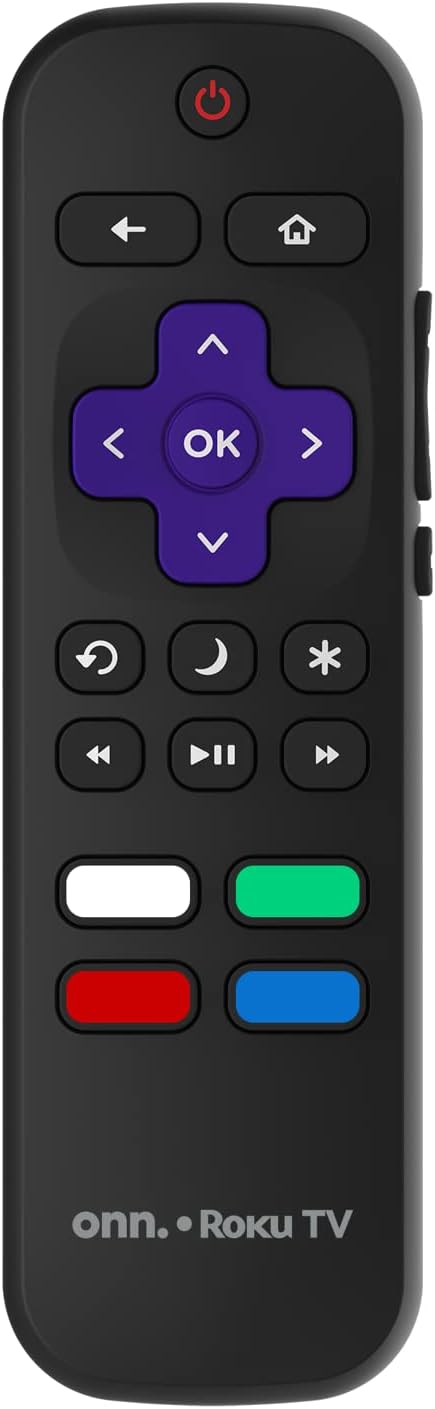
Image: The ONN Roku TV remote control, featuring a power button, directional pad, OK button, home button, back button, volume controls, and dedicated buttons for popular streaming services.
- د بریښنا تڼۍ: تلویزیون چالان یا بند کړئ.
- Directional Pad (D-Pad) & OK: مینو ته ننوځي او انتخابونه تاییدوي.
- د کور تڼۍ: د روکو تلویزیون کور سکرین ته راستنیږي.
- د شا تڼۍ: مخکینۍ سکرین یا مینو ته راستنیږي.
- حجم پورته / ښکته: د آډیو حجم تنظیموي.
- تteۍ غږول: آډیو خاموش یا غیر خاموش کوي.
- چینل پورته / ښکته: Changes channels (for antenna/cable inputs).
- وقف شوي اپلیکیشن تڼۍ: Quick access to popular streaming services like Netflix, Hulu, etc.
۴. د سمارټ تلویزیون ځانګړتیاوې
Your ONN Smart TV provides access to a wide range of streaming content and smart functionalities.
- د خپریدو خدمتونه: Access pre-installed apps like Netflix, YouTube, and many more through the Roku Channel Store.
- د غږ کنټرول: Compatible with Alexa and Google Assistant for hands-free control (requires a separate compatible voice assistant device).
- د سافټویر اتوماتیک تازه معلومات: The TV will automatically update its software when connected to the internet, ensuring you have the latest features and security.
د ننوت ټاکنه
To switch between connected devices (e.g., cable box, game console), use the داخلول button on your remote or select the desired input from the Roku TV home screen.
۳. د انځور او غږ ترتیبات
Access the TV's settings menu to customize picture and sound preferences. Navigate to Settings > TV picture settings or تنظیمات> آډیو to adjust options like brightness, contrast, color, sound mode, and equalizer settings.
ساتنه
۳. د پردې پاکول
- Always turn off the TV and unplug it before cleaning.
- یو نرم، له لینټ څخه پاک ټوکر وکاروئ، لږ څهampد اوبو یا ځانګړي سکرین پاکونکي سره مینځل کیږي.
- کلینر په مستقیم ډول په سکرین مه سپری کوئ، لومړی یې په ټوکر باندې واچوئ.
- د کثافاتو پاکوونکو، الکولو، بینزین، یا پتلوونکو کارولو څخه ډډه وکړئ، ځکه چې دا کولی شي سکرین ته زیان ورسوي.
2. د سافټویر تازه معلومات
Ensure your TV is connected to the internet to receive automatic software updates. These updates improve performance, add features, and enhance security. You can manually check for updates in the ترتیبات> سیسټم> د سیسټم تازه کول مینو
د ستونزو حل کول
که تاسو په خپل تلویزیون کې ستونزې سره مخ شئ، لاندې عام حلونو ته مراجعه وکړئ:
هیڅ ځواک نشته
- وګورئ چې ایا د بریښنا تار په خوندي ډول د تلویزیون او دیوال دواړو سره نښلول شوی دی.
- د بل وسیله په لګولو سره د دیوال آوټ لیټ کار کوي تایید کړئ.
- هڅه وکړئ چې په تلویزیون کې د بریښنا تڼۍ فشار ورکړئ، نه یوازې د ریموټ کنټرول.
انځور نشته / تحریف شوی انځور
- ډاډ ترلاسه کړئ چې سمه د ننوتلو سرچینه غوره شوې ده (د مثال په توګه، HDMI 1، HDMI 2).
- د تلویزیون او بهرنیو وسیلو ترمنځ ټول کیبل اتصالونه وګورئ.
- Try a different HDMI cable if possible.
- Adjust picture settings (brightness, contrast) in the TV menu.
بې غږه / ټیټ غږ
- Check if the TV is muted or if the volume is turned down.
- Ensure external audio devices (soundbars, receivers) are properly connected and powered on.
- د تلویزیون مینو کې د آډیو ترتیبات وګورئ.
د شبکې د اتصال ستونزې
- Verify your Wi-Fi router is powered on and functioning.
- خپل روټر او موډیم بیا پیل کړئ.
- ورتګ ترتیبات> شبکه> اړیکه وګورئ ستاسو په تلویزیون کې د ستونزې تشخیص لپاره.
- ډاډ ترلاسه کړئ چې تاسو سم د وای فای پټنوم داخل کوئ.
مشخصات
| فیچر | تفصیل |
|---|---|
| د ماډل شمیره | 100018254 |
| د سکرین اندازه | ۷۸۷ انچه |
| ټیکنالوژي ښکاره کول | LED |
| قرارداد | ۱۰۸۰p (بشپړ HD) |
| د تازه کولو نرخ | 60 Hz |
| ارتباط | USB، Wi-Fi |
| ملاتړ شوي انټرنیټ خدمتونه | Netflix, YouTube (and others via Roku platform) |
| د کنټرول طریقه | Voice (via Alexa & Google Assistant compatible devices), Remote Control |
| د نصب کولو ډول | دیوال ماونټ (VESA مطابقت لري) |
| رنګ | تور |
| UPC | 671227025567 |

Image: Energy Guide label for Television Model 100018254, indicating an estimated yearly energy cost of $11 based on 12 cents per kWh and 5 hours use per day.
تضمین او ملاتړ
For warranty information and technical support, please refer to the documentation included with your purchase or visit the official ONN support webسایټ د تضمین ادعاګانو لپاره خپل د پیرود رسید وساتئ.