
1. پیژندنه
This manual provides detailed instructions for the assembly, installation, operation, and maintenance of your AMANSON H07 ATX Mid Tower PC Case. Please read this manual thoroughly before beginning installation to ensure proper setup and safe operation. Keep this manual for future reference.

Figure 1.1: AMANSON H07 ATX Mid Tower PC Case with illuminated internal components.
2. د خوندیتوب معلومات
- د کمپیوټر کیس دننه د هر ډول نصب یا ساتنې ترسره کولو دمخه تل د دیوال له سایټ څخه د بریښنا رسولو قطع کړئ.
- د زیان څخه د مخنیوي لپاره ټولې برخې په احتیاط سره اداره کړئ.
- حساسو الکترونیکي برخو ته د الکتروسټاتیک خارجیدو (ESD) زیان مخنیوي لپاره د جامد ضد لاس پټه واغوندئ.
- کوچنۍ برخې او د بسته بندۍ مواد له ماشومانو لرې وساتئ.
- د کمپیوټر د قضیې شاوخوا مناسب هوا ورکول ډاډمن کړئ ترڅو د ډیر تودوخې مخه ونیول شي.
3. د بسته محتويات
ډاډ ترلاسه کړئ چې ټول توکي په کڅوړه کې شتون لري:
- AMANSON H07 ATX Mid Tower PC Case
- د لوازمو بکس (پیچونه، سټینډ آفونه، کیبل اړیکې، او نور)
- د کارونکي لارښود (دا لاسوند)
4. اجزا ختمview
The AMANSON H07 PC case features a panoramic design with tempered glass panels for full visibility of your internal components. It supports various motherboard sizes and extensive cooling configurations.

Figure 4.1: Top I/O Panel with power button, USB 3.0, USB 2.0, and audio ports.
The top I/O panel includes:
- د بریښنا تڼۍ
- د بیا تنظیم تڼۍ
- ۲x USB ۳.۰ پورټونه
- 1x USB 3.0 پورټ
- Audio In/Out Jacks
۱. تنظیم او نصب کول
۱. د قضیې چمتو کول
The AMANSON H07 features tool-less hinged tempered glass side panels for easy access. Gently open the side panel by pulling it from the rear edge. The panels can also be removed by lifting them off their hinges for full access during installation.

Figure 5.1: Hinged tempered glass side panel for easy access.
5.2. د مور بورډ نصب کول
The H07 supports E-ATX, ATX, Micro-ATX, and ITX motherboards. Install the necessary standoffs for your motherboard form factor. Carefully align your motherboard with the standoffs and I/O shield, then secure it with screws.
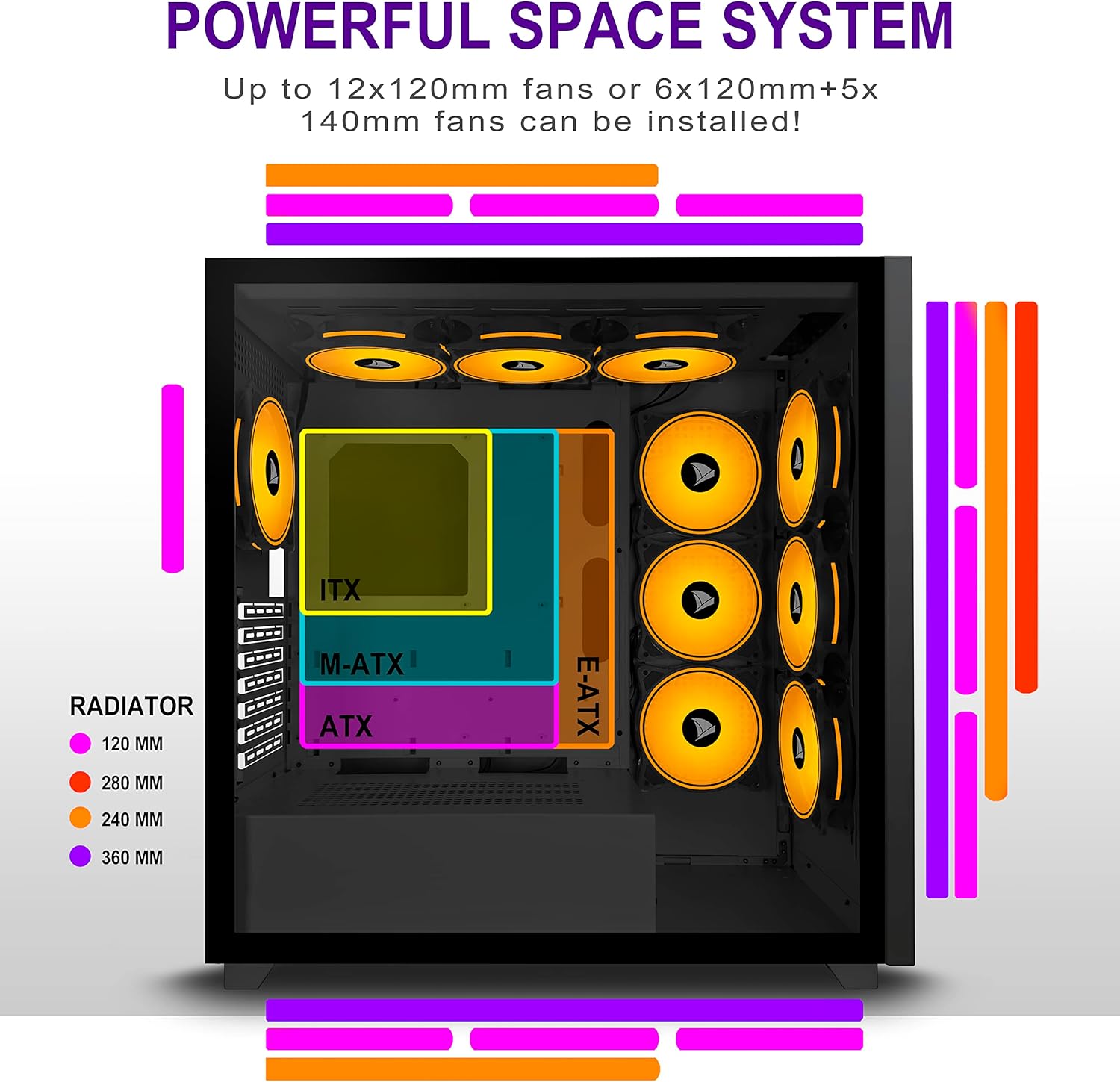
Figure 5.2: Motherboard and cooling component placement options.
5.3. د بریښنا رسولو نصب کول
خپل د بریښنا رسولو واحد (PSU) د قضیې په ښکته شا کې په وقف شوي خونې کې نصب کړئ. د قضیې له شا څخه د پیچونو سره یې خوندي کړئ.
۲.۴. د ذخیره کولو وسایلو نصبول
The case provides multiple mounting points for storage devices. Install your 3.5" HDDs and 2.5" SSDs into the designated trays and mounting locations. Refer to the case diagram for specific locations.

Figure 5.3: Storage drive mounting options for HDDs and SSDs.
5.5. Expansion Card (GPU) Installation
Remove the necessary PCI-E slot covers from the rear of the case. Insert your graphics card or other expansion cards into the motherboard's PCI-E slots and secure them with screws.
5.6. د کیبل مدیریت
Utilize the cable routing cutouts and tie-down points behind the motherboard tray to manage cables. This improves airflow and maintains a clean aesthetic.
6. عملیاتي لارښوونې
6.1. بریښنا کول/بندول
Press the power button located on the top I/O panel to turn on your PC. To shut down, use the operating system's shutdown function or press and hold the power button for several seconds.
6.2. Using Front I/O Ports
Connect USB devices to the USB 2.0 or USB 3.0 ports. Use the audio jacks for headphones, microphones, or speakers.
7. ساتنه
7.1. پاکول
په منظم ډول د قضیې بهرنۍ برخه د نرم، ډamp cloth. For internal cleaning, use compressed air to remove dust from fans and components. Ensure the PC is powered off and unplugged before cleaning.
7.2. د دوړو فلټرونه
The AMANSON H07 may include removable dust filters. Clean these filters periodically to maintain optimal airflow and cooling performance.
8. ستونزه حل کول
- کمپیوټر نه چالانیږي: Check all power connections, including the PSU to the wall, the PSU to the motherboard, and the front panel power switch cable to the motherboard.
- د ډیر تودوخې ستونزې: Ensure all fans are properly installed and functioning. Verify that dust filters are clean and not obstructing airflow. Check thermal paste application on CPU cooler.
- د USB پورټونه کار نه کوي: Confirm that the front panel USB cables are correctly connected to the motherboard headers.
- Audio jacks not working: Verify that the front panel audio cable is correctly connected to the motherboard's audio header.
9. مشخصات
Below are the technical specifications for the AMANSON H07 PC Case:
| فیچر | تفصیل |
|---|---|
| ماډل | H07 |
| د قضیې ډول | منځنی برج |
| د مور بورډ مطابقت | E-ATX, ATX, Micro ATX, ITX |
| مواد | ګرم شیشه |
| د محصول ابعاد (LxWxH) | 19.69 x 13.78 x 19.69 انچه (500 x 350 x 500 mm) |
| د توکي وزن | ۲.۴۵ پونډه |
| د USB 2.0 پورټونو شمیر | 2 |
| د USB 3.0 پورټونو شمیر | 1 |
| د پراختیا سلاټونو شمیر | 8 |
| د یخولو طریقه | هوا |
| د بریښنا رسولو د نصبولو ډول | لاندې غر |

Figure 9.1: AMANSON H07 PC Case dimensions (520mm height, 510mm length, 250mm width).
10. د تضمین معلومات
Please refer to the product packaging or the official AMANSON webد ځانګړو تضمین شرایطو او مقرراتو لپاره سایټ. د تضمین ادعاوو لپاره د پیرود ثبوت وساتئ.
11. ملاتړ
For technical assistance or customer support, please visit the official AMANSON website or contact their customer service department. Contact details can typically be found on the product packaging or the brand's webسایټ