
1. پیژندنه
The WORKPRO W159025 is a versatile cordless 3.6V grass and hedge trimmer designed for efficient garden maintenance. This tool features a dual-purpose design, allowing for quick conversion between a grass shear and a hedge trimmer. Its lightweight and compact design, combined with Type-C USB charging, makes it convenient for various trimming tasks around your garden.
This manual provides essential information for the safe and effective use, maintenance, and troubleshooting of your WORKPRO W159025 trimmer. Please read it thoroughly before first use and keep it for future reference.
2. د خوندیتوب مهمې لارښوونې
د اور لګېدو، برقي شاک او شخصي ټپي کېدو خطر کمولو لپاره تل د برېښنايي وسایلو کارولو پر مهال د خوندیتوب اساسي احتیاطي تدابیر تعقیب کړئ.
- ټولې لارښوونې ولولئ: د وسیلې د کنټرولونو او سم استعمال سره ځان آشنا کړئ.
- د سترګو د ساتنې جامې: Always wear safety glasses or goggles when operating the trimmer.
- ساحه پاکه وساتئ: ډاډ ترلاسه کړئ چې د کار ساحه د کثافاتو، ماشومانو او څارویو څخه پاکه ده.
- د ناڅاپي پیل څخه مخنیوی وکړئ: Ensure the safety lock button and operating switch are not engaged unintentionally.
- سم چارجر وکاروئ: Only use a 5V/2A adapter for charging. Using a 5V/1A adapter may trigger overvoltage protection and prevent charging.
- بلیډونه معاینه کړئ: Before each use, check blades for damage or wear. Replace if necessary.
- خوندي تیغونه: Ensure blades are correctly installed and secured before operation.
- لاسونه لرې وساتئ: Never touch the blades while the tool is operating or connected to power.
- په خوندي توګه ذخیره کول: وسیله په وچ او خوندي ځای کې وساتئ چې د ماشومانو له لاسرسي څخه لرې وي.
3. د بسته محتويات
د خلاصولو پر مهال ډاډ ترلاسه کړئ چې ټول توکي شتون لري:
- WORKPRO W159025 Main Unit
- Grass Shear Blade (75mm cutting width)
- Hedge Trimmer Blade (120mm cutting width, 7.8mm max cutting diameter)
- Type-C USB Cable (1m)
- د کارن لارښود
4. محصول ختم شوview
The WORKPRO W159025 features a compact and ergonomic design for comfortable use. Key components include:
- TPR Handle: یو آرام او خوندي گرفت چمتو کوي.
- د خوندیتوب قلف تڼۍ: د ناڅاپي فعالیدو مخه نیسي.
- عملیاتي سویچ: تیغونه فعالوي.
- د تیغ خوشې کولو تڼۍ: د چټکو او بې وسیلې تیغ بدلونونو لپاره.
- د ډول-C چارج کولو بندر: د اسانه چارج کولو لپاره.
- LED Charging Indicator Light: Displays charging status (Red: Charging, Green: Fully Charged, Yellow: Approx. 50% charged).
- د تبادلې وړ تیغونه: Includes both grass shear and hedge trimmer blades.

Figure 1: WORKPRO W159025 Component Diagram
5. ترتیب کول
5.1. د بیټرۍ چارج کول
The device is powered by a 3.6V rechargeable battery. Before first use, fully charge the battery.
- په وسیله کې د ټایپ-سي چارج کولو پورټ ومومئ.
- Connect the provided Type-C USB cable to the charging port.
- د USB کیبل بل پای د 5V/2A USB بریښنا اډاپټر سره وصل کړئ (شامل نه دی).
- The LED indicator light will show red during charging. It will turn green when fully charged (approximately 2-3 hours). A yellow light indicates approximately 50% charge.

شکل ۳: د ډول-سي چارج کول
۳.۲. د تیغونو بدلول
The WORKPRO W159025 allows for easy, tool-free blade changes between the grass shear and hedge trimmer blades.
- ډاډ ترلاسه کړئ چې وسیله بنده شوې او د هرې بریښنا سرچینې څخه منحل شوې.
- Push the two blade release buttons on either side of the blade housing.
- Carefully remove the installed blade.
- Align the desired blade (grass shear or hedge trimmer) with the pins on the main unit.
- Press the blade firmly into place until it clicks securely.

Figure 3: Blade Change Mechanism
6. عملیاتي لارښوونې
6.1. بریښنا کول/بندول
The WORKPRO W159025 features a dual safety mechanism to prevent accidental starts.
- To start the tool, simultaneously press the safety lock button (located on the top of the handle) and the operating switch (trigger).
- Once the tool starts, you can release the safety lock button, and the tool will continue to operate as long as the operating switch is pressed.
- To turn off the tool, release the operating switch.

Figure 4: Safety Lock and Operating Switch
۳. د واښو د قینچي کارول
Attach the grass shear blade for trimming grass in small areas, around edges, or where larger mowers cannot reach.
- Ensure the grass shear blade is securely attached.
- Hold the tool firmly with both hands, if possible, or one hand if comfortable and safe.
- Activate the tool as described in Section 6.1.
- Move the tool steadily across the grass, maintaining a consistent height. The cutting width is 75mm.
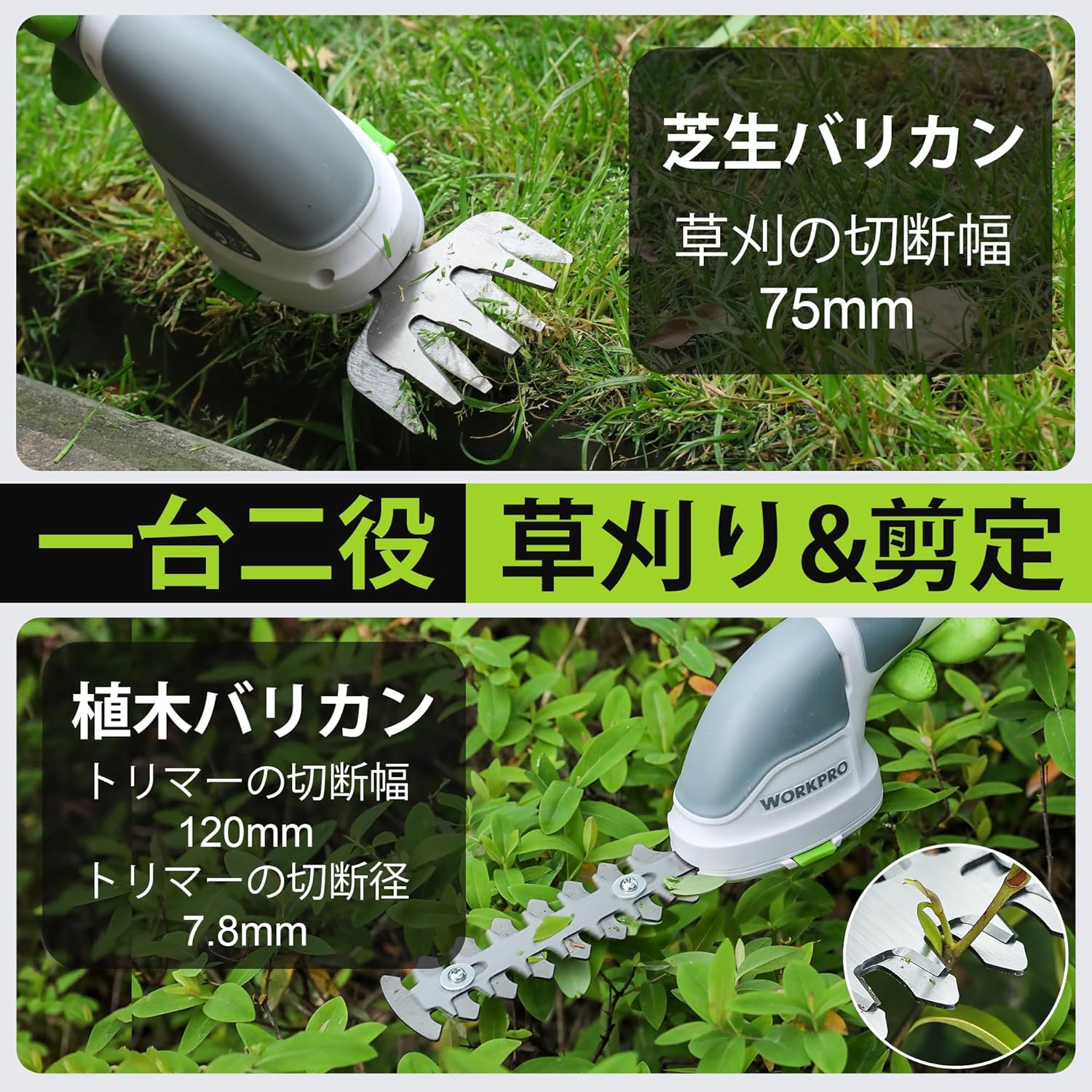
Figure 5: Grass Shearing Operation
۲. د هیج ټریمر کارول
Attach the hedge trimmer blade for shaping shrubs and hedges. The cutting width is 120mm, and the maximum cutting diameter is 7.8mm.
- ډاډ ترلاسه کړئ چې د هیج ټریمر تیغ په خوندي ډول وصل دی.
- Hold the tool firmly, ensuring a stable grip.
- Activate the tool as described in Section 6.1.
- Move the trimmer smoothly along the hedge, cutting small amounts at a time. Avoid forcing the blades through thick branches.
- The handle can rotate 180 degrees for improved ergonomics and access to different angles. To rotate the handle, press the handle rotation button (if present, otherwise manually rotate if designed for it) and adjust to the desired position.

Figure 6: Hedge Trimming Operation
Video 1: Demonstrates the WORKPRO W159025 in action, showing blade changes, safety features, and use as both a grass shear and hedge trimmer. It highlights the 180-degree handle rotation feature.
7. ساتنه
7.1. Cleaning and Blade Care
- Always ensure the tool is switched off and the battery is removed (if applicable) before cleaning or performing maintenance.
- Clean the blades after each use to remove sap, debris, and dirt. Use a stiff brush and a damp cloth. For stubborn residue, a blade cleaner or light oil can be used.
- Periodically apply a thin layer of machine oil to the blades to prevent rust and ensure smooth operation.
- Inspect blades for sharpness and damage. Dull or damaged blades can reduce efficiency and increase strain on the motor. Replace worn blades as needed.
7.2. ذخیره کول
- وسیله په وچه، ښه هوا لرونکي سیمه کې وساتئ، د مستقیم لمر وړانګو او سختې تودوخې څخه لرې.
- ډاډ ترلاسه کړئ چې تیغونه پاک، وچ او لږ غوړ شوي دي مخکې له دې چې ذخیره شي.
- وسیله د ماشومانو او غیر مجاز اشخاصو له لاسرسي لرې وساتئ.
8. ستونزه حل کول
| ستونزه | احتمالي لامل | د حل لاره |
|---|---|---|
| وسیله نه پیل کیږي | بیټرۍ ټیټه یا له منځه تللې ده Safety lock button not pressed simultaneously with operating switch تیغونه بند دي | بیټرۍ په بشپړه توګه چارج کړئ Ensure both buttons are pressed together Clear any obstructions from the blades (with tool off) |
| د قطع کولو ضعیف فعالیت | خراب یا خراب شوي تیغونه Excessive material being cut Blades are dirty or sticky | بلیډونه بدل کړئ Cut smaller sections at a time Clean and lubricate blades |
| بیټرۍ چارج نه کوي | Incorrect power adapter (e.g., 5V/1A) چارج کیبل زیانمن شوې Charging port is dirty | Use a 5V/2A USB power adapter Try a different Type-C USB cable د چارج کولو بندر پاک کړئ |
9. مشخصات
| فیچر | تفصیل |
|---|---|
| برانډ | د کار پرو |
| د ماډل شمیره | W159025 |
| د بریښنا سرچینه | د بیټرۍ چلول (3.6V) |
| د بیټرۍ ډول | لیتیم آیون |
| د چارج کولو بندر | ډول - C USB |
| د چارج کولو وخت | Approx. 2-3 hours (with 5V/2A adapter) |
| د نه بار کولو عملیاتي وخت | نږدې 40 دقیقې |
| د نه بار کولو سټروک کچه | 1100 سټروک / دقیقه |
| د واښو د قینچي د پرې کولو پلنوالی | 75mm |
| د هیج ټرمر د پرې کولو پلنوالی | 120mm |
| Max Cutting Diameter (Hedge Trimmer) | 7.8mm |
| د تیغ مواد | سټینلیس سټیل |
| Product Weight (without blade) | 0.37 کیلو ګرامه |
| UPC | 820909687412 |
10. تضمین او ملاتړ
For warranty information, technical support, or replacement parts, please contact WORKPRO customer service or refer to the official WORKPRO webسایټ. د پیرود ثبوت په توګه د پیرود رسید وساتئ.
د نورو مرستو لپاره، تاسو کولی شئ لیدنه وکړئ په ایمیزون کې د WORKPRO پلورنځی.