
1. پیژندنه
د پیرودلو لپاره مننهasing the TECURS GM003-1 Wired Gaming Mouse. This manual provides detailed instructions for setting up, operating, maintaining, and troubleshooting your new gaming mouse. Please read this manual carefully before use to ensure optimal performance and longevity of your device.

Image 1.1: The TECURS GM003-1 Gaming Mouse highlighting its adjustable DPI, polling rate, and RGB lighting features.
کلیدي ځانګړتیاوې:
- 9 د پروګرام وړ بټنونه: Customize your gaming experience with assignable functions.
- د تنظیم وړ DPI: ۲-سtage DPI settings from 1200 to 7200 for precise control.
- د 13 RGB د رڼا طریقې: Personalize your setup with various colorful backlight effects.
- ارګونومیک او سپک ډیزاین: Ambidextrous design weighing only 90g for comfortable, extended use.
- پراخه مطابقت: Supports Windows 11/10/8/7/XP/Vista and Mac OS.
۴. د تنظیم لارښوونې
۳.۲ د موږک سره نښلول
- Unpack the TECURS GM003-1 Gaming Mouse from its packaging.
- Locate an available USB port on your computer (PC, laptop, Macbook, notebook).
- د موږک USB نښلونکی په USB پورټ کې ولګوئ.
- ستاسو کمپیوټر باید په اتوماتيک ډول اړین ډرایورونه کشف او نصب کړي.
۲.۲ د سافټویر نصبول (اختیاري)
For full customization of the 9 programmable buttons, DPI settings, and RGB lighting modes, it is recommended to install the dedicated software. The software can typically be downloaded from the official TECURS website or provided on an included disc (if applicable).
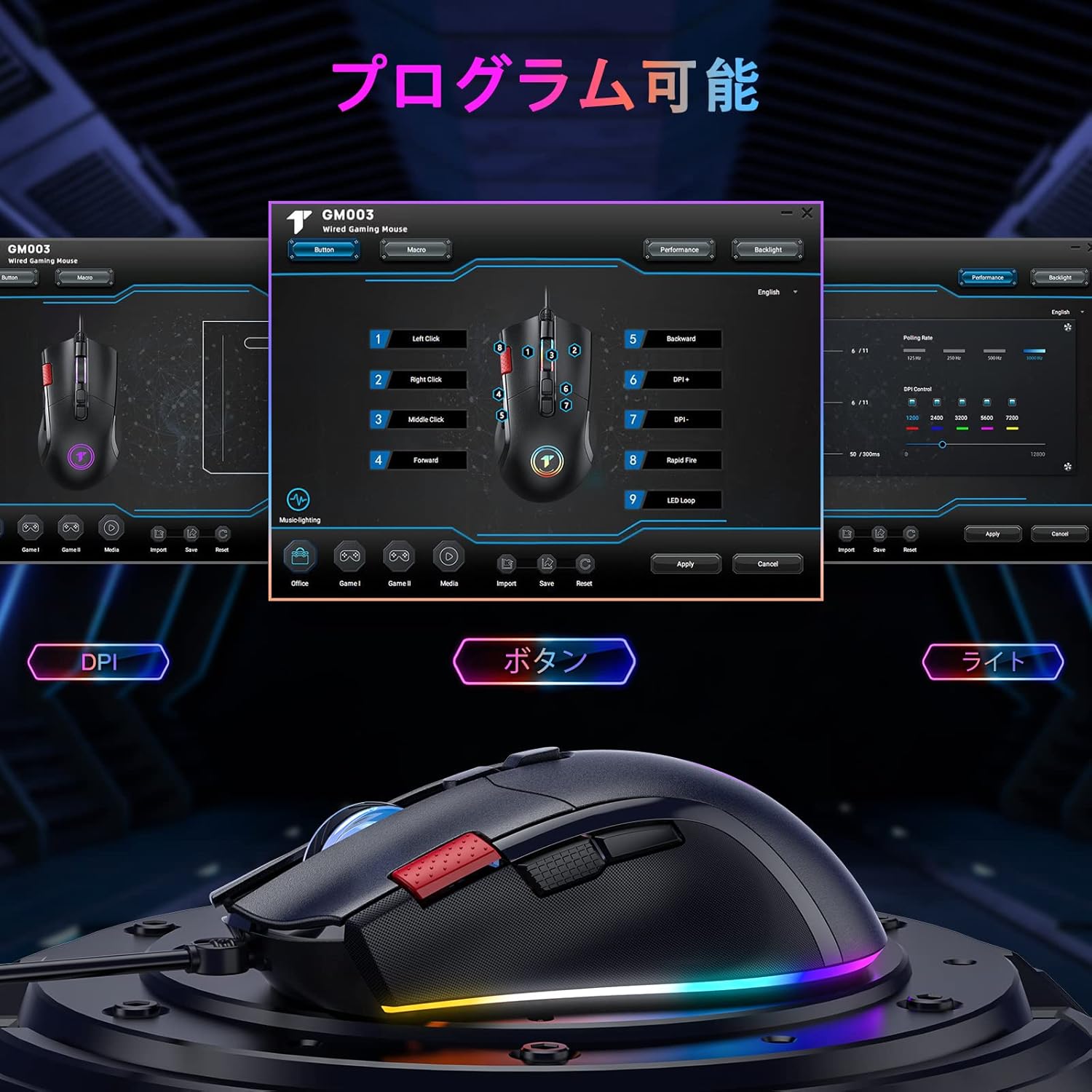
Image 2.1: The mouse software interface allows for comprehensive customization of buttons, DPI, and lighting.
Note: Side buttons and programmable functions are not supported on Mac OS.
3. عملیاتي لارښوونې
3.1 د تڼۍ دندې
The TECURS GM003-1 mouse features 9 buttons. Their default functions are as follows:

Image 3.1: Layout of the 9 programmable buttons on the GM003-1 mouse.
- کیڼ کلیک: د معیاري لومړني کلیک فعالیت.
- ښي کلیک: د معیاري ثانوي کلیک فعالیت.
- منځنی کلیک (د سکرول ویل پریس): Activates middle click function.
- پورته/ښکته سکرول: Navigates content vertically.
- د DPI+ تڼۍ: د DPI حساسیت زیاتوي.
- د DPI تڼۍ: د DPI حساسیت کموي.
- د وړاندې کولو تڼۍ: مخ په وړاندې ځي web براوزرونه یا file سپړونکي
- د شا تڼۍ: شاته نیویګیټ کوي web براوزرونه یا file سپړونکي
- د چټک اور تڼۍ: Executes multiple clicks with a single press (programmable via software).
3.2 د DPI تعدیل
The mouse offers 5 adjustable DPI levels: 1200, 2400, 3200, 5600, and 7200 DPI. Use the DPI+ and DPI- buttons (typically located near the scroll wheel) to cycle through these settings. The current DPI level may be indicated by a change in the mouse's LED color or through the software interface.
۴.۳ د RGB رڼا طریقې
The mouse features 13 distinct RGB lighting modes. These can be cycled through or customized using the dedicated software. Refer to the software interface for specific options to change colors, effects, and brightness.
4. ساتنه
4.1 پاکول
- د پاکولو دمخه موږک له خپل کمپیوټر څخه جلا کړئ.
- د موږک سطحه د پاکولو لپاره نرم، وچ، لینټ نه پاک ټوکر وکاروئ.
- د سختې خاورې لپاره، په روښانه توګه دampټوکر د اوبو یا نرم پاکولو محلول سره ومینځئ. د سختو کیمیاوي موادو څخه ډډه وکړئ.
- د تڼیو او سکرول ویل شاوخوا پاکولو لپاره د پنبې سویب یا فشار شوي هوا وکاروئ.
- Ensure the optical sensor on the bottom of the mouse is clean and free of debris for accurate tracking.
4.2 ذخیره کول
When not in use, store the mouse in a clean, dry environment away from direct sunlight and extreme temperatures. Avoid placing heavy objects on the mouse or tangling the cable.
5. ستونزه حل کول
۶.۱ موږک ځواب نه ورکوي
- ډاډ ترلاسه کړئ چې USB کیبل ستاسو په کمپیوټر کې په کار کوونکي USB پورټ کې په خوندي ډول ولګول شوی دی. یو بل USB پورټ هڅه وکړئ.
- خپل کمپیوټر بیا پیل کړئ.
- وګورئ چې ایا موږک په بل کمپیوټر کې کار کوي ترڅو د کمپیوټر پورې اړوند کومه ستونزه له منځه یوسي.
5.2 Inaccurate Tracking or Cursor Lag
- د موږک په ښکته برخه کې نظري سینسر پاک کړئ.
- ډاډ ترلاسه کړئ چې تاسو موږک په مناسب سطحه کاروئ (د مثال په توګه، د موږک پیډ). د ډیر انعکاس کونکي یا شفاف سطحو څخه ډډه وکړئ.
- Adjust the DPI settings using the DPI+ and DPI- buttons.
5.3 Programmable Buttons Not Working (Mac OS)
As noted, side buttons and programmable functions are not supported on Mac OS. This is a limitation of the operating system's compatibility with the mouse's advanced features.
۶.۲ د RGB رڼا کار نه کوي
- ډاډ ترلاسه کړئ چې موږک په سمه توګه وصل دی.
- Check the mouse software to ensure RGB lighting is enabled and configured correctly.
6. مشخصات
| فیچر | مشخصات |
|---|---|
| برانډ | TECURS |
| د ماډل شمیره | GM003،1-XNUMX |
| د ارتباط ټیکنالوژي | USB (ویر شوی) |
| د حرکت کشف ټیکنالوژي | نظري |
| د تڼیو شمیر | ۴ (پروګرام وړ) |
| د DPI تنظیمات | 1200 / 2400 / 3200 / 5600 / 7200 DPI (5-stagد تنظیم وړ) |
| د RGB رڼا | 13 موډل |
| د لاس لارښوونه | متضاد |
| د توکي وزن | 90 ګرامه |
| د بریښنا سرچینه | د بریښنا تار (بیټرۍ ته اړتیا نشته) |
| مطابقت لرونکي عملیاتي سیسټمونه | Windows 11/10/8/7/XP/Vista, Linux, Mac OS (Note: Limited functionality on Mac OS) |
| مطابقت لرونکې وسیلې | PC, Laptop, Notebook, Macbook |

Image 6.1: The mouse offers broad compatibility with various operating systems.
7. تضمین او ملاتړ
TECURS products are designed for reliability and performance. For warranty information, technical support, or any inquiries regarding your GM003-1 gaming mouse, please refer to the warranty card included with your product or visit the official TECURS website. Please have your model number (GM003-1) and purchase details ready when contacting support.