
پیژندنه
This manual provides detailed instructions for the installation, operation, and maintenance of your Strong SRT 7040 Digital Satellite HD Receiver. Please read this manual carefully before using the device to ensure proper functionality and to prevent damage.

Image: The Strong SRT 7040 DTT Tuner and its retail packaging.
The Strong SRT 7040 is a Full HD digital satellite receiver designed for Free-To-Air (FTA) channels. It features a USB port for multimedia playback and software updates, and supports Dolby Audio for enhanced sound quality.
1. ترتیب کول
1.1 پیک کول
په احتیاط سره د بسته بندۍ څخه ټولې برخې لرې کړئ. ډاډ ترلاسه کړئ چې لاندې توکي شتون لري:
- Strong SRT 7040 DTT Tuner
- ریموټ کنټرول (د دوه AAA بیټریو سره)
- د بریښنا اډاپټر
- د کارن لارښود
1.2 د آلې سره نښلول
Follow these steps to connect your SRT 7040 receiver:
- د سپوږمکۍ داخلول: خپل د سپوږمکۍ ډش کیبل له ناست د رسیدونکي په شا کې پورټ.
- Video Output (HDMI): د HDMI کیبل سره وصل کړئ HDMI port on the receiver to an HDMI input on your television.
- Video Output (SCART): Alternatively, for older televisions, connect a SCART cable from the تلویزیون SCART port on the receiver to the SCART input on your television.
- Audio Output (Digital): For digital audio, connect a coaxial cable from the COAXIAL S/PDIF port to your digital audio ampلايف
- Audio Output (Analog): For analog audio, connect RCA cables from the AUDIO R/L ports to your audio Hi-Fi ampلايف
- د USB وسیله: If desired, connect a USB storage device to the USB port for multimedia playback or software updates.
- ځواک: د بریښنا اډیپټر ته 12V === 1.5A په ریسیور کې ان پټ کړئ، بیا اډاپټر د دیوال په یوه ځای کې ولګوئ.

Image: Rear panel connections of the Strong SRT 7040 DTT Tuner, showing SAT IN, HDMI, TV SCART, COAXIAL S/PDIF, AUDIO R/L, USB, and Power input.
1.3 First-Time Installation and Channel Scan
Upon first power-on, the receiver will guide you through an initial setup wizard. Follow the on-screen prompts to select your language, country, and perform an automatic channel scan. This process will detect and store all available satellite channels.
2. عملیاتي لارښوونې
2.1 ریموټ کنټرول اوورview
The included remote control allows you to access all functions of the SRT 7040. Insert the two AAA batteries into the remote control, ensuring correct polarity.

Image: The remote control for the Strong SRT 7040 DTT Tuner, showing buttons for power, numbers, volume, channel, menu, and special functions.
2.2 اساسي دندې
- ځواک: فشار ورکړئ پاور button to turn the receiver on or off (standby mode).
- د چینل انتخاب: د کارولو CH+ / CH- buttons to change channels sequentially, or use the numeric keypad to enter a channel number directly.
- د حجم کنټرول: د کارولو VOL+ / VOL- د آډیو حجم تنظیم کولو لپاره تڼۍ.
- خاموش: فشار ورکړئ خاموش د آډیو د لنډمهاله خاموشولو لپاره تڼۍ.
2.3 د مینو نیویګیشن
فشار ورکړئ مینو د اصلي مینو ته د لاسرسي لپاره تڼۍ. د تیر کیلي وکاروئ (UP, ښکته, کیڼ, حق) to navigate through options and OK د انتخابونو تایید لپاره. فشار ورکړئ وتون to return to the previous screen or live TV.
2.4 ځانګړي ځانګړتیاوې
- ټایمر: The receiver supports programming timers for recording or switching to specific channels at scheduled times. Access this feature via the menu.
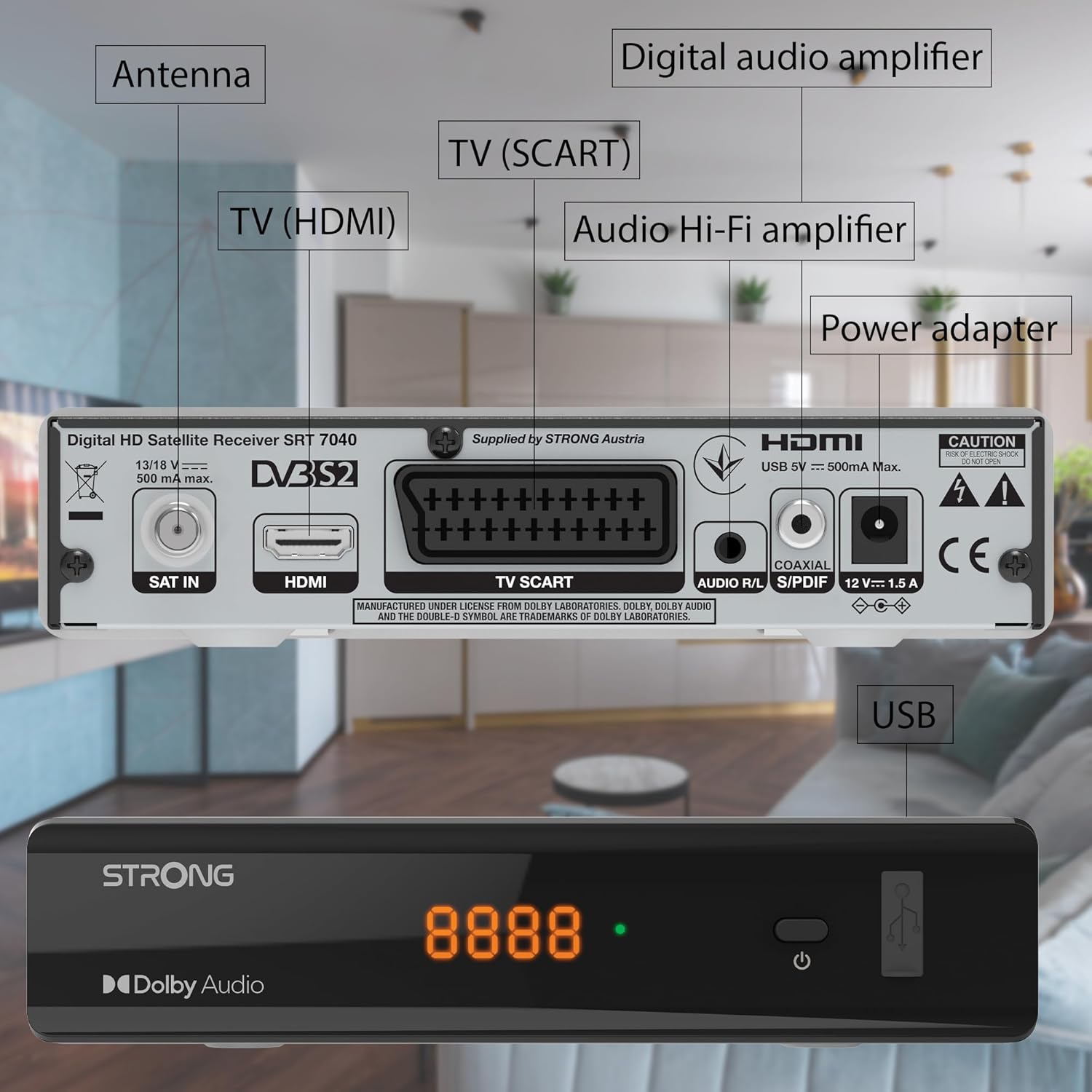
Image: The Strong SRT 7040 DTT Tuner displaying a timer icon, indicating its scheduling capabilities.
- د خوښې لیستونه: Create customized lists of your preferred channels for quick access.
- فرعي سرلیکونه: Enable or disable subtitles for compatible broadcasts using the SUB په ریموټ کې تڼۍ.
- د بریښنایی پروګرام لارښود (EPG): فشار ورکړئ EPG تڼۍ ته view program information for upcoming broadcasts.
- دولبي آډیو: The receiver supports Dolby Audio for a high-quality sound experience.

Image: The Strong SRT 7040 DTT Tuner with the Dolby Audio logo, illustrating its sound processing capability.
3. ساتنه
3.1 پاکول
To clean the receiver, disconnect it from the power supply. Use a soft, dry cloth to wipe the exterior. Do not use liquid cleaners, aerosols, or abrasive materials, as these can damage the finish or internal components.
3.2 د سافټویر تازه معلومات
په دوره یي ډول د تولید کونکي معاینه وکړئ website for available software updates. Updates can improve performance, add new features, or resolve issues. Software updates are typically performed via the USB port following specific instructions provided with the update file.
3.3 د خوندیتوب معلومات
- Do not open the receiver casinج. دننه د کارونکي لپاره د خدمت وړ برخې نشته. ټولې خدمتونه وړ پرسونل ته راجع کړئ.
- رسیور د مستقیم لمر وړانګو، تودوخې سرچینو او رطوبت څخه لرې وساتئ.
- د ډیر تودوخې مخنیوي لپاره د وسیلې شاوخوا مناسب هوا ورکول ډاډمن کړئ.
- یوازې چمتو شوي بریښنا اډاپټر وکاروئ.
4. ستونزه حل کول
If you encounter problems with your SRT 7040, consult the following table before contacting support.
| ستونزه | احتمالي لامل | د حل لاره |
|---|---|---|
| هیڅ ځواک نشته | د برېښنا اډاپټر نه دی وصل شوی؛ د برېښنا ساکټ خراب دی | Check power adapter connection; Try a different power outlet |
| سیګنال نشته / تور سکرین | Satellite cable loose or disconnected; Incorrect input selected on TV; Satellite dish alignment issue | Check SAT IN cable connection; Ensure TV is on correct HDMI/SCART input; Perform a channel scan; Consult a professional for dish alignment if necessary |
| ریموټ کنټرول کار نه کوي | Batteries depleted or incorrectly inserted; Obstruction between remote and receiver | Replace batteries; Ensure correct polarity; Remove any obstructions; Point remote directly at receiver |
| د خراب کیفیت کیفیت | Weak satellite signal; Incorrect display settings | Check satellite signal strength in menu; Adjust TV display settings; Ensure Full HD content is being broadcast |
5. مشخصات
The following are the technical specifications for the Strong SRT 7040 Digital Satellite HD Receiver:
- ماډل: SRT 7040 (SAT FTA Full HD)
- نښه: قوي
- ابعاد: 3.39 x 6.46 x 1.38 انچه (8.6 x 16.4 x 3.5 سانتي متره)
- د توکي وزن: ۰.۹۸۶ اونس (۲۷.۹۴ ګرامه)
- رنګ: تور
- د ارتباط ټیکنالوژي: USB
- والیtage: 100 - 240 V
- فریکونسی: ۲۰ - ۲۰۰۰۰ هرټز
- د بریښنا مصرف: 18 kWh (operational, typical)
- د کار د حرارت درجه: له 0ºC څخه تر 40ºC پورې
- نسبي رطوبت: ۴۰٪ - ۸۰٪
- بیټرۍ: ۳ AAA بیټرۍ (د ریموټ لپاره شاملې دي)
- مشخصات وکتل: DVB-S2
- شامل دي: Wally Receiver
6. تضمین او ملاتړ
For warranty information and technical support, please refer to the warranty card included in your product packaging or visit the official Strong webسایټ. د تضمین ادعاوو لپاره د پیرود ثبوت په توګه د پیرود رسید وساتئ.
For further assistance, you may contact Strong customer service through the contact details provided on their official webسایټ