
1. ترتیب کول
۲.۲ شاملې برخې
Your MAGIC-REFINER MK32 keyboard package includes:
- MK32 82-Key Hot Swappable Wired Mechanical Keyboard
- Acrylic Wrist Rest
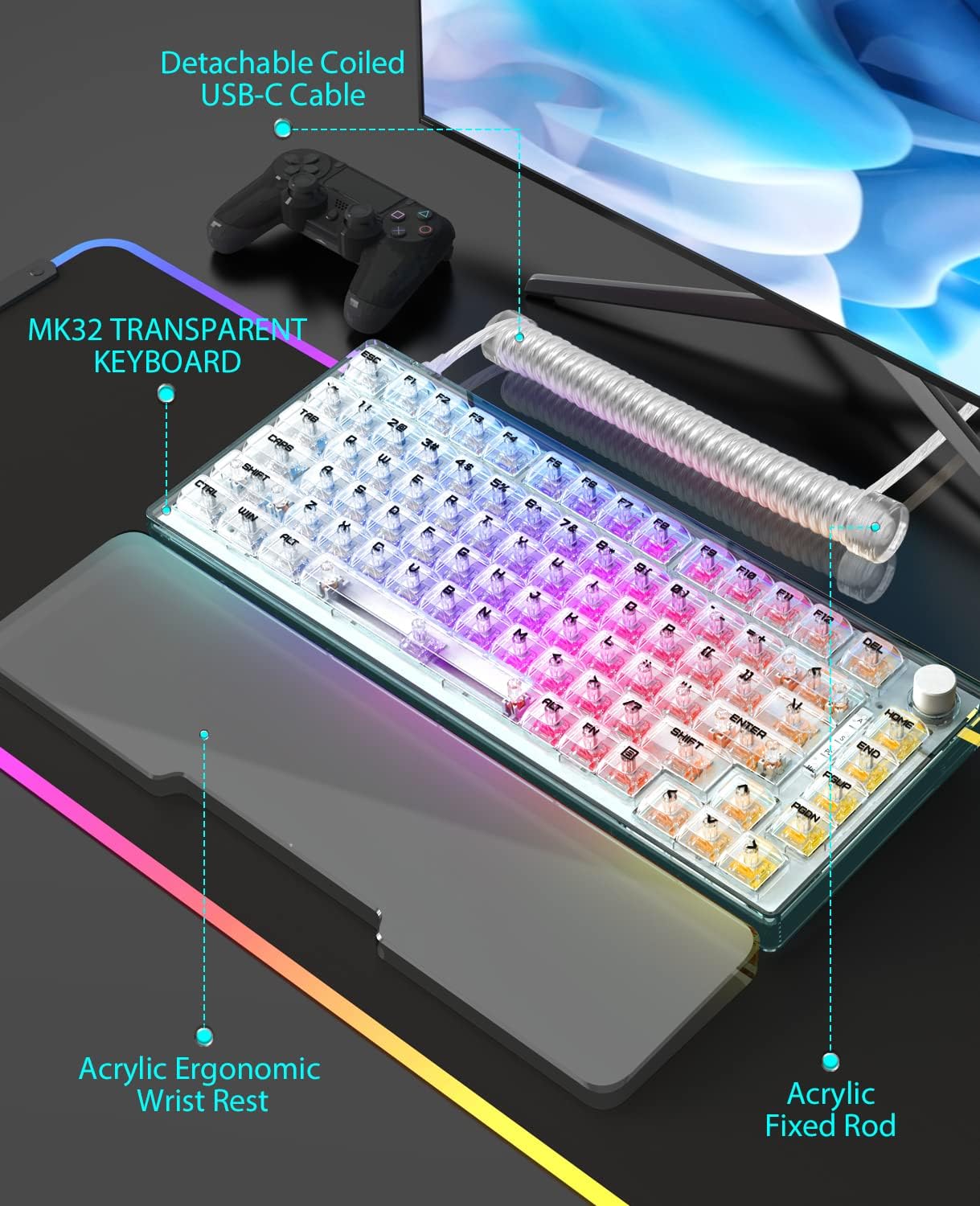
- Custom Coiled USB-C Cable
- کیکیپ پلر
- سویچ پلر
1.2 نښلول
The MK32 keyboard offers versatile connectivity options:
- تار لرونکی (USB-C): د ورکړل شوي USB-C کیبل په کارولو سره کیبورډ مستقیم خپل وسیله سره وصل کړئ.
- ۲.۴GHz بېسیم: For a stable and fast wireless connection, use the dedicated 2.4GHz dongle.
- بلوتوث: Connect wirelessly to compatible devices via Bluetooth.
To switch between connectivity modes, locate the switch on the top edge of the keyboard. Select your desired mode (Wired, 2.4G, or Bluetooth).
۴.۴ فزیکي سمونونه
The keyboard features two-level adjustable feet on the underside to customize your typing angle for optimal comfort.

انځور: په ټولیزه توګه view of the MAGIC-REFINER MK32 keyboard with vibrant RGB lighting.
2. عملیاتي لارښوونې
۳.۱ د کیبورډ اساسي دندې
The MK32 is an 82-key, 75% form factor keyboard. All standard alphanumeric and function keys operate as expected. Refer to your operating system's documentation for specific key combinations.
۵.۴ د RGB رڼا کنټرول
The keyboard features double-sided RGB LEDs with 18 default lighting effects. You can adjust multiple brightness levels and flowing backlight speeds. Use the FN key in combination with other keys (refer to the included function card) to:
- Cycle through 18 lighting effects.
- د روښانتیا کچه تنظیم کړئ.
- Control backlight speed.
- Control base and keyboard lighting effects separately.

Image: Dynamic RGB lighting effects illuminating the transparent keycaps and base of the MK32 keyboard.
۴.۲ د څرخي نوب فعالیت
The rotary knob located on the top right of the keyboard provides convenient media control:
- ګرځول: Adjusts system volume (clockwise for up, counter-clockwise for down).
- مطبوعات: Toggles play/pause for media playback.

Image: The 82-key layout of the MK32 keyboard, highlighting the convenient rotary knob for media control.
۵.۳ ګرم بدلیدونکي سویچونه
The MK32 features a hot-swappable PCB, allowing you to easily replace switches without soldering. It supports 99% of 3/5-pin MX-similar mechanical switches. The keyboard comes equipped with custom Ice-rock linear switches, designed for smooth and quick feedback with lower sound.
انځور: نږدې انځور view of the transparent OEM profile keycaps, showcasing their clear design and the underlying switches.
۳.۳ د سیسټم مطابقت
The keyboard is compatible with a wide range of operating systems and devices, including:
- PC (Windows series)
- Android
- لینکس
- iOS
- Gaming Consoles: PS4, Xbox Series X|S, Xbox One
3. ساتنه
۷.۲ د کیبورډ پاکول
د غوره فعالیت او ظاهري ساتلو لپاره، په منظم ډول خپل کیبورډ پاک کړئ:
- د کیلي کیپسونو ترمنځ د دوړو او کثافاتو لرې کولو لپاره نرم برش یا فشار شوي هوا وکاروئ.
- Wipe the keycaps and frame with a slightly damp, lint-free cloth. Avoid harsh chemicals.
- For the acrylic wrist rest, wipe clean with a damp cloth as needed, especially if it's white and prone to showing dirt.
۵.۲ د سویچونو او کی کیپسونو بدلول
Utilize the included keycap puller to carefully remove keycaps. Use the switch puller to gently extract switches from the PCB. When inserting new switches, ensure the pins are aligned correctly to avoid damage. Press firmly until the switch clicks into place.

Image: The MK32 keyboard paired with its ergonomic acrylic wrist rest and custom coiled USB-C cable.
4. ستونزه حل کول
۵.۳ د اتصال مسلې
- وایر شوی: Ensure the USB-C cable is securely connected to both the keyboard and your device. Try a different USB port or cable.
- ۲.۴GHz بېسیم: Verify the 2.4GHz dongle is properly inserted into your device. Ensure the keyboard is switched to 2.4GHz mode.
- بلوتوث: Ensure Bluetooth is enabled on your device and the keyboard is in pairing mode. Re-pair the device if necessary.
4.2 Key Malfunctions
If a key is unresponsive or inconsistent:
- Carefully remove the keycap and switch using the provided tools.
- Inspect the switch for any visible damage or debris. Clean if necessary.
- Re-insert the switch firmly. If the issue persists, try replacing it with one of the spare switches or a known working switch.
۵.۳ د RGB رڼا مسلې
If the RGB lighting is not functioning correctly:
- Check the keyboard's lighting settings using the FN key combinations.
- Ensure the brightness level is not set to minimum.
- که تاسو بېسیم حالت کاروئ، ډاډ ترلاسه کړئ چې بیټرۍ کافي چارج لري.
5. مشخصات
| فیچر | تفصیل |
|---|---|
| د ماډل شمیره | MK32 |
| ترتیب | 82-Key, 75% Form Factor |
| ارتباط | Wired (USB-C), 2.4GHz Wireless, Bluetooth |
| سویچونه | Hot-swappable, Custom Ice-rock Linear Switches (40g force) |
| کیکیپس | Transparent OEM Profile کیکیپس |
| شاته رڼا کول | Double-sided RGB LEDs (18 effects, adjustable brightness/speed) |
| مواد | Japanese silencing NANO cotton, high-density EVA, acrylic, TPU |
| ځانګړي ځانګړتیاوې | Ergonomic Wrist Rest, Transparent Base, Rotary Knob, Two-level Adjustable Feet |
| ابعاد | ۷.۱۳ x ۳.۷ x ۲.۰۵ انچه (پیکج) |
| د توکي وزن | 10.4 اونس |
6. تضمین او ملاتړ
۷.۲ د ساتنې پلانونه
Optional protection plans are available for your product:
- دوه کلن محافظتي پلان
- دوه کلن محافظتي پلان
- بشپړ محافظت (میاشتنی بلینګ)
For details on coverage and terms, please refer to the specific protection plan documentation.
۷.۳ د تولیدونکي ملاتړ
For any product inquiries, technical assistance, or warranty claims, please contact MAGIC-REFINER customer support.
Manufacturer: MAGIC-REFINER
د نورو معلوماتو او ملاتړ لپاره، لیدنه وکړئ MAGIC-REFINER Store on Amazon.


