
FAO Schwarz Thunderbolt Jet X2
FAO Schwarz Thunderbolt Jet X2 Drone User Manual
Model: Thunderbolt Jet X2 | Brand: FAO Schwarz
پیژندنه
Welcome to the user manual for your new FAO Schwarz Thunderbolt Jet X2 Drone. This manual provides essential information for safe operation, setup, maintenance, and troubleshooting. Please read it thoroughly before operating your drone to ensure a safe and enjoyable experience.
د خوندیتوب معلومات
- ډرون تل په خلاصو او پاکو سیمو کې، د خلکو، څارویو او خنډونو څخه لرې چل کړئ.
- هوايي ډګرونو، د برېښنا لینونو، یا محدود هوايي حریم ته نږدې الوتنه مه کوئ.
- Ensure the drone's battery and remote control batteries are fully charged before each flight.
- ګوتې، ویښتان او خلاصې جامې د څرخیدونکو پروپیلرونو څخه لرې وساتئ.
- په قوي بادونو یا ناوړه هوا شرایطو کې کار مه کوئ.
- د ځوانو کاروونکو لپاره د لویانو څارنه سپارښتنه کیږي.
په بکس کې څه دي
ډاډ ترلاسه کړئ چې ټولې برخې شتون لري:
- FAO Schwarz Thunderbolt Jet X2 Drone
- ریموټ کنټرول
- د چارج وړ ډرون بیټرۍ
- د USB چارج کیبل
- Spare Propellers (if included)
- د کارونکي لارښود (دا لاسوند)
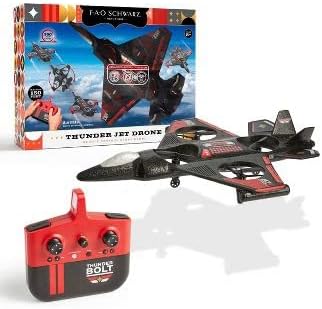
Image: The Thunderbolt Jet X2 Drone, its remote control, and the product packaging, showing the main components included.
چمتو کول
۱. د ډرون بیټرۍ چارج کول
- Locate the rechargeable drone battery.
- بیټرۍ د ورکړل شوي USB چارج کولو کیبل سره وصل کړئ.
- Plug the USB cable into a standard USB power source (e.g., computer USB port, USB wall adapter).
- د USB کیبل په شاخص کې رڼا به د چارج کولو حالت وښيي (د مثال په توګه، د چارج کولو لپاره سور، د بشپړ چارج لپاره بند).
- چارج کول معمولا شاوخوا 60-90 دقیقې وخت نیسي. ډیر چارج مه کوئ.
2. د ریموټ کنټرول بیټرۍ نصب کول
- د ریموټ کنټرول شاته د بیټرۍ کڅوړه خلاص کړئ.
- Insert 3x AAA batteries (not included) into the compartment, ensuring correct polarity (+/-).
- د بیټرۍ کڅوړه په خوندي ډول وتړئ.

انځور: یو مفصل view of the remote control for the Thunderbolt Jet X2 Drone, highlighting its buttons and joysticks.
۳. د ډرون او ریموټ جوړه کول
- ډرون په فلیټ ، سطح سطح کې ځای په ځای کړئ.
- Turn on the drone by pressing its power button. The drone's lights will flash.
- ریموټ کنټرول چالان کړئ.
- کیڼ جویسټیک (تروتل) ټوله پورته او بیا ټوله ښکته فشار ورکړئ.
- The drone's lights will become solid, indicating successful pairing.
د ډرون چلول
بنسټیز کنټرولونه
- کیڼ جویسټک (تروټل): Up to ascend, down to descend.
- ښي جویسټک (لارښودونکی): Forward to move forward, backward to move backward, left to move left, right to move right.
- د تڼۍ پرې کول: Used to fine-tune the drone's stability if it drifts in any direction.
- د یوې کیلي د پورته کېدو/کښته کېدو تڼۍ: په اتوماتيک ډول د پورته کېدو یا ښکته کېدو لپاره فشار ورکړئ.
- 360° Flip Button: Press this button, then push the right joystick in any direction to perform a flip.

Image: The Thunderbolt Jet X2 Drone flying in the air, with a hand holding the remote control in the foreground, illustrating active operation.
لومړی الوتنه
- Ensure you are in a safe, open area.
- ډرون په فلیټ سطح کې ځای په ځای کړئ.
- Press the One-Key Take-off button, or slowly push the left joystick up to ascend.
- Practice hovering at a low altitude first.
- Use the right joystick for directional control.
- To land, press the One-Key Landing button or slowly pull the left joystick down until the drone lands.

Image: Three Thunderbolt Jet X2 Drones shown in different aerial maneuvers, demonstrating its agility and flight capabilities.
ساتنه
- پاکول: Use a soft, dry cloth to clean the drone and remote control. Do not use water or harsh chemicals.
- پروپیلر معاینه: Regularly check propellers for damage (bends, cracks). Replace damaged propellers immediately using the provided spares.
- د بیټرۍ پاملرنه: Store batteries in a cool, dry place. Do not leave batteries fully discharged for extended periods.
- ذخیره کول: When not in use, store the drone and remote in a safe place, away from direct sunlight and extreme temperatures.
د ستونزو حل کول
| ستونزه | احتمالي لامل | د حل لاره |
|---|---|---|
| ډرون ریموټ ته ځواب نه ورکوي. | جوړه نه ده؛ ټیټه بیټرۍ؛ له حد څخه بهر. | Re-pair drone and remote; charge drone battery; replace remote batteries; ensure within 300 feet range. |
| ډرون د الوتنې پر مهال ګرځي. | Needs trimming; uneven take-off surface. | Use trim buttons to adjust; ensure drone is on a flat surface before take-off. |
| پروپیلرونه نه ګرځېږي. | خنډ؛ خراب شوی پروپیلر؛ د موټرو ستونزه. | Check for obstructions; replace damaged propellers; contact support if motor issue suspected. |
مشخصات
| فیچر | تفصیل |
|---|---|
| برانډ | د خوړو او کرنې سازمان شوارز |
| د ماډل نوم | Thunderbolt Jet X2 |
| رنګ | تور |
| د ویډیو نیول حل | 480p |
| د ارتباط ټیکنالوژي | USB |
| د مهارت کچه | ابتکار |
| د بیټرۍ ظرفیت | 850 ملیونهamp ساعتونه |
| د ویډیو نیول بڼه | MP4 |
| اعظمي حد | 300 پښه |
| مواد | پلاستیک |
| د توکي وزن | ۲.۴۵ پونډه |
| د کڅوړې ابعاد | 17.48 x 12.68 x 4.37 انچه |
تضمین او ملاتړ
For warranty information or technical support, please refer to the contact details provided on the product packaging or visit the official FAO Schwarz webسایټ. د پیرود ثبوت په توګه د پیرود رسید وساتئ.
Ask a question about this manual
Ask about setup, troubleshooting, compatibility, parts, safety, or missing instructions. Manuals+ will review the question and use this page’s manual context to help answer it.