
amazon basics B0C58TDFPR
د ایمیزون اساسات د لاسي ګیمبل سټیبلائزر کارونکي لارښود
Model: B0C58TDFPR
پیژندنه
The Amazon Basics Handheld Gimbal Stabiliser is designed to provide smooth and steady footage for your smartphone photography and videography. This manual provides essential information for setting up, operating, maintaining, and troubleshooting your device.

Image: The Amazon Basics Handheld Gimbal Stabiliser with a smartphone attached, ready for use.
د بسته محتويات
مخکې له دې چې تاسو پیل وکړئ، مهرباني وکړئ ډاډ ترلاسه کړئ چې ټول توکي په کڅوړه کې شتون لري:
- 1N Handheld Gimbal with attached holder
- 1N Charging cable
- د 1N کارن لارښود (دا سند)
- 1 ټرپډ
- 1N Hanging belt
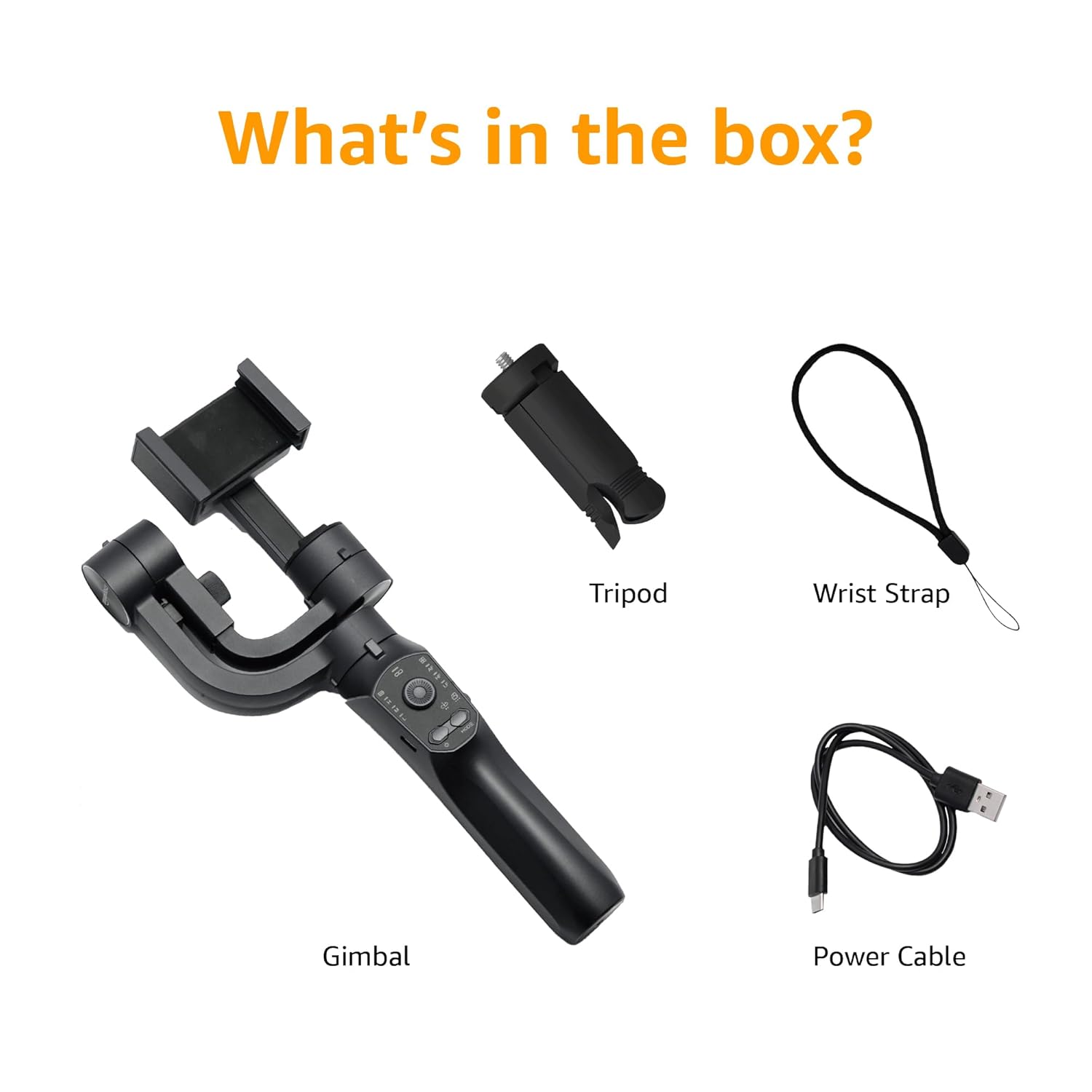
Image: A visual representation of the package contents, including the gimbal, tripod, power cable, and wrist strap.
د محصول اجزا
Familiarize yourself with the different parts of your gimbal stabiliser:
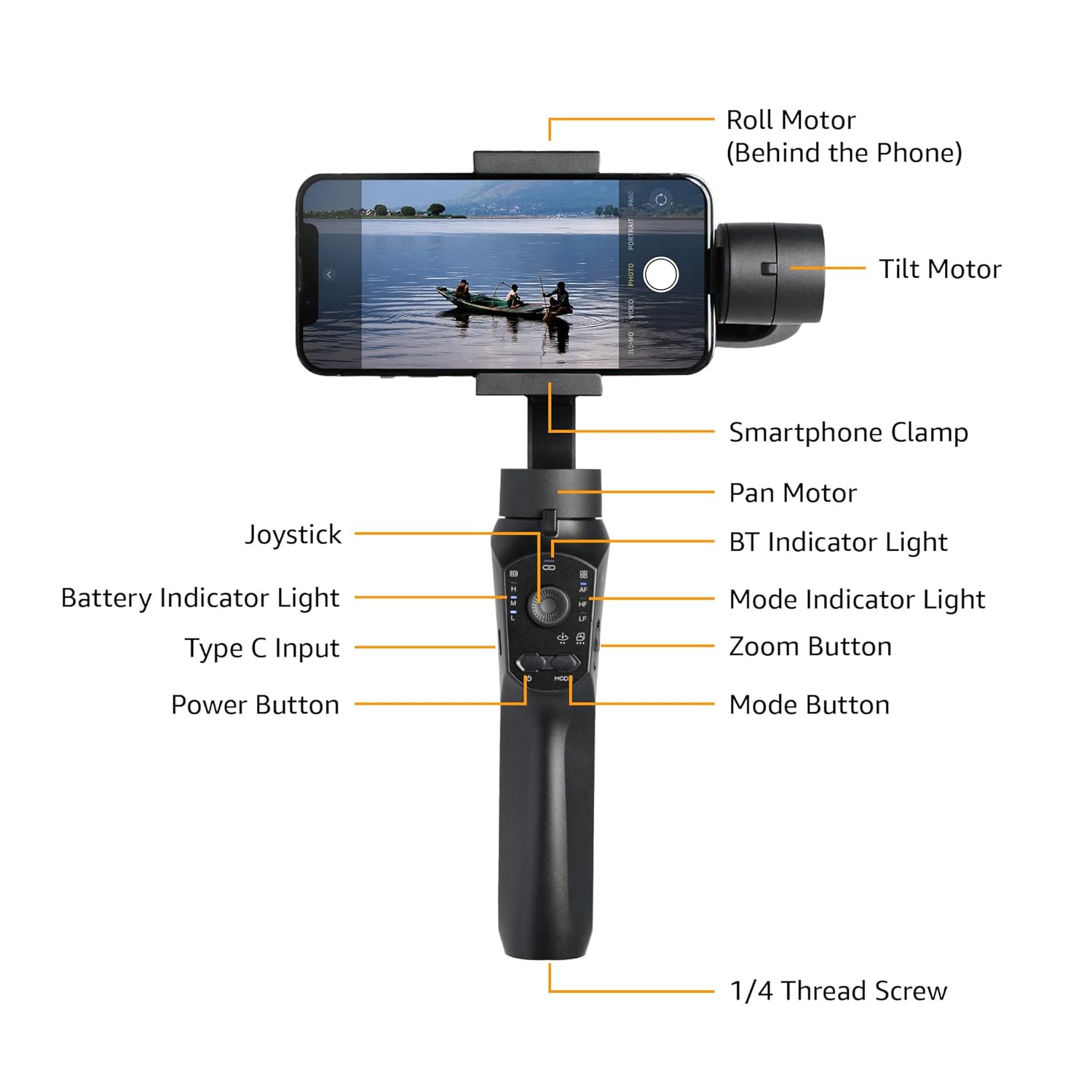
Image: Labeled diagram showing the various components of the gimbal, including the Roll Motor, Tilt Motor, Smartphone Clamp, Pan Motor, BT Indicator Light, Mode Indicator Light, Zoom Button, Mode Button, Power Button, Type C Input, Battery Indicator Light, Joystick, and 1/4 Thread Screw.
- رول موټور: Controls the roll axis (rotation along the lens axis).
- ټیلټ موټور: Controls the tilt axis (up and down movement).
- د سمارټ فون Clamp: ستاسو سمارټ فون په خوندي ډول نیسي.
- د پان موتر: Controls the pan axis (left and right rotation).
- جوسټک: د ګیمبل حرکت د لاسي کنټرول لپاره.
- د BT شاخص رڼا: د بلوتوث اتصال حالت په ګوته کوي.
- د بیټرۍ شاخص ر Lightا: د بیټرۍ اوسنی کچه ښیي.
- د C انپټ ډول: Charging port for the gimbal.
- د بریښنا تڼۍ: ګیمبل چالان/بندوي.
- د حالت شاخص رڼا: اوسنی عملیاتي حالت ښکاره کوي.
- د زوم تڼۍ: Controls digital zoom (via app).
- د حالت تڼۍ: د مختلفو عملیاتي حالتونو ترمنځ بدلیږي.
- 1/4 Thread Screw: For attaching accessories like the included tripod.
چمتو کول
- ګیمبل چارج کړئ: Before first use, fully charge the gimbal using the provided Type-C charging cable. The battery indicator light will show charging status.
- Install the Smartphone:
- د سمارټ فون کلپ پراخ کړئamp and carefully place your smartphone in the center.
- Ensure the phone is balanced as centrally as possible within the clamp to reduce motor strain.
- Manual Balancing (Crucial):
Important: Do not switch on this Gimbal without manual balancing. Doing so may lead to motor damage and fast battery draining.
- With the smartphone mounted, adjust the position of the phone within the clamp until it remains level when you release it. This minimizes the work the motors need to do.
- Adjust the horizontal arm if necessary to achieve perfect balance.
- پاور آن: Press and hold the Power Button until the gimbal powers on and stabilizes.
- اپلیکیشن ډاونلوډ کړئ: Download the "Gimbal Pro" app from your smartphone's app store (available for Android and iOS). This app unlocks advanced features and controls.
- د بلوتوث له لارې وصل شئ: Open the Gimbal Pro app and follow the on-screen instructions to connect your gimbal via Bluetooth. The BT Indicator Light will confirm a successful connection.

Image: An illustration demonstrating the three axes of stabilization: Tilt Axis, Roll Axis, and Pan Axis, which work together to keep footage ثابت.
عملیاتي لارښوونې
بنسټیز عملیات
- پاور آن/بند: د بریښنا تڼۍ فشار او ونیسئ.
- د جویسټیک کنټرول: Use the joystick to manually control the pan and tilt movements of the gimbal.
- د حالت تڼۍ: Press the Mode Button to cycle through different operating modes (e.g., Pan Follow, Lock Mode, FPV). The Mode Indicator Light will change accordingly.
- د زوم تڼۍ: Use the Zoom Button to zoom in or out within the Gimbal Pro app.
- Multifunction Push Key: This key allows you to focus or zoom, providing a more professional photography experience.
Advanced Features (via Gimbal Pro App)
The Gimbal Pro app unlocks a variety of advanced shooting modes and features:
- Facial Tracking: Automatically tracks a subject's face to keep them in frame.
- د وخت تېرېدل: Capture stunning time-lapse videos.
- ورو حرکت: Record high-frame-rate videos for slow-motion effects.
- هوښیار زوم: Provides precise zoom control.
- Hitchcock Mode: Creates a "Dolly Zoom" effect.
- Mad Dog Mode: A dynamic, fast-response mode.
- د پیل حالت: Rotates the camera 360 degrees along the roll axis.
- FPV حالت: Follows the gimbal's orientation for an immersive first-person view.

انځور: بصري سابقهamples of features available through the mobile app, including Facial Tracking, Time Lapse Shooting, Slow Motion, and Intelligent Zoom.

Image: Icons illustrating various shooting modes such as Mad Dog Mode, Hitchcock Mode, Inception Mode, and FPV Mode, available on the gimbal.
Portrait-to-Landscape Rotation
The gimbal supports effortless rotation between portrait and landscape orientations for versatile shooting.

Image: A three-panel image demonstrating the gimbal's ability to effortlessly rotate a smartphone from portrait to landscape orientation.
بیټرۍ او چارج کول
The gimbal is equipped with a 3600mAh Lithium Ion battery, providing up to 10 hours of operational time.
- چارج کول: Connect the provided Type-C cable to the gimbal's charging port and a suitable USB power source.
- د بریښنا بانک فعالیت: The gimbal can also function as a power bank to charge your smartphone during extended shoots. Connect your smartphone to the gimbal's Type-C port using a compatible cable.
- د بیټرۍ شاخص: Monitor the battery level using the Battery Indicator Lights on the control panel.
ساتنه
- پاکول: د ګیمبل پاکولو لپاره نرم، وچ ټوکر وکاروئ. د سخت کیمیاوي موادو یا خړوبونکي موادو کارولو څخه ډډه وکړئ.
- ذخیره کول: ګیمبل په یخ او وچ ځای کې د مستقیم لمر وړانګو او سختې تودوخې څخه لرې وساتئ.
- د بیټرۍ پاملرنه: For long-term storage, charge the battery to approximately 50-60% to prolong its lifespan. Recharge every 3 months if not in use.
- د ډیر بار کولو څخه ډډه وکړئ: Do not mount smartphones heavier than the recommended payload capacity (approx. 180 grams, as per user experience). Overloading can damage the motors.
د ستونزو حل کول
| ستونزه | احتمالي لامل | د حل لاره |
|---|---|---|
| Gimbal not powering on. | ټیټ بیټرۍ. | ګیمبل په بشپړه توګه چارج کړئ. |
| Gimbal motors vibrate or do not stabilize properly. | Improper manual balancing. | Ensure the smartphone is perfectly balanced before powering on. Refer to the "Manual Balancing" section under Setup. |
| Gimbal disconnects from phone or app features not working. | Bluetooth connection issue; App malfunction. |
|
| فوtage is still shaky. | Improper balancing; Exceeding gimbal's stabilization limits. |
|
مشخصات
| فیچر | تفصیل |
|---|---|
| د ماډل شمیره | B0C58TDFPR |
| ثبات | 3-Axis (Pan, Tilt, Roll) |
| د بیټرۍ ډول | لیتیم ایون |
| د بیټرۍ ظرفیت | 3600mAh |
| عملیاتي وخت | تر 10 ساعتونو پورې |
| د چارج کولو بندر | ټایپ-سي |
| مطابقت لرونکې وسیلې | سمارټ فونونه |
| د محصول ابعاد (LxWxH) | 10 x 7 x 28.9 سانتي متره |
| د توکي وزن | 460 ګرامه |
| رنګ | تور |
| جوړونکی | SHENZHEN JX ROBOT TECHNOLOGY CO. LTD |

Image: A diagram illustrating the dimensions of the gimbal in both folded and extended states.
تضمین او ملاتړ
This Amazon Basics Handheld Gimbal Stabiliser comes with a د 1 کلن محدود تضمین د پیرود نیټې څخه.
For warranty claims, technical support, or any product-related inquiries, please contact Amazon Basics customer service or refer to the official Amazon support channels.
Ask a question about this manual
Ask about setup, troubleshooting, compatibility, parts, safety, or missing instructions. Manuals+ will review the question and use this page’s manual context to help answer it.