
1. پیژندنه
Thank you for choosing the RisoPhy Mechanical Gaming Keyboard. This manual provides detailed instructions for setting up, operating, and maintaining your new keyboard. Please read this manual thoroughly before use to ensure optimal performance and longevity of your device.
2. محصول ختم شوview
2.1 کلیدي ځانګړتیاوې
- Responsive Blue Switches: Offers tactile feedback and an audible click for precise and quick key presses.
- Rainbow Backlit RGB: Features 9 different backlight modes, 5 levels of light speed, and 5 brightness levels for customizable illumination.
- 104-Key Full-Size Layout: Includes a numeric keypad and dedicated function keys for comprehensive functionality.
- 100٪ د غوسه کولو ضد: ډاډ ترلاسه کوي چې ټول په ورته وخت کې کیلي پریسونه په سمه توګه ثبت شوي دي.
- ۱۲ ملټي میډیا لنډلارې: Quick access to media controls, volume, and other functions via Fn key combinations.
- ارګونومیک ډیزاین: Scientific stair-up keycap design and adjustable rear kickstands reduce hand fatigue.
- د تودوخې په وړاندې مقاومت لرونکي ډیزاین: Equipped with 4 hydrophobic holes to quickly drain accidental spills.
- دوامدار ساختمان: Ultra-durable double injection ABS engineered keycaps for long-lasting use.
2.2 د بسته محتويات
- RisoPhy Mechanical Gaming Keyboard (Pink)
- د USB کیبل (مدغم)
- کیکیپ پلر
- د کارن لارښود
۳.۳.۴ د کیبورډ ترتیب
The RisoPhy Mechanical Gaming Keyboard features a standard 104-key layout, including a full numeric keypad and a row of function keys (F1-F12) that can be combined with the Fn key for multimedia shortcuts.

شکل ۱: پورته څخه ښکته view of the RisoPhy Mechanical Gaming Keyboard, showcasing its full 104-key layout and pink color with RGB backlighting.
3. ترتیب کول
Setting up your RisoPhy Mechanical Gaming Keyboard is a simple plug-and-play process.
- کیبورډ خلاص کړئ: Carefully remove the keyboard and any accessories from the packaging.
- خپل وسیله سره وصل کړئ: Locate an available USB-A port on your computer (PC, Mac) or gaming console (Xbox). Insert the USB connector of the keyboard into the port.
- د ډرایور نصب کول: The keyboard is plug-and-play and does not require additional driver installation for basic functionality. Your operating system will automatically detect and configure the device.
- ارګونومیک تنظیم کړئ: Flip out the two strong foldable rear kickstands located on the underside of the keyboard to adjust the typing angle for improved comfort.
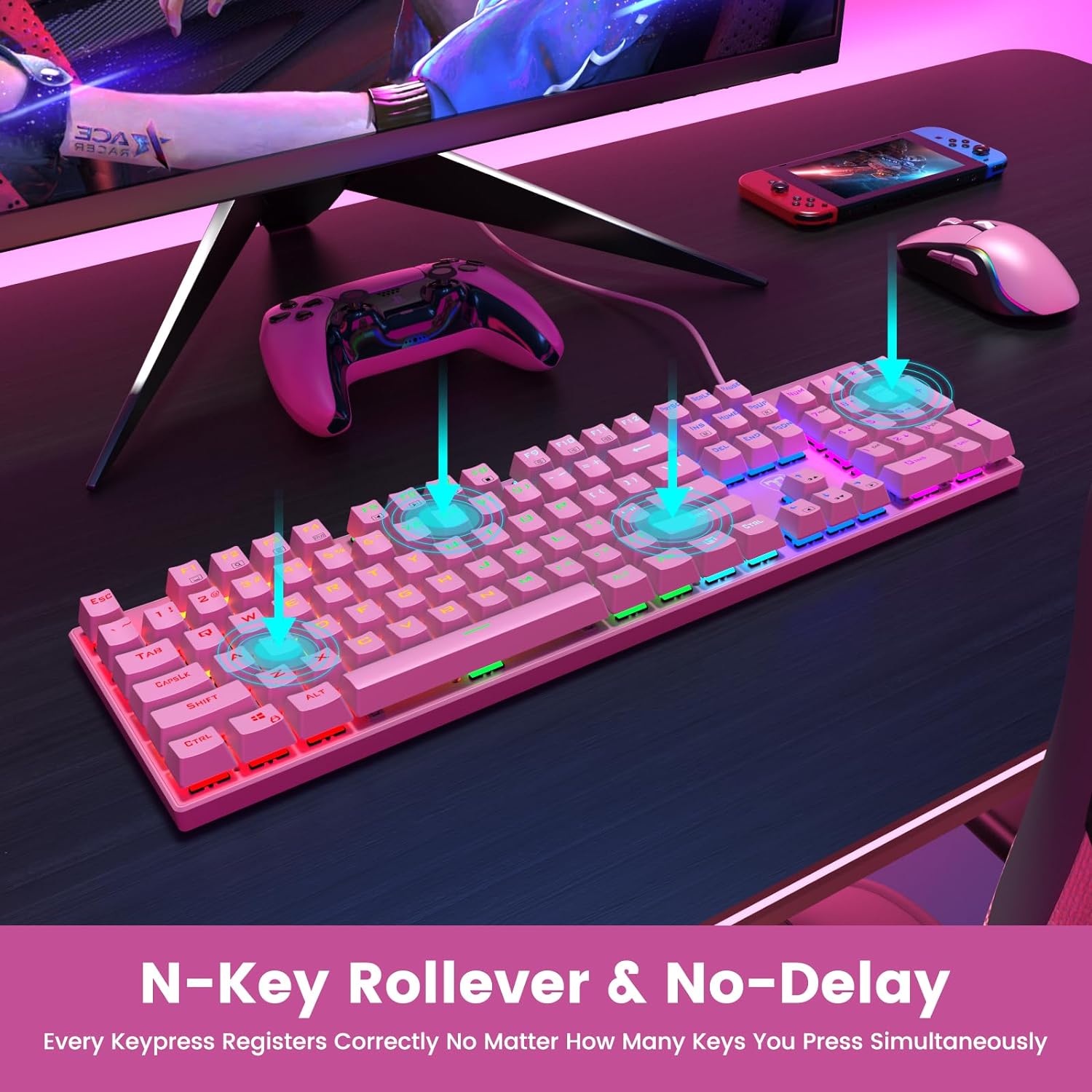
Figure 2: The underside of the RisoPhy keyboard, highlighting the adjustable rear feet that allow users to set a comfortable typing angle.
4. عملیاتي لارښوونې
4.1 بنسټیز عملیات
The RisoPhy keyboard functions as a standard 104-key keyboard. Simply type as you normally would. The blue mechanical switches provide a distinct tactile and audible feedback with each keypress.
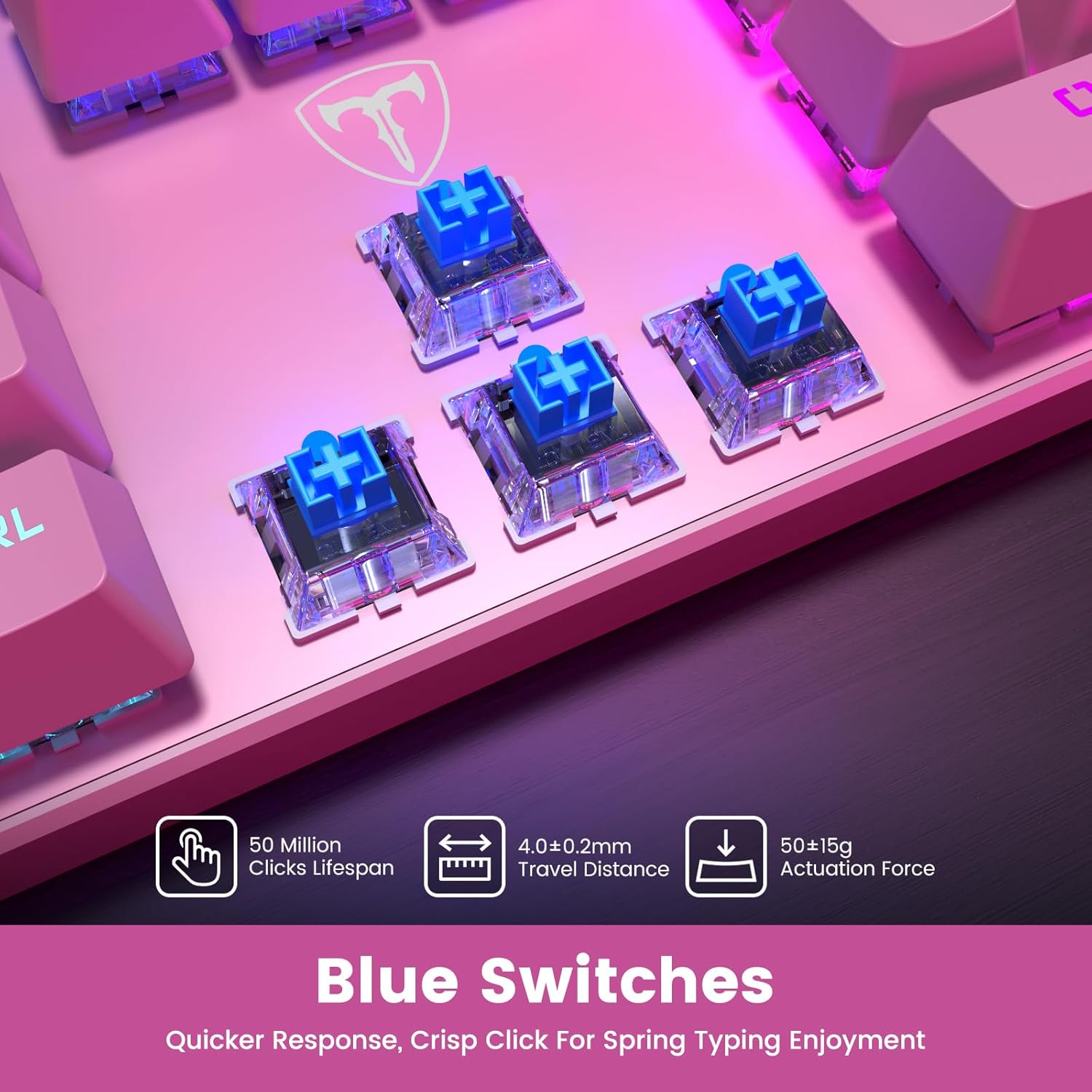
شکل ۶.۲: یوه نږدې کتنه view of the blue mechanical switches beneath the keycaps, illustrating their design for responsive and clicky feedback.
د 4.2 شاته څراغ کنټرول
Your RisoPhy keyboard features vibrant rainbow backlighting with multiple customization options:
- د شاته رڼا حالت بدلول: Use the dedicated backlight mode key (often indicated by a sun or light icon, usually near the arrow keys or F-row) to cycle through 9 different lighting effects.
- د روښانتیا تنظیم کول: مطبوعاتي Fn + PgUp د روښانتیا او لوړولو لپاره Fn + PgDn د روښانتیا کمولو لپاره (۵ کچې).
- د رڼا سرعت تنظیمول: مطبوعاتي Fn + +/- (on the numeric keypad) to adjust the speed of dynamic lighting effects (5 levels).
- Turning Backlight On/Off: Use the dedicated ON/OFF switch if available, or a specific Fn combination (refer to keyboard markings).

Figure 4: The keyboard illuminated with its rainbow RGB backlighting, demonstrating various lighting modes and brightness levels.
۴.۳ ملټي میډیا او شارټ کټ کیلي
The keyboard includes 12 multimedia shortcut combinations accessible by pressing the Fn key simultaneously with the corresponding F-key (F1-F12).
| ترکیب | فعالیت |
|---|---|
| Fn + F1 | زما کمپیوټر |
| Fn + F2 | د لټون |
| Fn + F3 | محاسبه کوونکی |
| Fn + F4 | ملټي میډیا پلیر |
| Fn + F5 | مخکینی ټریک |
| Fn + F6 | بله لار |
| Fn + F7 | پلی/ودرول |
| Fn + F8 | ودریږئ |
| Fn + F9 | خاموش |
| Fn + F10 | حجم کم کړئ |
| Fn + F11 | حجم زیات کړئ |
| Fn+وین | Win Lock (disables Windows key during gaming) |
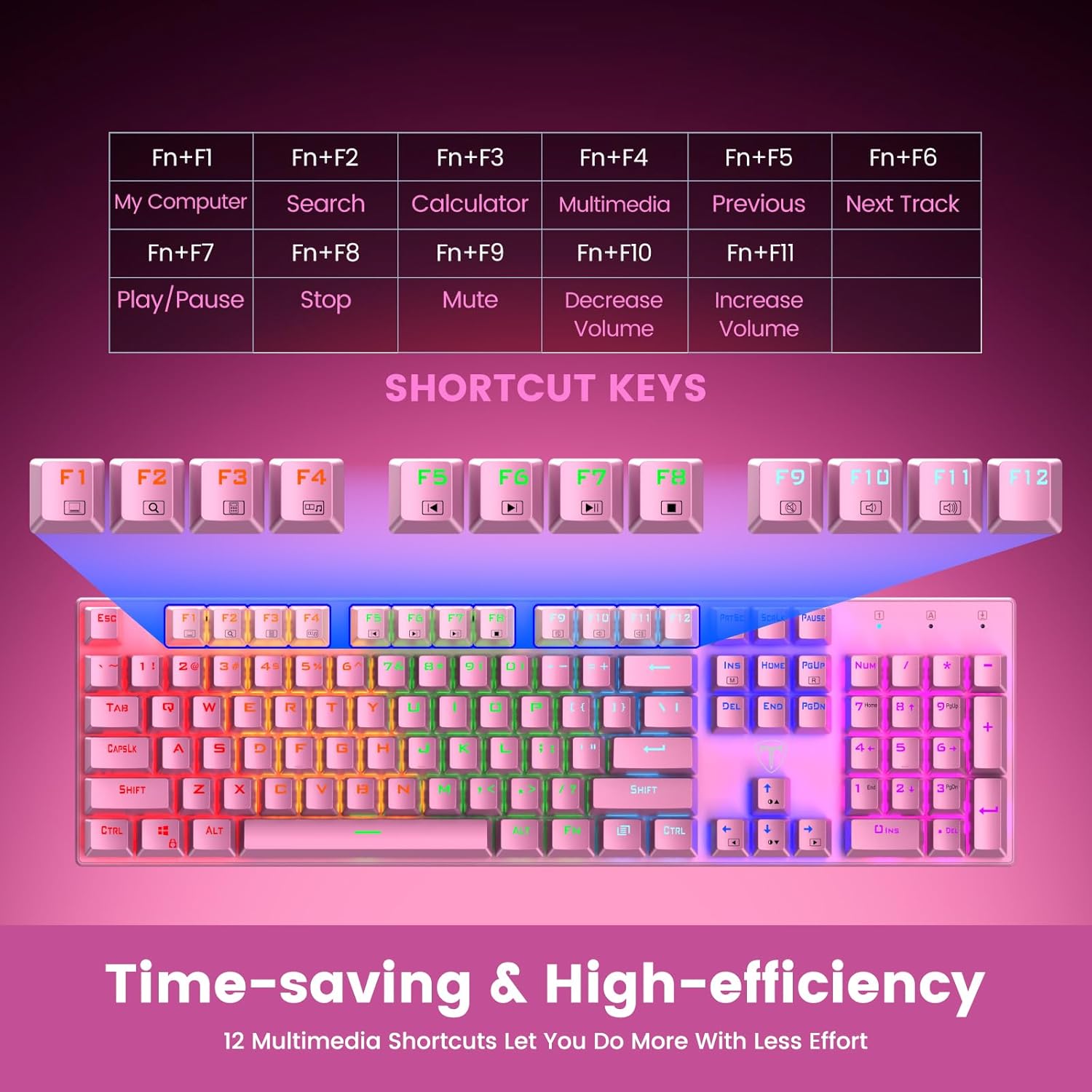
Figure 5: Visual representation of the Fn key combinations for various multimedia and system shortcuts.
۵.۳ د غیبت ضد
The 100% anti-ghosting feature ensures that every keypress is registered accurately, even when multiple keys are pressed simultaneously. This is crucial for fast-paced gaming and rapid typing.

Figure 6: An illustration demonstrating the N-Key Rollover capability, ensuring all key presses are registered without delay.
5. ساتنه
۵.۱ د کیبورډ پاکول
To maintain the performance and appearance of your keyboard, regular cleaning is recommended:
- نښلول: Always disconnect the keyboard from your device before cleaning.
- د دوړو لرې کول: د کیلي کیپسونو ترمنځ د دوړو او کثافاتو د لرې کولو لپاره د فشار شوي هوا کانال وکاروئ.
- د سطحې پاکول: د کیلي کیپس او کیبورډ سطحه د نرم، لږ څه وچ سره پاک کړئamp، له لینټ څخه پاک ټوکر. د سختو کیمیاوي موادو یا خړوبونکو موادو څخه ډډه وکړئ.
- Keycap Removal (Optional): For deeper cleaning, use the included keycap puller to carefully remove individual keycaps. Gently pull straight up on the keycap. Clean the switch and keycap, then firmly press the keycap back into place until it clicks.

Figure 7: An illustration highlighting the long-lasting and non-fading properties of the double-shot detachable keycaps.
۶.۲ د تویېدو مقاومت
The RisoPhy keyboard is designed with 4 hydrophobic holes to help drain accidental liquid spills. In case of a spill:
- Immediately Disconnect: د خپل وسیله څخه کیبورډ خلاص کړئ.
- Drain Liquid: Turn the keyboard upside down to allow liquid to drain through the designated holes.
- په بشپړه توګه وچول: Wipe the surface dry with a cloth and allow the keyboard to air dry completely for several hours (or overnight) before reconnecting.
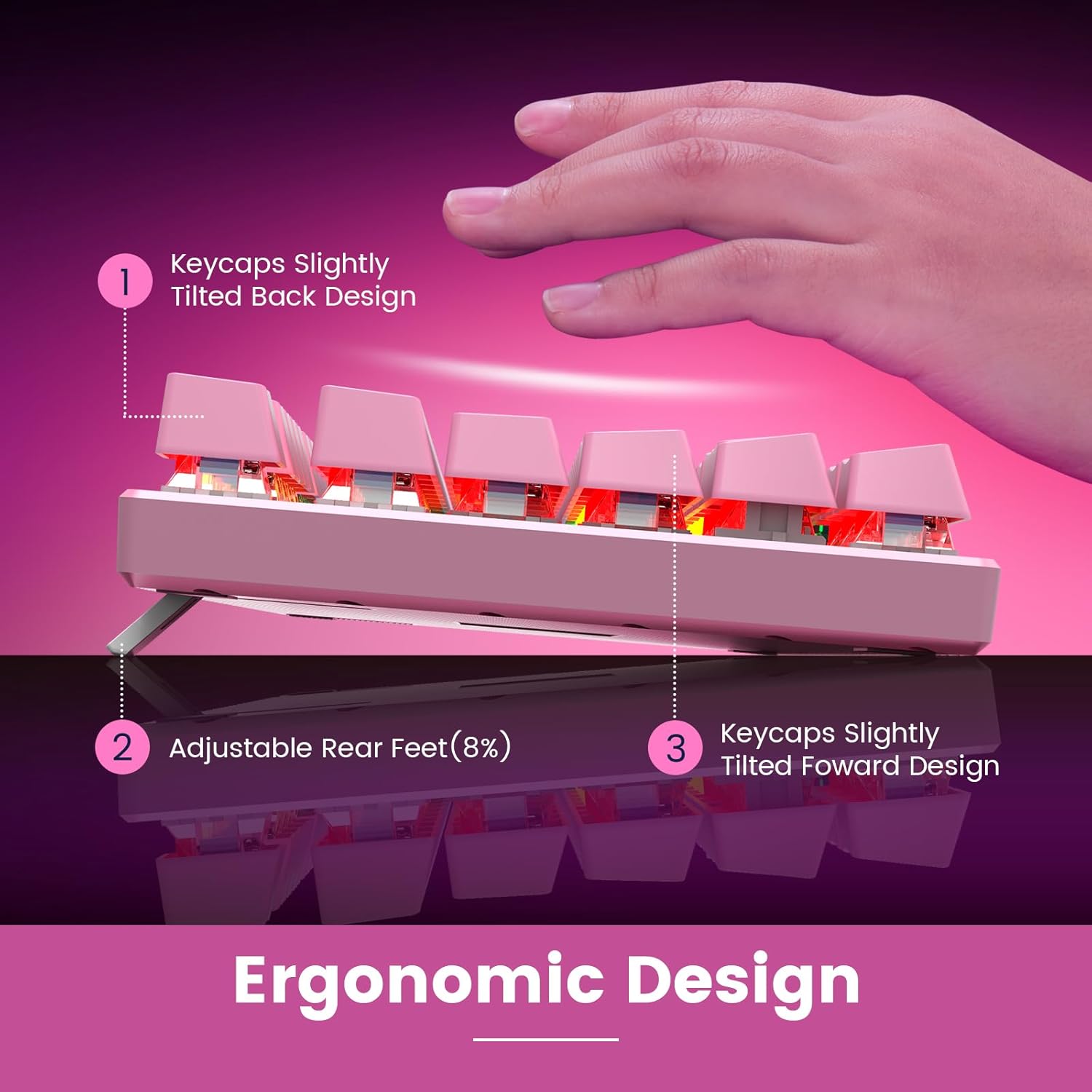
Figure 8: An image depicting water droplets on the keyboard surface, demonstrating its advanced spill-resistant design.
6. ستونزه حل کول
If you encounter issues with your RisoPhy Mechanical Gaming Keyboard, please refer to the following common solutions:
| ستونزه | د حل لاره |
|---|---|
| کیبورډ ځواب نه ورکوي |
|
| د شا څراغ کار نه کوي یا ځلیږي |
|
| کیلي چپکونکې یا غیر ځواب ورکوونکې دي |
|
| ملټي میډیا کیلي کار نه کوي |
|
7. مشخصات
- ماډل: B0C5CV369L
- نښه: RisoPhy
- کلیدي ډول: میخانیکي نیلي سویچونه
- د کلیدونو شمیر: 104
- ارتباط: USB-A وائرډ
- شاته رڼا: Rainbow RGB (9 modes, 5 brightness, 5 speed levels)
- کیکیپ مواد: Double Injection ABS
- د غیبت ضد: 100% (N-Key Rollover)
- د تویېدو مقاومت: Yes, with drainage holes
- مطابقت لرونکي وسایل: PC, Mac, Xbox, Gaming Consoles
- ابعاد: 17.48 x 6.38 x 1.81 انچه (نږدې)
- د توکي وزن: 1.92 پونډه (تقریبا)
8. تضمین او ملاتړ
RisoPhy is committed to providing high-quality products and excellent customer service.
- تضمین: دا محصول د دوه کلن تضمین سره راځي. مهرباني وکړئ د تضمین ادعاوو لپاره د پیرود ثبوت وساتئ.
- د پیرودونکي ملاتړ: For any questions, technical assistance, or warranty inquiries, please contact RisoPhy customer service.
- د اړیکو لارې:
- Click on the seller's name on the product page and send messages.
- Click on the store name in your order history and click to send messages.

Figure 9: Information regarding RisoPhy's customer support and warranty details.