
پیژندنه
This manual provides essential information for setting up, operating, and maintaining your Microsoft Surface Studio 2+ All-In-One Desktop Computer. The Surface Studio 2+ is designed for productivity and creativity, featuring a versatile 28-inch PixelSense™ touchscreen display.
مهرباني وکړئ دا لارښود په دقت سره ولولئ ترڅو ډاډ ترلاسه کړئ چې سم کارول کیږي او ستاسو د وسیلې عمر اعظمي کیږي.
په بکس کې څه دي
ډاډ ترلاسه کړئ چې ټول توکي په بسته بندۍ کې شتون لري:
- Surface Studio 2+ All-in-One Computer
- د سطحي قلم
- د ځمکی کیلي
- موږک
- Power Cord with Grip-Release Cable
- د چټک پیل لارښود
- د خوندیتوب او تضمین لارښود
چمتو کول
- بسته بندي کول: Carefully remove the Surface Studio 2+ and its accessories from the packaging. Place the computer on a stable, flat surface.

Image: The Microsoft Surface Studio 2+ All-in-One computer displaying the Windows 11 desktop interface.
- د بریښنا پیوستون: Connect the power cord to the power port on the back of the Surface Studio 2+ base, then plug the other end into a wall outlet.

انځور: شاته view of the Surface Studio 2+ base, highlighting the various ports including the power input.
- پرفیریلز وصل کړئ: Connect the Surface Keyboard and Mouse. These devices typically connect wirelessly via Bluetooth. Follow the on-screen instructions during initial setup for pairing.
- لومړنی بوټ: Press the power button, usually located on the back or side of the display. The computer will guide you through the Windows 11 Pro setup process, including language selection, network connection, and user account creation.
عملیاتي لارښوونې
د ښودنې تنظیم کول
The Surface Studio 2+ features a unique Zero Gravity Hinge, allowing the display to be adjusted from an upright desktop mode to a flat studio mode for drawing and writing.

Image: A sequence showing the Surface Studio 2+ display being adjusted from an upright position to a nearly flat angle.
- د ډیسټاپ موډ: Gently push the top of the screen backward to tilt it into an upright position for traditional desktop use.
- د سټوډیو حالت: Gently pull the top of the screen forward and down towards the base to transition it into a low-angle, flat position ideal for creative tasks with the Surface Pen.
Using the Surface Pen and Touchscreen
The 28-inch PixelSense™ touchscreen supports multi-touch gestures and is optimized for use with the included Surface Pen.
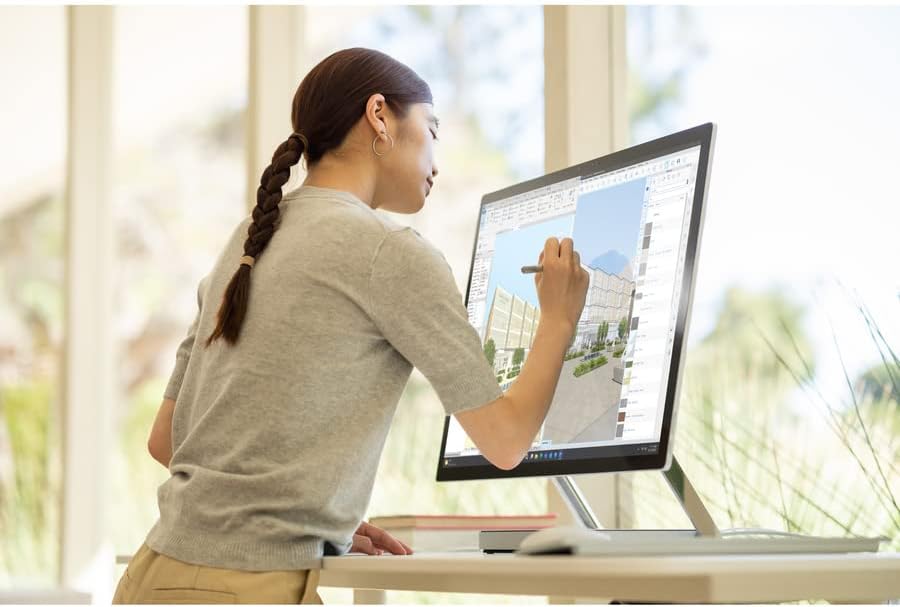
Image: A person using the Surface Pen to interact with the touchscreen of the Microsoft Surface Studio 2+ in studio mode.
- د لمس اشارې: د نیویګیشن، زوم کولو او سکرول کولو لپاره د معیاري وینډوز ټچ اشارو څخه کار واخلئ.
- د سطحې قلم: The Surface Pen allows for precise drawing, writing, and annotation directly on the screen. It can be magnetically attached to the side of the display for storage.
وینډوز 11 پرو
Your Surface Studio 2+ comes pre-installed with Windows 11 Pro. Familiarize yourself with the operating system's interface and features for optimal productivity.
- د پیل مینو: Access applications, settings, and power options from the Start Menu.
- ټاسک بار: Pin frequently used applications to the taskbar for quick access.
- ترتیبات: Customize your device, manage accounts, and configure privacy settings through the Settings app.
ځانګړتیاوې
The Microsoft Surface Studio 2+ is equipped with advanced components for high performance:
- پروسیسر: Intel Core i7 3 GHz processor for demanding tasks.
- حافظه: 32 GB DDR4 RAM for smooth multitasking.
- ذخیره کول: 1 TB Solid State Drive (SSD) for fast boot times and application loading.
- ګرافیک: NVIDIA GeForce RTX 3060 with 6GB dedicated memory for graphics-intensive applications and gaming.
- ښکاره کول: 28-inch PixelSense™ touchscreen with 4500 x 3000 resolution.
- عملیاتي سیسټم: وینډوز ۱۰ پرو.
- ارتباط: Integrated 802.11ax Wi-Fi and Bluetooth for wireless connections.
ساتنه
د وسیله پاکول
- سکرین: د نرم، لینټ پاک ټوکر څخه لږ څه کار واخلئampد اوبو یا سکرین پاکونکي سره مینځل شوي چې په ځانګړي ډول د بریښنایی توکو لپاره ډیزاین شوي. د سخت کیمیاوي موادو څخه ډډه وکړئ.
- بدن: بهرنۍ سطحې د نرم، وچ ټوکر سره پاک کړئ.
- وینټیلیشن: Ensure the ventilation openings on the base are clear of dust and obstructions to prevent overheating.
د سافټویر تازه معلومات
Regularly check for and install Windows updates to ensure your system has the latest security patches and performance improvements.
- ورتګ ترتیبات > د وینډوز تازه کول.
- کلیک وکړئ د تازه معلوماتو لپاره وګورئ او هر ډول شته تازه معلومات نصب کړئ.
د ستونزو حل کول
| مسله | احتمالي حل |
|---|---|
| کمپیوټر نه چالانېږي. | Ensure the power cord is securely connected to both the computer and a working electrical outlet. Try a different outlet. |
| ښودنه خالي ده. | Check power connection. Ensure the computer is powered on. If connected to an external display, verify display input settings. |
| Surface Pen or Mouse not responding. | Check battery levels. Re-pair the devices via Bluetooth settings in Windows. |
| ورو فعالیت. | Close unnecessary applications. Check for and install Windows updates. Run a disk cleanup. |
| د وای فای اتصال ستونزې. | Restart your router and the Surface Studio 2+. Check Wi-Fi settings in Windows to ensure it's enabled and connected to the correct network. |
مشخصات
| فیچر | تفصیل |
|---|---|
| د ماډل شمیره | SBG-00001 |
| د ښودلو اندازه | ۷۸۷ انچه |
| د سکرین ریزولوشن | 4500 x 3000 |
| پروسیسر | انټل کور i7 (3 GHz) |
| RAM | 32 GB DDR4 |
| هارډ ډرایو | 1 TB SSD |
| د ګرافیک کاپروسیسر | NVIDIA GeForce RTX 3060 |
| د ګرافیک کارت د RAM اندازه | 6 جي بي |
| عملیاتي سیسټم | وینډوز 11 پرو |
| بې سیم ډول | ۸۰۲.۱۱ اکس، بلوتوث |
| د توکي وزن | ۲.۴۵ پونډه |
| د محصول ابعاد (LxWxH) | 25.1 x 0.5 x 17.3 انچه |
| رنګ | سره زر |
تضمین او ملاتړ
Your Microsoft Surface Studio 2+ is covered by a manufacturer's warranty. Please refer to the included "Safety and Warranty Guide" for detailed information regarding warranty terms, conditions, and registration.
For technical support, driver downloads, or further assistance, please visit the official Microsoft Support webسایټ یا د مایکروسافټ پیرودونکي خدماتو سره اړیکه ونیسئ.
آنلاین ملاتړ: ملاتړ.مایکروسافټ.com/سطحه