
1. پیژندنه
Thank you for choosing the CAMKORY DC403 Digital Camera. This compact and easy-to-use camera is designed for capturing high-quality photos and videos, making it suitable for beginners and children. This manual provides essential information on setting up, operating, and maintaining your camera to ensure optimal performance and longevity.

Image 1.1: The CAMKORY DC403 camera is designed to be pocket-sized and easy to use, making it ideal for children and beginners. It has passed drop tests for durability.
2. محصول ختم شوview
2.1 کلیدي ځانګړتیاوې
- لوړ ریزولوشن: 44 Megapixel photos and 1080p Full HD video recording.
- ډیجیټل زوم: 16x digital zoom for capturing distant subjects.
- د انځور ثبات: Optical image stabilization to reduce blur.
- ښکاره کول: 2.5-inch LCD screen for clear viewing.
- څو اړخیزه طریقې: Includes self-timer, fill light, fun filters, smile capture, burst shooting, and webد cam فعالیت.
- د لېږد وړتیا: Compact and lightweight design (9.5 x 5.5 x 2 cm, 120g) for easy carrying.
- ځواک: Comes with two 3.7V 700mAh rechargeable lithium-polymer batteries.
- ارتباط: USB Type-C for charging and data transfer to PC.
۳.۱ د کیمرې اجزا
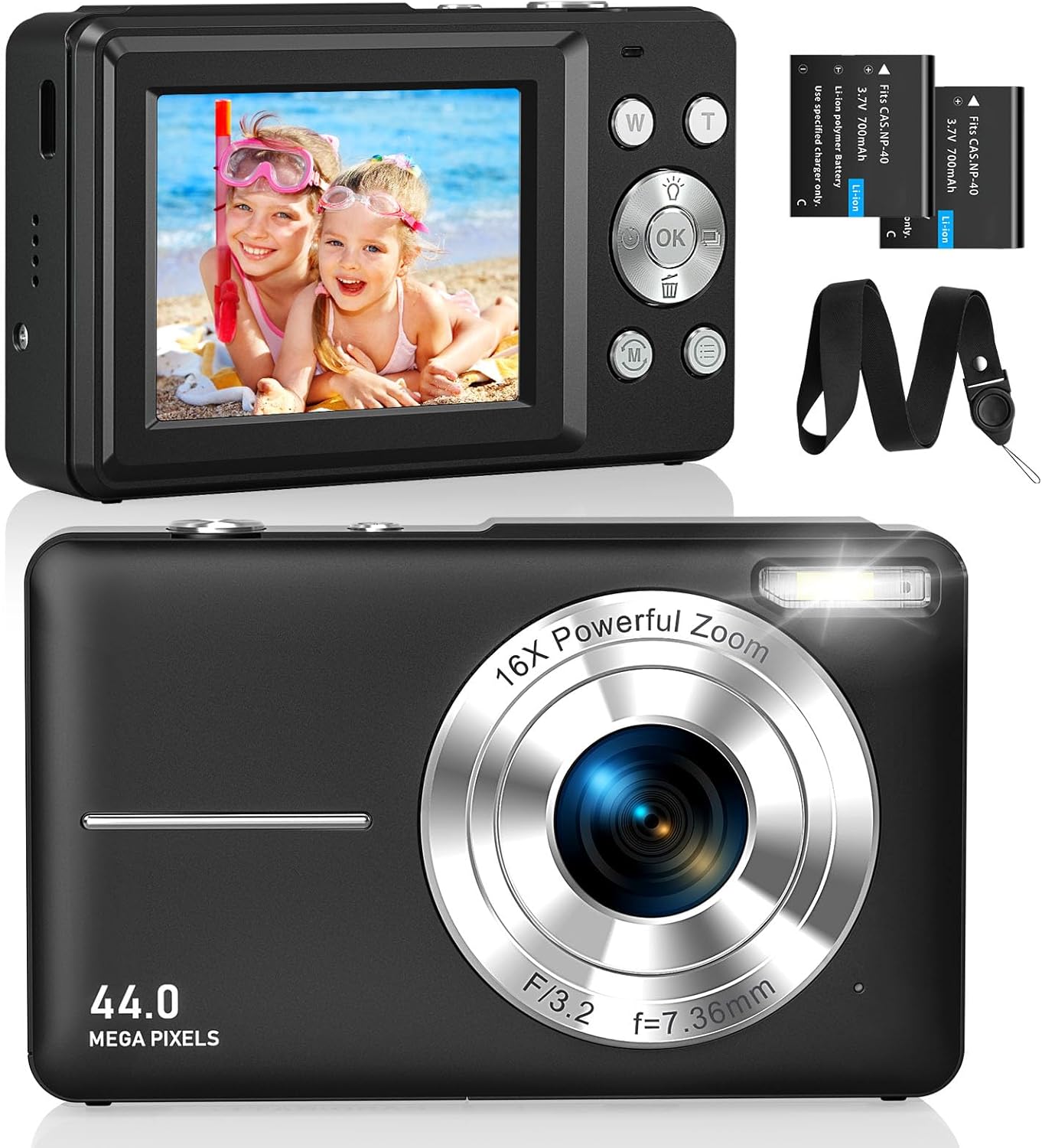
انځور ۱.۱: مخ او شا views of the CAMKORY DC403 Digital Camera, illustrating the lens, flash, LCD display, and various control buttons. Two rechargeable batteries are also shown.
The camera features an intuitive layout with ergonomically placed buttons suitable for small hands. Key controls include the power button, shutter button, zoom (W/T) buttons, mode button, and an OK button for menu navigation.

انځور ۲: تفصیلي view of the camera's side controls, including the ON/OFF button, Shutter, W/T (Zoom), Fill Light, and Mode button.
3. ترتیب کول
۵.۱ د بیټرۍ نصب او چارج کول
- د کیمرې په ښکته برخه کې د بیټرۍ د برخې پوښ خلاص کړئ.
- Insert the two provided 3.7V 700mAh rechargeable lithium-polymer batteries, ensuring correct polarity.
- د بیټرۍ کمپارټ پوښ په خوندي ډول وتړئ.
- Connect the camera to a power source using the supplied USB Type-C cable for charging. The charging indicator will show the charging status.
3.2 د میموري کارت نصب کول
The camera supports Micro SD memory cards from 4GB to 32GB. A memory card is required to save photos and videos.
- Locate the Micro SD card slot, usually near the battery compartment.
- Insert the Micro SD card with the metal contacts facing the front of the camera until it clicks into place.
- Before first use, it is recommended to format the memory card directly within the camera's settings menu. This ensures compatibility and optimal performance.
3.3 ابتدايي پاور آن
Press and hold the power button (usually located on the top or side of the camera) to turn on the device. The LCD screen will illuminate, and the camera will be ready for use.
4. عملیاتي لارښوونې
۵.۲ عکسونه اخیستل
- کیمره چالان کړئ.
- د ۲.۴ انچه LCD سکرین په کارولو سره خپل عکس چوکاټ کړئ.
- Use the W/T buttons to adjust the 16x digital zoom.
- Press the shutter button halfway down to focus, then press it fully to capture the 44MP image.

Image 4.1: The camera captures 44MP images, allowing for detailed and clear photographs.
4.2 ویډیوګانې ثبتول
- د موډ تڼۍ په کارولو سره د ویډیو حالت ته لاړ شئ.
- Press the shutter button to start recording 1080p FHD video.
- Press the shutter button again to pause or stop recording.

Image 4.2: The camera supports 1080p Full HD video recording, allowing users to capture moments with clarity.
4.3 ځانګړي ځانګړتیاوې
- ډیجیټل زوم: Use the W/T buttons to zoom in and out. The camera features 16x digital zoom.
- د انځور ثبات: The optical image stabilization feature helps reduce blur from camera shake.
- ر Lightا ډکه کړئ: Activate the fill light for better illumination in low-light conditions.
- د ځان ټایمر: Set a delay (e.g., 2s, 5s, 10s) before taking a photo, useful for group shots or selfies.
- دوامداره ډزې: د شټر تڼۍ په نیولو سره د عکسونو چټک ترتیب ونیسئ.
- فلټرونه: Experiment with 20 different built-in filters to add creative effects to your photos.
- Smile Detection: The camera can automatically detect and capture a photo when a smile is detected.
- Webد کمرې حالت: کیمره د USB له لارې کمپیوټر سره وصل کړئ ترڅو یې د a په توګه وکاروئ webد ژوندۍ خپرونې یا ویډیو زنګونو لپاره کیمره.

Image 4.3: Demonstrations of 16x digital zoom and image stabilization. The zoom feature allows for closer shots, while stabilization helps maintain clarity during movement.

انځور ۶: پخوانیamples of self-timer, continuous shooting, and fill light functions. These features enhance photographic flexibility and quality in various scenarios.

Image 4.5: The camera can be used as a webcam when connected to a computer, suitable for streaming or video calls.
5. ساتنه
۵.۱ د کیمرې پاکول
- د کیمرې د بدن پاکولو لپاره نرم، لینټ نه پاک ټوکر وکاروئ.
- د لینز او LCD سکرین لپاره، د لینز پاکولو لپاره ځانګړي ټوکر او محلول وکاروئ. د سختو کیمیاوي موادو څخه ډډه وکړئ.
- ډاډ ترلاسه کړئ چې کیمره د پاکولو دمخه بنده ده.
5.2 ذخیره کول
- کیمره په یخ او وچ ځای کې د مستقیم لمر وړانګو او سختې تودوخې څخه لرې وساتئ.
- که چیرې د اوږدې مودې لپاره ذخیره کوئ، نو د لیکیدو مخنیوي لپاره بیټرۍ لرې کړئ.
- Use the provided long strap and pouch to protect the camera from drops and scratches during transport.
6. ستونزه حل کول
If you encounter issues with your CAMKORY DC403 camera, please refer to the following common solutions:
| ستونزه | احتمالي حل |
|---|---|
| کیمره نه چالانېږي | Ensure batteries are correctly inserted and fully charged. Try using the second battery if available. |
| عکسونه/ویډیوګانې نشي اخیستلی | Check if a Micro SD card is inserted and has sufficient free space. Ensure the card is formatted in the camera. |
| انځورونه تیاره دي | Ensure the lens is clean. Hold the camera steady or use the image stabilization feature. Check lighting conditions. |
| Camera not recognized by PC | Ensure the USB Type-C cable is securely connected to both the camera and the PC. Try a different USB port or cable. |
| بیټرۍ په چټکۍ سره وچیږي | Reduce screen brightness. Turn off features like flash or continuous shooting when not needed. Ensure batteries are fully charged before use. |
7. مشخصات
| فیچر | تفصیل |
|---|---|
| برانډ | CAMKORY |
| د ماډل نوم | DC403 |
| رنګ | تور |
| د محصول ډول | کمپیکٹ ډیجیټل کیمره |
| اغیزمن لاهم حل | ۲ میګاپکسله |
| د ویډیو حل | 1080p بشپړ HD |
| ډیجیټل زوم | 16x |
| نظری زوم | 16x (Note: This appears to be a mislabeling in the source data, likely referring to digital zoom) |
| د انځور ثبات | نظري |
| د سکرین اندازه | 2.5 انچه LCD |
| د ارتباط ټیکنالوژي | USB (Type-C) |
| د میموري کارت ملاتړ شوی | Micro SD (4-32GB) |
| د بیټرۍ ډول | Lithium-polymer (2 x 3.7V 700mAh included) |
| ابعاد (L x W x H) | 9.5 x 2 x 5.5 سانتي متره |
| د توکي وزن | 120 ګرامه |
| د برسټ حالت سرعت | په هره ثانیه کې 30 چوکاټونه |
| د ISO رینج | ISO 100 to ISO 1600 |
| اپرچر | F3.5-F5.6 |
| د تمرکز ډول | اتوماتیک تمرکز |
| د اوبو د مقاومت کچه | پنروک نه |
8. تضمین او ملاتړ
For any questions, technical support, or warranty inquiries regarding your CAMKORY DC403 Digital Camera, please contact CAMKORY customer service through the retailer's platform or the official CAMKORY webسایټ. مهرباني وکړئ د تضمین ادعاوو لپاره د پیرود ثبوت وساتئ.