
1. پیژندنه
This manual provides instructions for the proper use and care of your Docooler Portable USB Cassette Player. This device allows you to play audio cassettes and convert their content into digital MP3 files via a USB connection to a computer. Please read this manual thoroughly before operating the device to ensure optimal performance and longevity.
2. محصول ختم شوview
The Docooler Portable USB Cassette Player is a compact, handheld device designed for playing and digitizing audio cassettes. It features a transparent casing, allowing visibility of the internal mechanism.
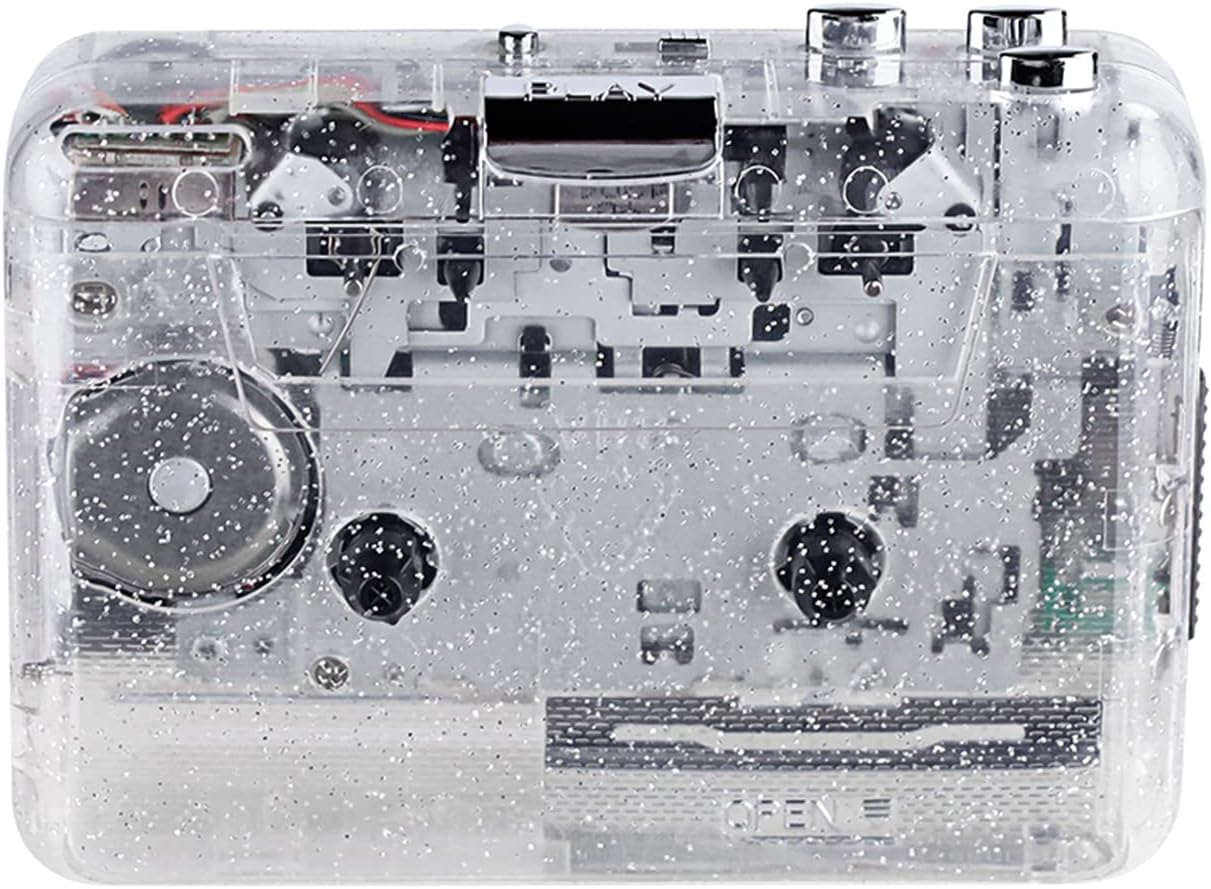
شکل 1: مخکی view of the Docooler Portable USB Cassette Player, showcasinد هغې شفاف ډیزاین.

Figure 2: Various angles of the cassette player, including top, side, and open views.
د بسته محتويات:
- Docooler Portable USB Cassette Player
- USB کیبل
- د کارونکي لارښود (دا لاسوند)
- Headphones (may vary by package)
3. ترتیب کول
3.1 د بریښنا رسول
The cassette player can be powered by either batteries or a USB connection.
د بیټرۍ نصب کول:
- په وسیله کې د بیټرۍ کڅوړه ومومئ.
- د بیټرۍ کمپارټ پوښ خلاص کړئ.
- دوه x AA بیټرۍ دننه کړئ (شامل نه دي)، د سم قطبیت ډاډ ترلاسه کول (+/-).
- د بیټرۍ کمپارټ پوښ په خوندي ډول وتړئ.
د USB پاور:
Connect the provided USB cable to the player's USB port and the other end to a powered USB port on your computer or a USB wall adapter. The device will draw power from the USB connection.
4. عملیاتي لارښوونې
۶.۱ د کیسیټ ټیپ غږول
- د کیسټ کمپارټمینټ پوښ خلاص کړئ.
- Insert an audio cassette tape with the open edge facing upwards.
- Close the cassette compartment cover firmly.
- هیډفونونه یا بهرني سپیکرې د 3.5 ملي میتر آډیو آوټ پټ جیک سره وصل کړئ.
- فشار ورکړئ لوبه وکړئ د پلی بیک پیل کولو لپاره تڼۍ.
- د کارولو ودروئ د پلې بیک بندولو لپاره تڼۍ.
- د کارولو ایف ایف (چټک مخ په وړاندې) او REW (شاید) د ټیپ له لارې د تګ راتګ لپاره تڼۍ.
- Adjust the volume using the volume control dial.
- The "DIR" button allows you to quickly flip the tape direction. The "play mode" button can be used to reverse playback once or an unlimited number of times.

Figure 3: The cassette player in use, demonstrating tape insertion and playback setup.

Figure 4: Users listening to audio through headphones connected to the cassette player.
4.2 Converting Tapes to MP3 Files
The Docooler Portable USB Cassette Player can convert your analog cassette audio into digital MP3 files. This process requires a computer and compatible audio recording software (not included).
- Ensure the cassette player is powered (via batteries or USB).
- Connect the cassette player to your computer using the provided USB cable.
- Install and open your preferred audio recording software on your computer. Software such as Audacity (free and open-source) is commonly used for this purpose.
- Configure your recording software to recognize the cassette player as an audio input device.
- Insert the cassette tape you wish to convert into the player.
- Start recording in your software, then press the لوبه وکړئ button on the cassette player.
- Monitor the recording process. Once the tape has finished playing, stop the recording in your software.
- Save the recorded audio as an MP3 file ستاسو په کمپیوټر کې.

Figure 5: Illustration of the process to convert cassette audio to MP3 files using the player and a computer.
5. ساتنه
5.1 د وسیلې پاکول
- د لوبغاړي بهرنۍ برخه د نرم او وچ ټوکر سره پاک کړئ.
- Do not use liquid cleaners or abrasive materials, as they may damage the surface.
- Periodically clean the tape heads and pinch rollers using a cotton swab lightly dampد ایزوپروپیل الکول سره پوښل شوی ترڅو د غږ غوره کیفیت ډاډمن کړي او د ټیپ زیان مخه ونیسي.
5.2 ذخیره کول
- کله چې د اوږدې مودې لپاره نه کارول کیږي، د لیکیدو مخنیوي لپاره بیټرۍ لرې کړئ.
- لوبغاړی په یخ او وچ ځای کې د مستقیم لمر وړانګو او سختې تودوخې څخه لرې وساتئ.
6. ستونزه حل کول
| ستونزه | احتمالي لامل | د حل لاره |
|---|---|---|
| هیڅ ځواک نشته | Dead batteries; USB cable not connected properly. | Replace batteries; ensure USB cable is securely connected. |
| غږ نشته | Headphones/speakers not connected; volume too low; dirty tape heads. | Connect audio output device; increase volume; clean tape heads. |
| Poor sound quality (hissing, muffled) | Dirty tape heads; worn-out tape; low battery. | د ټیپ سرونه پاک کړئ؛ یو بل ټیپ هڅه وکړئ؛ بیټرۍ بدل کړئ. |
| ټیپ نه غږېږي یا حرکت نه کوي | Tape jammed; mechanism issue; low battery. | Check tape for damage; replace batteries. |
| Cannot convert to MP3 | USB connection issue; software not configured correctly; no recording software. | Ensure USB is connected; check software settings; install compatible recording software. |
7. مشخصات
- ماډل: B0C69FDZF6
- د بریښنا رسول: 2 x AA Batteries or USB 5V DC
- انٹرفیس: USB 2.0
- آډیو تولید: د 3.5mm سټیریو جیک
- ابعاد: 7.2 x 5.91 x 1.54 انچه (نږدې)
- وزن: 9.6 اونس (تقریبا)
- جوړونکی: ډاکولر
8. د خوندیتوب معلومات
- وسیله د اوبو یا ډیر رطوبت سره مه مخ کوئ.
- د قوي تاثیراتو سره د وسیله له مینځه وړلو یا تابع کولو څخه ډډه وکړئ.
- هڅه مه کوئ چې وسیله پخپله جلا کړئ یا ترمیم کړئ. د خدماتو وړ پرسونل ته مراجعه وکړئ.
- د ماشومانو د لاسرسي څخه لرې وساتئ.
- د ځایی مقرراتو سره سم د بیټرۍ تصفیه کول.
9. تضمین او ملاتړ
For warranty information or technical support, please refer to the documentation included with your purchase or contact Docooler customer service through their official website or the retailer where the product was purchased. Please have your model number (B0C69FDZF6) and purchase date available when contacting support.