
پیژندنه
This manual provides essential information for the safe and effective operation and maintenance of your CRAFTSMAN CMMT25166 Rechargeable Aluminum Pen Light. Please read this manual thoroughly before using the product and retain it for future reference. This pen light features a durable aluminum body, USB-C charging, and dual LED brightness modes for versatile illumination.
د خوندیتوب معلومات
- د سترګو خوندیتوب: Do not stare directly into the LED light. The high intensity light can cause temporary vision impairment or eye damage.
- د بیټرۍ خوندیتوب: This product contains a Lithium-Ion battery. Do not expose the battery to extreme temperatures, fire, or water. Do not attempt to disassemble or replace the internal battery.
- چارج کول: Use only the provided USB-C cable or a certified USB-C cable with a compatible power adapter for charging.
- د اوبو مقاومت: دا وسیله ده د اوبو مقاومت نلريد زیان څخه د مخنیوي لپاره د اوبو یا لوړ رطوبت سره مخ کیدو څخه ډډه وکړئ.
- تخریب: Dispose of the product and its battery responsibly according to local regulations. Do not dispose of in household waste.
د بسته محتويات
ډاډ ترلاسه کړئ چې ټول توکي شتون لري:
- CRAFTSMAN CMMT25166 Rechargeable Aluminum Pen Light
- USB-C Charging Cable (included with the product)
محصول پای ته ورسیدview
Familiarize yourself with the components of your pen light:

Figure 1: CRAFTSMAN CMMT25166 Pen Light
- د LED لینز: Emits light in either flood or pen mode.
- د بریښنا تڼۍ: بریښنا کنټرولوي او د رڼا حالتونو ترمنځ بدلوي.
- د USB-C چارج کولو بندر: Located under a protective cover, used for recharging the internal battery.
- جیب کلیپ: د جامو یا وسایلو سره د خوندي نښلولو لپاره.
- د المونیم بدن: Durable, tri-sided design to prevent rolling.
چمتو کول
ابتدايي چارج کول
Before first use, fully charge the pen light.
- Locate the USB-C charging port, usually covered by a rubber flap for protection.
- Connect the provided USB-C cable to the pen light's charging port.
- د USB-C کیبل بل پای د یو مناسب USB بریښنا سرچینې سره وصل کړئ (د مثال په توګه، دیوال اډاپټر، د کمپیوټر USB پورټ).
- The charging indicator light (if present) will show the charging status. Refer to the product packaging for specific indicator light behavior.
- Charging typically takes a few hours. A full charge provides approximately 2-3 hours of runtime.
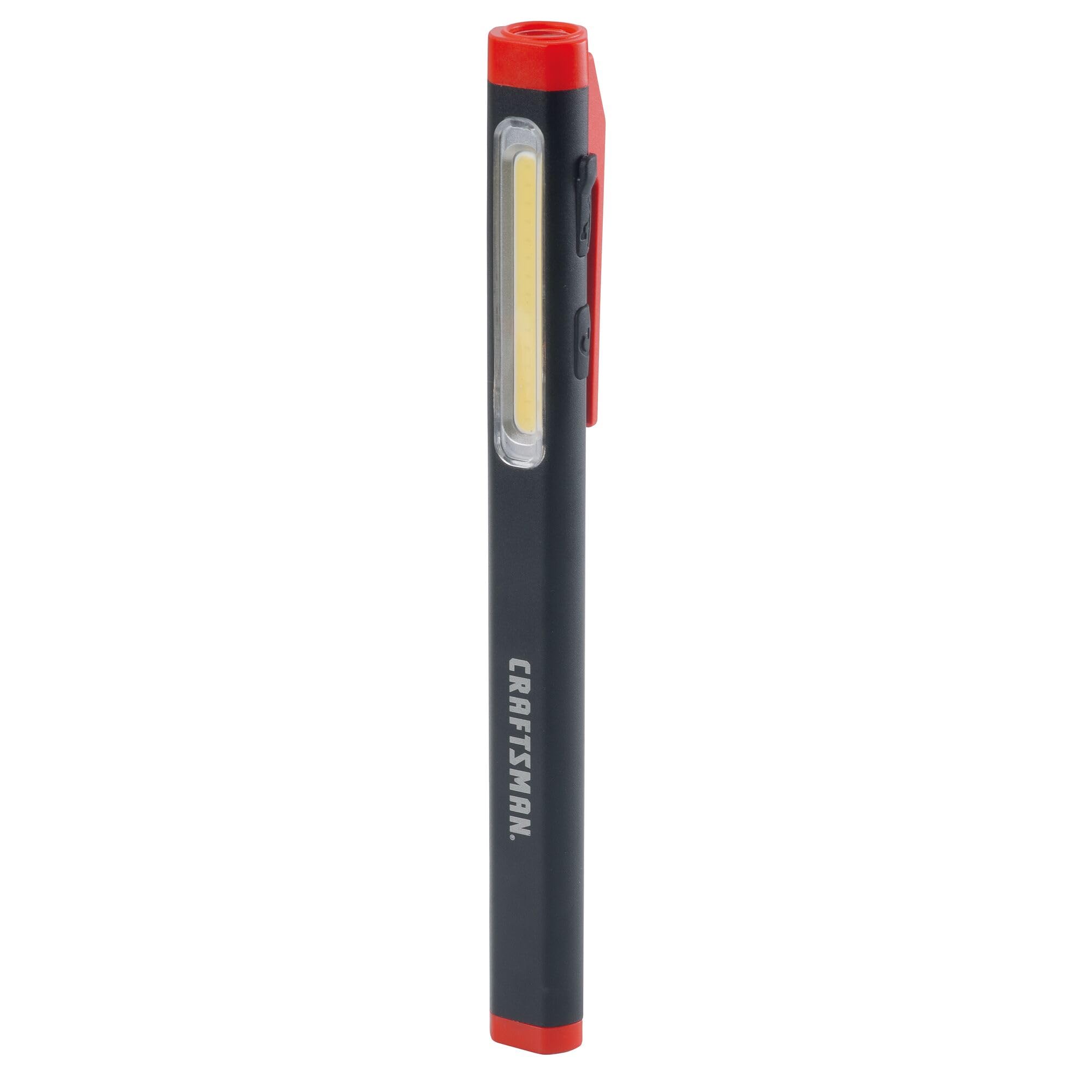
Figure 2: Charging the Pen Light via USB-C
عملیاتي لارښوونې
پاور آن/بند او د موډ انتخاب
The pen light features a single power button for all operations.
- د فعالولو لپاره: Press the power button once. The light will typically turn on in its last used mode or a default mode.
- د حالت بدلولو لپاره: While the light is on, press the power button repeatedly to cycle through the available modes: Flood Mode (300 Lumens) and Pen Mode (180 Lumens).
- بندول: Press and hold the power button for approximately 1-2 seconds, or cycle through all modes until the light turns off.
ساتنه
پاکول او ذخیره کول
- پاکول: Wipe the pen light with a soft, damp cloth. Do not use abrasive cleaners or solvents. Ensure the USB-C port cover is closed before cleaning.
- ذخیره کول: Store the pen light in a cool, dry place away from direct sunlight and extreme temperatures. For long-term storage, ensure the battery is partially charged (around 50%) to maintain battery health.
- د بیټرۍ پاملرنه: Recharge the battery regularly, even if not frequently used, to prevent deep discharge and prolong its lifespan.
د ستونزو حل کول
| ستونزه | احتمالي لامل | د حل لاره |
|---|---|---|
| ر Lightا نه ځي. | بیټرۍ ختمه شوې. | Charge the pen light using the USB-C cable. |
| رڼا تیاره ده. | د بیټرۍ ټیټ چارج. | Recharge the pen light. |
| Pen light not charging. | د USB-C کیبل یا د بریښنا سرچینه خرابه ده. | Try a different USB-C cable or power adapter. Ensure the cable is fully inserted. |
| Cannot switch between modes. | د تڼۍ ناسم فشار. | Ensure you are pressing the power button briefly to cycle modes. |
مشخصات
| فیچر | تفصیل |
|---|---|
| د ماډل شمیره | د CMMT25166 معرفي کول |
| د بریښنا سرچینه | د بیټرۍ چلول (لیتیم ایون) |
| د رڼا سرچینې ډول | LED |
| مواد | المونیم |
| White Brightness (Flood Mode) | 300 Lumens |
| White Brightness (Pen Mode) | 180 Lumens |
| د چلولو وخت | تر 3 ساعتونو پورې |
| د چارج کولو بندر | USB-C |
| د اوبو د مقاومت کچه | د اوبو مقاومت نلري |
| د توکي وزن | 3.68 اونس |
| د توکي ابعاد (L x W x H) | ۷۱"لیتر x ۲۳.۶"واټه x ۲۴.۴"هوا |
تضمین
This CRAFTSMAN product is backed by a د بشپړ ژوند تضمین. If the product fails to perform for any reason, it will be replaced. No proof of purchase is required for warranty claims.
To initiate a warranty claim, return the damaged product to a stocking Retail Partner or call CRAFTSMAN customer service at 1-888-331-4569 for details and assistance.
ملاتړ
For further assistance, technical support, or to inquire about other CRAFTSMAN products, please visit the official CRAFTSMAN webسایټ یا د پیرودونکي خدمت سره اړیکه ونیسئ.
د کسبګرو د پیرودونکو خدمت: 1-888-331-4569
تاسو کولی شئ نور معلومات او محصولات په لاندې لینک کې هم ومومئ په ایمیزون کې د هنرمندانو پلورنځی.