
1. پیژندنه
This manual provides comprehensive instructions for the installation, operation, and maintenance of your Segotep Memphis M-ATX Mini Tower PC Case. Please read this manual thoroughly before beginning assembly to ensure proper setup and optimal performance.
2. کلیدي ځانګړتیاوې
- 40 Series GPU Support: Designed to accommodate high-performance 40 series GPUs, ideal for gaming and creative applications.
- Vertical Air Duct: Optimizes internal airflow for efficient cooling and heat dissipation, preventing component overheating.
- Tool-less Disassembly: Facilitates quick and easy installation or upgrades of components without the need for tools.
- 460cm² Side Panel Cooling Holes: Allows for flexible installation of additional fans or radiators to enhance cooling capabilities.
- Excellent Cable Management: Features dedicated routing and concealment options for cables, ensuring a clean build, maximized airflow, and minimized interference.
- د تودوخې شیشې تختې: روښانه وړاندې کوي view of internal components and adds to the aesthetic appeal.
3. ترتیب او نصب کول
Follow these steps for assembling your PC components within the Segotep Memphis case. Refer to the accompanying images and video for visual guidance.
3.1 Case Disassembly
Before installing components, carefully remove the side panels and top cover. The tempered glass side panels are designed for easy removal.

3.1 شکل: چاودلی view of the Segotep Memphis case showing the removal of the 4mm tempered glass side panel, power cover, and removable dust filter.
Video 3.1: A detailed guide on disassembling the Segotep Slath Mini Case, which shares similar design principles for panel removal and internal access.
3.2 Motherboard and Storage Installation
The case supports M-ATX and ITX motherboards. Install your motherboard and then proceed with installing up to three SSDs and one HDD.

Figure 3.2: Layout indicating motherboard compatibility (M-ATX, ITX) and storage drive locations (3x SSD, 1x HDD).
د 3.3 GPU نصب کول
The Segotep Memphis case is designed to support 40 Series GPUs with a maximum length of 350mm. Ensure proper seating in the PCIe slot.
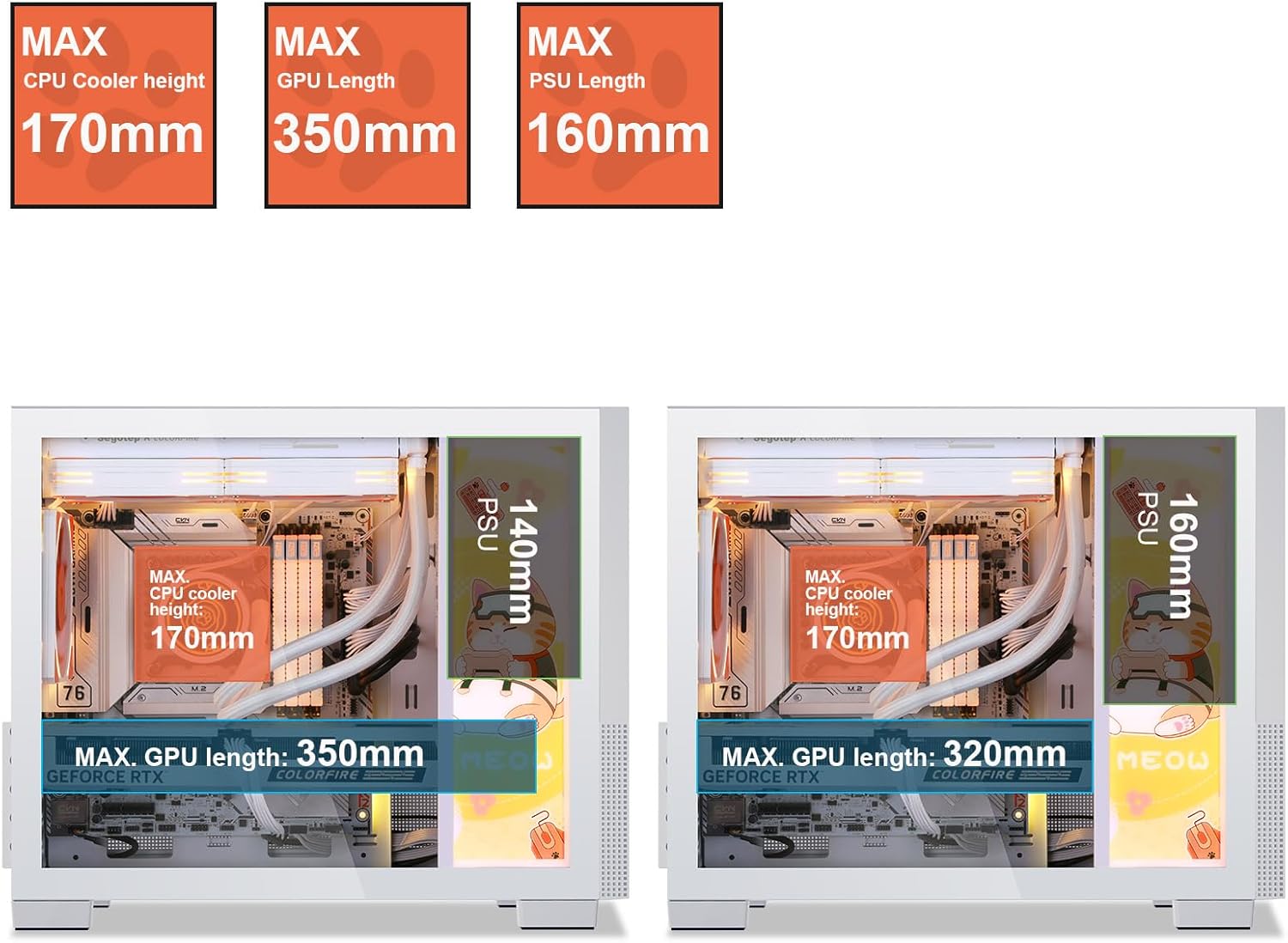
Figure 3.3: Component clearance specifications, including maximum GPU length.
۲.۶ د یخولو سیسټم نصبول
The case supports up to 6 case fans and a 240mm liquid radiator. Install fans in designated areas for optimal airflow.

Figure 3.4: Fan and radiator support, showing locations for 120mm/140mm fans and a 240mm liquid radiator.

Figure 3.5: Vertical air duct design for efficient cooling.
3.5 د بریښنا رسولو واحد (PSU) نصب کول
Install the PSU in its designated rear-mount location. The case supports PSUs with a maximum length of 160mm.
3.6 د کیبل مدیریت
د کارولو ample space and routing options behind the motherboard tray to manage cables effectively. This ensures a clean build and improved airflow.

Figure 3.6: Top panel and cable management features.
3.7 بیا یوځای کول
Once all components are installed and cables are managed, carefully reattach the side panels and top cover. Ensure all screws are tightened securely.
4. عملیاتي لارښوونې
After successful assembly, connect all necessary peripherals and power cables. The front I/O panel provides convenient access to power, audio, and USB 3.0 ports.

Figure 4.1: Front I/O Panel layout.
- Connect your monitor, keyboard, mouse, and other peripherals to the appropriate ports on your motherboard and graphics card.
- د بریښنا کیبل د PSU او دیوال آوټ لیټ سره وصل کړئ.
- Press the Power button on the front I/O panel to turn on your system.
5. ساتنه
Regular maintenance helps ensure the longevity and optimal performance of your PC case and components.
- د دوړو فلټرونه: The Segotep Memphis case includes removable dust filters. Regularly clean these filters to maintain optimal airflow and prevent dust buildup inside the case.
- بهرنۍ پاکوالی: یو نرم استعمال کړئ، دamp cloth to wipe down the exterior surfaces. Avoid abrasive cleaners that may damage the finish or tempered glass.
- د کور پاکول: Periodically use compressed air to remove dust from internal components, paying attention to fan blades and heatsinks. Ensure the system is powered off and unplugged before cleaning.
6. ستونزه حل کول
که تاسو د خپل کمپیوټر په جوړولو کې ستونزې سره مخ شئ، نو لاندې عام ستونزې حل کولو ګامونه په پام کې ونیسئ:
- ځواک نشته:
- Ensure the PSU is switched on and properly connected to the wall outlet and motherboard.
- Verify all power cables (24-pin ATX, CPU, GPU) are securely seated.
- د مخکینۍ پینل د بریښنا سویچ اړیکه د مور بورډ سره وګورئ.
- نه ښودنه:
- Confirm the monitor cable is connected to the graphics card (not the motherboard, if a dedicated GPU is installed).
- ګرافیک کارت په خپل PCIe سلاټ کې بیا ځای پر ځای کړئ.
- ډاډ ترلاسه کړئ چې د RAM ماډلونه په خپلو سلاټونو کې په سمه توګه ځای پر ځای شوي دي.
- ډیر ګرمول:
- Check if all case fans are spinning and properly oriented for airflow.
- د دوړو فلټرونه او داخلي برخې پاکې کړئ.
- د CPU کولر نصب او د تودوخې پیسټ غوښتنلیک تایید کړئ.
For further assistance, please refer to the support section or contact Segotep customer service.
7. مشخصات
| فیچر | مشخصات |
|---|---|
| برانډ | سیګوټیپ |
| د ماډل نوم | میمفیس |
| د قضیې ډول | مینی برج |
| د مور بورډ مطابقت | Micro ATX, ITX |
| اعظمي GPU اوږدوالی | 350mm |
| د اعظمي CPU کولر لوړوالی | 170mm |
| د PSU اعظمي اوږدوالی | 160mm |
| Liquid Radiator Support | تر 240mm پورې |
| د فین ملاتړ | تر ۹ مینه والو پورې |
| د ذخیره کولو ډرایو خلیجونه | 3x SSD, 1x HDD |
| سامنے I / O بندرونه | 2x USB 3.0, Audio (Headphone/Microphone) |
| مواد | فلزي، توده شیشه |
| رنګ | Memphis-White |
| د توکي وزن | ۲.۴۵ پونډه |
| د کڅوړې ابعاد | 19.25 x 15.5 x 11.5 انچه |
8. تضمین او ملاتړ
Segotep products are designed for reliability and performance. For warranty information and technical support, please refer to the official Segotep webسایټ ته مراجعه وکړئ یا مستقیم د دوی د پیرودونکو خدماتو سره اړیکه ونیسئ. د تضمین ادعاوو لپاره د پیرود ثبوت وساتئ.
د اړیکو معلومات: Please visit the official Segotep webد ملاتړ د اړیکو د تازه جزیاتو لپاره سایټ.