
TOMPROAD A52-CA
TOMPROAD A52-CA Bluetooth Speaker User Manual
Model: A52-CA | Brand: TOMPROAD
پیژندنه
د پیرودلو لپاره مننهasing the TOMPROAD A52-CA Portable Bluetooth Speaker. This powerful and versatile speaker is designed to deliver high-quality audio with deep bass, vibrant LED lights, and convenient features like FM radio and karaoke functionality. Please read this manual carefully to ensure proper use and maintenance of your device.
په بکس کې څه دي
د خلاصولو پر مهال، مهرباني وکړئ تصدیق کړئ چې لاندې ټول توکي پکې شامل دي:
- 1 x A52 بلوتوټ سپیکر
- 1 ایکس بې سیم مایکروفون
- 1 x ریموټ کنټرول
- 1 X USB چارجر کیبل
- 1 x د ایکس کیبل
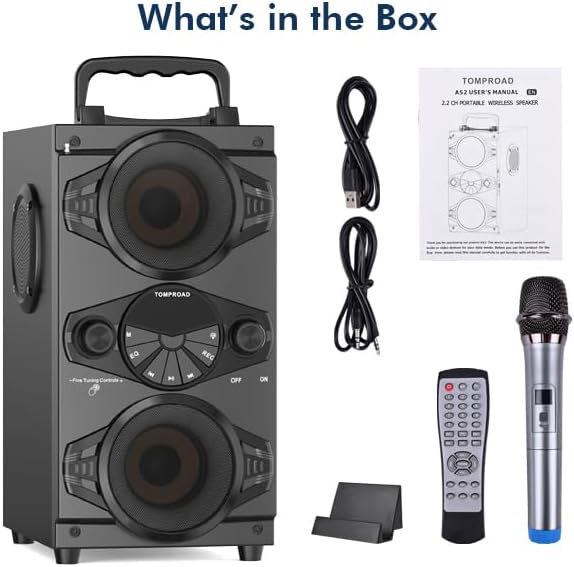
Image: The TOMPROAD A52-CA speaker, wireless microphone, remote control, USB charging cable, and AUX cable as packaged in the box.
محصول پای ته ورسیدview
The TOMPROAD A52-CA is a feature-rich portable speaker designed for various audio needs. Key features include:
- ځواکمن آډیو آوټ پټ: 60W surround sound with four 3-inch loudspeakers (two woofers, two tweeters) and a rear heavy bass guide tube for deep bass.
- پرمختللی بلوتوټ 5.0: Stable connection up to 100ft range, compatible with all Bluetooth-enabled devices.
- متحرک LED څراغونه: 9 flashing LED light modes to create an exciting atmosphere.
- Multi-functional Playback: Supports FM radio, AUX input, U-disk, and TF Card music playback.
- د کاراوکی فعالیت: Includes a wireless microphone and two extra microphone jacks for duets.
- د بیټرۍ اوږد ژوند: Built-in 8000mAh rechargeable battery provides 4-15 hours of playtime depending on volume.
- اسانه کنټرول: Digital display and intelligent remote control for easy operation.

Image: The TOMPROAD A52-CA speaker showcasing its design, accompanied by the wireless microphone and remote control.

Image: The speaker with its dimensions highlighted, emphasizing its portable and multifunctional design.

Image: Multiple speakers demonstrating the dynamic and colorful LED light effects.

Image: Visual representation of the speaker's long battery life and charging duration.
چمتو کول
۱. ابتدايي چارج کول
Before first use, fully charge the speaker using the provided USB charger cable. Connect the USB cable to the speaker's charging port and a compatible USB power adapter (not included). The charging indicator will show the charging status. A full charge typically takes 3-6 hours.
2. بریښنا کول/بندول
Locate the ON/OFF switch on the speaker's control panel. Slide the switch to the "ON" position to power on the speaker. You will hear an audible prompt, and the digital display will light up. To power off, slide the switch to the "OFF" position.
۳. د مایکروفون تنظیم کول
The included wireless microphone will automatically connect to the speaker when both are turned on. Ensure the microphone has fresh batteries (if applicable) and is powered on. For additional microphones, use the extra microphone jacks on the speaker.

Image: The speaker and microphone demonstrating their auto-connection feature and effective range.
عملیاتي لارښوونې
1. د بلوتوث جوړه کول
- Turn on the speaker. It will automatically enter Bluetooth pairing mode, indicated by a flashing "BLUE" on the digital display.
- په خپل وسیله (سمارټ فون، ټابلیټ، او نور) کې بلوتوث فعال کړئ.
- لټون "A52" in your device's Bluetooth list and select it to connect.
- Once connected, the "BLUE" indicator will stop flashing, and you will hear a confirmation sound.
2. د ایف ایم راډیو حالت
Press the "M" (Mode) button on the speaker or remote control to switch to FM Radio mode. Extend the antenna for better reception. Press the Play/Pause button to auto-scan and save available stations. Use the Previous/Next buttons to navigate between saved stations.

Image: The speaker demonstrating its strong FM radio reception with the antenna extended, enjoyed by a family.
3. AUX Input, U-disk, and TF Card Playback
- AUX داخلول: Connect an external audio device using the provided AUX cable to the speaker's AUX port. The speaker will automatically switch to AUX mode.
- U-disk (USB) Playback: په USB پورټ کې یو USB فلش ډرایو دننه کړئ. سپیکر به په اتوماتيک ډول آډیو کشف او غږوي files د ډرایو څخه.
- د TF کارت (مایکرو ایس ډی) پلے بیک: Insert a TF card into the TF card slot. The speaker will automatically detect and play audio files له کارت څخه.
۵.۳. د LED څراغونو کنټرول
Long press the dedicated LED light button on the speaker or remote control to turn the colorful LED lights on or off. Short press the button to cycle through the 9 different flashing modes.
5. Microphone and Karaoke Functions
Adjust the microphone volume and echo effects using the dedicated knobs on the speaker or buttons on the remote control. Sing along to your favorite tunes through the speaker. The two additional microphone jacks allow for multiple users.
۲. د ریموټ کنټرول کارول
The intelligent remote control allows you to manage various functions from a distance, including power, mode selection, volume, track control, EQ settings, and LED light control.
ساتنه
- پاکول: د سپیکر د سطحې د پاکولو لپاره نرم، وچ ټوکر وکاروئ. د کثافاتو پاکوونکي یا محلولونه مه کاروئ.
- ذخیره کول: سپیکر په یخ او وچ ځای کې وساتئ چې د مستقیم لمر وړانګو او سختو تودوخې څخه لرې وي کله چې د اوږدې مودې لپاره نه کارول کیږي.
- د بیټرۍ پاملرنه: د بیټرۍ د ژوند اوږدولو لپاره، د بیټرۍ په مکرر ډول د بشپړ چارج کولو څخه ډډه وکړئ. سپیکر په منظم ډول چارج کړئ، حتی که په کارولو کې نه وي، د بیټرۍ روغتیا ساتلو لپاره.
- د اوبو مقاومت: دا سپیکر د اوبو ضد نه دی. د اوبو یا لوړ رطوبت سره د مخ کیدو څخه ډډه وکړئ.
د ستونزو حل کول
| ستونزه | احتمالي لامل | د حل لاره |
|---|---|---|
| هیڅ ځواک نشته | بیټرۍ ټیټه یا مړه ده. | سپیکر په بشپړه توګه چارج کړئ. |
| غږ نشته | غږ ډېر ټیټ دی؛ غلط حالت غوره شوی؛ وسیله وصل نه ده. | Increase volume; ensure correct input mode (Bluetooth, AUX, etc.); re-pair Bluetooth device. |
| د بلوتوث پیوستون بې ثباته | وسیله د سپیکر څخه ډیره لرې ده؛ مداخله. | Move device closer to speaker (within 100ft); avoid obstacles; turn off other Bluetooth devices. |
| مایکروفون کار نه کوي | Microphone is off; low battery in microphone; not paired. | Ensure microphone is powered on; replace batteries; check automatic pairing. |
| د ایف ایم راډیو جامد | کمزوری سیګنال؛ انتن نه دی غځول شوی. | Extend the antenna fully; try repositioning the speaker for better reception. |
مشخصات
| فیچر | تفصیل |
|---|---|
| برانډ | ټامپروډ |
| د ماډل شمیره | A52-CA |
| د واټ محصولtage | 60 واټ |
| د ارتباط ټیکنالوژي | بلوتوث 5.0 |
| د بریښنا سرچینه | د بیټرۍ ځواکمن (۸۰۰۰mAh لیتیم آیون) |
| د لوبې وخت | 4-15 ساعته (په حجم پورې اړه لري) |
| د چارج کولو وخت | 3-6 ساعته |
| د محصول ابعاد (L x W x H) | 9.1 x 6.8 x 12.6 انچه |
| د توکي وزن | ۷.۹۶ پونډه (۳.۶۲ کیلوګرامه) |
| مواد | لرګي |
| آډیو ان پټ | اکس، USB، TF کارت |
| وړاندیز شوي استعمالونه | دننه / بهر |
تضمین او ملاتړ
For warranty information or technical support, please contact TOMPROAD customer service. Refer to the contact information provided with your purchase or visit the official TOMPROAD webد مرستې لپاره سایټ.
یادونه: د تضمین ادعاوو لپاره د پیرود ثبوت په توګه د پیرود رسید وساتئ.
Ask a question about this manual
Ask about setup, troubleshooting, compatibility, parts, safety, or missing instructions. Manuals+ will review the question and use this page’s manual context to help answer it.