
FREDEES BL-9222-32
FREDEES Nightstand BL-9222-32 User Manual
Model: BL-9222-32
1. پیژندنه
Welcome and thank you for choosing the FREDEES Nightstand. This manual provides essential information for the safe assembly, operation, and maintenance of your new nightstand. Please read it thoroughly before use and retain it for future reference.
2. د خوندیتوب معلومات
د خوندي عملیاتو ډاډ ترلاسه کولو او د زیان مخنیوي لپاره، مهرباني وکړئ لاندې خوندیتوب احتیاطي تدابیر په پام کې ونیسئ:
- Do not expose the nightstand to water or excessive moisture.
- Place the nightstand on a stable, level surface to prevent tipping.
- درازونه یا المارۍ ډیر مه باروئ.
- ډاډ ترلاسه کړئ چې ټول بریښنایی اړیکې خوندي دي او د ځایی بریښنایی کوډونو سره مطابقت لري.
- Keep children and pets away from the nightstand during assembly.
- Unplug the nightstand from the power outlet before cleaning or moving.
3. د بسته محتويات
مهرباني وکړئ تصدیق کړئ چې لاندې لیست شوي ټولې برخې د اسمبلۍ پیل کولو دمخه شتون لري. که چیرې کومې برخې ورکې یا زیانمنې وي، د پیرودونکي ملاتړ سره اړیکه ونیسئ.
- Nightstand Panels (Top, Bottom, Sides, Back)
- Drawer Fronts, Sides, and Bottoms
- د دراز سلایډونه او لاستي
- د اسمبلۍ هارډویر (سکرو، ډویلونه، کیم لاکونه، او نور)
- Power Adapter with USB/Type-C Ports and Wireless Charging Pad
- RGB LED Light Strips and Controller
- Human Sensor Module
- د شورا لارښود
4. د مجلس لارښوونې
Follow these steps carefully for proper assembly. An illustrated assembly guide is included in your package. Installation videos may also be available from the manufacturer's website for visual assistance.
- ټولې برخې خلاصې کړئ او په پاکه، نرمه سطحه یې کېږدئ ترڅو د سکریچونو مخه ونیول شي.
- Identify all panels and hardware according to the assembly guide.
- د چمتو شوي هارډویر په کارولو سره د غاړې تختې لاندې تختې سره وصل کړئ.
- Install the drawer slides onto the side panels and the drawer boxes.
- Assemble the three drawers and attach the handles.
- Insert the assembled drawers into the nightstand frame.
- شاته تخته د شپې سټینډ چوکاټ سره وتړئ.
- Install the RGB LED light strips and human sensor module as per the guide.
- Connect the power adapter and charging station components.
شکل 4.1: An illustration of the nightstand with drawers open, providing a general overview of its structure and components during assembly.
5. د محصول ب Featuresې
The FREDEES Nightstand is designed with several integrated features for convenience and modern living:
۳. د بېسیم چارج کولو سټیشن
Located on the top surface, the wireless charging pad allows for convenient, cable-free charging of compatible smartphones and devices.
5.2. USB and Type-C Charging Ports
Integrated USB and Type-C ports provide versatile wired charging options for a wide range of electronic devices.

شکل 5.1: تړل view of the nightstand's top surface, illustrating the wireless charging pad, USB, and Type-C ports in use with various devices.
5.3. RGB LED Lighting with Human Sensor
The nightstand features customizable RGB LED lighting with 20 distinct color options. It can be controlled manually or set to activate automatically via a human motion sensor.

شکل 5.2: The nightstand displaying its RGB LED lighting, with an indication of 20 available light modes and adjustable brightness.
۵.۳. د ذخیره کولو درازونه
Three spacious drawers and a convenient pull-out storage compartment provide ample space for organizing personal items.

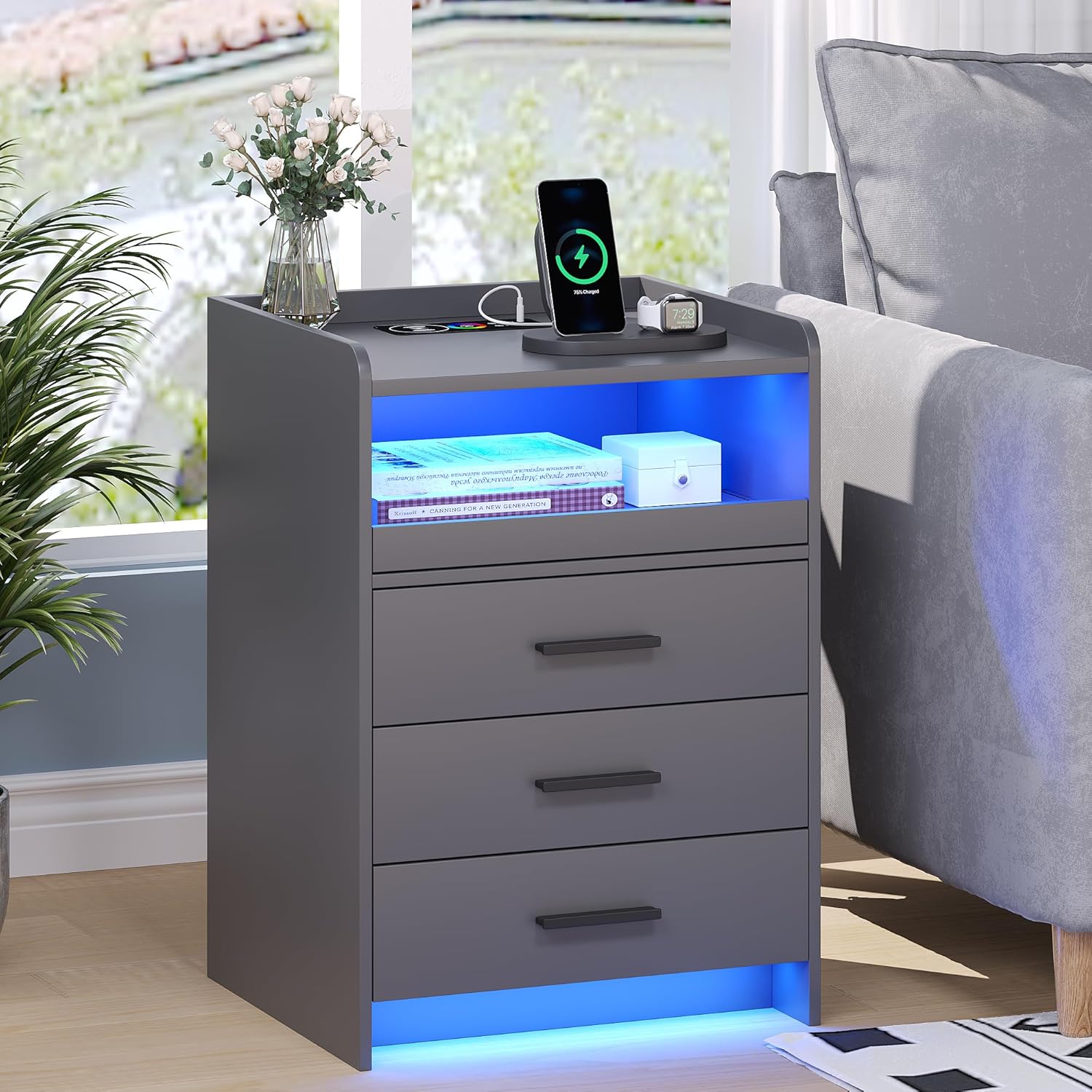
شکل 5.3: The FREDEES Nightstand showcasing its wireless charging pad, LED lighting, and three storage drawers in a typical bedroom environment.
6. عملیاتي لارښوونې
6.1. د بریښنا پیوستون
After assembly, connect the nightstand's power adapter to a standard electrical outlet. Ensure the connection is secure.
6.2. د چارج کولو سټیشن کارول
6.2.1. بې سیم چارج کول
Place your wireless charging compatible device (e.g., smartphone) directly onto the designated wireless charging pad on the top surface. Ensure the device is centered for optimal charging. A charging indicator (if present on your device) will confirm charging has begun.
6.2.2. USB/Type-C Charging
Connect your electronic device to the USB or Type-C port using an appropriate charging cable. These ports provide power for various devices.
۶.۲. د RGB LED څراغونو کنټرول کول
The LED lights can be controlled via a dedicated control interface, typically located on the nightstand or via a remote control (if included).
6.3.1. لاسي کنټرول
Press the light control button to cycle through the 20 available color options. Additional buttons may allow for brightness adjustment or special effects.
6.3.2. Human Sensor Mode
Activate the human sensor mode using the designated button. In this mode, the LED lights will automatically turn on when motion is detected within a range of approximately 2-3 meters. The lights will turn off automatically after a period of no detected motion.

شکل 6.1: An illustration demonstrating the human sensor functionality, where the nightstand's light activates upon detecting a person or pet nearby within its detection range.
7. ساتنه
Proper care and maintenance will extend the life of your FREDEES Nightstand:
- پاکول: سطحې د وچ او نرم ټوکر سره پاک کړئ. د سختو نښو لپاره، یو څه damp cloth can be used, followed immediately by a dry cloth. Avoid abrasive cleaners, harsh chemicals, or excessive moisture.
- خړوبول: Regularly dust all surfaces, including the charging area and LED strips, to maintain optimal performance and appearance.
- برقی اجزا: Ensure all electrical connections remain dry and free from dust. Do not attempt to service the internal electrical components yourself.
8. ستونزه حل کول
If you encounter issues with your nightstand, refer to the following common problems and solutions:
- برېښنا نشته / څراغونه نه روښانه کېږي:
- Check if the power adapter is securely plugged into both the nightstand and the wall outlet.
- د بل وسیلې په لګولو سره د دیوال آوټ لیټ فعال دی تصدیق کړئ.
- Ensure the LED light control is not set to 'off' or minimum brightness.
- د بې سیم چارج کار نه کوي:
- Confirm your device is compatible with wireless charging (Qi standard).
- ډاډ ترلاسه کړئ چې ستاسو وسیله د چارج کولو پیډ په مرکز کې ده.
- د تلیفون هر ډول غټ پوښونه لرې کړئ چې ممکن د چارج کولو سره مداخله وکړي.
- Check for any metallic objects between the phone and the charging pad.
- USB/Type-C Ports Not Charging:
- د چارج کولو بل کیبل هڅه وکړئ.
- د وسیلې پورې اړوند ستونزو د له منځه وړلو لپاره د بل وسیلې سره ازموینه وکړئ.
- Human Sensor Not Responding:
- Ensure the sensor mode is activated.
- Check for obstructions blocking the sensor's view.
- Verify the sensor is clean and free of dust.
If problems persist after attempting these solutions, please contact FREDEES customer support.
9. مشخصات

شکل 9.1: Diagram illustrating the dimensions of the FREDEES Nightstand and icons representing its key features: wireless charging, 20 color lighting, lighting regulation, human induction, and USB/Type-C ports.
| فیچر | مشخصات |
|---|---|
| برانډ | فریډیز |
| ماډل | BL-9222-32 |
| د محصول ابعاد | ۳۷.۴ x ۴۷.۵ x ۲۷.۲ سانتي متره (۱۴.۷D x ۱۸.۷W x ۱۰.۷H انچه) |
| د توکي وزن | ۷.۰ کیلو ګرامه (۱۵.۵ پونډه) |
| د موادو ډول | انجنیري لرګي |
| رنګ | خړ |
| ځانګړي ځانګړتیاوې | RGB Light (20 colors), Wireless Charging, USB Port, Type-C Port, Human Sensor |
| د درازونو شمیر | 3 |
| د بریښنا سرچینه | د AC بریښنا اډاپټر (شامل دی) |
10. تضمین او ملاتړ
For warranty information, technical assistance, or to report missing/damaged parts, please refer to the contact details provided with your purchase documentation or visit the official FREDEES website. Our professional team is available to answer your questions and provide support.
Ask a question about this manual
Ask about setup, troubleshooting, compatibility, parts, safety, or missing instructions. Manuals+ will review the question and use this page’s manual context to help answer it.