
1. پیژندنه
The FXTUL M6 Motorcycle Diagnostic Tool is a comprehensive OBD2 scanner designed for diagnosing and maintaining motorcycles. It features a 5-inch RGB display screen and offers full system coverage, real-time data recording, and printable reports. This manual provides detailed instructions for the proper use and maintenance of your M6 diagnostic tool.

Figure 1: FXTUL M6 Diagnostic Tool, cables, and protective carrying case.
2. محصول ختم شوview
2.1 کلیدي ځانګړتیاوې
- د سیسټم تشخیص: Supports engine, ABS, tire pressure, anti-theft, and other systems. Reads and clears Diagnostic Trouble Codes (DTCs), views freeze frame data, displays data streams, and performs active tests.
- 104 Service Functions: Includes ECU reset, oil maintenance lamp reset, CO Trimmer adjustments, TPS adjustments, auto adaptive parameter reset, service light reset, and idling adjustments.
- د بیټرۍ ازموینه: Features cranking test, standard test, quick test, and charging test functions.
- Data Recording & Playback: د وروسته بیاکتنې لپاره د تشخیصي معلوماتو ثبتولview او تحلیل.
- Information Printing: Generates printable reports for diagnostic results, module information, fault codes, and data streams.
- انځور Viewer: Captures and reviews screenshots of the device interface during diagnosis.
- 5-inch RGB Display: High-resolution (800x480) screen with customizable dark and light themes.
- Wide Motorcycle Coverage: Compatible with over 70 motorcycle brands and models globally.
- Free Lifetime Software Upgrade: Connects to a computer via USB for software updates.
- د څو ژبو ملاتړ: Offers various language options for user interface.
2.2 اجزا او کنټرول
The FXTUL M6 device features a user-friendly interface with a clear display and intuitive controls.
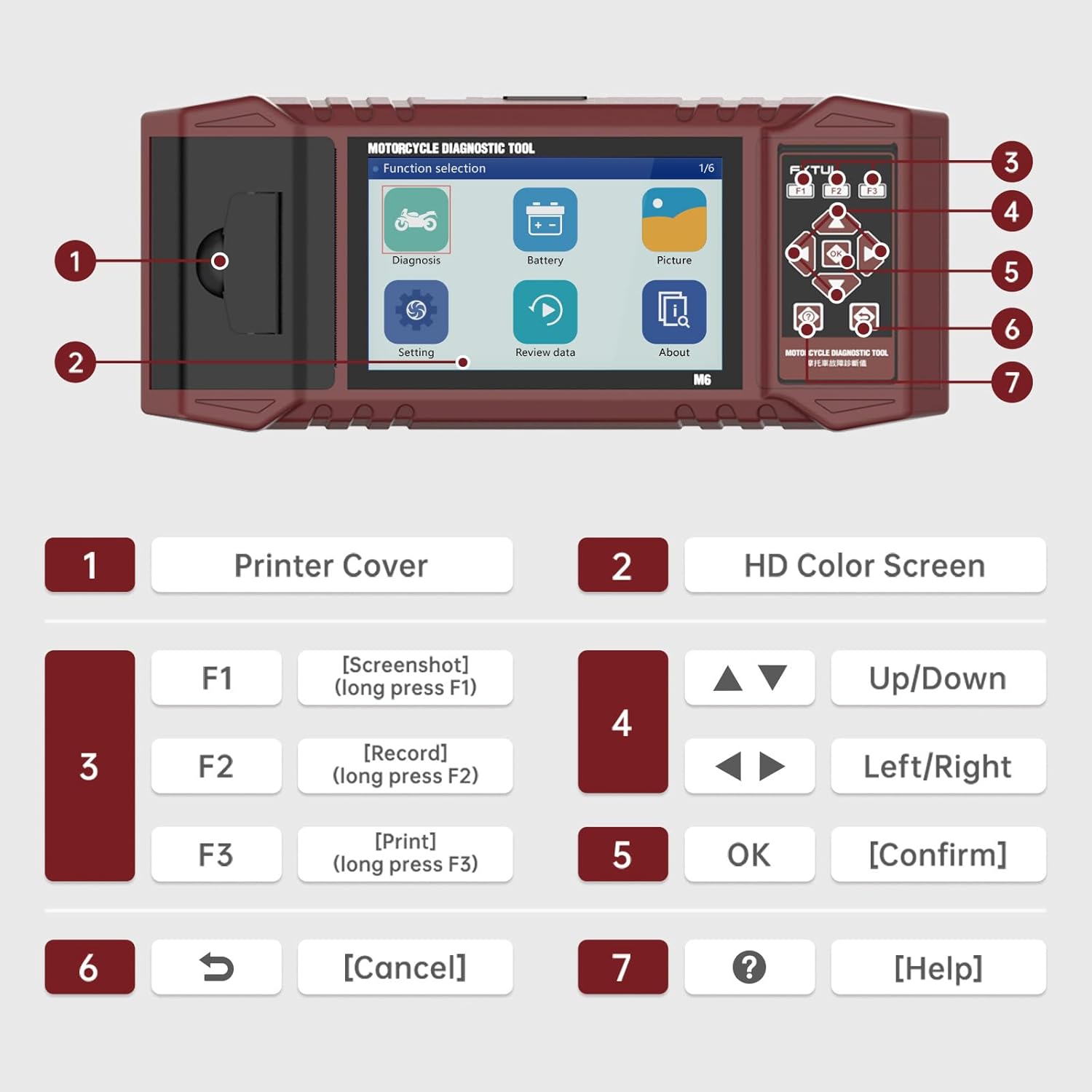
Figure 2: Labeled components and controls of the FXTUL M6 Diagnostic Tool.
| نه. | اجزا | فعالیت |
|---|---|---|
| 1 | د چاپګر پوښ | Covers the built-in thermal printer. |
| 2 | HD Color Screen | 5-inch RGB display for interface and data. |
| 3 | Function Keys (F1, F2, F3) | F1: Screenshot (long press), F2: Record (long press), F3: Print (long press). |
| 4 | د نیویګیشن کیلي | Up/Down, Left/Right for menu navigation. |
| 5 | سمه ده | انتخابونه تاییدوي. |
| 6 | لغوه کیلي | Returns to previous screen or cancels operation. |
| 7 | د مرستې کلید | Provides contextual help. |
3. ترتیب کول
- بسته بندي کول: Carefully remove the M6 diagnostic tool and all accessories from the packaging. Verify all components listed in the "What's in the Box" section are present.
- د بریښنا پیوستون: The device is typically powered via the motorcycle's diagnostic port. Ensure the motorcycle's ignition is turned off before connecting the tool.
- Connecting to Motorcycle: Locate the diagnostic port on your motorcycle. Connect the appropriate diagnostic cable from the M6 tool to the motorcycle's port.
- پاور آن: Turn the motorcycle's ignition to the ON position. The M6 tool should power on automatically. If not, check the connection.
- د ژبې انتخاب: Upon first use, you may be prompted to select your preferred language. Navigate using the arrow keys and confirm with the OK button.
4. عملیاتي لارښوونې
4.1 د سیسټم تشخیص
This function allows for comprehensive scanning of various motorcycle systems to identify and resolve issues.
- From the main menu, select "Diagnosis".
- The tool will automatically identify the vehicle model and scan all available systems.
- Review the assembly status and fault codes for each system.
- To read fault codes, select the "Read Fault Codes" option.
- To clear all fault codes, select the "Clear Fault Codes" option. Confirm the action when prompted.

Figure 3: Vehicle System Diagnostic interface for reading and clearing fault codes.
4.2 د خدماتو دندې
The M6 supports over 100 service functions for various maintenance procedures.
- From the main menu, navigate to the "Service Functions" or similar option (may be under "Diagnosis" depending on software version).
- Select the desired service function from the list (e.g., ECU reset, Oil service light reset, CO adjustment).
- Follow the on-screen prompts to complete the procedure.

شکل 4: مثالamples of 104 service functions supported by the tool.
4.3 د معلوماتو جریان ولولئ
View real-time data parameters from the motorcycle's ECU. The data stream waveform graph automatically adapts for easy viewing.
- From the "Diagnosis" menu, select "Data Stream" or "Live Data".
- Choose the specific data parameters you wish to monitor.
- The data will be displayed numerically and can also be viewed as a waveform graph for trend analysis.

Figure 5: Data Stream Display and Waveform Analysis.
4.4 د بیټرۍ ازموینه
Perform various tests on the motorcycle's battery.
- From the main menu, select "Battery".
- Choose the desired test: "Cranking Test", "Standard Test", "Quick Test", or "Charging Test".
- Follow the on-screen instructions to perform the test and view پایلې

Figure 6: Battery Test functions interface.
4.5 Data Recording and Playback
Record diagnostic sessions for later review او تحلیل.
- During a diagnostic process, long-press the F2 key to initiate data recording.
- To play back recorded data, select "Review data" from the main menu.
- Navigate through recorded files and select the one you wish to play back.
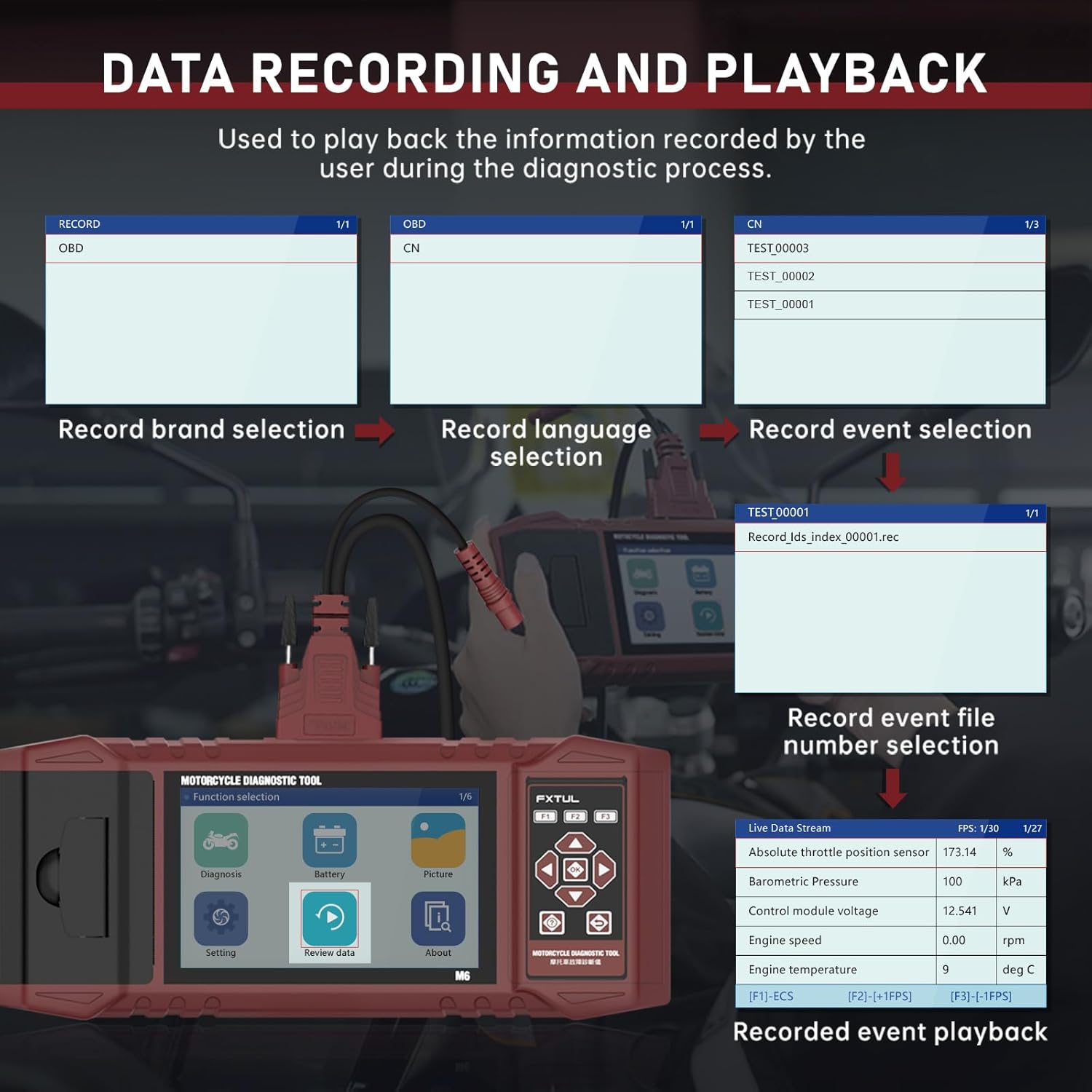
Figure 7: Data Recording and Playback process.
4.6 Information Printing
Print diagnostic reports directly from the device using the built-in printer.
- On any screen displaying information you wish to print (e.g., diagnostic reports, fault codes), long-press the F3 key.
- Input any required user or vehicle information using the on-screen keyboard.
- The device will print the information.

Figure 8: Information Printing function.
4.7 انځور Viewer
Capture screenshots of the device interface and review دوی وروسته.
- To capture a screenshot, long-press the F1 key on any interface.
- ته view saved images, select "Picture" from the main menu.
- You can browse through saved images and delete them as needed.

Figure 9: Image Viewer interface for browsing and deleting screenshots.
5. د سافټویر لوړول
The FXTUL M6 offers free lifetime software upgrades to ensure compatibility with new motorcycle models and features.
- تازه ډاونلوډ کړئ: Obtain the latest software update files from the official FXTUL webسایټ یا د پیرودونکي ملاتړ سره اړیکه ونیسئ.
- کمپیوټر سره وصل کړئ: Connect the M6 device to your computer using a USB cable.
- وسیله پیژندنه: Wait for the computer to recognize the device. A new drive symbol should appear.
- Replace Folder: Open the new drive. Locate the "DIAGNOSE" folder. Replace this folder with the downloaded "DIAGNOSE" upgrade folder.
- ریبوټ: Disconnect the device from the computer and power it on again. The updated software will be loaded.

Figure 10: Software upgrade process via USB connection.
6. ستونزه حل کول
- وسیله نه فعالیږي:
- Ensure the diagnostic cable is securely connected to both the M6 tool and the motorcycle's diagnostic port.
- Verify the motorcycle's ignition is turned to the ON position.
- Check the motorcycle's battery voltage.
- Cannot connect to motorcycle ECU:
- Ensure the correct diagnostic cable for your motorcycle model is being used.
- Verify the motorcycle's ignition is ON and the engine is off (unless specific tests require it to be running).
- Check for any blown fuses in the motorcycle's diagnostic circuit.
- Ensure the M6 software is up to date. Some newer motorcycle models may require the latest software version.
- Specific motorcycle models not listed:
- While the tool supports over 70 brands, specific models within those brands may require the latest software updates. Perform a software upgrade as described in Section 5.
- Contact FXTUL customer support with your motorcycle's make, model, and year for assistance with compatibility.
- Printer not working:
- Check if the printer cover is properly closed.
- Ensure there is sufficient thermal paper loaded in the printer.
- Verify you are long-pressing the F3 key to initiate printing.
7. مشخصات
| مشخصات | تفصیل |
|---|---|
| ماډل | FXTUL-M6 |
| د ښودلو سکرین | 5-inch RGB Display (800x480 resolution) |
| د توکي وزن | ۲.۴۵ پونډه |
| د کڅوړې ابعاد | 15 x 12 x 5 انچه |
| Supported Motorcycle Brands | 70+ (e.g., Ducati, Harley Davidson, BMW, Kawasaki, Yamaha, Honda, Suzuki, etc.) |
| ارتباط | OBD2, USB for updates |
| د بریښنا سرچینه | Vehicle's diagnostic port |
| د سافټویر تازه معلومات | Free Lifetime Upgrade |

Figure 11: Partial list of supported motorcycle brands and models.
8. تضمین او ملاتړ
FXTUL is committed to providing high-quality products and customer satisfaction. The M6 Motorcycle Diagnostic Tool is designed for durability and reliability.
- د کیفیت تضمین: The product is manufactured under strict quality control standards.
- Free Lifetime Software Upgrade: As mentioned in Section 5, software updates are provided free of charge for the lifetime of the product.
- تخنیکي ملاتړ: For any technical assistance, troubleshooting, or inquiries regarding product functionality and compatibility, please contact FXTUL customer support. Refer to the product packaging or official webد تماس جزیاتو لپاره سایټ.