
docooler V8 Finder 2
docooler V8 Finder 2 TV Signal Finder Meter User Manual
Model: V8 Finder 2
1. پیژندنه
The docooler V8 Finder 2 is a professional digital satellite signal finder meter designed for efficient and accurate installation and adjustment of satellite dishes. It features a high-definition LCD display, supports various DVB standards, and includes advanced functions like spectrum analysis and automatic angle calculation. This manual provides comprehensive instructions for operating and maintaining your device.
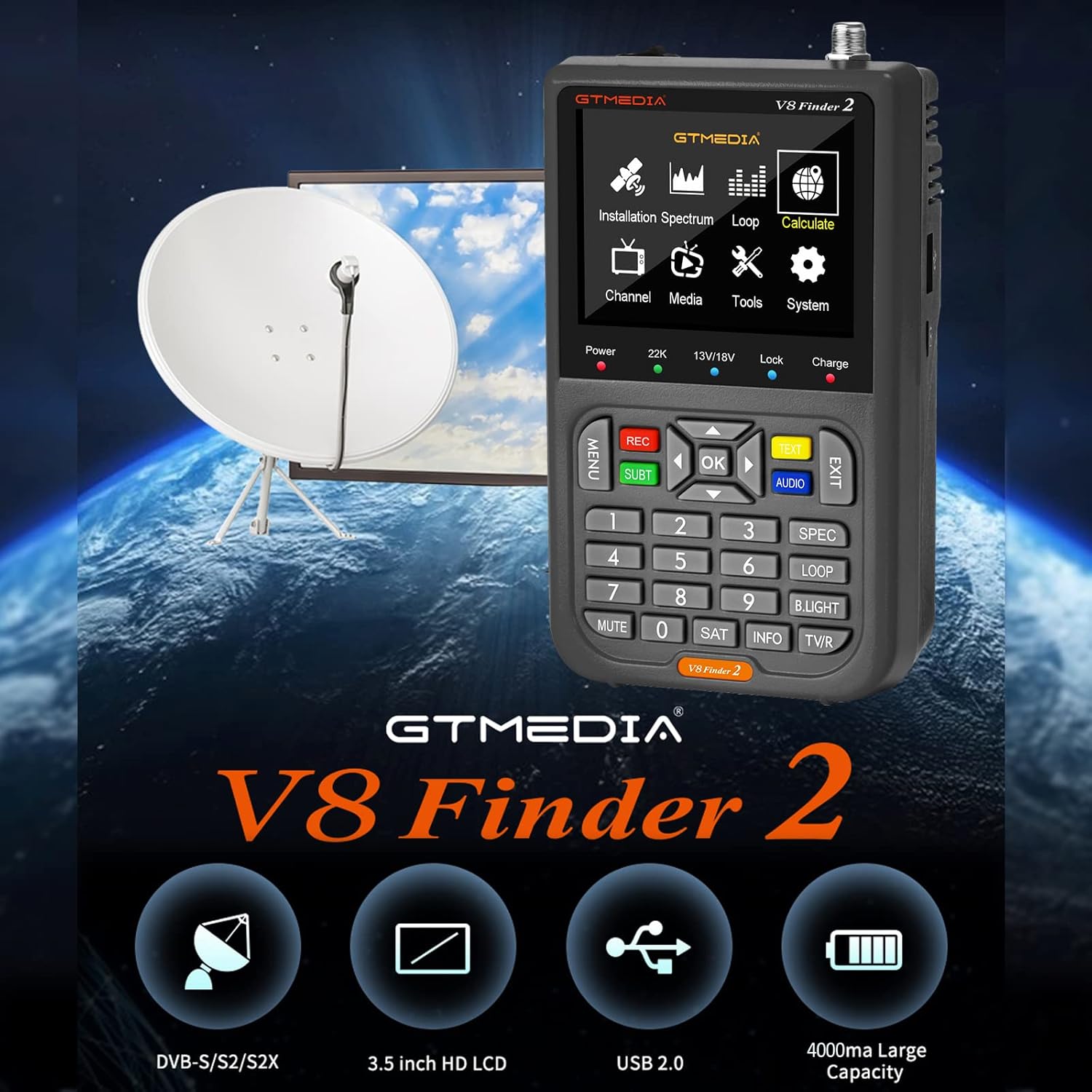
Figure 1: docooler V8 Finder 2 in use with a satellite dish, highlighting its core function.
2. د خوندیتوب معلومات
مهرباني وکړئ د دې محصول کارولو دمخه د خوندیتوب ټول اخطارونه او لارښوونې په دقت سره ولولئ ترڅو خوندي عملیات ډاډمن کړئ او د زیان مخه ونیسئ.
- وسیله باران یا رطوبت ته مه ښکاره کوئ.
- د سختې تودوخې څخه ډډه وکړئ. وسیله د سپارښتنو چاپیریالي شرایطو کې وکاروئ.
- وسیله مه جلا کوئ یا یې پخپله ترمیمولو هڅه مه کوئ. ټولې خدمتونه وړ پرسونل ته راجع کړئ.
- Use only the provided or recommended charging accessories.
- د وسیلې د چلولو پر مهال د هوا مناسبه هوا ډاډمنه کړئ.
- وسیله د قوي مقناطیسي ساحو څخه لرې وساتئ.
3. محصول ختم شوview
The V8 Finder 2 is a compact and powerful tool for satellite signal detection. Familiarize yourself with its components and features.
3.1 وسیله وسیله

شکل 2: مخکی view of the V8 Finder 2, showing the LCD display and control panel.
The front panel features a 3.5-inch high-definition LCD screen for displaying signal information, menus, and media. Below the screen are navigation buttons, numeric keypad, and function keys for various operations.
۳.۳ بندرونه او اړیکې
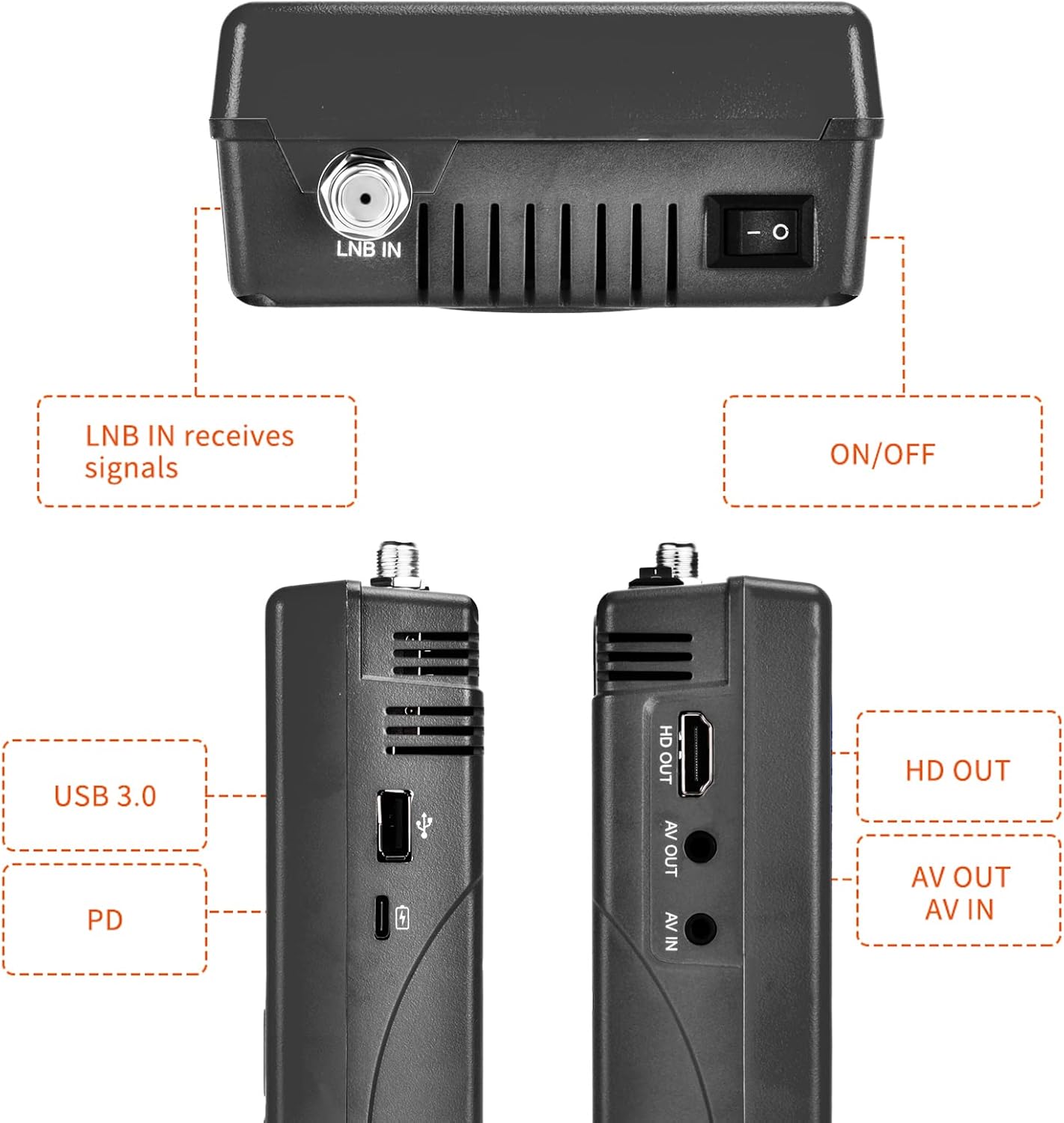
شکل ۳.۲: اړخ او پورته views illustrating the various input and output ports.
- LNB IN: Connects to the LNB of your satellite dish for signal reception.
- آن/آف سویچ: وسیله چالان یا بندوي.
- USB Port (USB 3.0): For software updates and connecting a 2.4G USB Wi-Fi dongle for YouTube functionality.
- PD (Power Delivery) / Type-C Charging Port: For charging the device and supports reverse charging.
- HD بهر: High-Definition Multimedia Interface output for connecting to an external display.
- ای وی آوټ: Analog Video output for connecting to older displays.
- AV IN: Analog Video input for connecting external video sources.
3.3 کلیدي ځانګړتیاوې
- 3.5-inch High-Definition LCD Display.
- Full compatibility with DVB-S2X/S2/S, MPEG-2/MPEG-4.
- H.264 (8-bit) hardware decoding support.
- Digital measurement for signal strength and quality.
- Spectrum Analyzer and Loop Search functions.
- Supports Auto, Blind, Manual, or NIT scanning.
- Audible tone for signal lock.
- Automatic calculation of AZ, EL angles.
- DISEQC 1.0/1.1/1.2, Unicable, 0/22kHz tone support.
- جوړ شوی سپیکر.
- 7.4V/4000mAh Li-ion battery with Type-C fast charging and reverse charging.
- Software upgrade via USB port.

Figure 4: Visual representation of the V8 Finder 2's main features.
4. ترتیب کول
Before first use, ensure the device is fully charged and familiarize yourself with the package contents.
4.1 د بسته محتويات

Figure 5: Items included in the V8 Finder 2 product package.
ډاډ ترلاسه کړئ چې ټول توکي شتون لري:
- docooler V8 Finder 2 Device
- د کارن لارښود
- USB کیبل (Type-C)
- Power Adapter (if included, not explicitly listed in JSON but implied by charging)
- F-connector adapter (if included)
4.2 د وسیلې چارج کول
The device is equipped with a 7.4V/4000mAh Li-ion battery. For optimal performance, fully charge the device before first use.
- Connect the provided USB Type-C cable to the PD/Type-C charging port on the device.
- Connect the other end of the USB cable to a compatible USB power adapter (not explicitly listed as included, but standard for Type-C charging) or a powered USB port.
- The charging indicator on the device will illuminate. Charging is complete when the indicator changes color or turns off (refer to device screen for battery status).
The device supports multi-protocol fast charging and Type-C reverse charging, allowing it to act as a power bank for other devices.
5. عملیاتي لارښوونې
This section details the steps for using the V8 Finder 2 to locate and optimize satellite signals.
5.1 بریښنا کول / بندول
- To power on, slide the ON/OFF switch located on the top of the device to the 'ON' position.
- To power off, slide the ON/OFF switch to the 'OFF' position.
۴.۳ د سپوږمکۍ ډش سره نښلول
- Ensure the V8 Finder 2 is powered off.
- Connect the coaxial cable from your satellite dish's LNB (Low Noise Block) to the LNB IN port on the V8 Finder 2.
- If connecting to a receiver or TV, use the HD بهر or آو آوټ بندرونه
5.3 Signal Finding and Optimization
The V8 Finder 2 provides various modes for signal acquisition and analysis.
- سپوږمکۍ غوره کړئ: From the main menu, navigate to the "Installation" or "Satellite Setup" section. Select the desired satellite from the pre-programmed list or add a new one.
- Adjust Dish: Slowly adjust the azimuth (horizontal) and elevation (vertical) of your satellite dish. Observe the signal strength and quality indicators on the V8 Finder 2's display. The device will emit an audible tone when a signal is locked.
- د سپیکٹرم شنونکی: Use the "Spectrum" function to visualize the signal spectrum, which can help identify interference or weak signals.
- Angle Calculation: The device can automatically calculate the AZ (Azimuth) and EL (Elevation) angles for your location, assisting in precise dish alignment.
- د چینل سکین: Once a strong signal is acquired, perform an "Auto Scan," "Blind Scan," "Manual Scan," or "NIT Scan" to find available channels.

Figure 6: The V8 Finder 2 display showing signal decoding capabilities.
5.4 Media Playback and Other Functions
- رسنۍ: The device supports media playback. Connect a USB drive to the USB port to access compatible audio or video files.
- YouTube (via Wi-Fi): Connect a 2.4G USB Wi-Fi dongle to the USB port to enable YouTube functionality.
- د AV دننه/بهر: Use the AV IN port to display video from an external source on the V8 Finder 2 screen. Use AV OUT or HD OUT to display the V8 Finder 2's screen on an external monitor or TV.

Figure 7: Illustration of AV IN and AV OUT functionality, connecting the device to a television.
6. ساتنه
Proper maintenance ensures the longevity and optimal performance of your V8 Finder 2.
- پاکول: د وسیلې د پاکولو لپاره نرم، وچ ټوکر وکاروئ. مایع پاکوونکي یا ایروسول مه کاروئ.
- ذخیره کول: وسیله په یخ او وچ ځای کې د مستقیم لمر وړانګو او سختې تودوخې څخه لرې وساتئ.
- د بیټرۍ پاملرنه: To preserve battery life, avoid fully discharging the battery frequently. If storing for extended periods, charge the battery to about 50% every few months.
- د سافټویر تازه معلومات: Periodically check for software updates on the manufacturer's website. Updates can improve performance and add new features. Use the USB port for software upgrades.
7. ستونزه حل کول
If you encounter issues with your V8 Finder 2, refer to the following common problems and solutions.
| ستونزه | احتمالي لامل | د حل لاره |
|---|---|---|
| وسیله فعاله نه ده. | د بیټرۍ ټیټه کچه؛ د بریښنا بندول. | Charge the device fully. Ensure the ON/OFF switch is in the 'ON' position. |
| هیڅ سیګنال ندی موندل شوی. | Incorrect LNB connection; Dish misalignment; Incorrect satellite selected. | Check LNB cable connection. Re-align the satellite dish. Verify the correct satellite is selected in the device settings. |
| Weak or unstable signal. | Fine-tuning needed; Obstruction; LNB issue. | Make small adjustments to the dish. Check for any physical obstructions. Inspect LNB for damage. |
| د وائی فای سره وصل نشو. | No 2.4G USB Wi-Fi dongle connected; Incorrect Wi-Fi settings. | Ensure a compatible 2.4G USB Wi-Fi dongle is inserted. Verify Wi-Fi network settings and password. |
| Display issues. | Software glitch; Hardware fault. | Restart the device. If the problem persists, consider a software update or contact support. |
8. مشخصات
Technical specifications for the docooler V8 Finder 2.
- ښکاره کول: 3.5-inch High-Definition LCD
- مطابقت: DVB-S2X/S2/S, MPEG-2/MPEG-4
- ویډیو کوډ کول: H.264 (8-bit)
- بیټرۍ: 7.4V/4000mAh لی آیون
- د چارج کولو بندر: Type-C (supports fast charging, reverse charging)
- ارتباط: USB (for software update, 2.4G Wi-Fi dongle), HD OUT, AV OUT, AV IN
- ابعاد: تقریبا ۱۰۷ ملي متره x ۶۳ ملي متره x ۱۰.۵ ملي متره
- وزن: 530 ګرامه
- DISEQC Support: 1.0/1.1/1.2, Unicable
- Tone Support: 0/22kHz
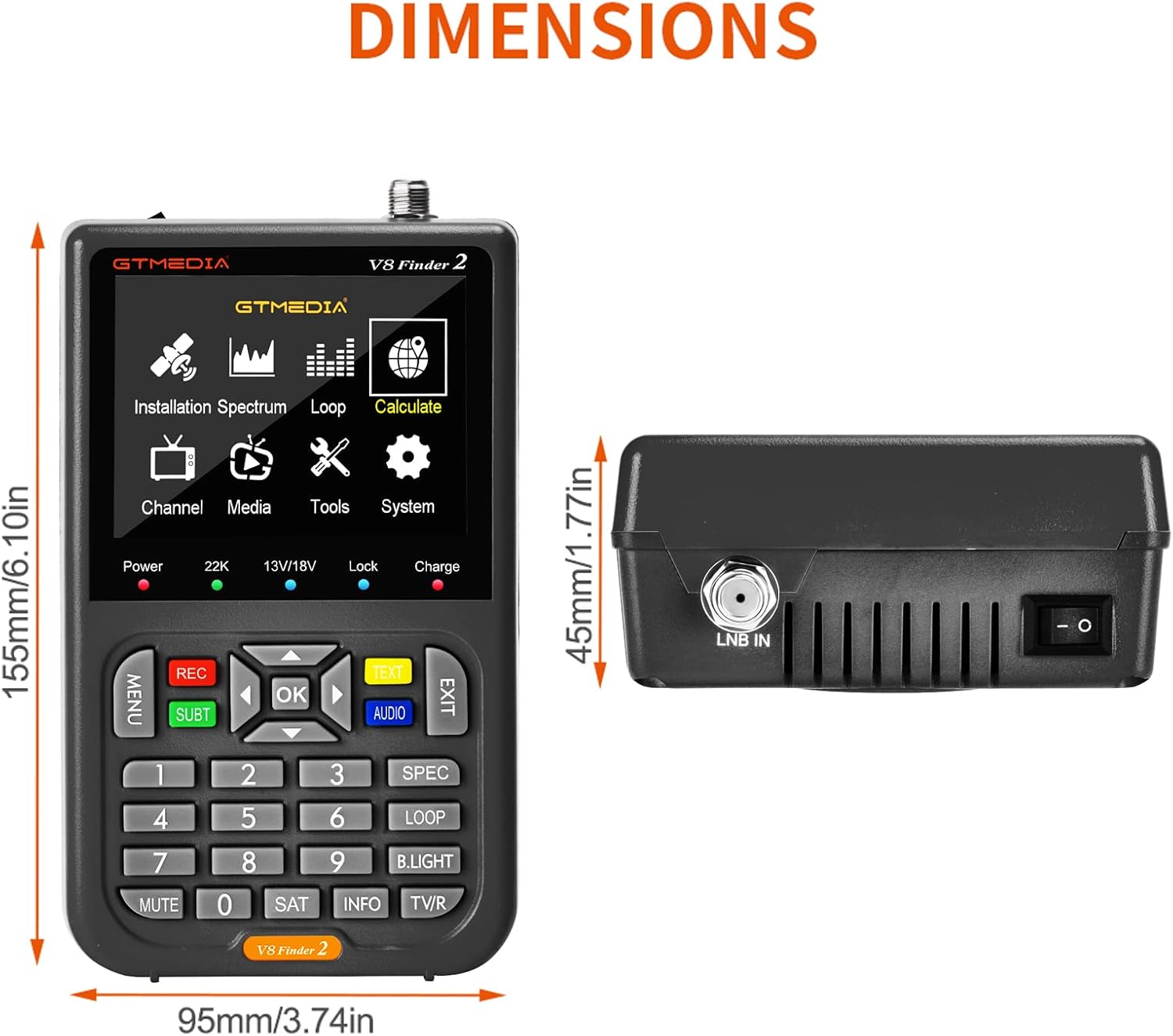
Figure 8: Physical dimensions of the V8 Finder 2.
9. تضمین او ملاتړ
For warranty information and technical support, please refer to the product warranty card included in your package or visit the official docooler webسایټ. د تضمین ادعاوو لپاره د پیرود ثبوت په توګه د پیرود رسید وساتئ.
جوړونکی: ډاکولر
نښه: docooler
For further assistance, please contact docooler customer service.
Ask a question about this manual
Ask about setup, troubleshooting, compatibility, parts, safety, or missing instructions. Manuals+ will review the question and use this page’s manual context to help answer it.