
پیژندنه
The MEE audio Connect Air AF-CA1 is a compact Bluetooth wireless audio transmitter designed to enable wireless audio streaming from devices equipped with a 3.5mm audio jack to Bluetooth headphones or speakers. This adapter is ideal for use with in-flight entertainment systems, gym equipment, televisions, and gaming consoles, allowing you to enjoy audio wirelessly.
د خوندیتوب معلومات
Please read and follow these safety guidelines to ensure proper use and prevent damage to the device or personal injury:
- وسیله د اوبو یا ډیر رطوبت سره مخ کیدو څخه ډډه وکړئ.
- وسیله د سختې تودوخې (ګرمې یا سړې) سره مه مخ کوئ.
- د وسیلې د جلا کولو یا بدلولو هڅه مه کوئ. دا به تضمین باطل کړي.
- وسیله د ماشومانو او څارویو څخه لرې وساتئ.
- د ځایی مقرراتو سره سم د بیټرۍ تصفیه کول.
د بسته محتويات
- MEE audio Connect Air AF-CA1 Bluetooth Wireless Audio Transmitter
- د USB-C چارج کیبل
- د کارن لارښود
محصول پای ته ورسیدview
The MEE audio Connect Air features a compact design with intuitive controls and indicators.

Image: MEE audio Connect Air AF-CA1 Bluetooth Transmitter, showing the 3.5mm jack, multifunction button, headphone indicator lights, and battery indicator lights.

Image: Diagram illustrating the components of the Connect Air, including the 3.5mm audio jack, multifunction button, two headphone indicator lights (blue/red alternating for pairing, blinking blue for standby, solid blue for connected), and four battery indicator lights (100%, 75%, 50%, 25%).
کنټرولونه او شاخصونه:
- 3.5mm آډیو جیک: د آډیو سرچینو سره وصل کیږي.
- ملټي بټن: Power on/off (hold 2 seconds), Bluetooth pairing mode (press 2 times), check battery status (press 1 time).
- Headphone Indicator Lights (1 & 2): Indicate pairing status for each connected headphone (blue & red alternating for pairing, blinking blue for standby, solid blue for connected).
- د بیټرۍ شاخص څراغونه: Four white LEDs show remaining battery charge (4 lights for 100%, 3 for 75%, 2 for 50%, 1 for 25%).
- د USB-C پورټ: د وسیله چارج کولو لپاره.
چمتو کول
1. Charging the Connect Air
Before initial use, fully charge the Connect Air using the provided USB-C cable. Connect the USB-C end to the Connect Air and the other end to a USB power source (e.g., computer, wall adapter).

Image: Diagram showing the Connect Air connected to a power source via its USB-C port for charging.
2. Pairing with Bluetooth Headphones
The Connect Air can pair with up to two Bluetooth headphones simultaneously.
- پاور آن: Press and hold the multifunction button for 2 seconds until the indicator lights turn on.
- Enter Pairing Mode (Connect Air): Double-press the multifunction button. The headphone indicator light (1) will flash blue and red alternately, indicating it is in pairing mode.
- Enter Pairing Mode (Headphones): خپل بلوتوث هیډفونونه د جوړې کولو حالت ته واچوئ. د ځانګړو لارښوونو لپاره د خپل هیډفون د کارونکي لارښود ته مراجعه وکړئ.
- نښلول: Place your headphones close to the Connect Air. Once paired, the headphone indicator light (1) on the Connect Air will turn solid blue.

Image: Diagram illustrating how to turn on the Connect Air by holding the button for 2 seconds, and how to enter pairing mode by double-pressing the button.

Image: Diagram showing how to put AirPods into pairing mode by opening the case lid and pressing the button on the back, or double-tapping the front for some models.
۱. د آډیو سرچینې سره نښلول
- Plug the 3.5mm audio jack of the Connect Air into the audio output port of your desired device (e.g., airplane entertainment system, TV, gym equipment).
- Ensure your paired headphones are powered on and connected to the Connect Air.
- Start playing audio on your source device. The audio will now stream wirelessly to your headphones.

Image: Diagram showing the Connect Air plugged into an audio source, wirelessly transmitting audio to a pair of over-ear headphones.
عملیات
Using with In-Flight Entertainment
Plug the Connect Air into the 3.5mm headphone jack of the airplane's entertainment system. Pair your Bluetooth headphones to enjoy movies, music, or TV shows wirelessly.

Image: The MEE audio Connect Air plugged into an airplane seat-back entertainment system, wirelessly streaming audio.
Using with Gym Equipment, TVs, and Gaming Consoles
The Connect Air is compatible with any device featuring a standard 3.5mm audio output. This includes treadmills, elliptical machines, televisions, and gaming console controllers (e.g., Nintendo Switch, Xbox, PlayStation).

Image: Icons representing gym equipment, airplanes, gaming consoles, and TVs, indicating the Connect Air's broad compatibility with 3.5mm audio jacks.
Dual Headphone Support
The Connect Air can stream audio to two Bluetooth headphones simultaneously, allowing two users to share the audio experience from a single source.
- First, pair your primary headphones as described in the Setup section.
- To pair a second pair of headphones, double-press the multifunction button again. The second headphone indicator light (2) will flash blue and red alternately.
- خپل د بلوتوث دوهمه جوړه هیډفون د جوړه کولو حالت ته واچوئ.
- Once paired, the second headphone indicator light (2) will turn solid blue.

Image: Two individuals sharing audio from a tablet via the Connect Air, each wearing Bluetooth headphones, demonstrating dual-headphone support.
چارج کول
The Connect Air features a built-in rechargeable battery. To check the current battery level, press the multifunction button once. The battery indicator lights will illuminate to show the remaining charge:
- 4 څراغونه: 100٪ چارج
- 3 څراغونه: 75٪ چارج
- 2 څراغونه: 50٪ چارج
- ۱ رڼا: 25٪ چارج
The device can be used while charging. A full charge provides approximately 20 hours of playtime with one pair of headphones or 15 hours with two pairs.

Image: The Connect Air displaying its battery indicator lights, with text highlighting its extended battery life of 20 hours with one headphone and 15 hours with two headphones.
ساتنه
To ensure the longevity and optimal performance of your MEE audio Connect Air:
- وسیله د نرم او وچ ټوکر سره پاکه کړئ. سخت کیمیاوي مواد یا د کثافاتو مواد مه کاروئ.
- وسیله په یخ او وچ ځای کې ذخیره کړئ کله چې نه کارول کیږي.
- د وسیلې له مینځه وړلو یا د قوي تاثیراتو تابع کولو څخه ډډه وکړئ.
د ستونزو حل کول
د هارډویر تنظیمول
If the device becomes unresponsive, a hardware reset may resolve the issue.
- Locate the reset pinhole on the side of the Connect Air.
- Insert a small pin or paperclip into the pinhole and gently press until you feel a click.
- The device will power off and reset.
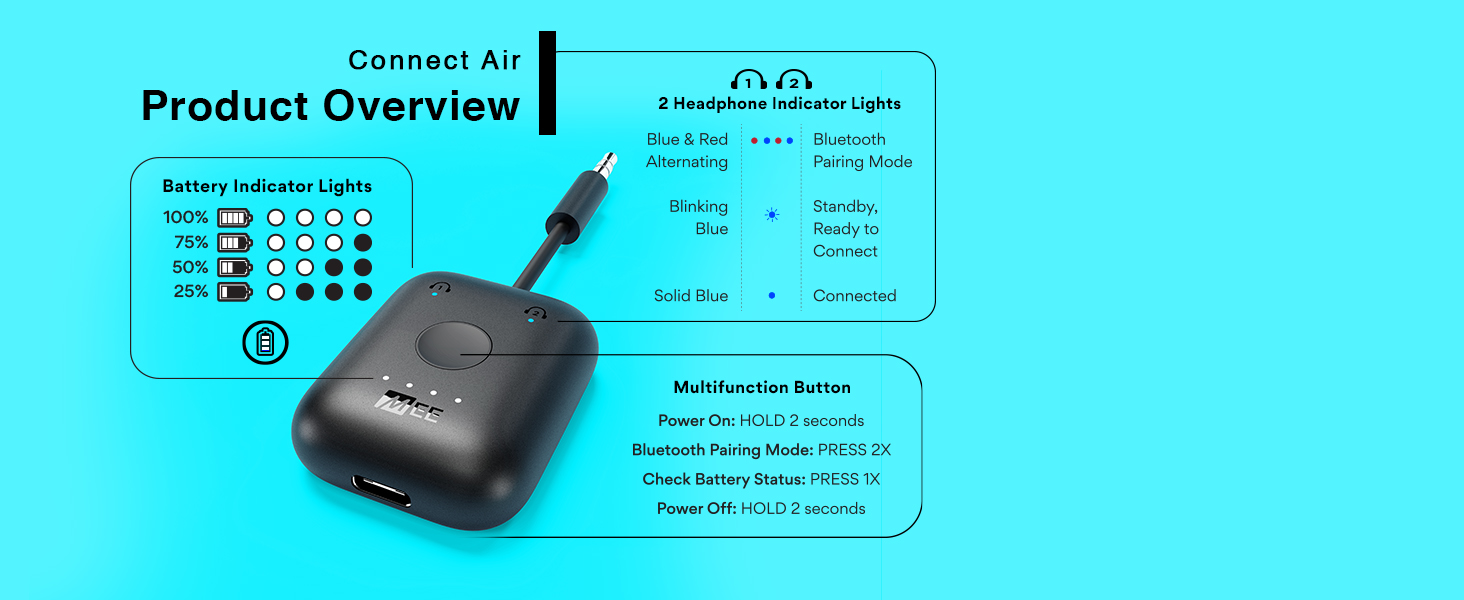
Image: Diagram showing the location of the reset pinhole on the side of the Connect Air and how to insert a pin or paperclip to perform a hardware reset.
Software Reset (Clear Pairing Memory)
To clear all previous Bluetooth pairings from the Connect Air's memory:
- Power on the Connect Air.
- Press the multifunction button 6 times rapidly.
- Both headphone indicator lights will flash, indicating that the memory has been cleared.
- A new pairing process must be initiated for any headphones.

Image: Diagram showing the Connect Air and indicating to press the multifunction button 6 times to perform a software reset and clear pairing memory.
مشخصات
| د محصول ابعاد | 1.5 x 0.6 x 1.8 انچه |
| د توکي وزن | 0.6 اونس |
| د توکي ماډل شمیره | AF-CA1 |
| بیټرۍ | 1 لیتیم فلزي بیټرۍ (شامل) |
| د ارتباط ټیکنالوژي | بلوتوث |
| د بریښنا سرچینه | د بیټرۍ چلول |
| ځانګړی ځانګړنه | Low Latency (aptX Low Latency compatible) |
| مواد | پلاستیک |
تضمین او ملاتړ
The MEE audio Connect Air AF-CA1 comes with a 1-year manufacturer's warranty. For technical support, warranty claims, or additional product information, please visit the official MEE audio webسایټ یا د دوی د پیرودونکي خدماتو څانګې سره اړیکه ونیسئ.
MEE آډیو Webسایټ: www.meeaudio.com