
1. پیژندنه
This manual provides detailed instructions for the installation, operation, and maintenance of your CP PLUS 4MP Wi-Fi Floodlight Camera, model CP-F42A. Please read this manual thoroughly before using the product to ensure proper functionality and safety. This camera combines high-resolution video surveillance with integrated floodlighting for enhanced security.
2. د خوندیتوب معلومات
- Ensure the power supply matches the camera's requirements.
- د کیمرې د جلا کولو یا بدلولو هڅه مه کوئ.
- Install the camera in a location where it is protected from extreme weather conditions, although it has an IP54 rating, direct exposure to heavy rain or prolonged submersion is not recommended.
- کیمره د تودوخې سرچینو او مستقیم لمر وړانګو څخه لرې وساتئ.
- کیمره په احتیاط سره اداره کړئ ترڅو د فزیکي زیان څخه مخنیوی وشي.
- که تاسو د بریښنایی تارونو په اړه ډاډه نه یاست، د نصبولو لپاره د وړ بریښنایی متخصص سره مشوره وکړئ.
3. د بسته محتويات
ډاډ ترلاسه کړئ چې ټول توکي په کڅوړه کې شتون لري:
- CP PLUS 4MP Wi-Fi Floodlight Camera (CP-F42A)
- د بریښنا اډاپټر
- د نصبولو پیچونه او دیوال پلګونه
- د چټک پیل لارښود (په دې لارښود کې شامل نه دی)
4. محصول ختم شوview
The CP-F42A is an outdoor Wi-Fi floodlight camera designed for surveillance and illumination. It features a 4MP sensor for clear video, H.265 video compression for efficient storage, and a 110° viewing angle. The integrated floodlight provides illumination, and the PIR sensor detects motion up to 12 meters.
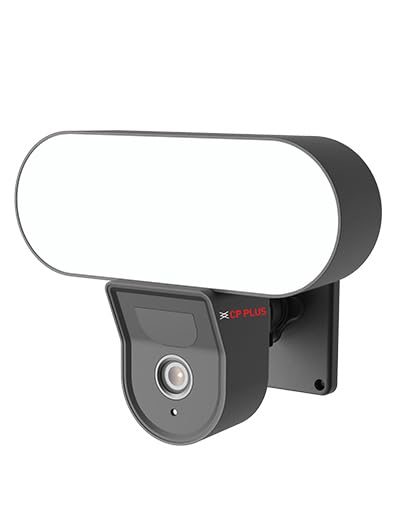
انځور: مخکینۍ برخه view of the CP PLUS 4MP Wi-Fi Floodlight Camera CP-F42A, showing the camera lens and the integrated floodlight panel.
مهمې برخې:
- د کیمرې لینز: ۵ میګاپکسله ویډیو ثبتوي.
- Floodlight Panel: روښانتیا برابروي.
- د پییر سینسر: حرکت کشف کوي.
- مایکروفون: د آډیو ان پټ لپاره.
- سپیکر: For two-way audio output.
- د نصب کولو بریکٹ: د خوندي نصبولو لپاره.
5. ترتیب کول
5.1 فزیکي نصب کول
- یو ځای غوره کړئ: یو بهرنی ځای غوره کړئ چې روښانه وي view of the area you wish to monitor and within Wi-Fi range. Ensure the mounting surface is sturdy.
- د نښه کولو د برمه کولو ځایونه: Use the mounting bracket as a template to mark the screw holes on the wall.
- سوراخونه: په نښه شویو نقطو کې پیلوټ سوري وکرئ. که چیرې په معمارۍ کې نصب شوي وي نو دیوال پلګونه دننه کړئ.
- کیمره نصب کړئ: Secure the mounting bracket to the wall using the provided screws. Attach the camera to the bracket.
Image: The CP PLUS Floodlight Camera mounted on the exterior of a house, illustrating a typical installation scenario during the day.
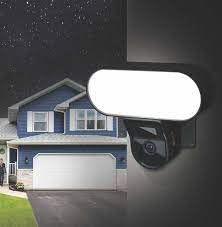
Image: The CP PLUS Floodlight Camera mounted on the exterior of a house at night, with the floodlight illuminated, demonstrating its night-time functionality.
5.2 د بریښنا نښلول
Connect the provided power adapter to the camera's power input port and then plug it into a suitable electrical outlet. Ensure the connection is secure and protected from moisture.
5.3 Wi-Fi Connection and App Pairing
- اپلیکیشن ډاونلوډ کړئ: لټون the "ezyKam+" app (or the recommended CP PLUS app) on your smartphone's app store (iOS or Android) and install it.
- یو حساب جوړ کړئ: اپلیکیشن پرانیزئ او د نوي حساب لپاره راجستر کړئ یا که تاسو دمخه یو حساب لرئ نو ننوتل وکړئ.
- وسیله اضافه کړئ: Follow the in-app instructions to add a new device. Select "Floodlight Camera" or a similar option.
- وائی فای سره وصل کړئ: The app will guide you through connecting the camera to your home Wi-Fi network. This usually involves scanning a QR code on the camera or entering your Wi-Fi credentials.
- بشپړ تنظیم: Once connected, you can name your camera and adjust initial settings.
Image: Branding for CP PLUS ezyKam+ Wi-Fi Floodlight Full Color Camera, indicating compatibility with Alexa and Google Home, relevant for app pairing and smart home integration.
6. عملیاتي لارښوونې
Access all camera functions through the dedicated mobile application.
6.1 ژوندی View
اپلیکیشن خلاص کړئ او د وسیلو له لیست څخه خپله کیمره غوره کړئ ترڅو view the live video feed. You can pinch to zoom and pan across the image.
6.2 ریکارډ کول او پلے بیک
- لاسي ثبتول: په ژوندۍ بڼه کې د ثبت تڼۍ کېکاږئ view to start/stop manual recording.
- د پیښو ثبتول: The camera automatically records when motion is detected. These recordings are stored on the installed microSD card (if any) or cloud storage (subscription may be required).
- پلې بیک: ثبت شوي foo ته لاسرسیtage په اپلیکیشن کې د "پلے بیک" یا "تاریخ" برخې له لارې.
۵.۳ د حرکت کشف او خبرتیاوې
Configure motion detection sensitivity and areas within the app settings. When motion is detected, the camera can send push notifications to your phone and trigger recording. The PIR sensor has a detection range of 6-12 meters.
6.4 Floodlight Control
The floodlight can be controlled manually via the app or set to activate automatically upon motion detection during specific times or low-light conditions. Adjust brightness and duration settings in the app.
۴.۴ دوه اړخیزه آډیو
Use the microphone and speaker icons in the live view to communicate with visitors or deter intruders. Press and hold the microphone icon to speak, and release to listen.
6.6 د شپې لید
The camera features infrared (IR) night vision for clear black-and-white video in low-light conditions and can also utilize the floodlight for full-color night vision when activated. The night vision range is up to 12 meters.
7. ساتنه
7.1 پاکول
Wipe the camera lens and floodlight panel with a soft, damp ټوکر د دوړو او خاورې لرې کولو لپاره. سخت کیمیاوي توکي یا د کثافاتو پاکوونکي مه کاروئ.
7.2 د فرم ویئر تازه معلومات
Periodically check the app for available firmware updates. Keeping your camera's firmware up-to-date ensures optimal performance and security features.
7.3 د ذخیرې مدیریت
If using a microSD card, regularly check its status in the app. Format the card periodically to maintain performance. Back up important recordings before formatting.
8. ستونزه حل کول
| ستونزه | احتمالي حل |
|---|---|
| کیمره نه چالانېږي. | Check power adapter connection and ensure the outlet is functional. |
| د وائی فای سره د نښلولو توان نلري. | Ensure the camera is within Wi-Fi range. Verify Wi-Fi password. Try resetting the camera and router. |
| د ویډیو خراب کیفیت. | Check Wi-Fi signal strength. Clean the camera lens. Ensure sufficient lighting. |
| د حرکت کشف کار نه کوي. | Adjust motion detection sensitivity and area settings in the app. Ensure there are no obstructions. |
| Floodlight not activating. | Check floodlight settings in the app. Ensure it's set to activate on motion or during low light. |
9. مشخصات
| فیچر | تفصیل |
|---|---|
| د ماډل شمیره | CP-F42A |
| قرارداد | 4MP (Effective Still Resolution: 4 MP) |
| د ویډیو کمپریشن | H.265, MPEG |
| Viewزاویه | 110 درجې |
| د PIR فاصله | 6~12 متره |
| بې سیم ټیکنالوژي | وای فای |
| د شپې لید لړۍ | 12 Meters (Infrared, Night Color) |
| د چوکاټ نرخ | په هره ثانیه کې 20 چوکاټونه |
| نظری زوم | 3x |
| د نړیوال خوندیتوب درجه بندي | IP54 |
| د خبرتیا ډول | یوازې حرکت |
| د بریښنا سرچینه | د بریښنا تار شوی |
| شاملې برخې | اډاپټر |
| ابعاد (L x W x H) | 20 x 12 x 10 سانتي متره |
| د توکي وزن | 630 ګرامه |
| د کور دننه / بهر کارول | بهر |
| د عکس سینسر ټیکنالوژي | CMOS |
| وړاندیز شوي استعمالونه | Home Security, Night Vision |
10. تضمین او ملاتړ
For warranty information and technical support, please refer to the official CP PLUS webسایټ ته مراجعه وکړئ یا د دوی د پیرودونکو خدماتو سره اړیکه ونیسئ. د تضمین ادعاوو لپاره د پیرود ثبوت په توګه د پیرود رسید وساتئ.
CP PLUS Official Webسایټ: www.cpplusworld.com