
پیژندنه
This manual provides essential instructions for the safe and efficient operation of your Sanyo PLC-WXU700A 3LCD Projector. The PLC-WXU700A is a WXGA conference room projector featuring 3LCD technology, delivering 3,800 lumens brightness and a native resolution of 1280x800. Please read this manual thoroughly before using the projector and retain it for future reference.
د بسته محتويات
ډاډ ترلاسه کړئ چې ټول توکي ستاسو په کڅوړه کې شتون لري:
- Sanyo PLC-WXU700A 3LCD Projector
- ریموټ کنټرول
- د بریښنا کیبل
- HDMI کیبل
- د کارونکي لارښود (دا لاسوند)
چمتو کول
۵.۱. د پروجیکټور ځای پرځای کول
Position the projector on a stable, flat surface or mount it securely. Ensure adequate ventilation around the projector to prevent overheating. The projector is designed to be portable, allowing for flexible placement in various environments.
2. د نښلولو بریښنا
- Connect the supplied power cable to the AC inlet on the rear of the projector.
- د بریښنا کیبل بله پای په یوه ځمکني بریښنایی پلورنځي کې ولګوئ.
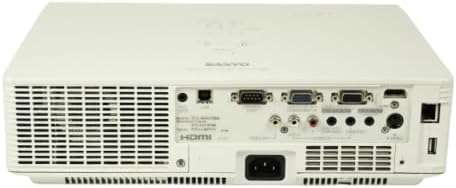
Image: Rear panel of the Sanyo PLC-WXU700A projector, highlighting the power input and connectivity ports.
۳. د ننوتلو سرچینو سره نښلول
The Sanyo PLC-WXU700A offers multiple connectivity options:
- HDMI: Connect the supplied HDMI cable from your source device (e.g., laptop, Blu-ray player) to the HDMI input port on the projector.
- VGA (D-Sub 15-pin): For analog computer connections, use a VGA cable to connect to the D-Sub 15-pin input ports.
- جامع ویډیو: Use RCA cables for composite video input.
- آډیو معلومات: Separate audio input jacks are available for various sources.

Image: Side-rear perspective of the projector, illustrating the array of input ports and side ventilation grilles.
عملیاتي لارښوونې
1. بریښنا کول/بندول
- د فعالولو لپاره: فشار ورکړئ پاور د پروجیکټر د کنټرول پینل یا ریموټ کنټرول تڼۍ. د بریښنا شاخص څراغ به روښانه شي.
- د بریښنا بندولو لپاره: فشار ورکړئ پاور button twice. The projector will enter a cooling down cycle before completely shutting off. Do not unplug the projector during the cooling cycle.
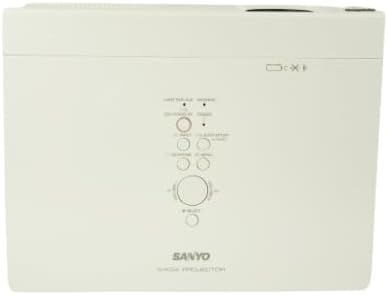
انځور: پورته-ښکته view of the projector, displaying the integrated control panel with various buttons for power, menu navigation, and input selection.
2. د ننوت سرچینې غوره کول
فشار ورکړئ INPUT or سرچینه button on the projector or remote control to cycle through available input sources (HDMI, VGA, Video). Select the input corresponding to your connected device.
۴. د انځور تنظیم کول
- د تمرکز زنګ: Rotate the focus ring on the projector lens to achieve a sharp image.
- د زوم لیور: Adjust the zoom lever on the projector lens to change the image size without moving the projector.
- د کیسټون سمون: If the image appears trapezoidal, use the keystone correction function (usually found in the projector's menu or via dedicated buttons on the remote) to square the image.
ساتنه
۱. د پروجیکټر پاکول
- بهر: پروجیکټر پاک کړئ casinد نرم، وچ ټوکر سره. د سختې خاورې لپاره، لږ څه d وکاروئamp ټوکر د نرم صابون سره ومینځئ، بیا وچ پاک کړئ.
- لینز: Gently clean the projector lens with a lens cleaning cloth or lens paper. Avoid using abrasive materials.
- د هوا فلټرونه: Regularly check and clean the air filters to ensure proper ventilation and prevent overheating. Refer to the full service manual for filter replacement instructions.
2. ایلamp بدلول
The Sanyo PLC-WXU700A uses a lamp-based illumination system. The lamp has a finite lifespan and will eventually need replacement. When the lamp indicator light illuminates or the image brightness significantly decreases, it is time to replace the lamp.
- Ensure the projector is powered off and completely cooled down before attempting lamp بدیل
- l پیدا کړئamp cover (often on the top or bottom of the projector).
- l خلاص کړئamp cover and carefully remove the old lamp ماډل
- Install a new, genuine Sanyo replacement lamp module, ensuring it is securely seated.
- l بدل کړئamp پیچونه پوښ او ټینګ کړئ.
- ایل بیا تنظیم کړئamp timer in the projector's OSD (On-Screen Display) menu.
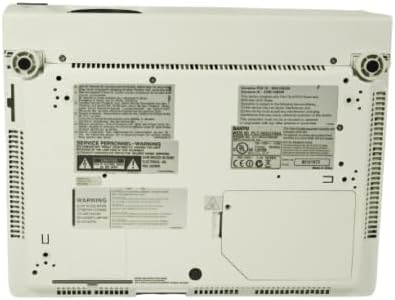
Image: Underside of the projector, displaying product labels, warning information, and potential access panels for maintenance like lamp بدیل
د ستونزو حل کول
که تاسو د خپل پروجیکټر سره ستونزې سره مخ شئ، لاندې عامې ستونزې او حل لارې وګورئ:
- هیڅ انځور ندی ښودل شوی:
- ډاډ ترلاسه کړئ چې پروجیکټر فعال دی او د بریښنا کیبل په خوندي ډول وصل دی.
- Verify that the input source is correctly selected on the projector.
- Check the connection cable (HDMI, VGA) between the source device and the projector. Try a different cable if possible.
- Ensure the source device is outputting a signal.
- انځور تیاره دی:
- د پروجکټور لینز کې د تمرکز حلقه تنظیم کړئ.
- Ensure the projector is at an appropriate distance from the screen.
- انځور ټراپیزایډل دی:
- Adjust the keystone correction setting in the projector's menu.
- ډاډ ترلاسه کړئ چې پروجیکټر د امکان تر حده د سکرین سره عمودي ځای پر ځای شوی دی.
- Projector Overheats or Shuts Down:
- Ensure all ventilation vents are clear and not obstructed.
- د هوا فلټرونه پاک کړئ.
- پروجیکټر په ښه هوا لرونکي ځای کې وکاروئ.
- ریموټ کنټرول کار نه کوي:
- په ریموټ کنټرول کې بیټرۍ وګورئ او بدل کړئ.
- ډاډ ترلاسه کړئ چې د ریموټ او پروجیکټر د IR ریسیور ترمنځ هیڅ خنډ شتون نلري.
مشخصات
| فیچر | تفصیل |
|---|---|
| برانډ | Sanyo (Tekswamp) |
| ماډل | PLC-WXU700A |
| ټیکنالوژي ښکاره کول | 3LCD |
| سپینه روښانتیا | 3,800 د ANSI Lumens |
| اصلي حل | 1280x800 (WXGA) |
| د تناسب تناسب | 500:1 |
| د ارتباط ټیکنالوژي | HDMI ، VGA |
| د محصول ابعاد | 10 x 13.1 x 3.1 انچه |
| ځانګړی ځانګړنه | د پورټ وړ |
| وړاندیز شوي استعمالونه | سوداګرۍ |
تضمین او ملاتړ
For warranty information and technical support, please refer to the documentation provided at the time of purchase or contact your vendor. Keep your purchase receipt as proof of purchase for warranty claims.